Man vs. World: Multiplayer
Compatibility with MVSZ
This guide works with Man vs. Zombies as well. Follow the original guide below but make the changes to the man_vs_zombies_mp folder instead
C:\Program Files (x86)\Steam\steamapps\common\RunningWithRifles\media\packages\man_vs_zombies_mp
Editing files
To begin, you want to head over to a folder among the game files named man_vs_world_mp
The default location is:
You can get there quickly by doing the following:
The folder looks like this:
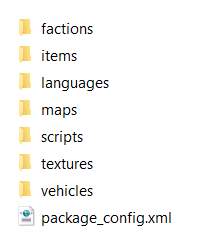 Open package_config.xml with Notepad, as in this guide, or any other software of your liking.
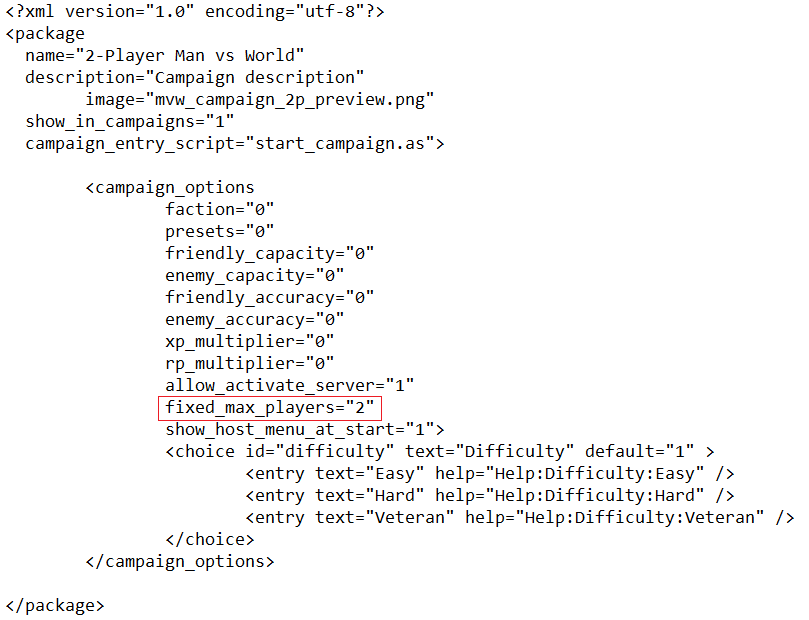
It should look like this:
The default location is:
C:\Program Files (x86)\Steam\steamapps\common\RunningWithRifles\media\packages\man_vs_world_mp
You can get there quickly by doing the following:
- Press the Windows key and R at the same time
- In the window, paste the path of the default location
- Click OK or press Enter
The folder looks like this:
Open package_config.xml with Notepad, as in this guide, or any other software of your liking.It should look like this:
Pay attention to the line fixed_max_players="2". Replace 2 with your preferred player count.
Save your changes.
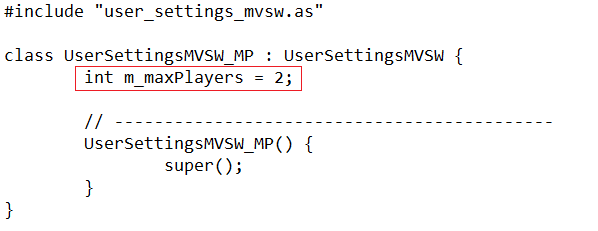
Replace 2 with the same number as in package_config.xml. Save your changes.
Now you are good to go! Start a new 2-player Man vs. World Campaign and activate a server. It will have room for the same amount of players as you specified. As a last note, keep in mind that the number of AI won't increase with the player count.
Good luck with your MvsW Campaign!
More RUNNING WITH RIFLES guides
- Opt_0™: Starter Guide to RUNNING WITH RIFLES.★ 5 (472)28k views457 ♥33 minUpdated 23 Mar, 2023
- Secret Crates and Cars in RWR / The Tracker challenge guide★ 5 (1k)26k views2k ♥4 minUpdated 27 Jun, 2020
- Private to Commander: Guide to Running With Rifles★ 5 (460)25k views454 ♥78 minUpdated 27 Jan, 2020
- Running With Rifles: Weapons and Equipment Guide★ 5 (186)13k views352 ♥78 minUpdated 18 Jul, 2021
- 【中文指南】如何在潜行中把作者充满恶意的设计按在地上摩擦★ 5 (570)13k views531 ♥1 minSimplified ChineseUpdated 1 Oct, 2018
- Single player chat codes★ 5 (226)11k views528 ♥4 minUpdated 18 Aug, 2020


🔥 Popular guides
- Upgrading to PremiumTeam Fortress 2★ 5 (20k)1441k views11k ♥6 minUpdated May 11, 2022
- No More Room in Hell Official ManualNo More Room in Hell★ 5 (2.8k)569k views2.1k ♥29 minUpdated Apr 22, 2019
- NMRiH Community Hosting GuidesNo More Room in Hell★ 5 (526)351k views653 ♥1 minUpdated Aug 10, 2022
- How to 'Git Gud' Soon™MORDHAU★ 5 (2k)318k views3k ♥68 minUpdated Nov 16, 2024
- Лучшие кооперативные игры SteamPAYDAY 2★ 5 (1.5k)315k views2.1k ♥56 minRussianUpdated Apr 27, 2025
- Desert Eagle Heat Treated | Blue GemCounter-Strike 2★ 5 (1.6k)293k views1.5k ♥2 minUpdated Jan 16





This guide was created by its original author on the Steam Community. Are you the author and want it removed? Request removal.