NEW:CSNZ Fps Boost Commands!!! //Yeni:CSNZ FPS Arttırma!!!
Important Information! //Önemli Bilgi!
///Bu Rehber İllegal Değildir.Sadece Oyunun Dokularını Ve Yazılımını Resmi Komutlarla Daha İyi Performans İçin Değiştirir.
Steam Launch Commands!!! //Steam Başlatma Komutları!!!
'Images Is For Showing.Please Don't Write In Picture Commands.'
///(Resim Temsilidir,Lütfen Resimdeki Komutları Yazmayınız)
First,Go to csnz's properties at steam.You will see "SET LAUNCH OPTIONS" at general window.Click To Set Launch Options.
///(Steamden Csnz'ye sağa tıklayıp özelliklere tıklayın.Aşağıda Başlatma seçenekleri veya ayarları diye bir buton göreceksiniz.Lütfen ona tıklayın.)
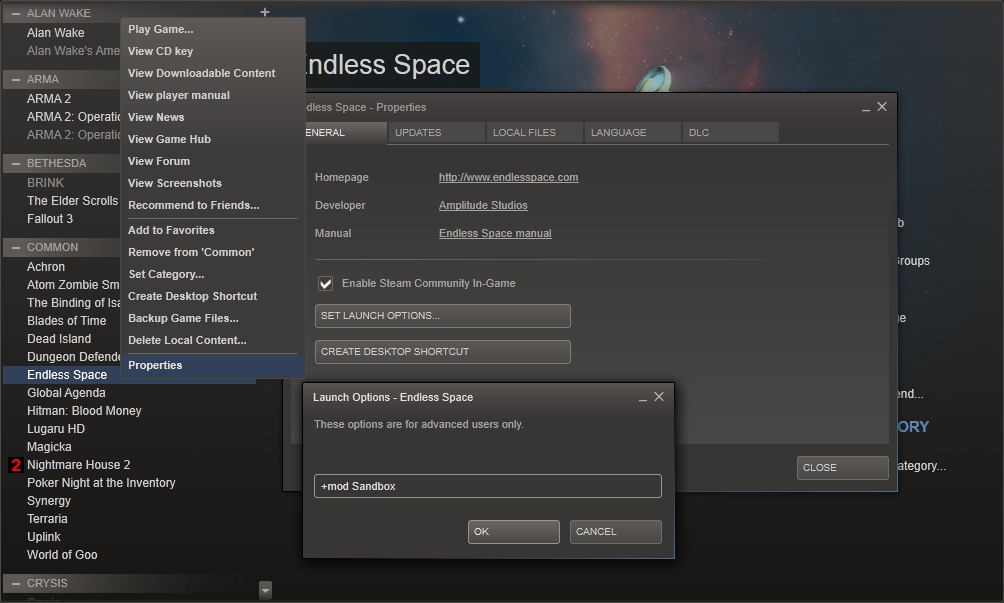
Please Write This Commands To Area.(Dont Forget To Use "-" Or "+")
///Lütfen Oradaki Boş Alana Bu Komutları Yazın.(Başına "-" Veya "+"Kullanmayı Unutmayın)
-USEALLAVAILABLECORES
-sm4
-lowmemory
+gl_texturemode "GL_NEAREST_MIPMAP_NEAREST"
-d3d10
-freq
-nojoy
-high
-noaafonts <<<this code is changing game's texts,if you didnt like
Dont write this code. //Bu kod oyun içindeki metinleri değiştirir,eğer beğenmediyseniz
Bu kodu yazmayınız.
-noforcemaccel
-noforcemparms
-noforcemspd
-gl_picmip 0.75
-r_dynamic 0
-lightmap 0
-gl_fog 0
+mat_hdr_enable 0
-gl_round_down 4
Important= -gl_round_down 4 << "This Command Is Make Csnz's Textures Better Or Worse.It is going From 1 to 9.From Better To Worse Texture >>> " -gl_round_down 1 " its Best quality Texture But " -gl_round_down 9 " is worst.If you want fps boost ,but you dont love minecraft,You should choose " -gl_round_down 4 ". (So,4)"
///Önemli= -gl_round_down 4 << "Bu komut csnz nin dokularını iyiden kötüye doğru ayarlar.1'den 9'a kadar gider.En iyiden En kötüye " -gl_round_down 1 " bu en kaliteli dokudur ama " -gl_round_down 9 " bu ise en kötüsüdür.Eğer fps artışı istiyorsan ve minecraft'ı sevmiyorsan, " -gl_round_down 4 " (Bu komutu yani 4'ü seçmelisin.)"
I have more commands, but I've chosen these commands.
(Unable to Write Any More To Area Already)
///Daha fazla komutum vardı.Ama bunları seçtim.
(Zaten Boşluğa Daha Fazla Yazılamıyor)
CSNZ Consol Commands!!! //CSNZ Konsol Komutları!!!
Press Button From Under The ESC For Open Consol!!!
///Esc'nin altındaki tuşa basın.
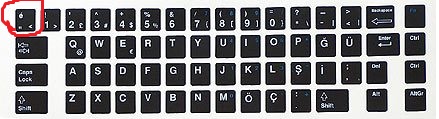
Buttons Can Be Different,Just Try Different Buttons From Keyboard.
Consol Will Open.
///Tuşlar Farklı Olabilir,Klavyenizden Farklı Tuşları Deneyin.
///Konsol Açılacak.
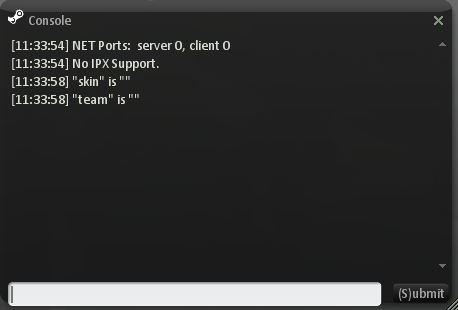
Write This Codes To Consol !!! (You just will write this codes 1 time ,you will dont write when enter to game.But if you want ,you can verify the codes again)
///Bu kodları konsola yazın !!! (Bu kodları sadece 1 kere yazmanız yeterli,birdahaki oyuna girişinizde yazmanıza gerek yok.Ama isterseniz kodları tekrardan doğrulayabilirsiniz)
fps_max 101
cl_showfps 1 <<< If you dont want see fps, write " cl_showfps 0 ". ///Eğer Fps'inizi Görmek istemiyorsanız " cl_showfps 0 " yazınız.
cl_radar_on 1
cl_radartype 1
cl_headname 0
cl_objname 0
cl_killeffect 0
cl_weather 0
violence_hblood 0
violence_ablood 0
brightness 5
bgmvolume 0.0
gamma 3
cl_shadows 0
cl_crosshair_translucent 0
hud_fastswitch 1
fastsprites 0
gl_dither 0
cl_minmodels 1
cl_corpsestay 0
mp_decals 0
max_shells 0
max_smokepuffs 0
gl_overbright 0
cl_sp_far 0
r_detailtextures 0
........................
These Commands You Need To Write Everytime When Enter To Game;
///Bu komutlar oyuna girdiğiniz herzaman yazmanız lazım;
gl_vsync 0
gl_cull 0
NOTES!!! //NOTLAR!!!
If you have a problem with this guide please write feedback!!!
///Eğer bu rehber ile ilgili probleminiz varsa lütfen geribildirim yazınız!!!
Please Like And Share With Your Friends!!!
///Lütfen Beğenip Arkadaşlarınız İle Paylaşınız!!!
Good Games!!!
///İyi Oyunlar
- Recommended/useful console commands★ 5 (254)11k views292 ♥1 minUpdated 28 Jun, 2015
- Большое руководство по медалям в CSN:S (264 / 264)★ 5 (358)7.7k views363 ♥419 minRussianUpdated 13 Apr, 2024
- Основа из основ (Описание, Обзор, Гайд)★ 4 (216)7.2k views122 ♥9 minRussianUpdated 2 Jul, 2016
- Как "быстро" выполнить достижение [Мастер Клинка]★ 4 (134)4.1k views99 ♥1 minRussianUpdated 1 Nov, 2014
- Conquistas de Counter-Strike Nexon Zombies★ 5 (221)3.7k views153 ♥1 minPortugueseUpdated 1 Aug, 2020
- The pistols you should own in Counter-Strike Nexon: Zombies★ 4 (60)3.7k views44 ♥2 minUpdated 26 Jun, 2015




- Upgrading to PremiumTeam Fortress 2★ 5 (20k)1441k views11k ♥6 minUpdated May 11, 2022
- No More Room in Hell Official ManualNo More Room in Hell★ 5 (2.8k)569k views2.1k ♥29 minUpdated Apr 22, 2019
- NMRiH Community Hosting GuidesNo More Room in Hell★ 5 (526)351k views653 ♥1 minUpdated Aug 10, 2022
- How to 'Git Gud' Soon™MORDHAU★ 5 (2k)318k views3k ♥68 minUpdated Nov 16, 2024
- Лучшие кооперативные игры SteamPAYDAY 2★ 5 (1.5k)315k views2.1k ♥56 minRussianUpdated Apr 27, 2025
- Desert Eagle Heat Treated | Blue GemCounter-Strike 2★ 5 (1.6k)293k views1.5k ♥2 minUpdated Jan 16





This guide was created by its original author on the Steam Community. Are you the author and want it removed? Request removal.