Player rotation with mouse
Configuring input.ini
Go to Steam\steamapps\common\Resident Evil 4\BIO4 (and\or My Documents/My Games/Capcom/RE4/) and open input.ini (and\or usr_input.ini) with Notepad.
Find this block:
###GAMEPLAY###KEYBOARD
KEY_FORWARD = W
KEY_BACK = S
KEY_RIGHT = D
KEY_LEFT = A
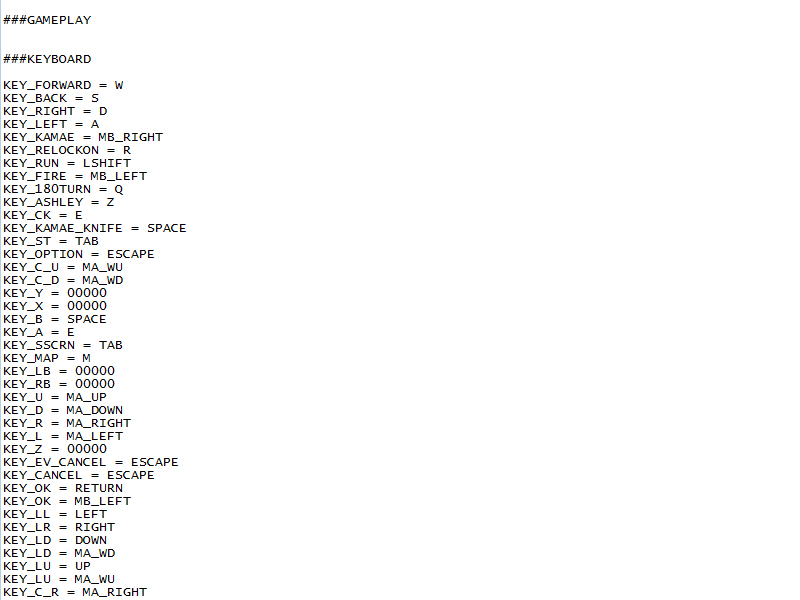 Warning! ###KEYBOARD must be in ###GAMEPLAY category, not in ###MENUS.
Then add:
KEY_RIGHT = MA_RIGHTafter
KEY_LEFT = MA_LEFT
KEY_LEFT = A
You wil get this:
###GAMEPLAY###KEYBOARD
KEY_FORWARD = W
KEY_BACK = S
KEY_RIGHT = D
KEY_LEFT = A
KEY_RIGHT = MA_RIGHT
KEY_LEFT = MA_LEFT
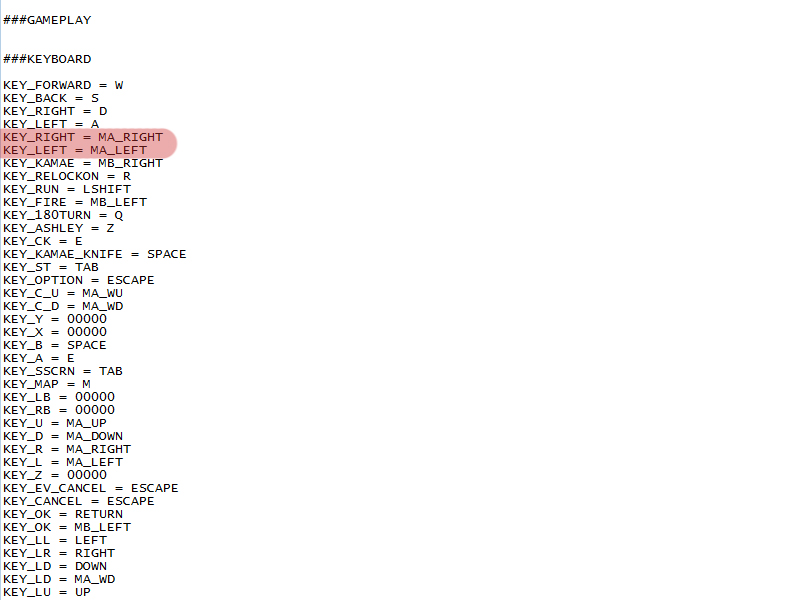
After that mouse will rotate player, not camera.
P.S. Some times camera can stuck. Just aim and it will fix camera position.
More Resident Evil 4 (2005) guides
- Ultimate RE4 Modding Guide (HD Project 1.1 Installation + Fixes & Optional Mods)★ 5 (1.2k)56k views2.3k ♥46 minUpdated Dec 28, 2024
- re4 HD Project★ 5 (1.5k)52k views1.4k ♥1 minUpdated Feb 1, 2022
- Re4: All Possible Treasure Combinations★ 5 (1k)52k views2.1k ♥7 minUpdated Jan 9, 2023
- 100% Achievement Guide★ 5 (789)28k views1.5k ♥3 minUpdated Jul 8, 2020
- Русификатор для "Resident Evil 4: Ultimate HD Edition"★ 5 (1.5k)28k views680 ♥1 minRussianUpdated May 23, 2017
- RE4 - РУСИФИКАТОР ОТ WHISKAS TEAM + ENG SUBS★ 5 (467)26k views1k ♥4 minRussianUpdated Jan 16, 2023




🔥 Popular guides
- Upgrading to PremiumTeam Fortress 2★ 5 (20k)1441k views11k ♥6 minUpdated May 11, 2022
- No More Room in Hell Official ManualNo More Room in Hell★ 5 (2.8k)569k views2.1k ♥29 minUpdated Apr 22, 2019
- NMRiH Community Hosting GuidesNo More Room in Hell★ 5 (526)351k views653 ♥1 minUpdated Aug 10, 2022
- ULTIMATE GUIDE FOR GAME DEV TYCOONGame Dev Tycoon★ 5 (5.8k)326k views10k ♥4 minUpdated 23 Jan, 2014
- How to 'Git Gud' Soon™MORDHAU★ 5 (2k)318k views3k ♥68 minUpdated Nov 16, 2024
- Лучшие кооперативные игры SteamPAYDAY 2★ 5 (1.5k)315k views2.1k ♥56 minRussianUpdated Apr 27, 2025






This guide was created by its original author on the Steam Community. Are you the author and want it removed? Request removal.