Ultimate guide to Industries and Supply Chain
Industry Overview: Importance
Industries are a critical part of any city. In Cities Skylines, they serve two key purposes. Provide jobs and provide goods to be sold at commercial places.
The main alternative for jobs is offices, but they only take educated workers. Other alternatives like commercial or jobs at services are not enough for the entire population. You can import goods, but it has limits and needs extensive traffic management.
Tip: There are two other ways of providing goods. ‘IT specialization’ for offices manufacture invisible goods that don't have any truck traffic and ‘organic and local produce’ district specialization for commercial make half of their goods themselves.
Industrial Supply Chain
There are 4 basic natural resources in Cities skylines. Oil, Ore, Fertile land and Forestry.
Oil and Ore are not renewable, and they deplete as they are used. (You can use the inbuilt mod to turn off depleting). Fertile land and forestry are renewable and do not deplete. However, if you plant a lot of trees on fertile land, you'll lose land fertility. Forestry is just a bunch of trees; you can plant some and the game will treat at natural resource. If you remove them, natural resources will go away. It is not very realistic or logical, but it is what it is.
Extractor buildings take the natural resources and turn them into raw materials. They need to be on the land where natural resources are present.
Processor buildings process the raw materials and turn them into processed materials.
Processed materials from all 4 industry types are used by a single type of generic industry to produce goods that are sold by commercial places.
Tip: Recycling centre turns garbage into processed materials that can be used by generic industries.
Industrial Zoning and District Specializations
Extractors, Processors and Generic industries all grow on industrial zones. By default, generic industries will grow on your industrial zones and just import Processed Materials if you don’t have industry specialization.
If you make a district and give it one of the specializations, it will only grow extractors and processors based on natural resources availability on the zoned land.
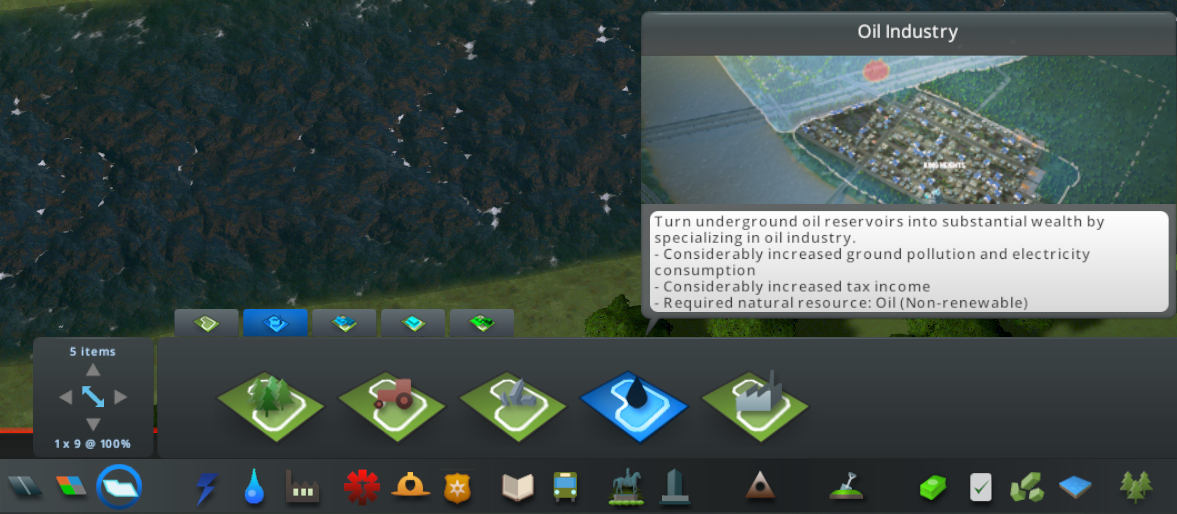
Because all the materials I mentioned so far can be imported or exported, You are not forced to balance them. However, you can use districts and specializations to reduce imports and control your traffic flow.
Confusing names: both raw materials and processed materials of a particular industry type are labelled the same on trucks and import-export UI. This can be confusing at times. So, keep it in mind.
This is my city's farming specialized industry importing a lot of agricultural products(crops) and exporting a lot of agricultural products(processed material).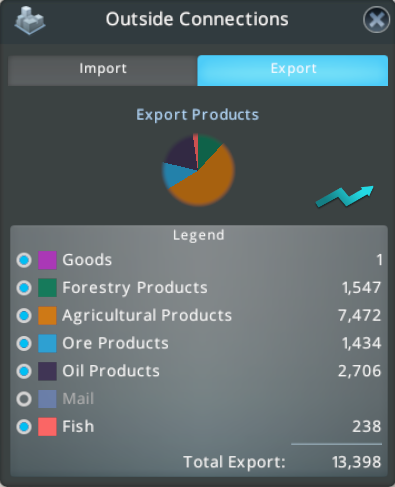
Industries DLC: Make your own profit!
You own these industries, so you will get profits instead of taxes. On the flip side, if there are problems with the operation and supply chains, you will get losses instead of abandoned buildings. You will need to manage the supply chain much more carefully and warehouses will help you do that.
Materials and Supply Chain Overview
Before we start, here's the complete supply chain and material list, including DLC, for your reference. We will go through it all.
This is the table for all the materials available in the industrial supply chain.
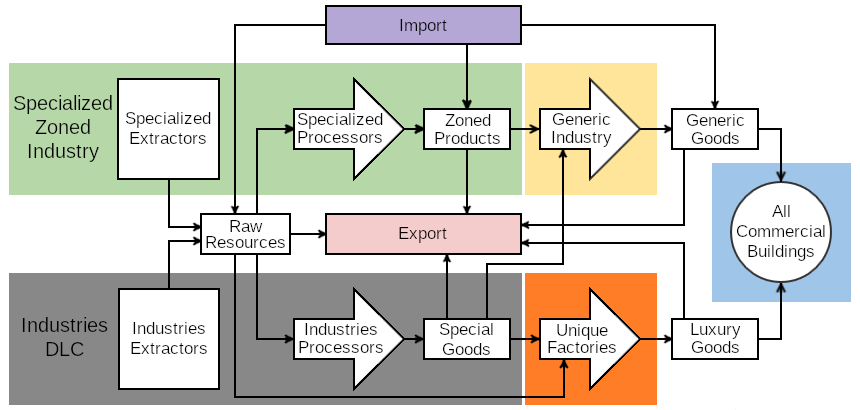 '
'This is the supply chain flowchart from the wiki. The names are slightly different.
Industrial Areas: New Supply Chains
To start up with your own industrial area, you need to first draw your own industry area and put the main building.
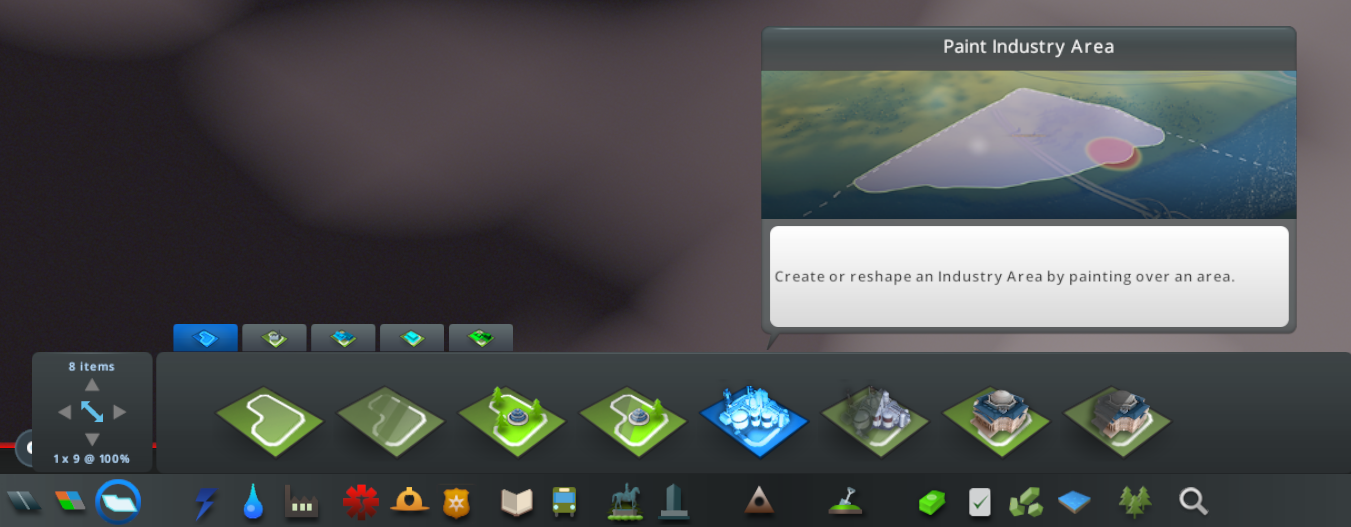
You will start with a few buildings unlocked, but as you get more workers and produce more, your areas will level up and unlock more buildings. You also have access to some policies, auxiliary buildings and bonuses based on the industry area level. They are quite self-explanatory. You will also have storage buildings for raw materials, which we will discuss with warehouses.
Your DLC extractors will need to be placed on natural resources and you can see how much raw materials they will produce while placing. The raw materials from DLC extractors are named properly now; Oil, Ore, Crops and Raw forest products. They are functionally the same as raw materials produced by zoned extractors and completely interchangeable. That means you do not need natural resources on the map to build a particular industry. You can just import the raw materials. Although, you will need warehouses to make them work properly, which we will discuss later.
In a logical world, this should resolve the naming problem we saw earlier. But paradox decided to stay true to their name and now you’ll see your DLC farming extractor, which is meant to produce crops, send 'agricultural product' to a zoned processor, which will be processed to make 'agricultural products' again.
You can see my crops storage accepting 'agricultural product' and my crop farm sending 'agricultural product'.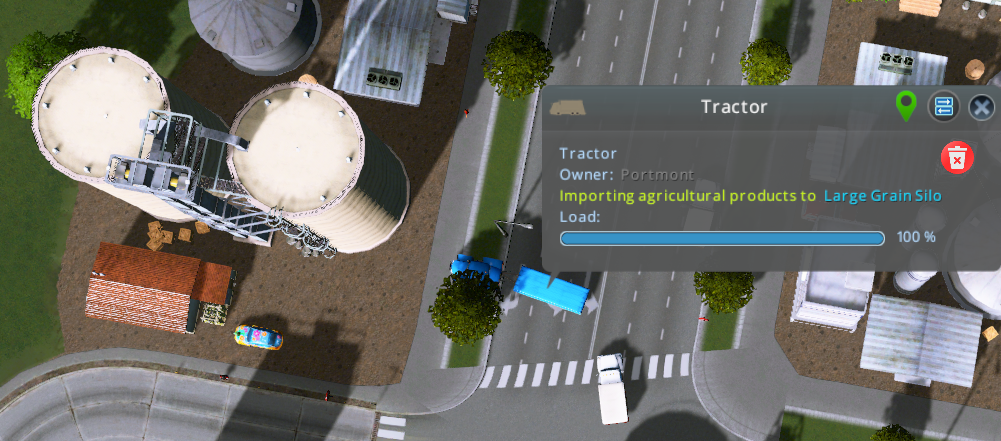
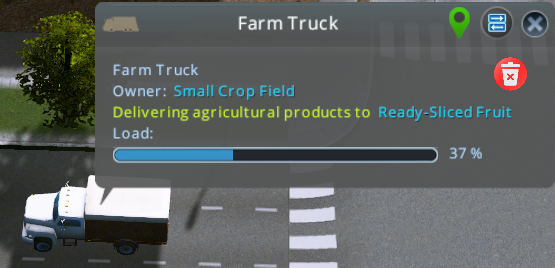
Your DLC processors use the raw materials to make newly introduced special goods. You have eight of them, two per industry type. They cannot be imported, and they do not have any substitutes. They are primarily used by unique factories, but generic zoned industries can also use them to make commercial goods.
Flour
Paper
Glass
Petroleum
Unique Factories: Truly Colossal!
- All unique factories goods are functionally the same despite different names (like electronics, cars) shown on the building info view.
- Unique factories do not belong to any particular industry type, and consequently can be placed anywhere on the map.
- They need multiple input materials, so they will stop working even if just one of them is missing. But, they can make a huge amount of profit if your supply chains are functioning properly.
- You can also control their production rate between 50% to 150%. The operating cost is proportional to the production rate.
- Apart from special goods, some unique factories will ask for crops directly.
- Shipyard makes huge ships. So, they do not need trucks to send to customers. Customers just sail their ships away.
Managing Supply Chain
The first part of managing the supply chain is ensuring you have enough supply. This is not exactly a confusing task because the exact input/output numbers for all DLC buildings are known. Just look out for productivity bonuses and multipliers.
The wiki has all the production rates, costs, multipliers and other numbers.[skylines.paradoxwikis.com]
The raw materials and special goods can be used by zoned industries. This means if your supply chain is very lean and zoned industries poach your materials, you will face problems. Keep redundancies at each step of your supply chain to ensure your unique factories do not run out of input materials.
For example, if your unique factory needs 100 tons of special goods, make 110 tons of them. To make 110 tons of special goods, you might want to make 120 tons of raw material. The exact production buffer needed is unique to your situation, so play around a bit.
The second and more challenging part of the supply chain is transportation. There can be an entire guide on this topic. Traffic is an obvious suspect; but even with good traffic, you can end up having a lot of problems with no obvious solution. I will explain the fundamental game mechanics and why they cause problems.
The core problem in industries DLC is that buildings do not care about the distance when they buy input material or sell output material.
This is unrealistic and coupled with the following game mechanics they cause a lot of headaches.
- Buildings have a limited number of trucks.
All the buildings and warehouses in the industrial supply chain have trucks that they only use to sell. They will never send their own trucks to bring anything. If buildings keep selling to distant places including exporting out of town, they will run out of trucks. Soon, they will run out of internal storage to keep output material as well. In this case, they will stop working and throw a misleading ‘not enough buyers’ error.
Tip: Always check the number of trucks being used when you see this error. If all the trucks are being used, then you are running out of trucks. If the number is flickering, they have trouble finding a path to their destination, check the road networks, especially one-ways.
- Buildings order quite late and only once.
They expect very quick delivery. If they had ordered from a nearby place, it would be okay. But these people expect next day delivery even if they had ordered from another galaxy. You will often find buildings that bought from across the city or outside map and refuse to reorder when the truck is stuck in transit. Soon, they will run out of raw materials, complain about it and stop working.
- Fun happens when these two problems coincide. A building will order from someone who does not have any truck available. One building will complain ‘not enough buyers’ and another will complain ‘not enough raw materials’. More often than not, they're right next to each other...
So, what’s the solution? Warehouses!!
Warehouses
Industries DLC introduces many options for storing all kinds of materials. They have their own fleet of trucks and can act as a large buffer because of their much larger storage capacity. Using them properly requires a bit of thought. Let’s see how they function.
All 4 types of raw materials have their own special storage facilities that can not be utilized for any other material. They are found in specific industry tab. All processed materials and goods are stored in general storage facilities.
Warehouses will solve the problem of limited trucks. But, they can not do anything if your buildings decide to ignore a full warehouse nearby and order from another side of the map. Unique factories are especially notorious for this. Spread out industrial areas will keep cross ordering across the city and cause problems. The only vanilla solution for this problem is to place everything nearby or hope your industries get lucky when they order randomly. The mod I recommend is 'More Effective Transfer Manager' because it forces buildings to take distance into account while buying/selling. Check other mods and details in the mod recommendations section.
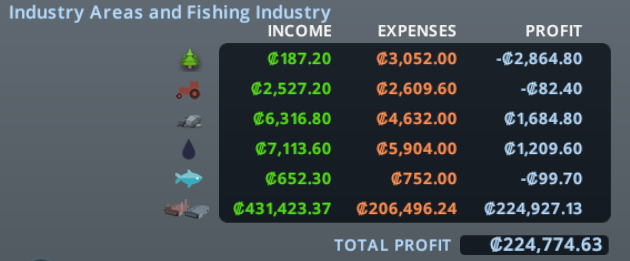
Apparently, all your buildings buy goods for free from your other buildings. That means the last building in the supply chain will claim all the profits. Consequently, your industrial areas will always make a loss if they send most of the materials to unique factories or warehouses. Unique industries will always get all the processed materials for free since those cannot be imported or made by zoned industries. This is why your budget panel does not reflect the actual performance of the industries.
Also, the industrial cash flow number and production number in the industrial overview window will fluctuate quite a bit because the profit is only registered when the trucks drop off materials or goods to someone else.
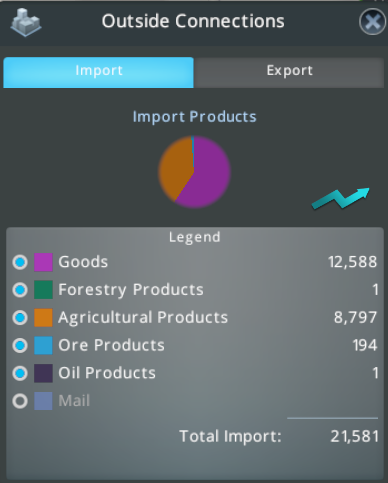
Here's an example of my city attributing most of the profits to my unique industries and warehouses. (Ignore fishing, it is part of sunset harbor DLC, not industries DLC.)
Warehouse Placement and Modes
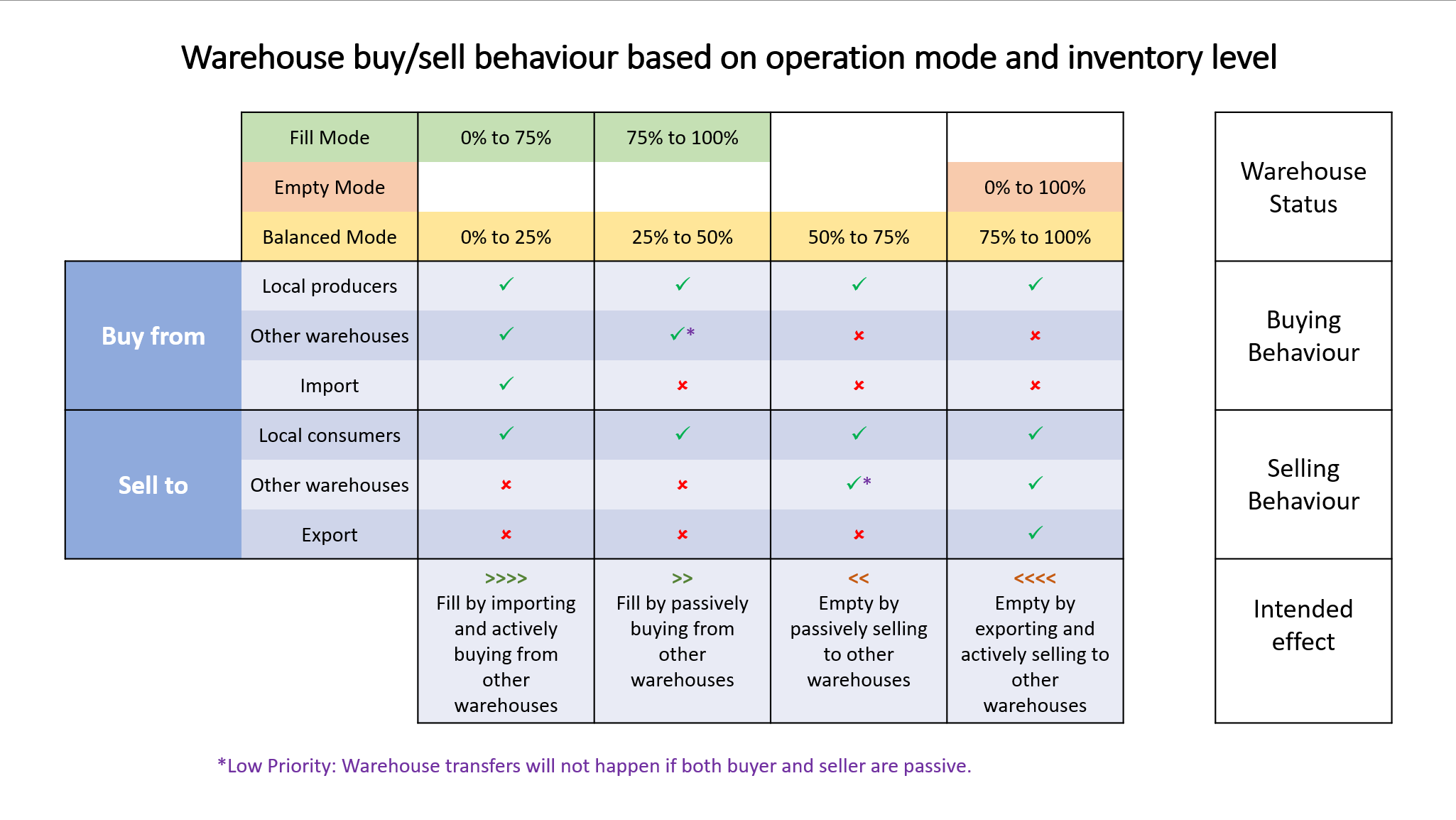
- Warehouses are always willing to buy from local industries and sell to local industries.
- Warehouses will only use their trucks to deliver the goods, not to bring them in.
- Ideally, you should put warehouses in all production and consumption areas of that material.
- If they are running out of trucks, make more warehouses or make bigger warehouses.
- Balanced mode is capable of handling every use-case, so you can just keep all warehouses in balanced mode and they will work just fine. Since the new update, the balanced mode has passive warehouse transfer behaviour between 25-75% inventory level which allows very reliable warehouse to warehouse transfers and robust supply/chain management.
- In Empty mode, the warehouse will sell off everything immediately, so only use this mode if there are no businesses nearby that require the goods.
- In Fill mode, the warehouse will try to keep 100% inventory level by actively purchasing. With the new update, it will only import up to 75% and then try to source locally by buying from other warehouses. Only use this mode if there are no businesses nearby that produce the goods.
- Warehouses might end up with some extra inventory beyond their limits because the order was placed when their inventory level was under the threshold. This is a negligible effect.
Cargo Transportation Options and Traffic Tips
You are not limited to trucks and roads when it comes to cargo transfer in Cities Skylines. You can use cargo trains, ships and airplanes. Using them properly can help you massively. They can reduce the number of trucks needed because trucks only need to drop off locally.
Trains are easiest to use, but without mods, you might be plagued with almost empty cargo trains going around the city jamming your network. Making a functional train network requires some work, but it can be very rewarding.
Cargo ships and Airplanes do not suffer from traffic since they just phase through each other. But, placing them is tougher. Cargo harbours need access to shipping paths and Airports take a lot of space.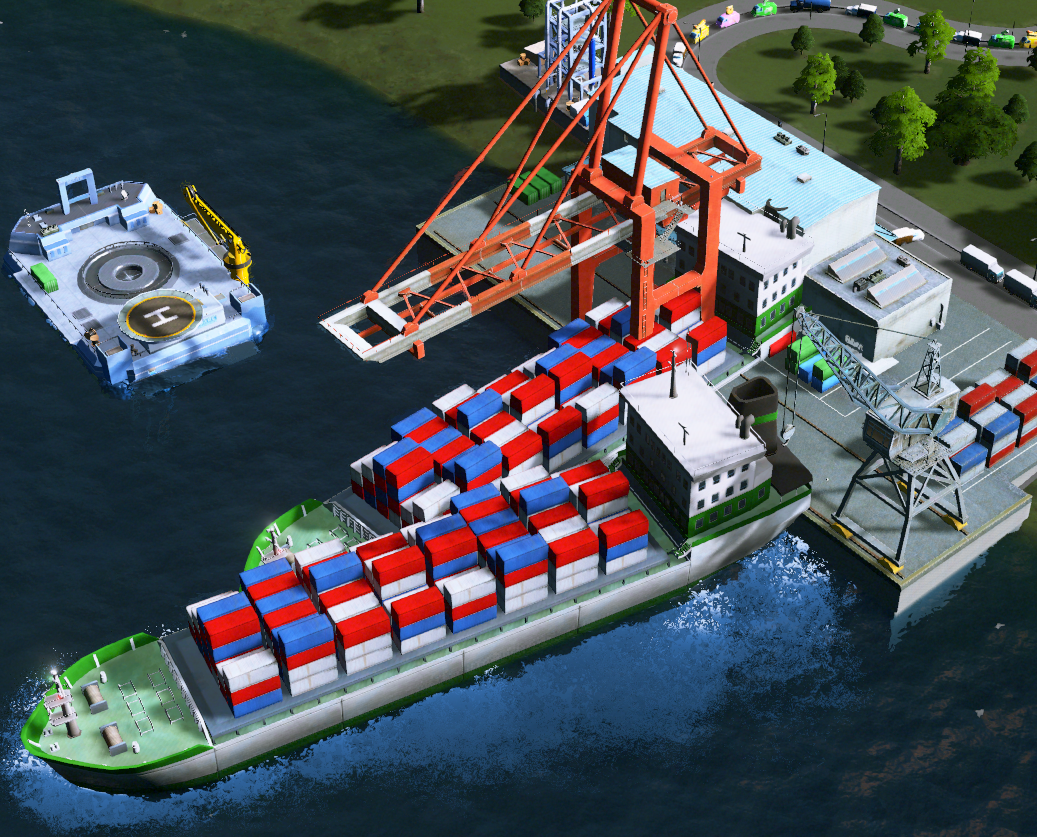
Traffic tips:
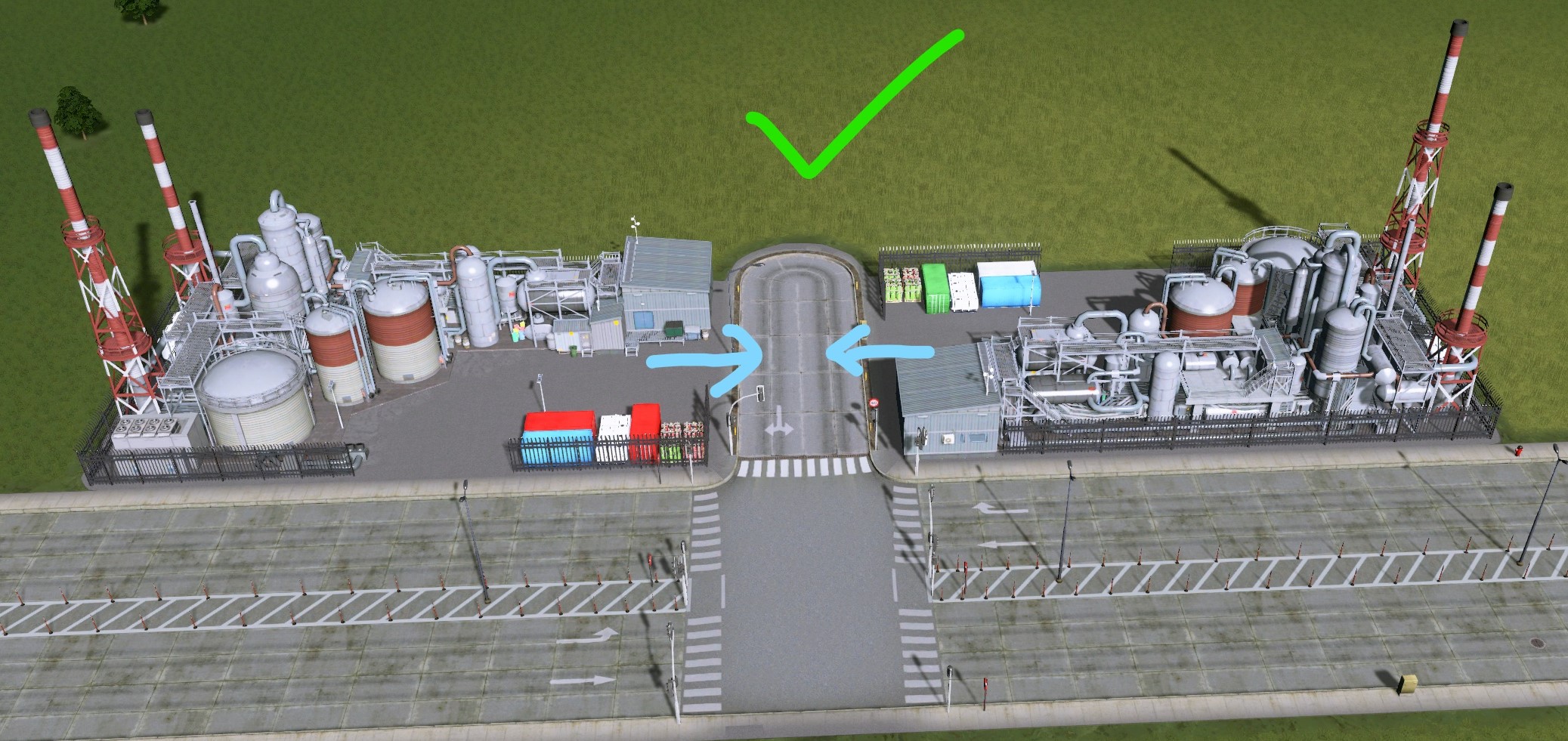
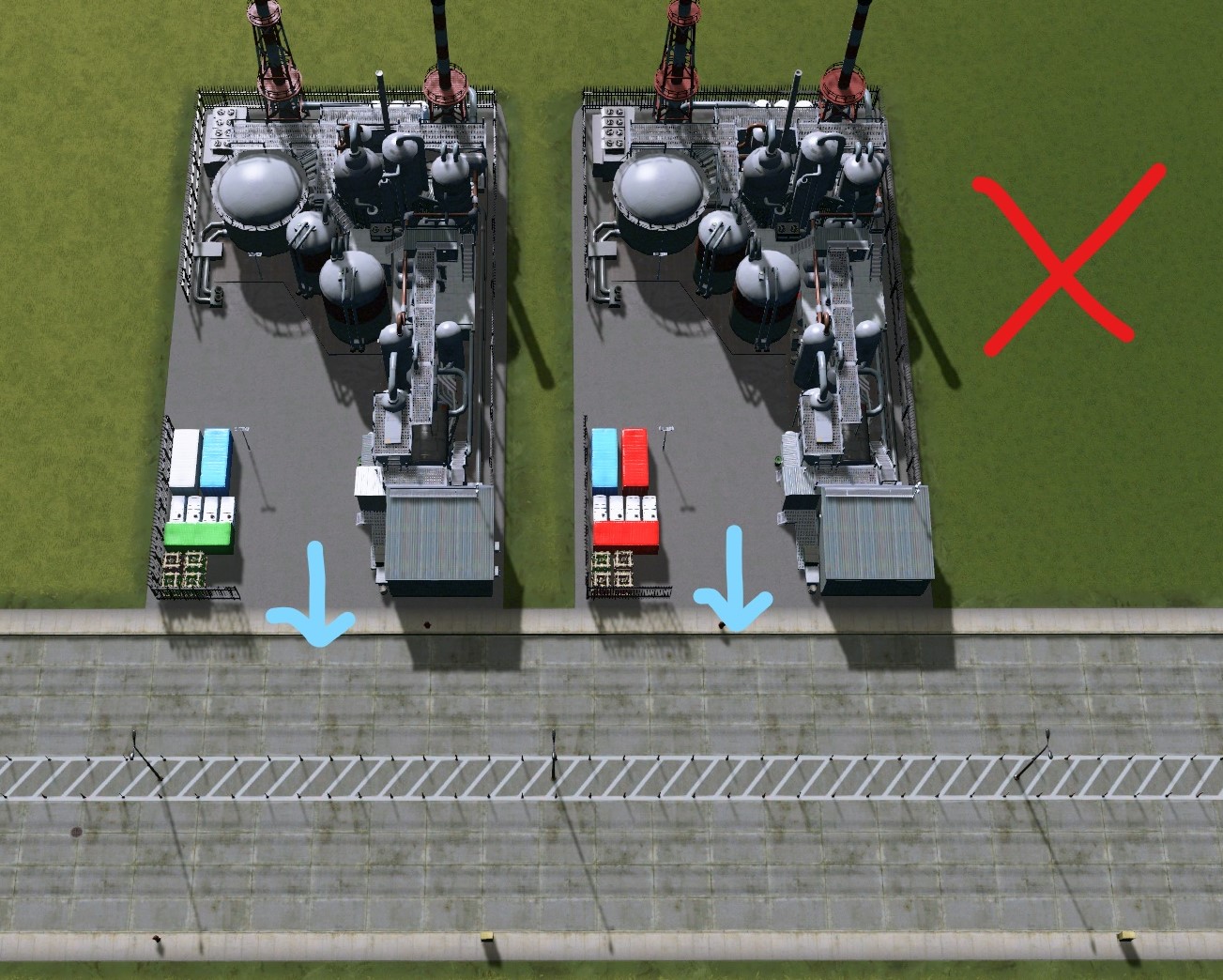
- Avoid placing industrial buildings or warehouses directly facing the road. Make a dead-end alley for the entrance. This will ensure the trucks can come and go from either direction and they do not stop other vehicles when they are loading/unloading.
Just make sure there's no traffic light at all the alleys. It is okay if an alley has 4-5 buildings on it, but do not make it very long. - Avoid excessive one-ways in the Industrial areas because they can cause complications. Very dense industrial areas will also cause traffic issues.
- Cargo stations, harbours and airports can end up causing a lot of road traffic at the entrance because they have an inherent limit of how fast they can absorb the trucks. Use dedicated one-way roads for these buildings instead of putting them directly on main roads. If there are significant backlogs near the entrance, make another building instead of creating very long buffers.
- Rail network is shared between passenger and cargo trains and they can interfere with each other. You should try to make sure that all your stations have a bypass that is shorter, so other trains actually prefer to use it. You might need to separate cargo and passenger traffic by building multiple rail networks.
- You can disable intercity train traffic on passenger train stations. Allowing intercity traffic on only a few passenger stations can free up the rail network significantly.
- The edge of the map absorbs trains at a rather slow rate, so you might need to rely on mods to help you there. Ships and planes do not suffer from such issues.
- The train, planes and ships do not return back empty. So, you can be very creative with your one-way networks. You can also make an isolated road network or just ban trucks to force transfer through trains and other means, but you might need to provide all the services separately.
Recommended Mods
- Extra Landscaping Tools – Allows you to put natural resources like oil, ore and fertile land wherever you want.
- Extended Game Options – Allows you to change the depletion rate of oil and ore.
- More Effective Transfer Manager – Fixes a lot of supply chain issues by improving buy/sell algorithms for all services by using the geographical distance between buildings. It also has a few great options for warehouses and export. It is a plug-n-play mod and I always use it.
- Enhanced District Service – It is an extremely powerful mod that allows you to micromanage all the buy/sell relations for industries and services. It is a lot of work though.
- Industries Rebalanced – Changes a lot of numbers like production rate and truck's cargo capacity for industries DLC buildings to make them more realistic.
- Optimized Outside Connections – Allows your trains, ships and planes to wait for cargo before moving, effectively reducing the number of them on the network.
- More Network Stuff – Allows you to make custom ship path, so you can place harbour more easily.
- Upgrade Untouchable: Convert stations – Allows you to edit roads connected to cargo harbours, You should consider using one-way roads with it.
Ending thoughts
Thank you for reading!
- The Beginner's Guide to Traffic★ 5 (5.9k)167k views13k ♥27 minUpdated Sep 26, 2015
- HOW TO TRAFFIC★ 5 (3.5k)95k views5.2k ♥33 minUpdated Mar 26, 2017
- 都市天际线模组推荐指南V5.1★ 5 (1.9k)67k views6.5k ♥29 minSimplified ChineseUpdated Dec 26, 2023
- Cities Skylines: An In-Depth Beginner's Guide & Walkthrough★ 5 (926)66k views2.8k ♥37 minUpdated Apr 9, 2015
- Traffic Planning Guide for Realistic Cities★ 5 (1.4k)59k views3.1k ♥30 minUpdated Jul 20, 2017
- Cities Skylines | A Beginner's Guide To Using Mods & Custom Content★ 5 (898)47k views2k ♥28 minUpdated May 21, 2023




- Upgrading to PremiumTeam Fortress 2★ 5 (20k)1441k views11k ♥6 minUpdated May 11, 2022
- No More Room in Hell Official ManualNo More Room in Hell★ 5 (2.8k)569k views2.1k ♥29 minUpdated Apr 22, 2019
- NMRiH Community Hosting GuidesNo More Room in Hell★ 5 (526)351k views653 ♥1 minUpdated Aug 10, 2022
- How to 'Git Gud' Soon™MORDHAU★ 5 (2k)318k views3k ♥68 minUpdated Nov 16, 2024
- Лучшие кооперативные игры SteamPAYDAY 2★ 5 (1.5k)315k views2.1k ♥56 minRussianUpdated Apr 27, 2025
- Desert Eagle Heat Treated | Blue GemCounter-Strike 2★ 5 (1.6k)293k views1.5k ♥2 minUpdated Jan 16





This guide was created by its original author on the Steam Community. Are you the author and want it removed? Request removal.