Assassin's Creed II Unlock Bonus Content
Closed servers
On June 1st, 2021, Ubisoft closed servers of Assassin's Creed II. These servers were activating additional content in your saves. Now that the servers are down, this content, such as Ubisoft Connect rewards or Deluxe Edition bonuses, cannot be unlocked. The only way to access them is to load an old save file that has them activated.
However, after some research, I found a way to unlock this content in new saves. In the following sections, I will describe how to do it. For those who don't want to modify the file themselves, here is a download link to the prepared file:
https://drive.google.com/file/d/1Z3EfolrLk35_bwh4xBFd_h26f_EvM64W/view?usp=sharing
Save types
First of all, the save files are located in "C:\Program Files (x86)\Ubisoft\Ubisoft Game Launcher\savegames\[Ubisoft account ID]\4".
There are two save types in Assassin's Creed II. The first type is responsible for settings and unlocking the content, while the second type contains data about game progress, Ezio's location and your session's name.
Depending on which one is created first, these saves may have different numbers. If you start by changing some settings, the first type will be created and thus it will have number 1. However, if you start a new session without changing anything, the second type will be created first and this one will be number 1.
There are also "files" with .upload extension. These are just indicators pointing which saves should be uploaded to the cloud. They are empty and do exactly the same as adding .upload extension to your save files.
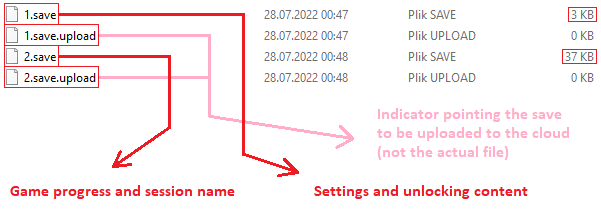
You can identify your save type by size of the file. The second save type is much bigger and grows as you progress through the game. The first save type is around 3 KB and doesn't change much later.
The one that interests us is the first type.
Unlocking content
First, you need to create a save file of the first type. You can do this by simply launching the game and turning subtitles on, which are turned off by default. You don't even have to create a new game session.
If you're unlocking content in your current saves, make sure to back them up just in case.
- Deluxe Edition bonuses:
- 5F2 - Palazzo Medici Templar Lair
- 604 - Santa Maria dei Frari Templar Lair
- 616 - Arsenale di Venezia Templar Lair
- 63A - Bonus outfit dye
- 5F2 - Palazzo Medici Templar Lair
- Ubisoft Connect rewards:
- 694 - Throwing knives capacity upgrade
- 6A6 - Altaïr's outfit
- 6B8 - Auditore Family Crypt
- 694 - Throwing knives capacity upgrade
- Bloodlines weapons:
- 78B - Maria Thorpe's Longsword
- 78C - Fredrick's Hammer
- 78D - Mace of the Bull
- 78E - Dark Oracle's Bone Dagger
- 78F - Twins' Rapier
- 790 - Bouchart's Blade
- 78B - Maria Thorpe's Longsword
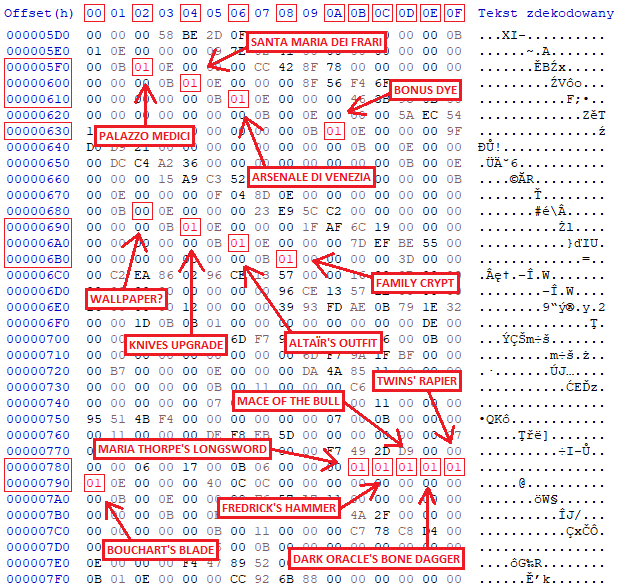
After modifying and saving the file, the content should be unlocked.
If you're using cloud saving, add .upload extension to the file you just modified. Depending on the save number it may be named "1.save.upload" after that. There is probably an indicator file with the same name in this folder already, so just delete it. This will upload your modified save to the cloud and replace the old one. If you wouldn't do that, the old file would keep replacing the new one every time you launch the game.
Now all you have to do is progress enough in the game's plot to access the desired content.
That's all
So in the end it all comes down to turning zeros into ones. Unfortunately, in next games in the series, the content unlocking system looks different, and I haven't found the time to decrypt it. But at least this game was saved from being stripped of its additional content.
- Xbox Controller Fix★ 5 (744)55k views785 ♥1 minUpdated Feb 25, 2014
- Assassin's Creed II Glyph puzzles (from Gamesradar.com)★ 5 (362)36k views630 ♥7 min
- RU | Русификатор для Assassin's Creed II Текст/Звук 2025★ 5 (533)36k views1.2k ♥3 minRussianUpdated Nov 18, 2025
- All Glyph Locations and Solutions - Assassin's Creed II★ 5 (360)32k views845 ♥1 minUpdated Jul 9, 2018
- Русификатор Assassin's Creed II★ 5 (247)29k views543 ♥1 minRussianUpdated Apr 13, 2023
- Делаем оригинальную озвучку + рус.сабы.★ 5 (330)25k views609 ♥1 minRussianUpdated Dec 6, 2020




- Upgrading to PremiumTeam Fortress 2★ 5 (20k)1441k views11k ♥6 minUpdated May 11, 2022
- No More Room in Hell Official ManualNo More Room in Hell★ 5 (2.8k)569k views2.1k ♥29 minUpdated Apr 22, 2019
- NMRiH Community Hosting GuidesNo More Room in Hell★ 5 (526)351k views653 ♥1 minUpdated Aug 10, 2022
- ULTIMATE GUIDE FOR GAME DEV TYCOONGame Dev Tycoon★ 5 (5.8k)326k views10k ♥4 minUpdated 23 Jan, 2014
- How to 'Git Gud' Soon™MORDHAU★ 5 (2k)318k views3k ♥68 minUpdated Nov 16, 2024
- Лучшие кооперативные игры SteamPAYDAY 2★ 5 (1.5k)315k views2.1k ♥56 minRussianUpdated Apr 27, 2025






This guide was created by its original author on the Steam Community. Are you the author and want it removed? Request removal.