How to Build a Plane in Besiege [Basic Vanilla]
Video Guide
Thrust
Plane need thrust to take-off and fly. A spinning landing gear will never work. Wheel with propeller is one of the easiest source of thrust to build.
Make sure they don’t spin too fast or the propellers will be stretched and the wheel will start spasming. Use more engine if you want to go faster.Place four or more wheels on the starting block.
How to bypass the intersection warning: gfycat.com/EvenValidCoatiAdd one block, add a propeller on each sides, then replace that block with a wheel.
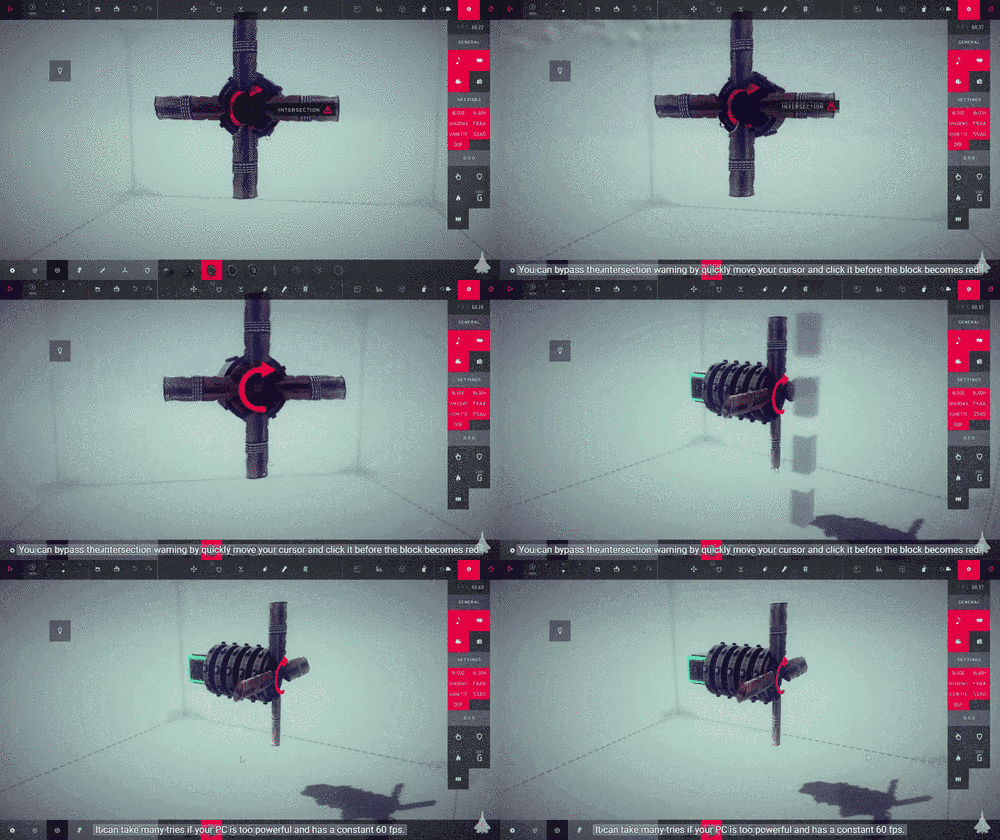
EDIT: or you can just use Advanced Building Tools
You can use normal or small propellers. While their lift is the same, the longer one has higher linear velocity, so it will generate more thrust. Test it in zero-g to make sure it goes forward properly.
Keep in mind about Newton's third law of motion: For every action there is an equal and opposite reaction. When you use one rotor; your entire aircraft will also roll in the opposite direction.Add plane body with unpowered wheel or swivel joint.
An unpowered wheel or swivel joint will usually solve the problem of aircraft rolling on their own,
However, this will halve the effectiveness of the rotor.
It will secure the rotor and reduce engine vibration when moving in high speed.Add another unpowered wheel or swivel joint on the front and brace it.
This will create coaxial counter-rotating engines and increases the effectiveness of the engine.Add flipped propellers on the opposite side.
The torque will already be negated if you build a double rotor plane. Just remember, make sure each propeller is rotating in opposite direction relative to its counterpart.
Wing
The force created by the engine is called thrust. When a plane gains speed from the thrust, the wings generate lift, which makes the plane fly.
Do not use wing block. Wing panel is more compact, has good drag, and have many attachment points. Aerodynamic propeller is even more compact and provide lift.Shape a wing with aerodynamic propeller block or wing panel block.
Create your favorite wing shape with aerodynamic propellers. While each wing add lift, you can just disregard it and purely aim for good looks here. The different number of aerodynamic propeller will affect the number of propeller for stabilizer that will be addressed when I show you how to balance the lift later. Do not try to rotate the right side aerodynamic propellers, you have to flip them with F button.
Secure them together with wooden pole or braces. Keep in mind that each blocks add weight to the plane. A heavy plane needs more powerful engine or more wings to have enough lift.
Even if you use Symmetry Tool. Never rotate them manually with R button or Advanced Tools.Don’t forget to flip the aerodynamic propeller blocks on right side of the wing using the F button.
Stabilizers
The tail section of a plane commonly consist of vertical and horizontal stabilizers. Stabilizers stabilize aircraft flight by providing drag. They prevent backflipping and drifting on plane. While they sounds cool in your head, it will make a plane feels really unresponsive to controls.
Place it on the furthest point from the plane center of mass. You will need two vertical stabilizers if you use aerodynamic propellers.Add some makeshift stabilizer using either wing panel or aerodynamic propeller.
The plane will lose altitude for a brief moment but as soon as it reaches enough speed, it will start to ascend.Move the machine above the ground, start the simulation in normal gravity and start the engine.
For example, when your plane nose is rapidly pitching up it means the wings on the front generate too much lift and it rotates the entire plane. Add more lift using propellers on the tail so it adds up the front lift. Same goes when your plane is suddenly nose diving, reduce the lift on the rear.Starts calibrating the lift
Aileron Controls
When the pilot rolls the plane, one aileron tilts down which causes it to produce more lift. The other aileron tilts up which causes it to produce less lift. This imbalance in force causes the plane to roll.
Brace piston to make sure they can’t move, and then check if that works. I explained how I moved the back rotor on the video.Place swivel joint, hinge under it, and two pistons (with two different keys) on the hinge.
They will act as control surface. Brace as necessaryPut some wing panel/aerodynamic propeller on the swivel joint.
Mechanism like this are heavy and your engine probably will need some readjustment.Adjust speed on the rotor.
Elevator Controls
Elevator control will cause the nose of the plane tilt upwards or downwards when you tilt the control surface.
You might need to remove the vertical stabilizer, or place the mechanism near it. Don’t forget to put the stabilizers back.Add hinge, place another hinge, then add two braced pistons (with two different keys) on top and bottom of the hinge.
Since we have added weight to the back of the aircraft, we’ll need extra lift if we want the aircraft to fly properly so add some aerodynamic propellers. Keep adding more propellers until the aircraft fly level.Re-calibrate the lift
Appendix
http://steamcommunity.com/sharedfiles/filedetails/?id=630568871
Your plane is ready. Don’t forget to add weapons like bombs to kill those pesky knight.
If you feeling like to tackle more challenge, watch this video about realistic steering and create a brand new plane from it.
Any question? Need help with anything? Just write in the comments below!
You can also live chat with me if you need further assistance:
Facebook[www.facebook.com] | Discord[discord.gg]
Don't forget to show a screenshot and describe your problem
- Fast Steering Catapult★ 5 (311)29k views313 ♥1 minUpdated 11 Mar, 2022
- Machines to complete all 54 zones!★ 5 (471)21k views931 ♥2 minUpdated 26 Aug, 2021
- Getting started in Besiege★ 4 (122)17k views128 ♥5 minUpdated 5 Feb, 2015
- Comprehensive Realistic Helicopter Tutorial★ 5 (346)17k views644 ♥21 minUpdated 24 Mar, 2017
- Besiege -初心者向けガイド-★ 5 (770)14k views1.1k ♥2 minJapaneseUpdated 22 Aug, 2015
- Guide for Independent Suspension★ 5 (188)10k views393 ♥2 minUpdated 13 Mar, 2017




- Upgrading to PremiumTeam Fortress 2★ 5 (20k)1441k views11k ♥6 minUpdated May 11, 2022
- No More Room in Hell Official ManualNo More Room in Hell★ 5 (2.8k)569k views2.1k ♥29 minUpdated Apr 22, 2019
- NMRiH Community Hosting GuidesNo More Room in Hell★ 5 (526)351k views653 ♥1 minUpdated Aug 10, 2022
- ULTIMATE GUIDE FOR GAME DEV TYCOONGame Dev Tycoon★ 5 (5.8k)326k views10k ♥4 minUpdated 23 Jan, 2014
- How to 'Git Gud' Soon™MORDHAU★ 5 (2k)318k views3k ♥68 minUpdated Nov 16, 2024
- Лучшие кооперативные игры SteamPAYDAY 2★ 5 (1.5k)315k views2.1k ♥56 minRussianUpdated Apr 27, 2025






This guide was created by its original author on the Steam Community. Are you the author and want it removed? Request removal.