How to Change FOV + How to Skip intro movie + How to Bind jump on mouse wheel
HOW TO BIND JUMP ON MOUSE WHEEL
Open Console and type ; bind mwheeldown "_jump"
HOW TO SKIP INTRO MOVIE
Steam - Library - Doom Eternal - Properties - Launch Options ; +com_skipIntroVideo 1
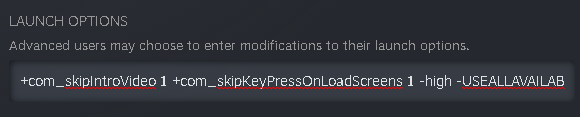
HOW TO CHANGE FOV
Join my discord {https://discord.gg/zP9UHAzXV8} and go to #downloads and download "DOOM_ETERNAL_CUSTOM_FOV.zip"
Open eternalmodinjector_a2af4.zip and move "EternalModinejctor.bat,Mods,base" into your folder where is your game instaled. Then run the bat file and wait. Then open game and open console and type ; hands_fovscale 1 or 1.2 or 1.3 ......
g_fov 150 (can be lower btw maxed out being 150)
Open eternalmodinjector_a2af4.zip and move "EternalModinejctor.bat,Mods,base" into your folder where is your game instaled. Then run the bat file and wait. Then open game and open console and type ; hands_fovscale 1 or 1.2 or 1.3 ......
g_fov 150 (can be lower btw maxed out being 150)
More DOOM Eternal guides
- DOOM Eternal 100% Achievement Guide★ 5 (677)39k views1.6k ♥15 minUpdated Apr 9, 2024
- DOOM Eternal Written Guide/Walkthrough for all collectables and secrets inc DLC.★ 5 (1.7k)36k views3.9k ♥129 minUpdated May 22, 2025
- Секреты Doom Eternal★ 5 (874)32k views1.7k ♥23 minRussianUpdated Apr 17, 2023
- Console Commands for DOOM Eternal★ 5 (213)29k views502 ♥18 minUpdated Mar 30, 2021
- Collectibles and Secrets Guide 100% DOOM Eternal★ 4 (370)26k views589 ♥1 minBulgarianUpdated Apr 2, 2021
- DOOM for Dummies [Tweaks, Fixes, Problem solving] [EN]★ 5 (720)23k views878 ♥15 minUpdated Jun 18, 2020




This guide was created by its original author on the Steam Community. Are you the author and want it removed? Request removal.