Doom Eternal - Offline mode / No bethesda.net account
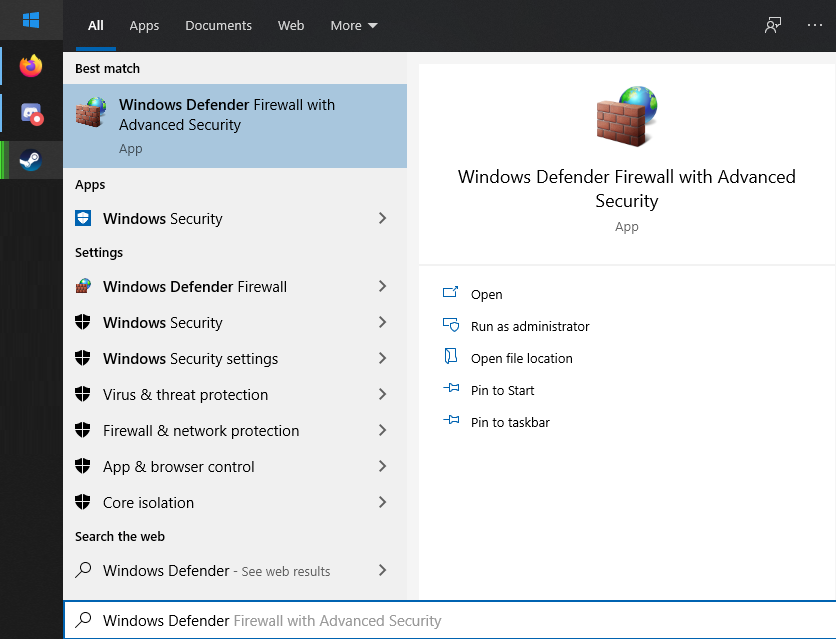
1. Open Windows Defender Firewall
Press the WinKey on your keyboard and search for "Windows Defender", then click on the "Windows Defender Firewall with Advanced Security"
2. Create new rule on the firewall
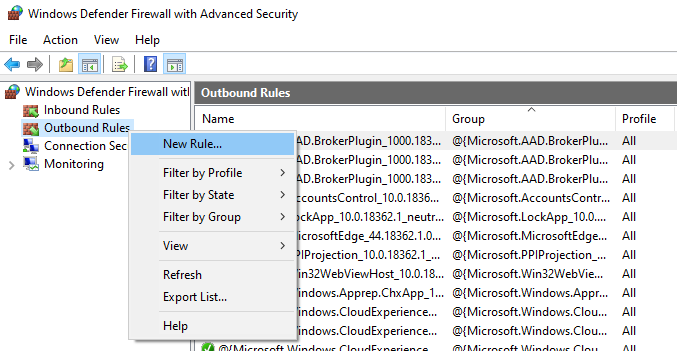
On the left side, right click on "Outbound Rules" and select "New Rule"
3. Configure blocking rule
- Rule Type: Select "Program"
- Program: Select "This program path", and navigate to where Doom Eternal is installed. For example: "D:\Steam\steamapps\common\DOOMEternal\DOOMEternalx64vk.exe"
- Action: Select "Block Connection"
- Profile: All boxes ticked.
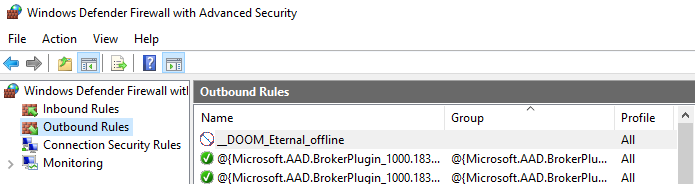
- Name: Choose a name for the rule, I suggest "__DOOM_Eternal_offline". The underscore will keep the rules at the top of the list, and make it easy to find.
Click finish, and you are done.
4. Launch the game and play
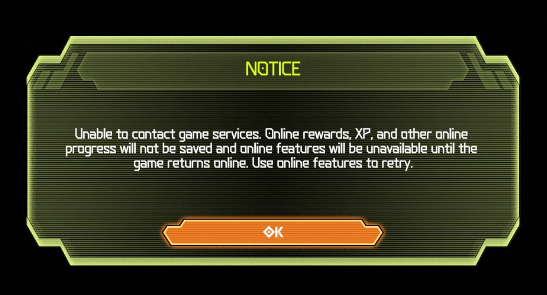
Click on the Doom logo, wait a few seconds. You will see the following popup. Just click through
Like and reward
Remember to like and reward this guide if you found it helpful
More DOOM Eternal guides
- DOOM Eternal 100% Achievement Guide★ 5 (677)39k views1.6k ♥15 minUpdated Apr 9, 2024
- DOOM Eternal Written Guide/Walkthrough for all collectables and secrets inc DLC.★ 5 (1.7k)36k views3.9k ♥129 minUpdated May 22, 2025
- Секреты Doom Eternal★ 5 (874)32k views1.7k ♥23 minRussianUpdated Apr 17, 2023
- Console Commands for DOOM Eternal★ 5 (213)29k views502 ♥18 minUpdated Mar 30, 2021
- Collectibles and Secrets Guide 100% DOOM Eternal★ 4 (370)26k views589 ♥1 minBulgarianUpdated Apr 2, 2021
- DOOM for Dummies [Tweaks, Fixes, Problem solving] [EN]★ 5 (720)23k views878 ♥15 minUpdated Jun 18, 2020




🔥 Popular guides
- Upgrading to PremiumTeam Fortress 2★ 5 (20k)1441k views11k ♥6 minUpdated May 11, 2022
- No More Room in Hell Official ManualNo More Room in Hell★ 5 (2.8k)569k views2.1k ♥29 minUpdated Apr 22, 2019
- NMRiH Community Hosting GuidesNo More Room in Hell★ 5 (526)351k views653 ♥1 minUpdated Aug 10, 2022
- ULTIMATE GUIDE FOR GAME DEV TYCOONGame Dev Tycoon★ 5 (5.8k)326k views10k ♥4 minUpdated 23 Jan, 2014
- How to 'Git Gud' Soon™MORDHAU★ 5 (2k)318k views3k ♥68 minUpdated Nov 16, 2024
- Лучшие кооперативные игры SteamPAYDAY 2★ 5 (1.5k)315k views2.1k ♥56 minRussianUpdated Apr 27, 2025






This guide was created by its original author on the Steam Community. Are you the author and want it removed? Request removal.