How to change your playermodel
Step one
Navigate to your CFG folder, usually it's: C:\Program Files (x86)\Steam\steamapps\common\Half-Life 1 Source Deathmatch\hl1mp\cfg
Open: autoexec.cfg
Add the following line:
cl_playermodel "models/player/mp/gman/gman.mdl"
// robo/robo.mdl
// barney/barney.mdl
// gina/gina.mdl
// gman/gman.mdl
// helmet/helmet.mdl
// hgrunt/hgrunt.mdl
// scientist/scientist.mdl
// zombie/zombie.mdl
And just replace gman with one of the available strings
Here's a list of all models:
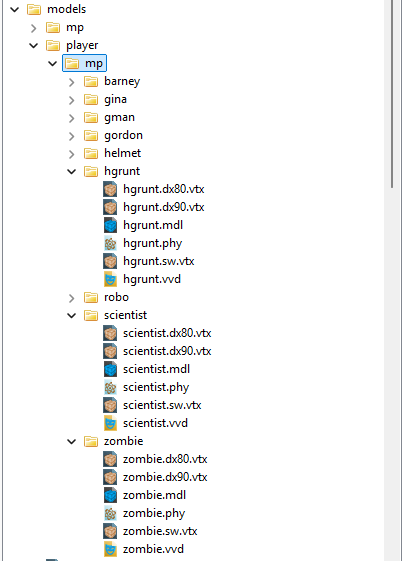
The reason it keeps changing your playermodel back to gordon is because of the steam cloud downloading the config.cfg. It gets extremely annoying.
Open: autoexec.cfg
Add the following line:
cl_playermodel "models/player/mp/gman/gman.mdl"
// robo/robo.mdl
// barney/barney.mdl
// gina/gina.mdl
// gman/gman.mdl
// helmet/helmet.mdl
// hgrunt/hgrunt.mdl
// scientist/scientist.mdl
// zombie/zombie.mdl
And just replace gman with one of the available strings
Here's a list of all models:
The reason it keeps changing your playermodel back to gordon is because of the steam cloud downloading the config.cfg. It gets extremely annoying.
More Half-Life Deathmatch: Source guides
- How to get the most fun out of Half-Life Deathmatch: Source★ 5 (200)12k views238 ♥10 minUpdated May 9, 2015
- How to get a kill★ 4 (145)6.1k views32 ♥1 min
- Setting a Player Model★ 4 (93)4.9k views122 ♥1 minUpdated Jun 12, 2016
- [HLDM:S] Change Language/Сменить Язык★ 4 (69)4.4k views88 ♥3 minBulgarianUpdated Jun 29
- How to Troll Hard in Half-Life Deathmatch: Source★ 4 (65)4.3k views43 ♥1 minUpdated Jan 17, 2020
- How to jump★ 4 (248)4.2k views51 ♥1 minUpdated Apr 6, 2021





This guide was created by its original author on the Steam Community. Are you the author and want it removed? Request removal.