Setting a Player Model
Introduction
So, you've bought (or own) Half-Life Deathmatch: Source. Well, you've noticed that the playermodel area in the Multiplayer section of the settings doesn't work. This guide is for you!
Console
Make sure that you have the dev console enabled, as shown in this picture:
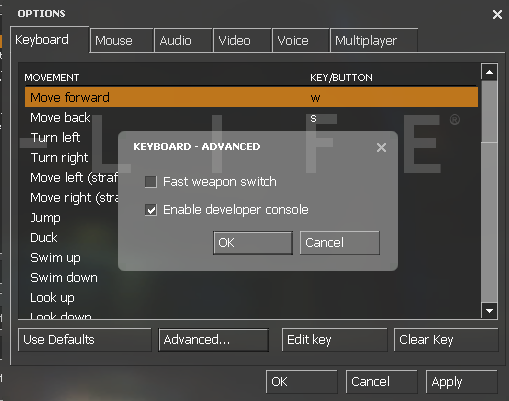
Now, go to console (by hitting the tilde key, or ~ on the keyboard), and type this in:

Replace "name.mdl" with the name of the model (you can find this in the playermodel section where it tells you the name) and put .mdl at the end.
Now, go to console (by hitting the tilde key, or ~ on the keyboard), and type this in:
Replace "name.mdl" with the name of the model (you can find this in the playermodel section where it tells you the name) and put .mdl at the end.
Ending bit thing
Valve should have already fixed this, but of course, they're busy updating other games and stuffs.
I might make another guide soon.
EDIT: You should also put this command inside of autoexec.cfg in order to set your model by default.
I might make another guide soon.
EDIT: You should also put this command inside of autoexec.cfg in order to set your model by default.
More Half-Life Deathmatch: Source guides
- How to get the most fun out of Half-Life Deathmatch: Source★ 5 (200)12k views238 ♥10 minUpdated May 9, 2015
- How to get a kill★ 4 (145)6.1k views32 ♥1 min
- [HLDM:S] Change Language/Сменить Язык★ 4 (69)4.4k views88 ♥3 minBulgarianUpdated Jun 29
- How to Troll Hard in Half-Life Deathmatch: Source★ 4 (65)4.3k views43 ♥1 minUpdated Jan 17, 2020
- How to jump★ 4 (248)4.2k views51 ♥1 minUpdated Apr 6, 2021
- Боты в HLDMS★ 4 (85)3.9k views127 ♥1 minRussianUpdated Aug 21, 2018




This guide was created by its original author on the Steam Community. Are you the author and want it removed? Request removal.