(Input Lag / Input Delay Fix) How to Fix Control Delay in Online Co-op Repentance+
What you need for online co-op
You need to own all the official DLCs for The Binding of Isaac: Rebirth:
- The Binding of Isaac: Rebirth
- Afterbirth
- Afterbirth+
- Repentance
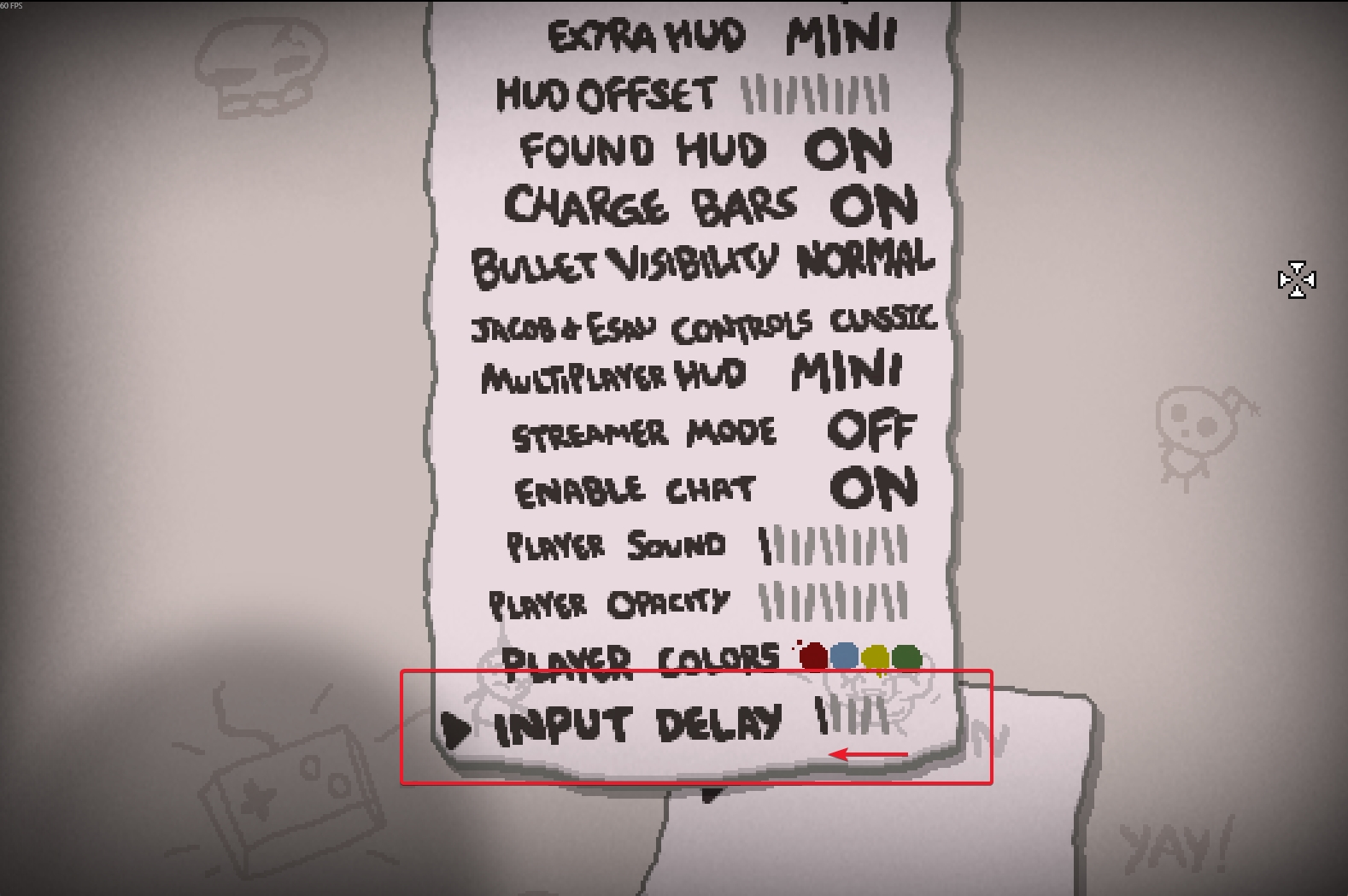
How to fix input delay
- Launch the game.
- Go to Options.
- Scroll all the way down.
- Find the Input Delay setting.
- Set it to the minimum value.
Thanks
I don’t know how long this option has been there, or why input delay isn’t set to the minimum by default. A few months ago it didn’t even exist. My wife and I bought Isaac, realized we had to buy all the DLCs to unlock online co-op, so we did. We played for about a week, ~10 runs, and it was fun, but the delay was too annoying to keep going. Recently we decided to check if it was fixed — nothing had changed, and there were no mentions of it in the patch notes. Out of curiosity I went digging in the settings, and that’s when I found this hidden option.
More The Binding of Isaac: Rebirth guides
- Most & Least Important Unlocks (Repentance+)★ 5 (774)82k views2.3k ♥49 minUpdated Jul 19
- The Bindening™ - A Comprehensive Guide to Everything Isaac: Rebirth★ 5 (1.5k)50k views3.5k ♥666 minUpdated Sep 10, 2025
- Dead God - Roadmap for 100% completion★ 5 (853)47k views2.7k ♥15 minUpdated Jan 17
- Unlocking Everything In The Binding of Isaac (Repenting Update!)★ 5 (567)43k views1.6k ♥122 minUpdated Nov 18, 2024
- Предметы / Артефакты★ 5 (2.4k)37k views4.1k ♥86 minRussianUpdated Sep 18, 2021
- Персонажи: Как открыть и их описание. (AB, AB+ & Rep)★ 5 (386)35k views1.1k ♥13 minRussianUpdated Jul 14, 2021





This guide was created by its original author on the Steam Community. Are you the author and want it removed? Request removal.