(Likely Obsolete) Modding Persona 4 Golden on the Steam Deck
Intro + Protontricks Setup
This guide is for getting 64-bit mods[gamebanana.com] for the 64-bit update of Persona 4 Golden[gamebanana.com] to work on the Steam Deck/SteamOS. Make sure your P4G on Steam is fully updated before following this guide. You will need Protontricks, if you already have that installed you can skip this entire section after reading this.
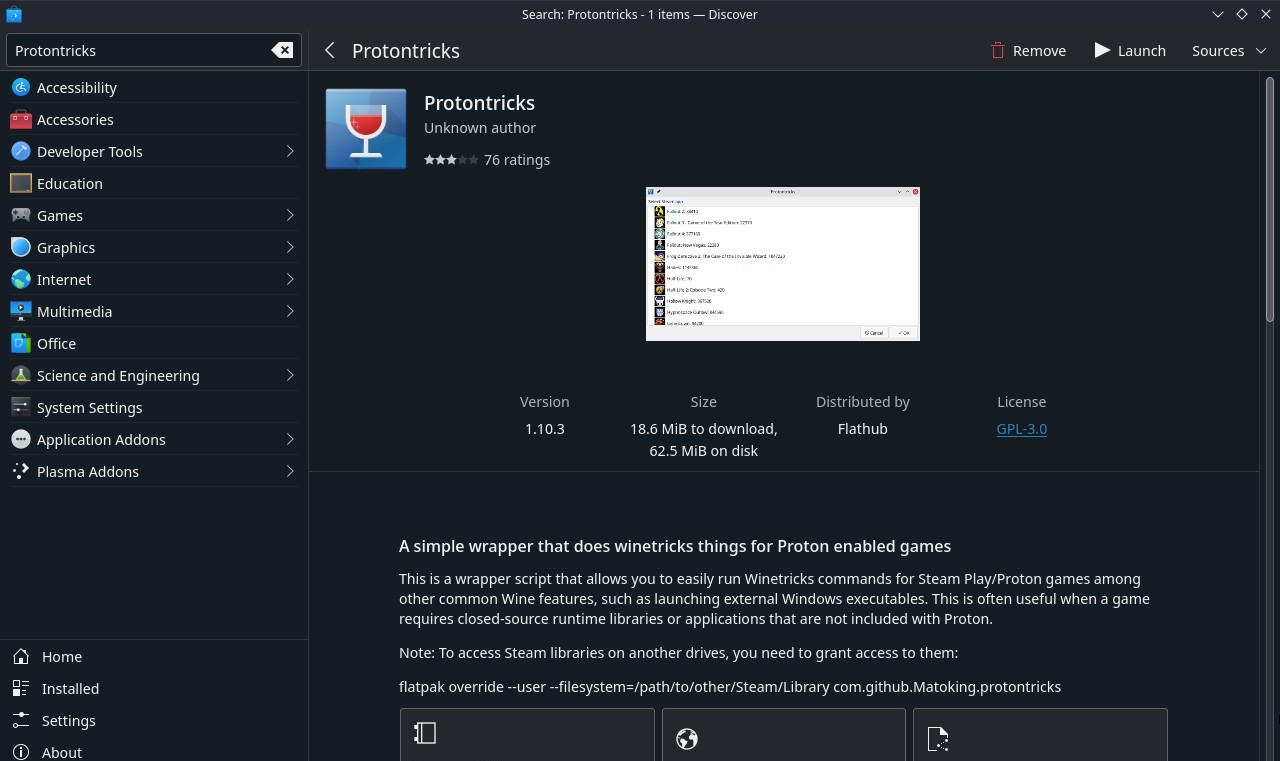
Open up Discover and search for Protontricks then install it.
 |
|
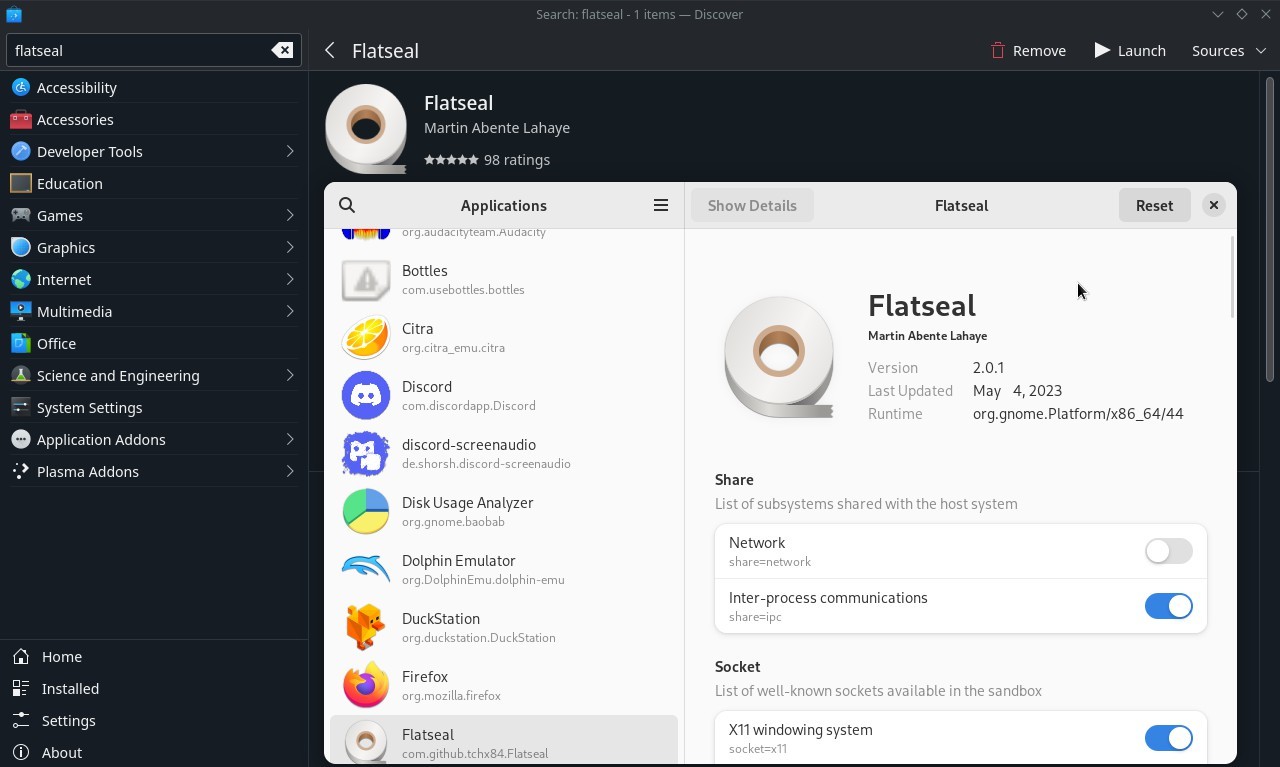
After that, search for Flatseal then install and open it.
 |
|
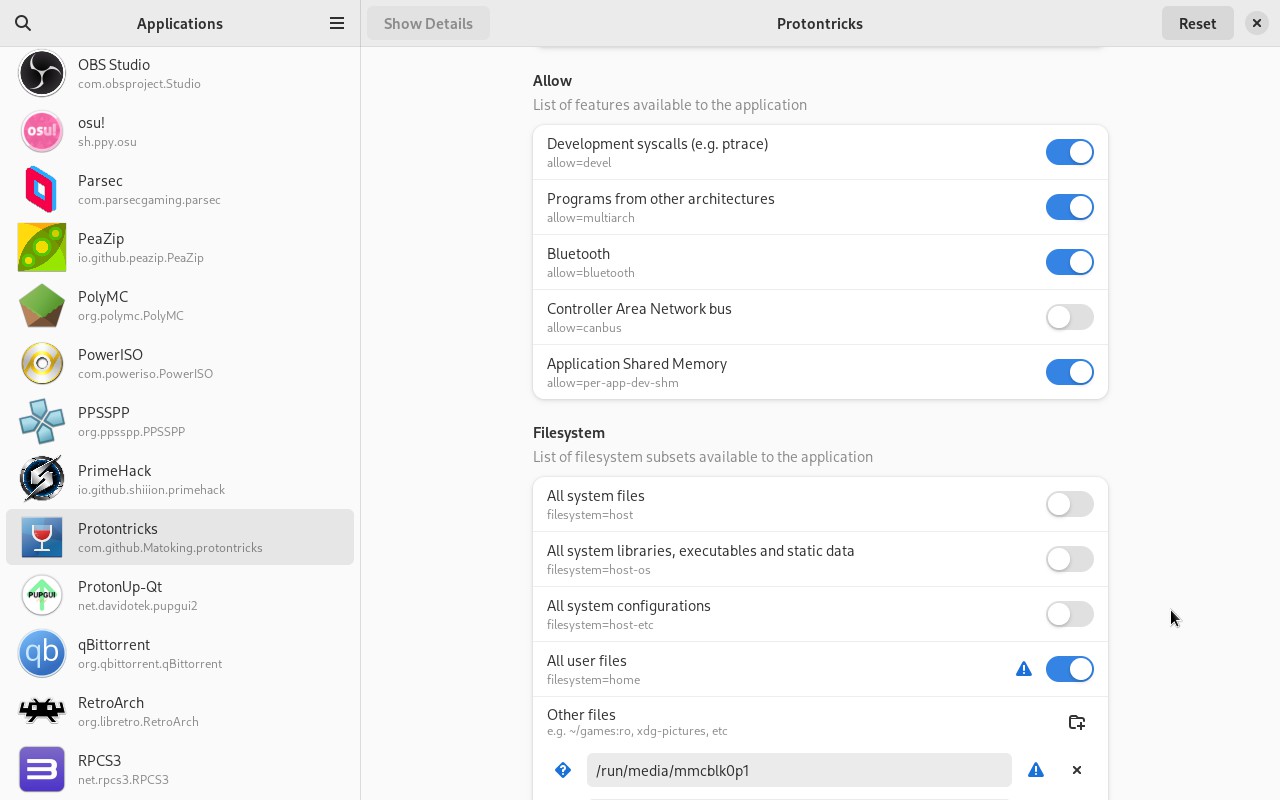
Click on Protontricks on the left, scroll down to Filesystem then click All user files and give permission to /run/media under Other files.
Open Protontricks
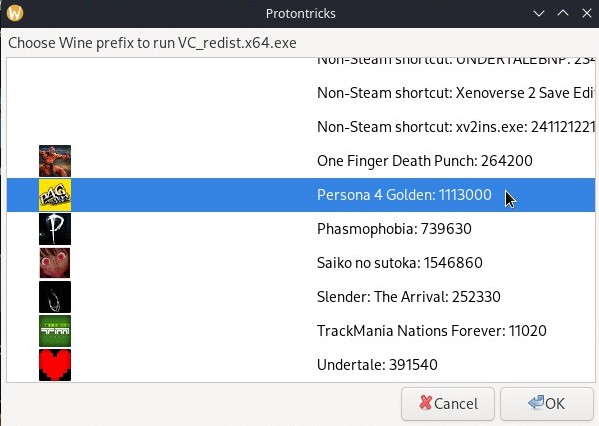
Find & click Persona 4 Golden in the list, then click OK
A Winetricks window will eventually pop up, click Select the default wineprefix, then OK
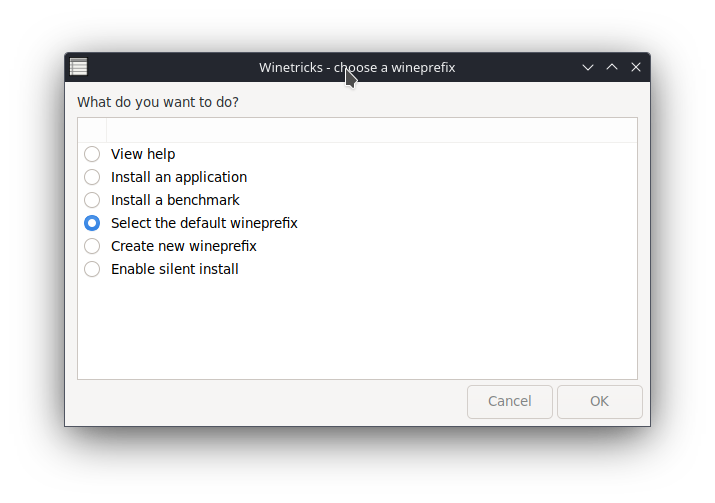
In the new window click Run winecfg, then OK
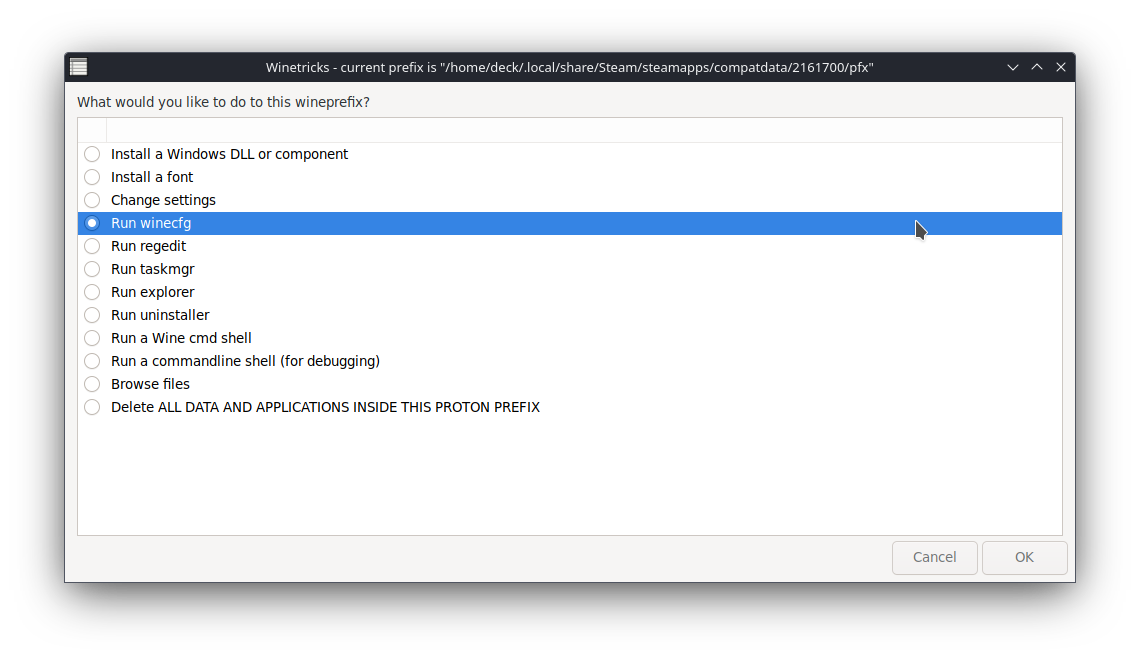
In the Wine configuration window, click the Drives tab, then check Show dot files (towards the bottom left)
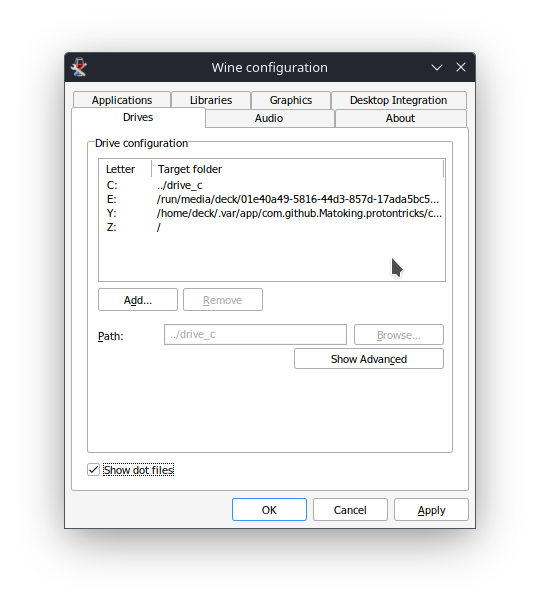
Click Apply then OK, and close any other Winetricks windows.
|
|
What is Flatseal and what exactly am I giving access to?
Flatseal allows you to review and modify permissions from your Flatpak applications, we are giving Protontricks access to any external drive (like a MicroSD card) you may have in case the game is installed there.
Open up Discover and search for Protontricks then install it.
|After that, search for Flatseal then install and open it.
|Click on Protontricks on the left, scroll down to Filesystem then click All user files and give permission to /run/media under Other files.
Open Protontricks
Find & click Persona 4 Golden in the list, then click OK
A Winetricks window will eventually pop up, click Select the default wineprefix, then OK
In the new window click Run winecfg, then OK
In the Wine configuration window, click the Drives tab, then check Show dot files (towards the bottom left)
Click Apply then OK, and close any other Winetricks windows.
|
|
What is Flatseal and what exactly am I giving access to?
Flatseal allows you to review and modify permissions from your Flatpak applications, we are giving Protontricks access to any external drive (like a MicroSD card) you may have in case the game is installed there.
Reloaded II Prerequisites
Before starting, run Persona 4 Golden at least once with Proton 8.0-5 (or your preferred Proton) to generate the prefix.
Next download all of these:
Visual C++ 2015-2022 Redistributable (x64)[aka.ms]
Visual C++ 2015-2022 Redistributable (x86)[aka.ms]
.NET 7 Desktop Runtime (Install BOTH x64 and x86)[dotnet.microsoft.com]
.NET 8 Desktop Runtime (Install BOTH x64 and x86)[dotnet.microsoft.com]
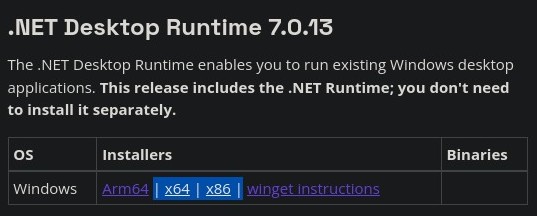
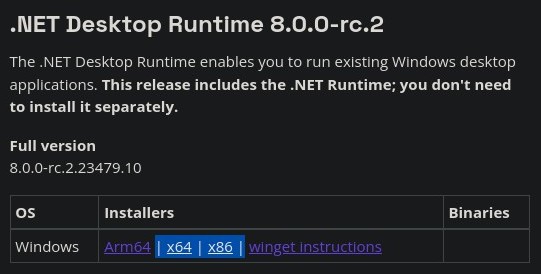
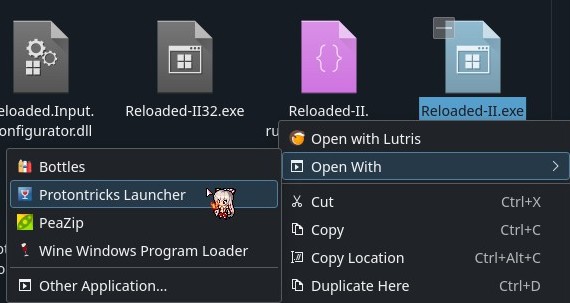
Download each one by right-clicking > Open With > Protontricks Launcher.
After it opens, scroll down and click on Persona 4 Golden's Prefix. Do this one at a time with all 6 files until you've downloaded all of them.
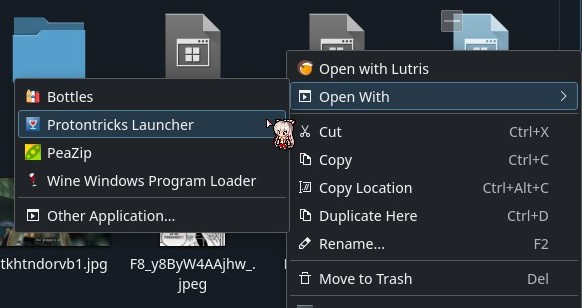
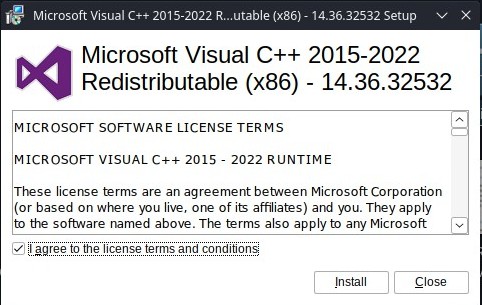
Next download all of these:
Visual C++ 2015-2022 Redistributable (x64)[aka.ms]
Visual C++ 2015-2022 Redistributable (x86)[aka.ms]
.NET 7 Desktop Runtime (Install BOTH x64 and x86)[dotnet.microsoft.com]
.NET 8 Desktop Runtime (Install BOTH x64 and x86)[dotnet.microsoft.com]
Download each one by right-clicking > Open With > Protontricks Launcher.
After it opens, scroll down and click on Persona 4 Golden's Prefix. Do this one at a time with all 6 files until you've downloaded all of them.
Reloaded II Setup
Download Reloaded II[github.com] and extract it to a folder anywhere you want, the name also doesn't matter.
(I created a folder called Reloaded II and put it in my P4G Directory).
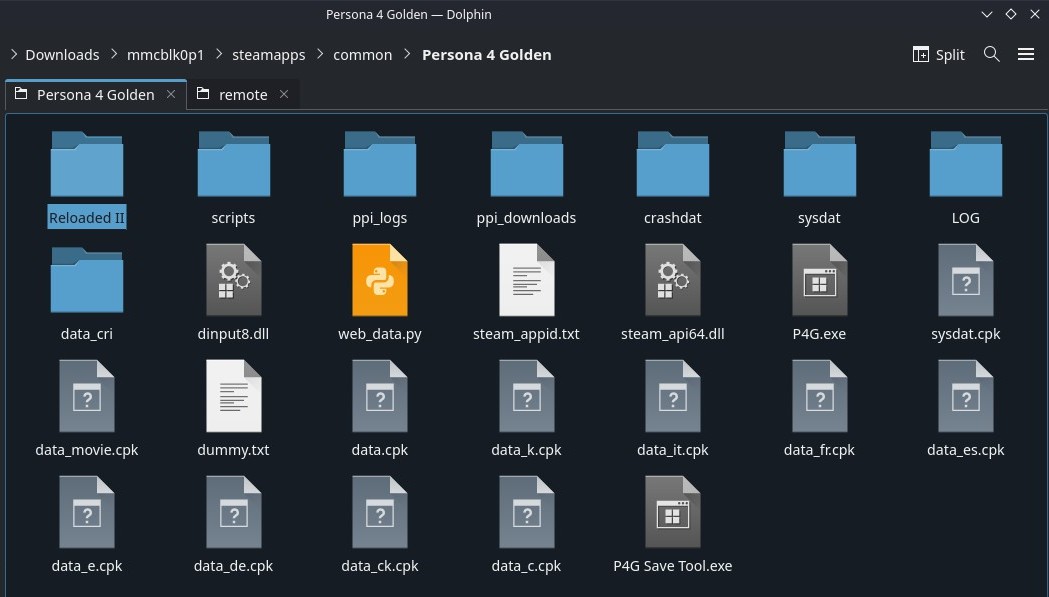 |
|
Open Reloaded II the same way you downloaded the prerequisites, you will need to open it like this every time. Make sure you are opening Reloaded-II.exe and NOT Reloaded-II32.exe.
 |
|
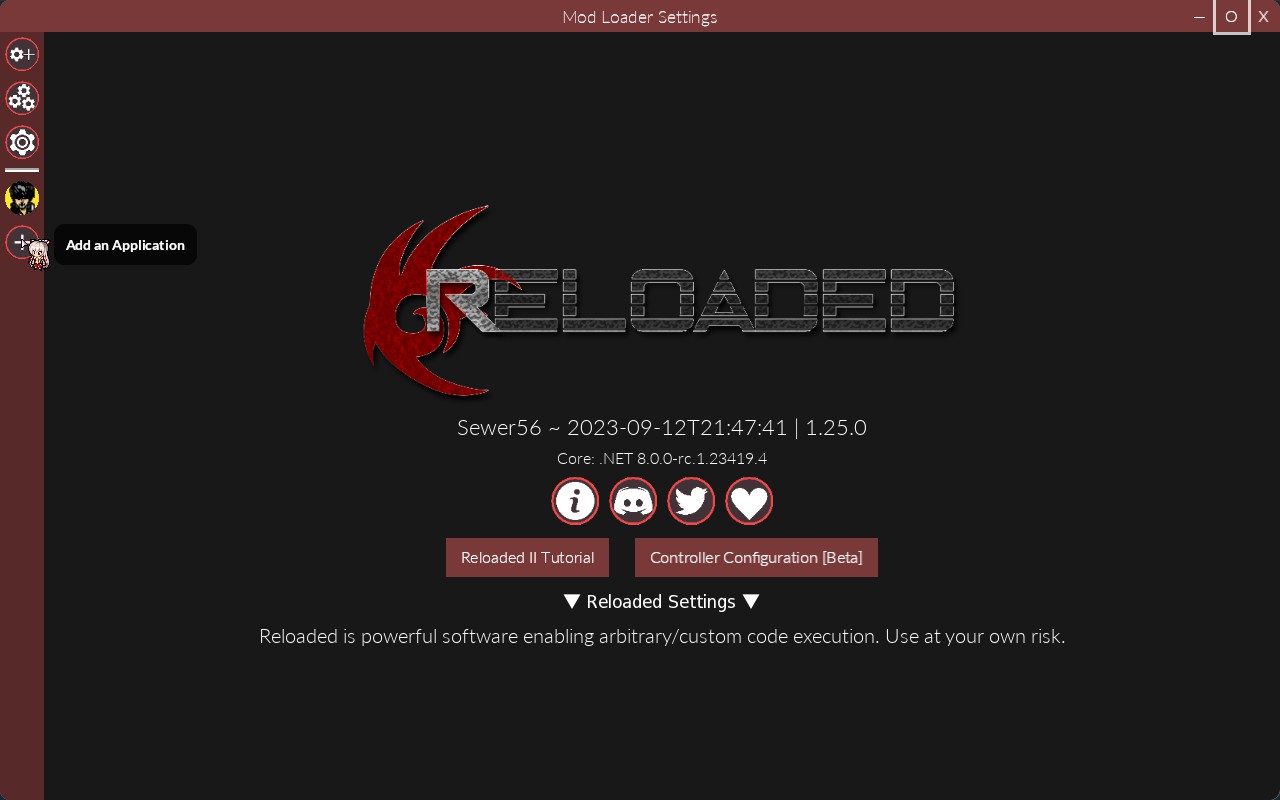
Click Add an Application and direct it to your P4G.exe
 |
|
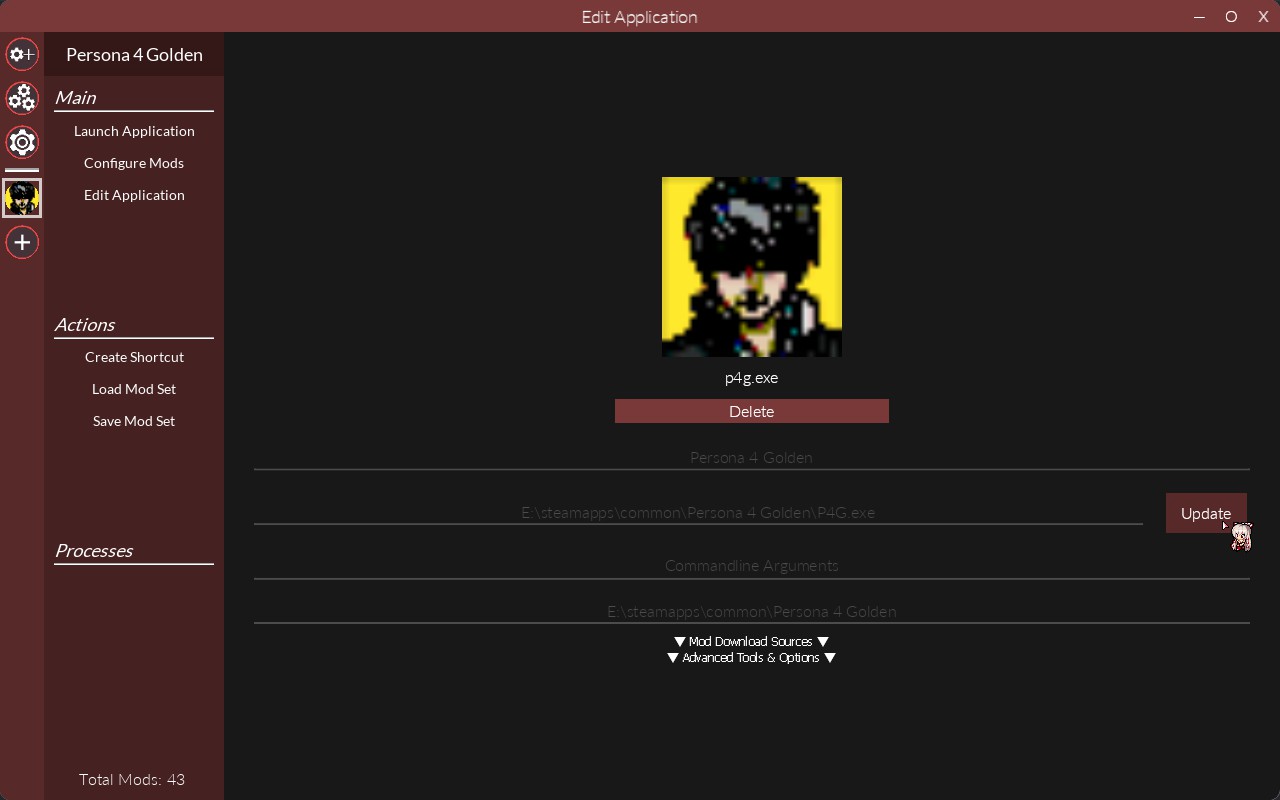
Location will vary depending on where the game is installed, double check it's correct.
 |
|
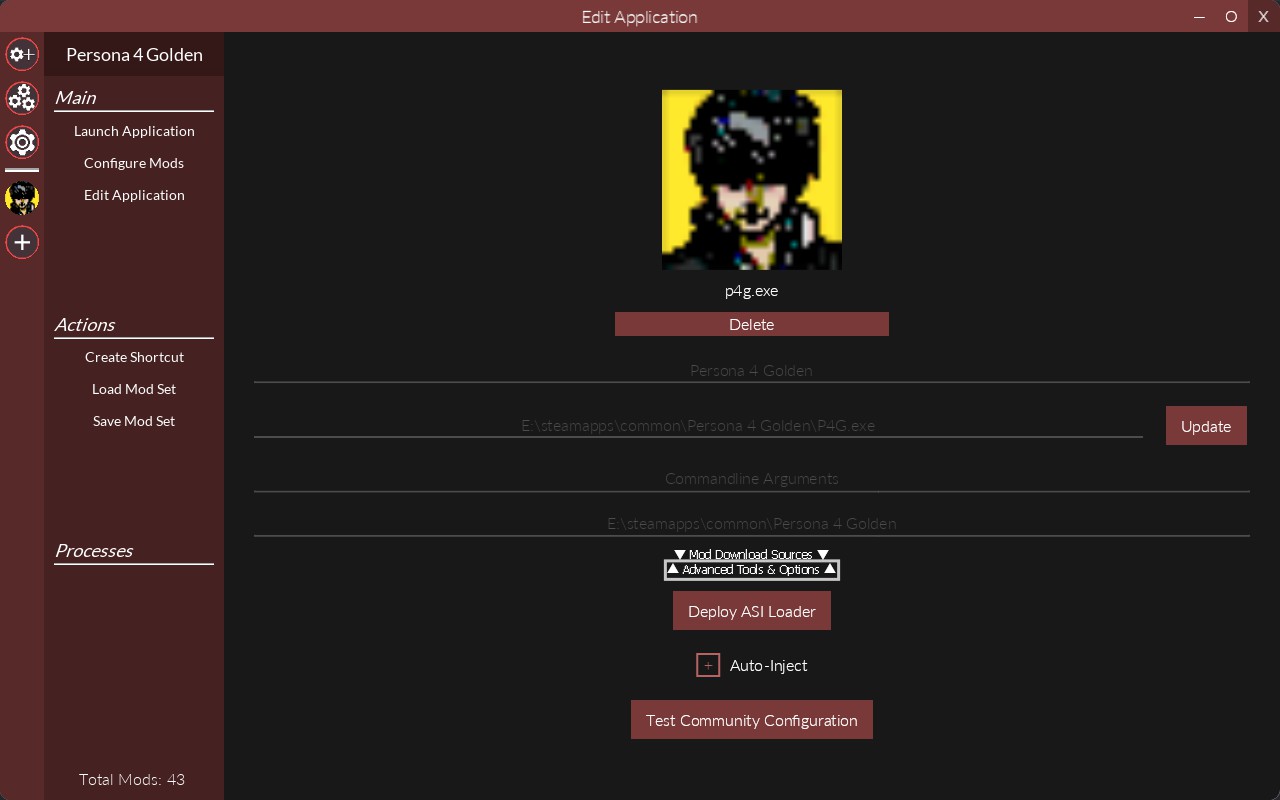
Click on Advanced Tools & Options, toggle Auto-Inject on, and Deploy the ASI Loader.
 |
|
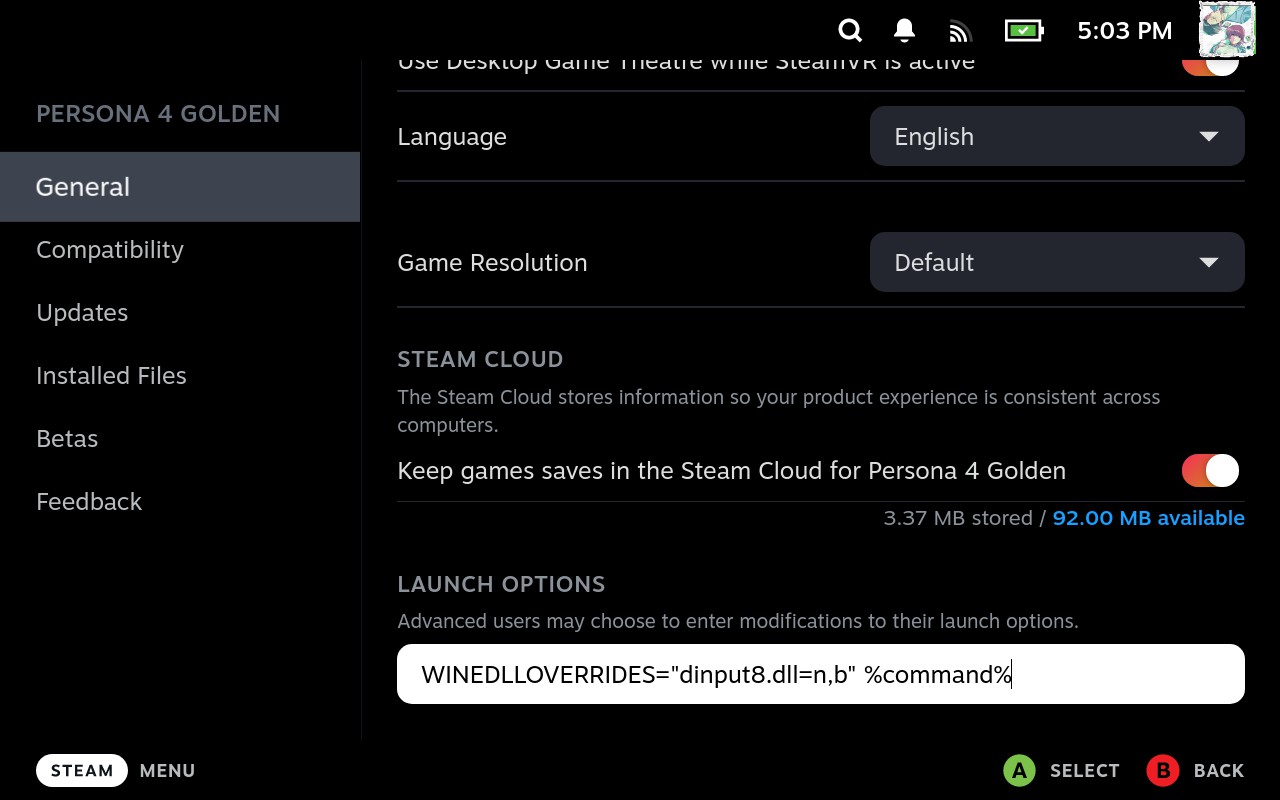
Go to your Steam Launch Settings for Persona 4 Golden and add WINEDLLOVERRIDES="dinput8=n,b" %command%
 |
|
There are 2 ways to install mods, through Reloaded II itself and manually, I do it manually most of the time but will show both. Pick whatever method you prefer.
(I created a folder called Reloaded II and put it in my P4G Directory).
|Open Reloaded II the same way you downloaded the prerequisites, you will need to open it like this every time. Make sure you are opening Reloaded-II.exe and NOT Reloaded-II32.exe.
|Click Add an Application and direct it to your P4G.exe
|Location will vary depending on where the game is installed, double check it's correct.
|Click on Advanced Tools & Options, toggle Auto-Inject on, and Deploy the ASI Loader.
|Go to your Steam Launch Settings for Persona 4 Golden and add WINEDLLOVERRIDES="dinput8=n,b" %command%
|There are 2 ways to install mods, through Reloaded II itself and manually, I do it manually most of the time but will show both. Pick whatever method you prefer.
Installing Mods Manually
Whenever you download a mod, make sure to also download any requirements it may have.
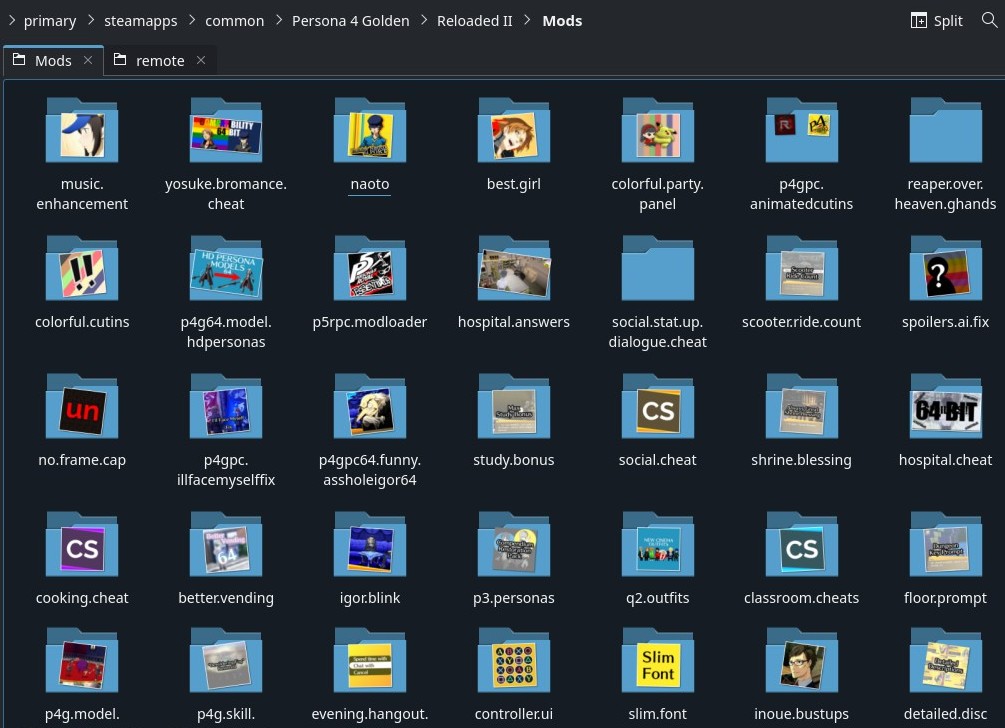
Wherever your Reloaded-II.exe is located, there should be a folder named Mods. You'll want to create a folder for each mod you download in there.
 |
|
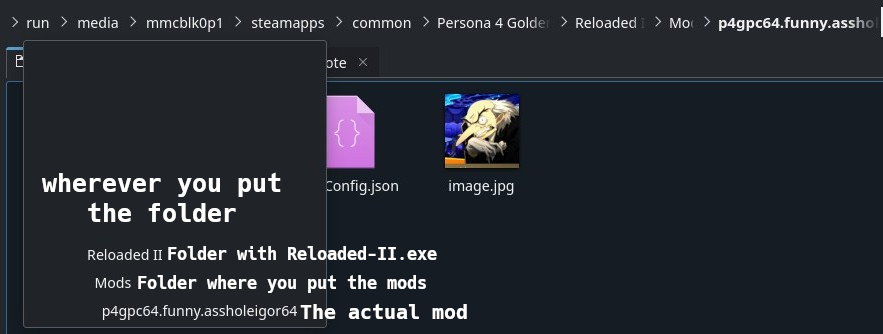
Each Mod in its folder should look something like this.
 |
|
You'll need to download:
Persona 5 Royal Essentials[gamebanana.com]
Inaba Exe Patcher[github.com]
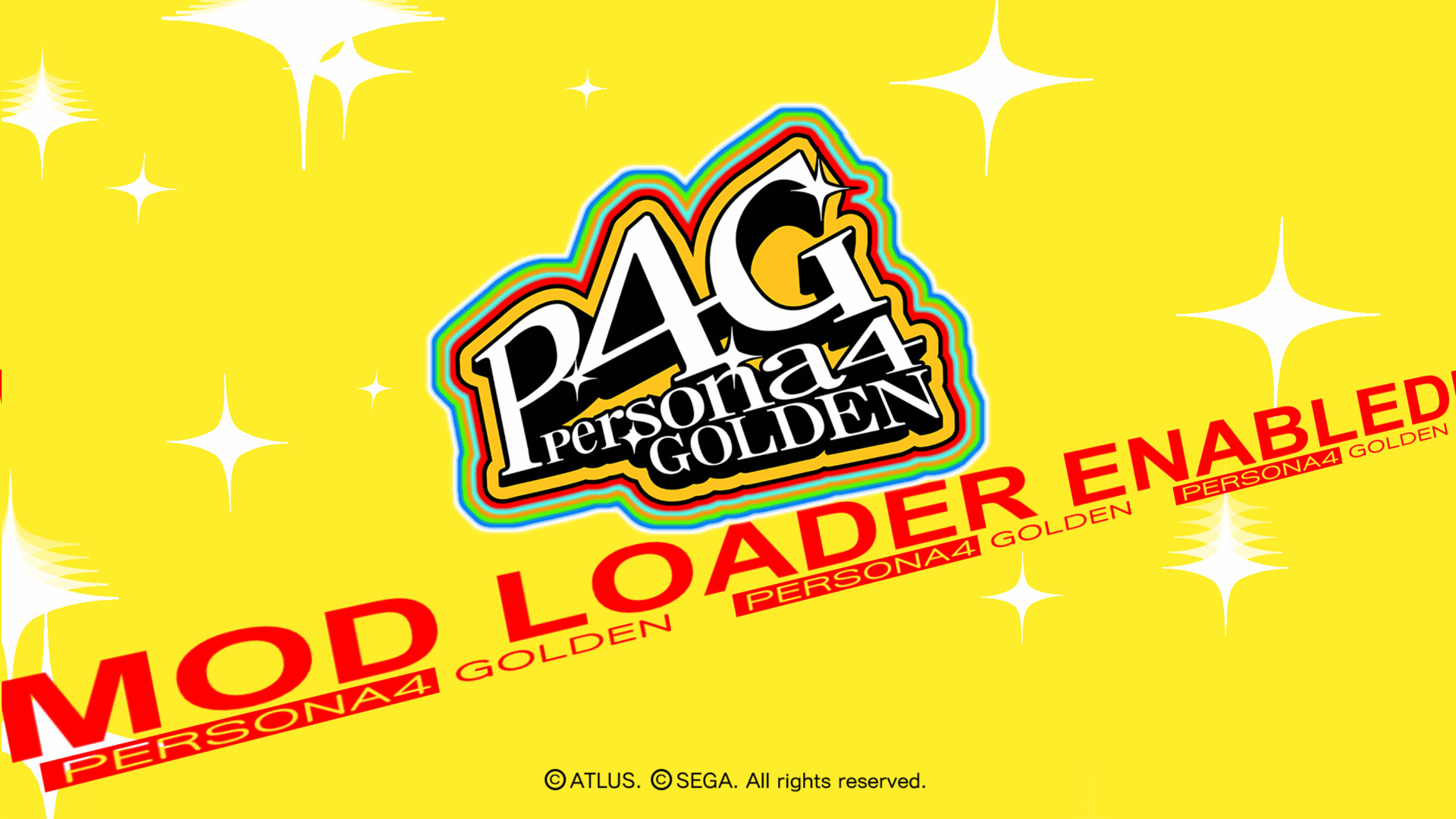
This 3rd mod, Title Screen Fix+[gamebanana.com], isn't needed but will tell you if mods are working on the title screen, which makes testing much faster.
Wherever your Reloaded-II.exe is located, there should be a folder named Mods. You'll want to create a folder for each mod you download in there.
|Each Mod in its folder should look something like this.
|You'll need to download:
Persona 5 Royal Essentials[gamebanana.com]
Inaba Exe Patcher[github.com]
This 3rd mod, Title Screen Fix+[gamebanana.com], isn't needed but will tell you if mods are working on the title screen, which makes testing much faster.
Installing Mods Automatically
Whenever you download a mod, make sure to also download any requirements it may have.
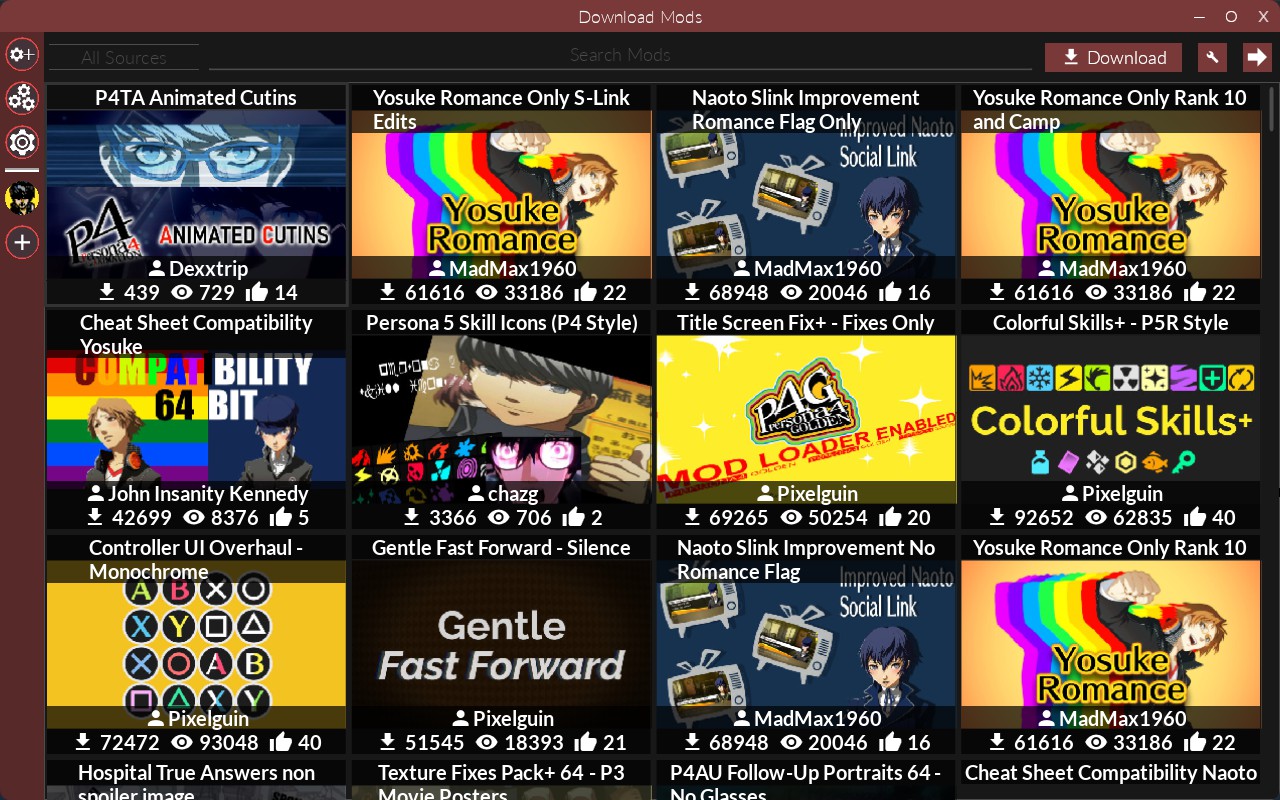
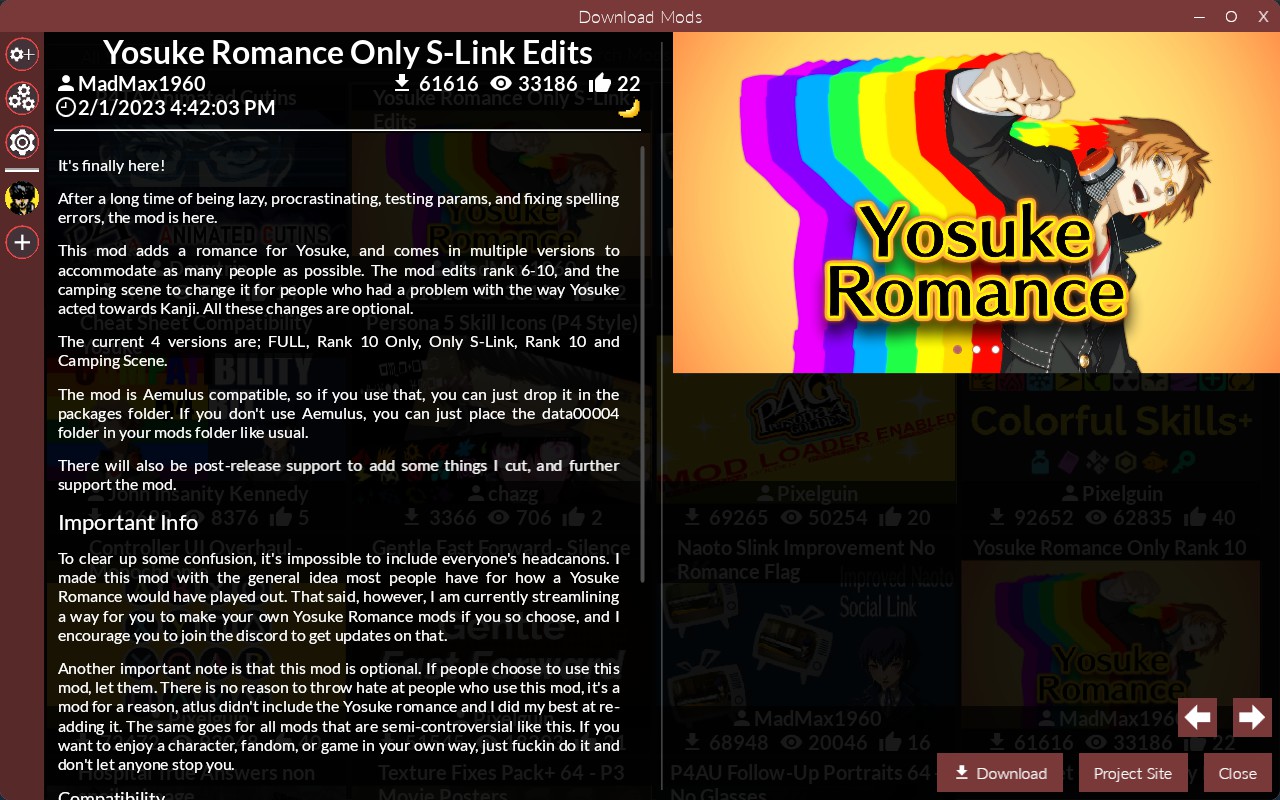
In Reloaded II, click the top left button to browse P4G mods on GameBanana. Simply clicking a mod and clicking download will download it.
You'll need to download:
Persona 5 Royal Essentials[gamebanana.com]
Inaba Exe Patcher[github.com]
This 3rd mod, Title Screen Fix+[gamebanana.com], isn't needed but will tell you if mods are working on the title screen, which makes testing much faster.
In Reloaded II, click the top left button to browse P4G mods on GameBanana. Simply clicking a mod and clicking download will download it.
You'll need to download:
Persona 5 Royal Essentials[gamebanana.com]
Inaba Exe Patcher[github.com]
This 3rd mod, Title Screen Fix+[gamebanana.com], isn't needed but will tell you if mods are working on the title screen, which makes testing much faster.
Managing Mods & Steam Deck Issues
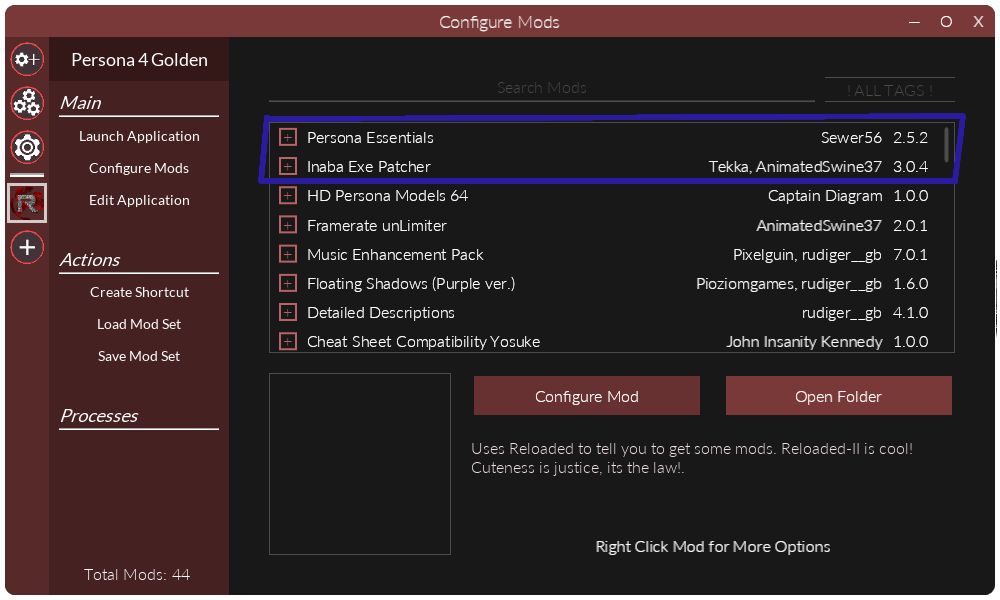
Make sure Persona Essentials and Inaba Exe Patcher are always in this order and at the very top.
 |
|
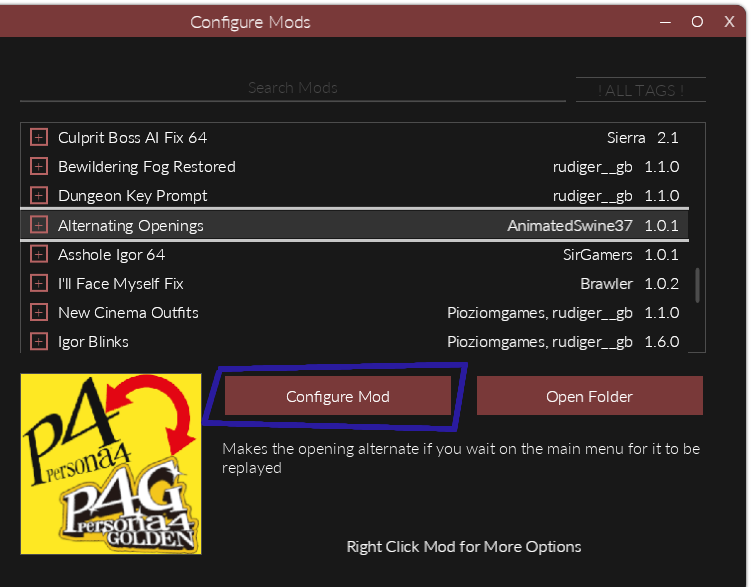
Some Mods, such as Alternating Openings[gamebanana.com], have extra settings that you can toggle or customize by clicking Configure Mod.
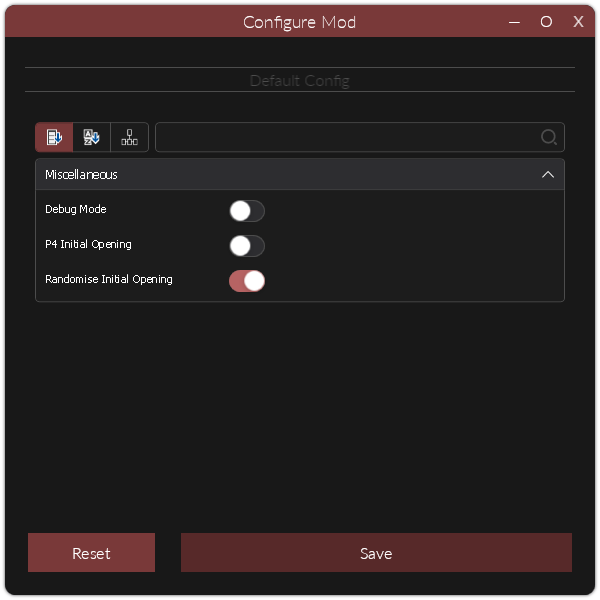
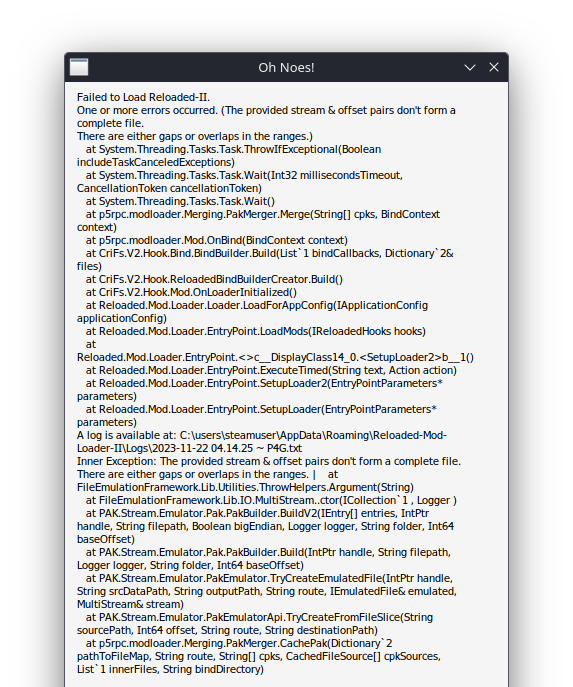
Certain mods like Dojima's Coffee[gamebanana.com] or Scooter Ride Count[gamebanana.com] do not work for some reason. The game will instantly crash while booting whenever attempting to use them. I have no idea what causes this, I assume it isn't something with the mod itself since no one on Windows seems to be having issues. If anyone knows why this happens or a fix please lmk. There are a couple of mods like this so beware.
|Some Mods, such as Alternating Openings[gamebanana.com], have extra settings that you can toggle or customize by clicking Configure Mod.
Certain mods like Dojima's Coffee[gamebanana.com] or Scooter Ride Count[gamebanana.com] do not work for some reason. The game will instantly crash while booting whenever attempting to use them. I have no idea what causes this, I assume it isn't something with the mod itself since no one on Windows seems to be having issues. If anyone knows why this happens or a fix please lmk. There are a couple of mods like this so beware.
Potential Questions
Does the P4G Community Enhancement Pack work?
No, it contains mods, such as Crane Game Rebalanced[gamebanana.com], that crash on the Steam Deck. You'll need to set up every mod included manually to find out which are causing issues, which I'd recommend doing anyway for full control and customization.
EDIT: I've never tested it and don't currently have the game installed to do so, but this guide[p4g-deck.cep.one] should walk you through setting it up.
Reloaded II keeps crashing randomly
This is normal and unavoidable, Reloaded II works through Wine but not very well. Sometimes it might crash multiple times in a row when launching, you must keep attempting until it decides to work. I'd advise against going fullscreen, it seems to be much more unstable that way.
Why does my game keep crashing?
Why is ____ Mod not working?
No, it contains mods, such as Crane Game Rebalanced[gamebanana.com], that crash on the Steam Deck. You'll need to set up every mod included manually to find out which are causing issues, which I'd recommend doing anyway for full control and customization.
EDIT: I've never tested it and don't currently have the game installed to do so, but this guide[p4g-deck.cep.one] should walk you through setting it up.
Reloaded II keeps crashing randomly
This is normal and unavoidable, Reloaded II works through Wine but not very well. Sometimes it might crash multiple times in a row when launching, you must keep attempting until it decides to work. I'd advise against going fullscreen, it seems to be much more unstable that way.
Why does my game keep crashing?
- If it's crashing at launch it may be the Steam Deck issue mentioned in the previous section.
- If it's crashing mid-game there could be many possible causes, such as the Compendium Restoration Pack[gamebanana.com] causing crashes after obtaining the Orb of Sight. Disable mods in a batch until you find the problem child. I only encountered maybe 1-3 crashes during my 110-hour playthrough.
Why is ____ Mod not working?
- If it's crashing, refer to the previous question.
- If everything seems to be working but certain mods are missing, see if another mod is overwriting it.
Recommended Mods
Mods I recommend for a first playthrough (Mostly QoL fixes)
Detailed Descriptions[gamebanana.com] - Tells you exactly what you need to know about everything.
Framerate unLimiter[gamebanana.com] - Unlocks the FPS.
Texture Fixes Pack+[gamebanana.com] - Collection of texture and UI improvements.
Tiny Fixes[gamebanana.com] - Fixes very minor specific issues.
Inoue Bustups [gamebanana.com]- Adds animated/dynamic bust-ups from Persona 4: Dancing All Night to Minoru Inoue's dialogue.
Dungeon Key Prompt[gamebanana.com] - QoL tweak to a prompt that appears in the 5th dungeon.
P4TA Animated Cutins[gamebanana.com] - Adds the animated cutins from Persona 4 The Animation.
Bewildering Fog Restored[gamebanana.com] - Restores additional effects of Bewildering Fog that appear to have been disabled late into Persona 4's development.
Better Vending Machines[gamebanana.com] - Overhauls the Vending Machines.
Igor Blinks[gamebanana.com] - Makes Igor mortal >:)
Evening Hangout Improvements[gamebanana.com] - Adds an option to chat with a social link at night instead of passing time with them.
Colorful Party Panel[gamebanana.com] - Gives each party member a unique color around their party panel icon in battles and dungeons.
Max Study Bonus[gamebanana.com] - Removes RNG from studying.
Always Great Shrine Blessing[gamebanana.com] - Removes RNG from the Shrine.
Floating Shadows[gamebanana.com] - Restores Floating Shadows.
Slim Font[gamebanana.com] - Overhauls the font to be less w I d e.
Colorful Cut-ins[gamebanana.com] - Replace the standard blue background for critical and union attack cut-ins with a colorful one.
Culprit Boss AI Fix[gamebanana.com] - Corrects oversights in The Culprit boss's move pool made during the game's port to PC.
Mods I recommend for NG+ or replaying (Cool/funny sh1t or gameplay additions)
Anime Music Expansion[gamebanana.com] or Music Enhancement Pack[gamebanana.com] - They both overhaul the OST, but you can actually install both, just make sure you have Anime Music Expansion below Music Enhancement Pack in your load order.
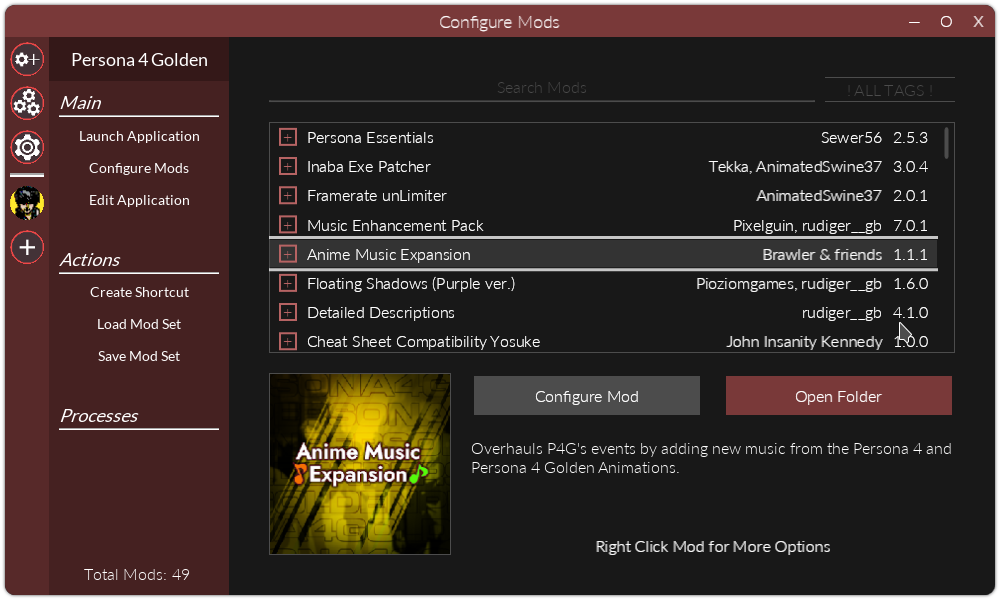
Yosuke Romance[gamebanana.com] - Attempts to recreate Yosuke's cut romance route.
Compendium Restoration Pack[gamebanana.com] - Restores all 21 of the Persona 3 (FES and Portable) Personas that were cut from Persona 4 Golden. Also adds Messiah, Makoto Yuki's Ultimate Persona. When I was completing the compendium, I fused him while completely blind to avoid spoilers lmao.
P4AU Follow-Up Portraits[gamebanana.com] - Replaces the follow-up portraits with their character-select portraits from Persona 4 Arena Ultimax.
Remove Cringe Events[gamebanana.com] - Lets you skip certain story events.
New Cinema Outfits[gamebanana.com] - Adds Persona Q2 Outfits.
Hospital True Answers[gamebanana.com] - QoL mod that makes reaching the true ending easier.
As$hole Igor[gamebanana.com] - BMs you for dying (VERY essential)
Reaper over Golden Hands[gamebanana.com] - Allows you to play like a real masochist man.
There are many other mods but these were just the ones on the top of my head.
You should be good to go assuming you didn't misstep along the way. If you have any questions or need help, try asking in the Persona Modding Discord[discord.gg]. If you don't have Discord or just lack a phone number (me) you can try posting a question on GameBanana[gamebanana.com] but it may take a long time to get any responses.
Hope this helped!
Detailed Descriptions[gamebanana.com] - Tells you exactly what you need to know about everything.
Framerate unLimiter[gamebanana.com] - Unlocks the FPS.
Texture Fixes Pack+[gamebanana.com] - Collection of texture and UI improvements.
Tiny Fixes[gamebanana.com] - Fixes very minor specific issues.
Inoue Bustups [gamebanana.com]- Adds animated/dynamic bust-ups from Persona 4: Dancing All Night to Minoru Inoue's dialogue.
Dungeon Key Prompt[gamebanana.com] - QoL tweak to a prompt that appears in the 5th dungeon.
P4TA Animated Cutins[gamebanana.com] - Adds the animated cutins from Persona 4 The Animation.
Bewildering Fog Restored[gamebanana.com] - Restores additional effects of Bewildering Fog that appear to have been disabled late into Persona 4's development.
Better Vending Machines[gamebanana.com] - Overhauls the Vending Machines.
Igor Blinks[gamebanana.com] - Makes Igor mortal >:)
Evening Hangout Improvements[gamebanana.com] - Adds an option to chat with a social link at night instead of passing time with them.
Colorful Party Panel[gamebanana.com] - Gives each party member a unique color around their party panel icon in battles and dungeons.
Max Study Bonus[gamebanana.com] - Removes RNG from studying.
Always Great Shrine Blessing[gamebanana.com] - Removes RNG from the Shrine.
Floating Shadows[gamebanana.com] - Restores Floating Shadows.
Slim Font[gamebanana.com] - Overhauls the font to be less w I d e.
Colorful Cut-ins[gamebanana.com] - Replace the standard blue background for critical and union attack cut-ins with a colorful one.
Culprit Boss AI Fix[gamebanana.com] - Corrects oversights in The Culprit boss's move pool made during the game's port to PC.
Mods I recommend for NG+ or replaying (Cool/funny sh1t or gameplay additions)
Anime Music Expansion[gamebanana.com] or Music Enhancement Pack[gamebanana.com] - They both overhaul the OST, but you can actually install both, just make sure you have Anime Music Expansion below Music Enhancement Pack in your load order.
Yosuke Romance[gamebanana.com] - Attempts to recreate Yosuke's cut romance route.
Compendium Restoration Pack[gamebanana.com] - Restores all 21 of the Persona 3 (FES and Portable) Personas that were cut from Persona 4 Golden. Also adds Messiah, Makoto Yuki's Ultimate Persona. When I was completing the compendium, I fused him while completely blind to avoid spoilers lmao.
P4AU Follow-Up Portraits[gamebanana.com] - Replaces the follow-up portraits with their character-select portraits from Persona 4 Arena Ultimax.
Remove Cringe Events[gamebanana.com] - Lets you skip certain story events.
New Cinema Outfits[gamebanana.com] - Adds Persona Q2 Outfits.
Hospital True Answers[gamebanana.com] - QoL mod that makes reaching the true ending easier.
As$hole Igor[gamebanana.com] - BMs you for dying (VERY essential)
Reaper over Golden Hands[gamebanana.com] - Allows you to play like a real masochist man.
There are many other mods but these were just the ones on the top of my head.
You should be good to go assuming you didn't misstep along the way. If you have any questions or need help, try asking in the Persona Modding Discord[discord.gg]. If you don't have Discord or just lack a phone number (me) you can try posting a question on GameBanana[gamebanana.com] but it may take a long time to get any responses.
Hope this helped!
More Persona 4 Golden guides
- The Hardcore Risette Fan Experience™️★ 5 (489)32k views985 ♥48 minUpdated Aug 7, 2020
- Recommended level for every boss and their affinities. No spoilers★ 5 (730)32k views1.9k ♥7 minUpdated Jun 30, 2025
- Persona 4 Golden 100% Achievements Guide | 2020 (This is not a strict-Everyday-Guide)★ 5 (706)30k views1.7k ♥58 minUpdated Dec 25, 2020
- 100% Achievements Guide for Persona 4 Golden★ 5 (1.2k)29k views3.6k ♥87 minUpdated Feb 23, 2025
- 100% Day By Day Guide by Hurricanehaon★ 5 (1.3k)28k views4.2k ♥102 minUpdated Oct 4, 2023
- All Social Links Guide★ 5 (1.4k)26k views4.6k ♥95 minUpdated Nov 22, 2020





This guide was created by its original author on the Steam Community. Are you the author and want it removed? Request removal.