MUST READ: Private Lobbies 101
Why does this guide require existance?
I once joined a lobby of people playing this wonderful game.
I suddenly got a "Server Disconnection" from them.
I went to a different group.
Same thing.
Another night I played the game.
Some random guy said "Kick Him" in the chat.
Another.
"Sorry, nothing personal but can you not be in this group?"
((These are all true stories by the way)).
It was then I realized that this feature needed to be proclamed to the world.
That it is my duty to educate the public in preventing another sad soul from this.
To declare my knowledge to all those willing to find it.
A journey of unprecedented lessons follow:
I suddenly got a "Server Disconnection" from them.
I went to a different group.
Same thing.
Another night I played the game.
Some random guy said "Kick Him" in the chat.
Another.
"Sorry, nothing personal but can you not be in this group?"
It came to the point that one day I joined a random lobby and...
...They screamed at me in an attempt to annoy me to get off.
...They screamed at me in an attempt to annoy me to get off.
((These are all true stories by the way)).
It was then I realized that this feature needed to be proclamed to the world.
That it is my duty to educate the public in preventing another sad soul from this.
To declare my knowledge to all those willing to find it.
A journey of unprecedented lessons follow:
How to open a Private lobby:
Opening a lobby that your designated-thieves can enjoy yet doesn't appear in the public lists is easier than drowning yourself with a bathroom sink.
Follow these simple steps and you'll not only make a lot of innocent Monacans happy, but keep yourself hands free with the random players joining:
That's all there is to it! Congratulations!
Follow these simple steps and you'll not only make a lot of innocent Monacans happy, but keep yourself hands free with the random players joining:
- STEP ONE: Select your desired level and press the "x" button (Or Gamepad Equivalent).
- STEP TWO: You will now see a list of lobbies already open, ignore this and press the "x" button (Or Gamepad Equivalent) a second time.
- STEP Three: Here you have parameters for publicity and person count. Swap "PUBLIC" for "PRIVATE" and press the Space Bar (Or Gamepad Equivalent) to open up your lobby.
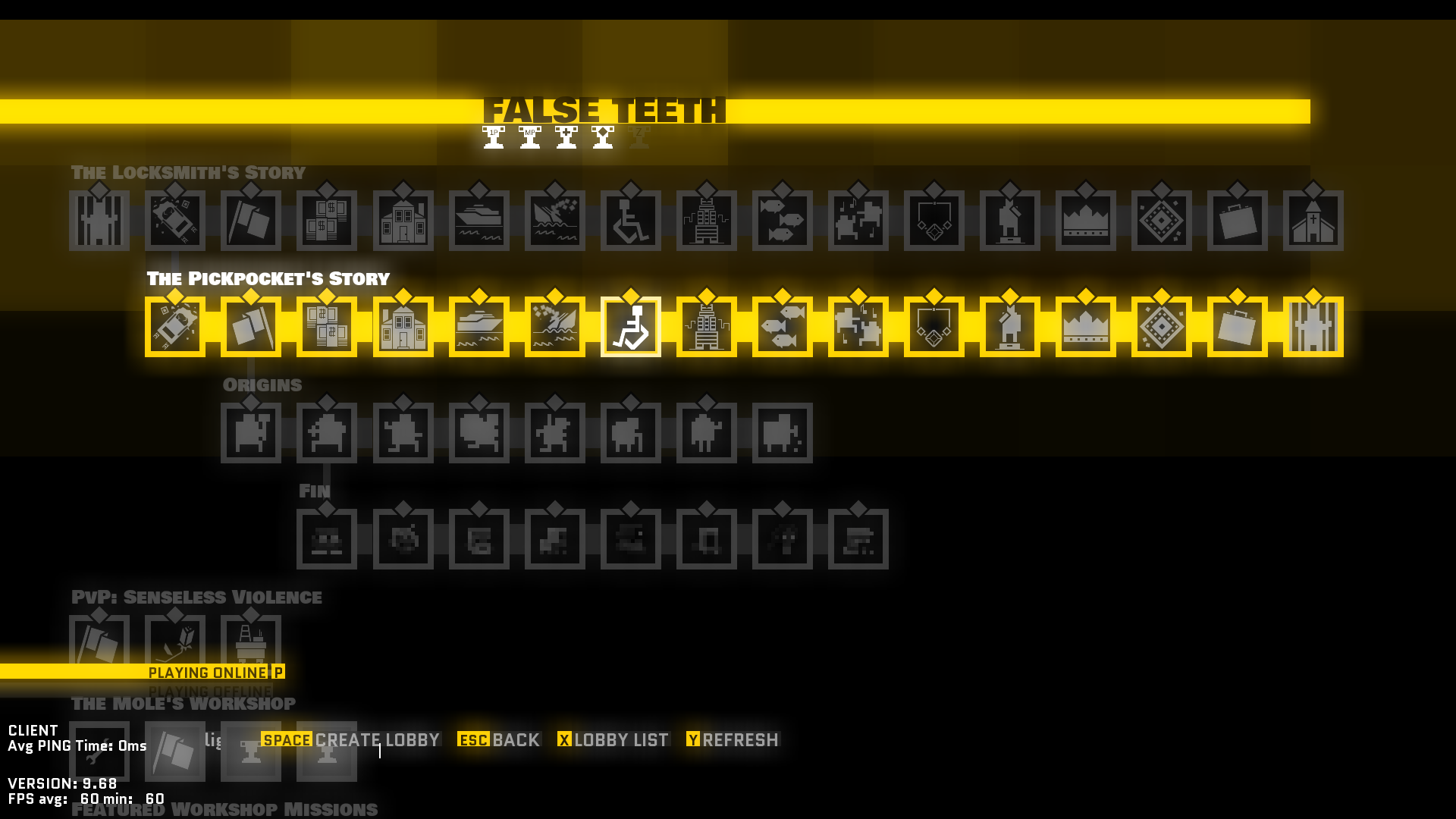
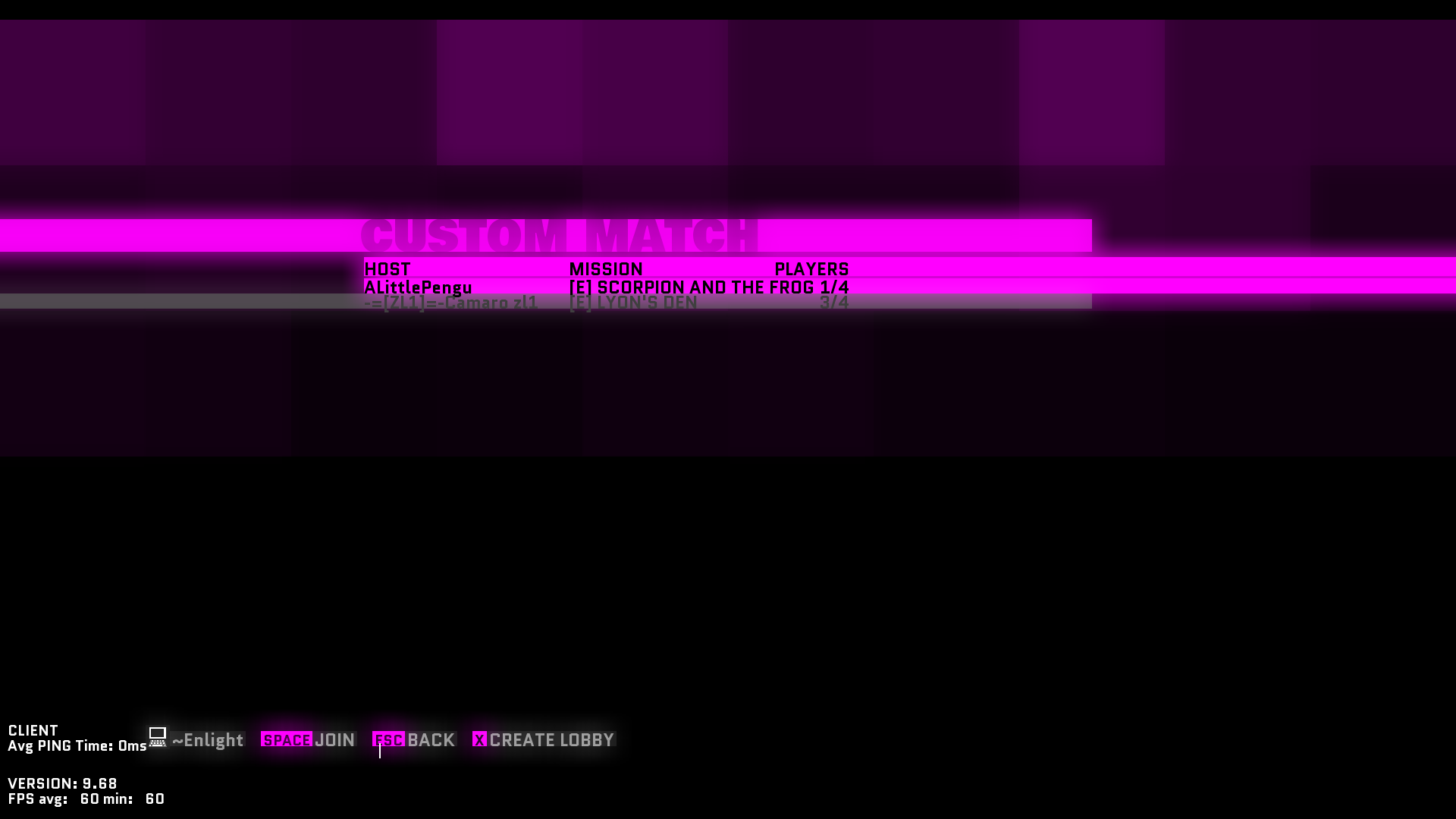
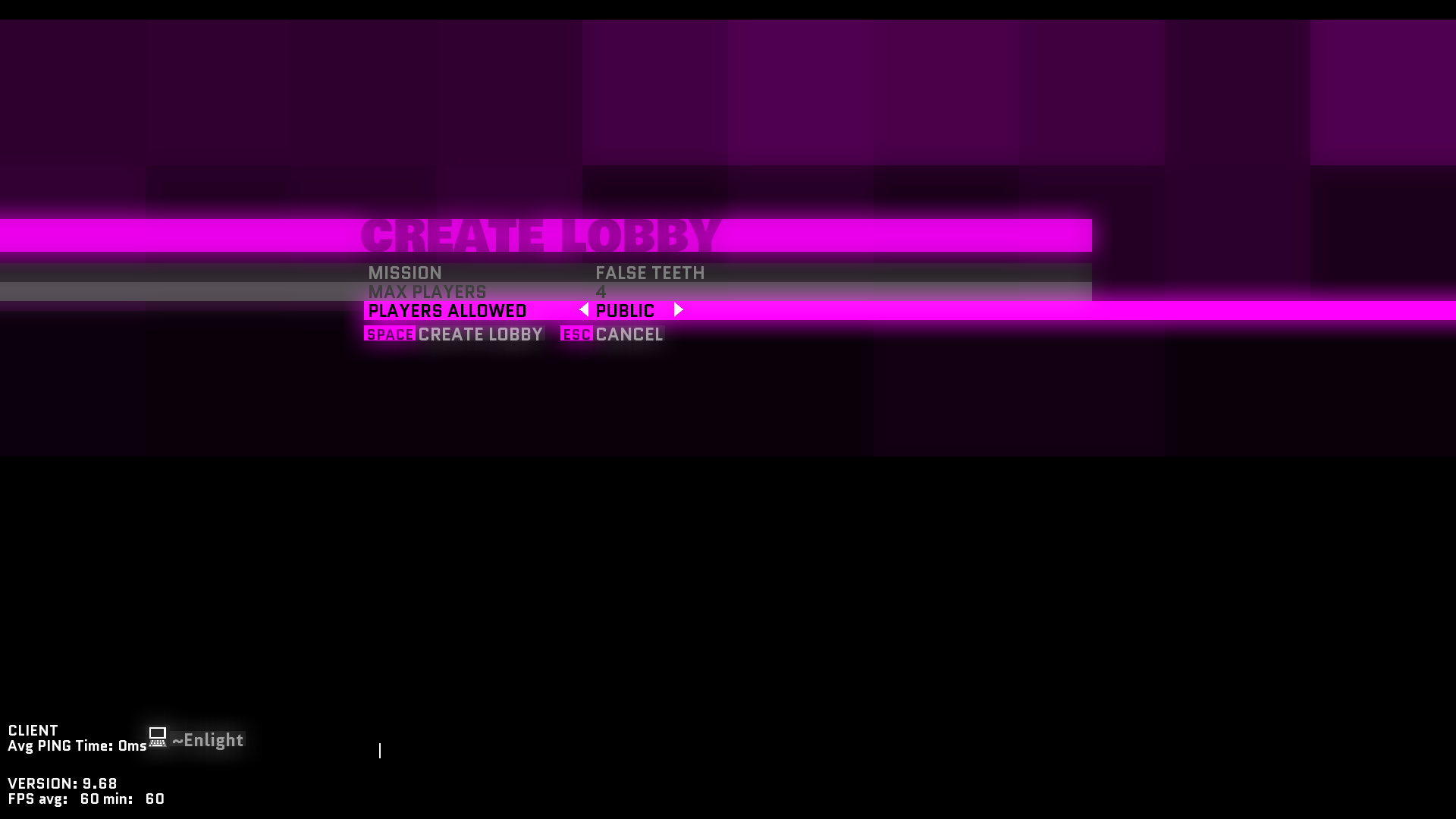
That's all there is to it! Congratulations!
How to add a person to a Private Lobby:
Well now, if all you could do was open one up but not invite anyone, you may as well drown yourself with a glass of lemonade to achieve a less redundant result.
To invite personages to your lobby, simply press "X" (Or Gamepad Equivalent).
You'll then see a lobby options menu like:
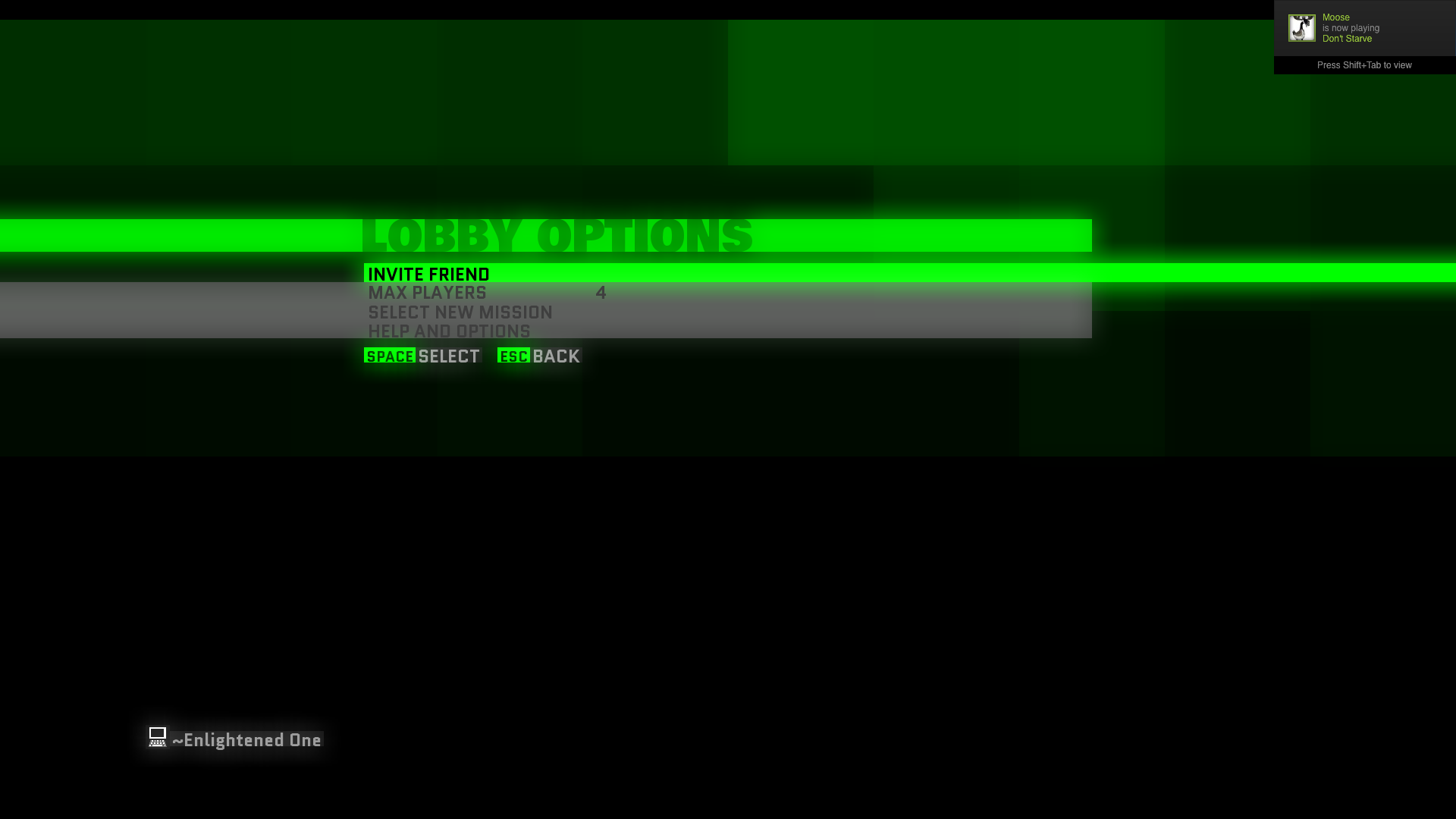 Select "INVITE FRIEND" and you'll be able to invite people on your friends list in no time. AMAZING!
There's also a nifty tool for changing the level without closing the lobby, in-case an improper one was selected.
To invite personages to your lobby, simply press "X" (Or Gamepad Equivalent).
You'll then see a lobby options menu like:
Select "INVITE FRIEND" and you'll be able to invite people on your friends list in no time. AMAZING!There's also a nifty tool for changing the level without closing the lobby, in-case an improper one was selected.
How to avoid joining a "Wannabe Private" Lobby:
Strictly speaking you can't....
If you are disconnected before the level begins, don't join that lobby again, they likely kicked you.
I can only pretty much disclose one tip: if the lobby has anything less than four total players, it's pretty much a wannabe, so lobbies like this one with only 2 players available:
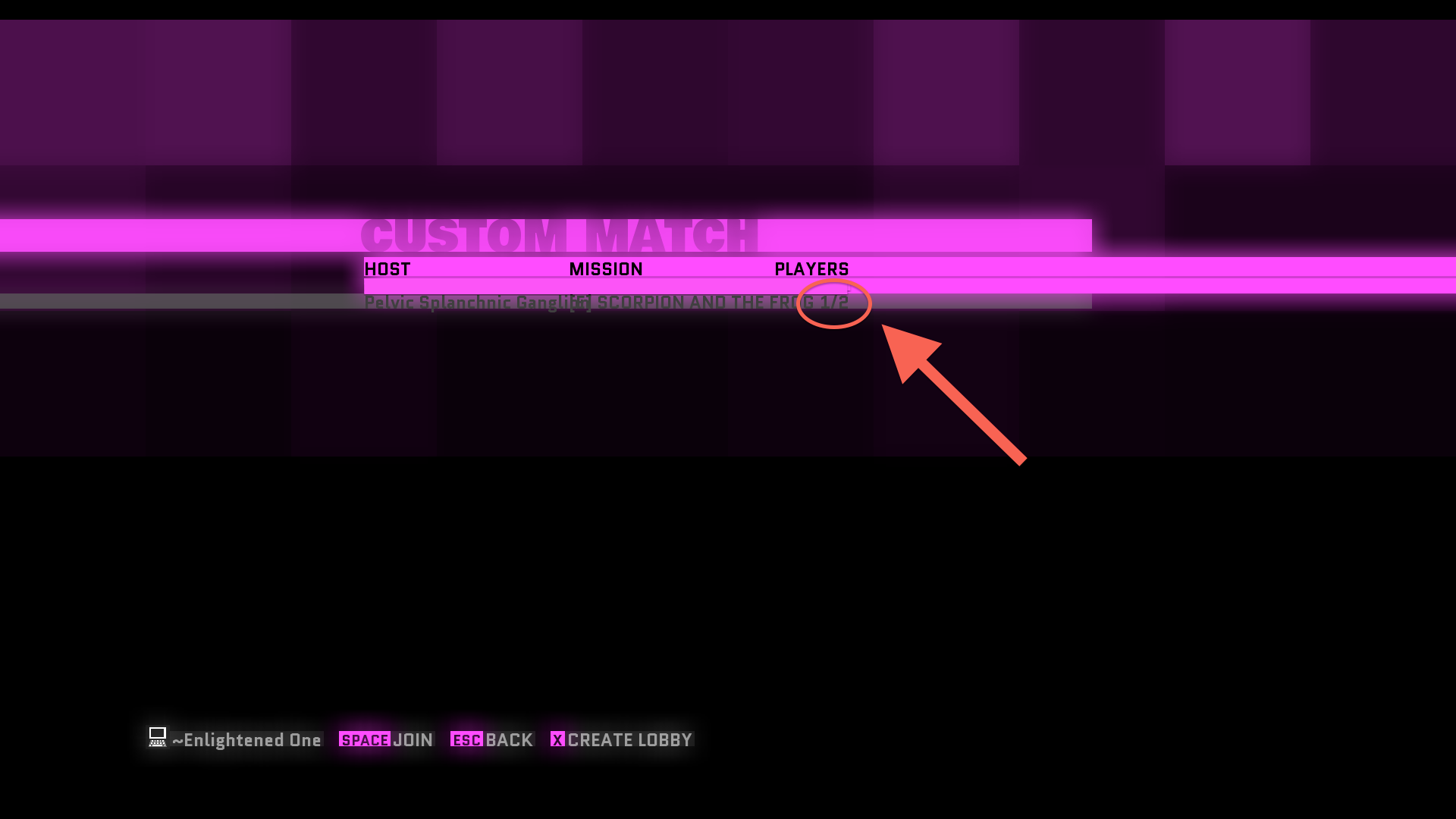 Should be avoided. They tried their best but they haven't figured it out on their own, nor have they read this guide. Let them drown in our tears of just wanting to play.
If you are disconnected before the level begins, don't join that lobby again, they likely kicked you.
I can only pretty much disclose one tip: if the lobby has anything less than four total players, it's pretty much a wannabe, so lobbies like this one with only 2 players available:
Should be avoided. They tried their best but they haven't figured it out on their own, nor have they read this guide. Let them drown in our tears of just wanting to play.
More Monaco guides
- Character cheat sheet★ 5 (498)27k views378 ♥3 minUpdated Aug 8, 2021
- Achievements Guide in Monaco: What's Yours is Mine!★ 5 (224)9.5k views243 ♥6 minUpdated Apr 8, 2020
- Monaco 日本人用ガイド★ 5 (534)8.4k views710 ♥2 minJapaneseUpdated Sep 6, 2014
- Editor: A comprehensive guide★ 5 (356)7.9k views432 ♥44 minUpdated Apr 20, 2014
- "Play It Again Sam" Achievement Guide★ 4 (39)4.6k views25 ♥2 minUpdated Dec 25, 2023
- Strategy behind each pickup★ 4 (76)4.3k views71 ♥8 minUpdated Feb 1, 2015


This guide was created by its original author on the Steam Community. Are you the author and want it removed? Request removal.