Oblivion Essentials Setup Guide (2026)
☆ Please Read
[ Guide Updated: 04/2026 ]
Please check the Guide Layout Section for Information
As requested, I am also currently working on similar guide for Oblivion Remastered
(The link will be added here when it's done)
(The link will be added here when it's done)
Oblivion Essentials Steam Guide
A simple and straight-forward setup guide and small list of vanilla-friendly mods for the classic RPG.This guide was made to help newcomers and veterans setup a stable, bug-free installation of Oblivion in the simplest way possible without altering the vanilla experience of the original game.
▹ No Overhauls, No Patching, No Headaches.
Guide Layout
The guide is now split into a few sections to be a bit more clear.1: Requirements & Setup
A small list of whats required and a quick guide on how to set it up.2: Essential Mods
REQUIRED core mods that are necessary to the guide, provides major bug fixes and improvements to performance and stability. As well as a few smaller mods for extra fixes and improvements.3: Additional Mods
OPTIONAL mod recommendations for those interested, provides minor gameplay tweaks for balancing, and quality of life improvements for a smoother experience.4: Guide Notes
Some extra notes, tips and a list of helpful resources, not required but I thought it would be useful to some.Before Starting
- Requirements: Sections or mods are marked with a "☆", are required, do not skip these.
- Questions: Please provide information about the issue and what you've done to try and solve it. (Don't flood the mod authors with comments)
- Help: Check the Guide Notes / F.A.Q Sections at the bottom for extra tips and help.
☆ Requirements & Setup
☆ HARD REQUIREMENT ☆
(Do not skip)
▹ (This guide is made for these, I will not be supporting anything else.)
(Example below)
(Do not skip)
☆ Requirements
What you will need.▹ (This guide is made for these, I will not be supporting anything else.)
- Oblivion Game of the Year Edition
Steam Version, for playing, lol.
▹ (Other versions will not be supported by this guide) - A Nexusmods Account[nexusmods.com]
Large modding website and community for many games.
▹ (Account required for downloading mods) - Mod Organizer 2[www.modorganizer.org]
A mod management software, makes organization much easier.
▹ (Other Mod Managers will not be supported by this guide) - BethINI[www.nexusmods.com]
Program for editing game .ini files easily.
▹ (Can be done manually, if you know what you're doing)
☆ Oblivion Game of the Year Edition
▹ The game, install it.- Install Oblivion Game of the Year Edition on Steam (a clean, unmodded install)
- Open the game through Steam at least once, when the main menu loads, you can close it.
Oblivion Game of the Year Edition
☆ (Other versions are NOT SUPPORTED by this guide)
☆ Mod Organizer 2
▹ A Mod management software, helps organize mods without touching game files.Installation:
- Download and install the latest version of MO2.
(Do not install in Program Files or any location that is UAC protected) - In the top left, click File > Manage Instances > Create New Instance.
- Select Create a Global Instance > Oblivion.
- Choose a location where you'd like all of the mods and downloads to be stored.
- In “Configure Profile Settings” select Automatic Archive Invalidation.
- Next, select a location where you'd like all of the mods to be stored.
(This can be a separate drive if you want, I’d recommend an SSD.) - (Optional) Check the Notes Section to get Steam's Overlay working with MO2.
Mod Organizer 2[github.com]
☆ (Other options are NOT SUPPORTED by this guide)
☆ BethINI
▹A program for editing / generating .ini files for Bethesda Games easily.Installation:
- Download and Extract the Main File, open BethINI.exe
- Choose Game > Oblivion
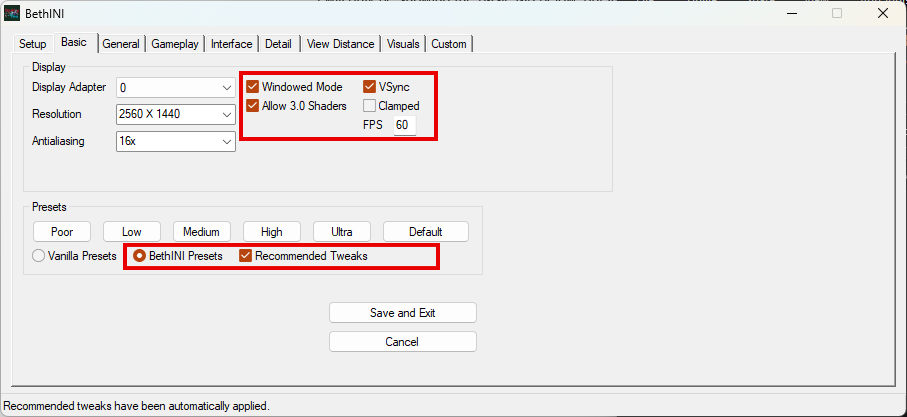
- In the Basic Tab, select "BethINI Presets" and "Recommended Tweaks".
- In the Setup Tab, make sure “INI Path” is set to the default location
(Default Location: “C:\Users\USERNAME\Documents\My Games\Oblivion”) - (Optional) You can go through each of the tabs and set your preferences accordingly.
- Once finished, Click Save and Exit.
(Example below)
Considerations:
- Enabling Windowed Mode will fix common crashing issues when using Alt+Tab.
- V-Sync is optional, its buggy by default, but we will be using a mod that will fix most of its issues.
- Do not change options you don't understand, please.
Setup Complete
Congratulations, your Oblivion and Mod Organizer 2 are now set up and you can move on to the next section.Please see the Further Notes section at the bottom of the guide for more help and information.
☆ Essentials
☆ HARD REQUIREMENT ☆
(Do not skip)
▹ IMPORTANT: Skip this if you are somehow still using a 32-bit system. (See Further Notes)
▹ (Alternative to Oblivion's autosave feature, which is known to cause crashes / file corruption)
▹ (Fixes common issue where the dropped item will fall through the ground)
▹ (Makes XP gain relate to the amount of item sold rather than amount of transactions)
▹ (I saw a slight reduction in load time, but if you don't notice a difference, you can omit this mod)
▹ (I've never had this issue, so if you don't either you can omit this mod)
(Do not skip)
☆ 1: Core Essentials
The most important core mods, provides thousands of bugfixes, and massive improvements to performance and stability, these are required and should not be skipped.
☆ LAA Patch
Patches Oblivion’s executable files to increase its ~2Gb RAM cap to ~4GB.▹ IMPORTANT: Skip this if you are somehow still using a 32-bit system. (See Further Notes)
Installation:
- Download and extract the latest 4gb_patch.exe to your Oblivion Directory.
- Open the patch and apply it to both Oblivion.exe and OblivionLauncher.exe
(It will create backup files of both, I'd recommend keeping them just in case)
4GB Patch[ntcore.com]
☆ (The Nexusmods version is outdated, use this instead)
☆ xOBSE - Oblivion Script Extender
Updated fork of the original OBSE, expands the game's scripting capabilities for modding.Installation:
- Download the Main File and install manually.
- Extract Data and obse.dll into your Oblivion Directory.
(Merge files if asked) - (Optional) If you plan to use Construction Set, also extract obse_editor.dll and obse_loader.exe into your Oblivion Directory.
xOBSE - Oblivion Script Extender[www.nexusmods.com]
☆ Unofficial Oblivion Patch + Unofficial DLC Patches
Fixes thousands of bugs, inconsistencies and oversights within the game.Installation:
- Download the Main Files for each mod and install with MO2.
(Make sure to get all three)
Unofficial Oblivion Patch[www.nexusmods.com]
Unofficial DLC Patches[www.nexusmods.com]
Unofficial Shivering Isles Patch[www.nexusmods.com]
Unofficial DLC Patches[www.nexusmods.com]
Unofficial Shivering Isles Patch[www.nexusmods.com]
☆ Oblivion Display Tweaks
Improves stability and fixes issues relating to FPS, stutters, crashes etc.Installation:
- Download the Main File and install with MO2.
- To edit the .ini file, Right click Oblivion Display Tweaks > Information.
- In INI Files Tab, set the values below in oblivion_display_tweaks.ini
- iMaxFPSTolerance= (Set this value to your maximum FPS + 60)
- bUseD3D9Ex = 1 (Set to “0” if you plan to use ENB)
- bUseFlipExSwapMode = 1 (If you use G-SYNC / FreeSync)
Oblivion Display Tweaks[www.nexusmods.com]
☆ Engine Bug Fixes
Fixes engine bugs, lol.Installation:
- Download the Main File and install with MO2.
Engine Bug Fixes[www.nexusmods.com]
☆ Blue’s Engine Fixes
Fixes a common memory crash issue with the engine.Installation:
- Download the Main File and install with MO2.
Blue’s Engine Fixes[www.nexusmods.com]
☆ AveSithis Engine Fixes
Fixes a handful of bugs, optionally updates zlib to newer version to reduce load timesInstallation:
- Download the Main File and install with MO2.
AveSithis Engine Fixes[www.nexusmods.com]
===========================================================================
☆ 2: Smaller Essentials
☆ Soft-ish Requirement ☆A few smaller mods that fix minor bugs, issues and oversights within the game, while not technically required, I would highly recommend using them.
Simple Saves Plus
Automatically creates save files at custom intervals.▹ (Alternative to Oblivion's autosave feature, which is known to cause crashes / file corruption)
Installation:
- Download the Main File and install with MO2.
Simple Saves Plus[www.nexusmods.com]
SB Weapon Drop Fix
NPC weapons will be moved to their inventory instead of being dropped upon death. ▹ (Fixes common issue where the dropped item will fall through the ground)
Installation:
- Download the Main File and install with MO2.
SB Weapon Drop Fix[www.nexusmods.com]
Mercantile Experience Fix
Fixes an oversight with experience gain when trading items.▹ (Makes XP gain relate to the amount of item sold rather than amount of transactions)
Installation:
- Download the Main File and install with MO2.
Mercantile Experience Fix[www.nexusmods.com]
OBL Mod Limit Fix
Increases maximum plugin limit, can improve load times even with only a few mods installed.▹ (I saw a slight reduction in load time, but if you don't notice a difference, you can omit this mod)
Installation:
- Download the Main File and install with MO2
OBL Mod Limit Fix[www.nexusmods.com]
Two-Handed Weapon Swing Fix
Fixes possible two-handed weapon animation bug when using tick fix.▹ (I've never had this issue, so if you don't either you can omit this mod)
Installation:
- Download the Main File and install with MO2
Two-Handed Weapon Swing Fix[www.nexusmods.com]
◌ OPTIONAL (Gameplay)
☆ Optional ☆
(Recommendations / Suggestions)
▹ (Total HP is no longer only based solely on Endurance level)
▹ (Makes combat more rewarding and balanced without changing any mechanics.)
▹ (Makes magic more balanced and less tedious without changing any mechanics.)
▹ (Effectively increases the annoyingly low maximum charge in vanilla)
▹ (Balances loot drops and quest rewards to be more fair)
▹ (Balances creature levels and stats to scale better during progression)
▹ (Balances NPC difficulty with level caps, and alters loot based on difficulty)
▹ (Random container items are no longer "free", taking them will be a crime)
▹ (Locations now need to be discovered before fast travel, personal preference)
(Recommendations / Suggestions)
Additional suggested mods that provide small gameplay tweaks for balancing.
▹ (Provides more balanced and rewarding gameplay, without overhauling vanilla mechanics)Real Retroactive Health Formula
Balances Health values by changing the way HP is calculated.▹ (Total HP is no longer only based solely on Endurance level)
Installation:
- Download the Main File and install with MO2.
Real Retroactive Health Formula[www.nexusmods.com]
Vanilla Combat Enhanced
Minor tweaks and changes to the combat system's values.▹ (Makes combat more rewarding and balanced without changing any mechanics.)
Installation:
- Download the Main File and install with MO2.
(Optional) Can be tweaked via VanillaCombatEnhanced.ini
Vanilla Combat Enhanced[www.nexusmods.com]
Balanced Magic
Minor tweaks and changes to the magic and magic combat system's.▹ (Makes magic more balanced and less tedious without changing any mechanics.)
Installation:
- Download the Main File and install with MO2.
Balanced Magic[www.nexusmods.com]
More Effective Enchantments
Halves the enchantment cost for weapons, that's all.▹ (Effectively increases the annoyingly low maximum charge in vanilla)
Installation:
- Download the Main File and install with MO2.
(Optional, can be tweaked via More Effective Enchantments.ini)
More Effective Enchantments[www.nexusmods.com]
Balanced Unleveled Rewards
Removes level scaling from all leveled quest rewards and items▹ (Balances loot drops and quest rewards to be more fair)
Installation:
- Download the Main File and install with MO2.
Balanced Unleveled Rewards[www.nexusmods.com]
Balanced Creature Stats
Improves and balances levels / stats for creatures▹ (Balances creature levels and stats to scale better during progression)
Installation:
- Download the Main File and install with MO2.
Balanced Creature Stats[www.nexusmods.com]
Balanced NPC Level Cap
Improves level scaling and loot for NPCs▹ (Balances NPC difficulty with level caps, and alters loot based on difficulty)
Installation:
- Download the Main File and install with MO2.
Balanced NPC Level Cap[www.nexusmods.com]
Complete Clutter and Crop Ownership
Adds ownership to various items in cities / towns so they can’t be freely taken.▹ (Random container items are no longer "free", taking them will be a crime)
Installation:
- Download the Main File and install with MO2.
Complete Clutter and Crop Ownership[www.nexusmods.com]
No Start Game Fast Travel
Removes ability to fast travel to any major city after leaving the sewers.▹ (Locations now need to be discovered before fast travel, personal preference)
Installation:
- Download the Main File and install with MO2.
No Start Game Fast Travel[www.nexusmods.com]
◌ OPTIONAL (Quality of Life)
☆ Optional ☆
(Recommendations / Suggestions)
▹ That's all, removes the tedious delay between hours.
▹ That's all, less waiting during quests with NPCs.
▹ (Similar to how Skyrim works)
▹ (Similar to how Skyrim works)
▹ Simple tweaks to the vanilla UI proportions, mainly
▹ (No more 1000 keys cluttering up the misc section)
▹ (No more “How many would you like to take/sell” for a stack of two items)
▹ (Can only be used for fast-travel once discovered.)
▹ Example: Quest map marker is still shown, but won't reveal exact specific location of objective.
(Recommendations / Suggestions)
Mods that provide various quality of life improvements with tweaks and small features.
▹ (Provides a tiny bit of modernisation to the game to smooth things out, preference based.)Faster Sleep Wait
Shortens the vanilla hourly delay when sleeping or waiting.▹ That's all, removes the tedious delay between hours.
Installation:
- Download the Main File and install with MO2.
Faster Sleep Wait[www.nexusmods.com]
Quest NPCs Run
NPCs will now run during quests instead of slowly walking.▹ That's all, less waiting during quests with NPCs.
Installation:
- Download the Main File and install with MO2.
Quest NPCs Run[www.nexusmods.com]
De-nock Arrows
Adds hotkey for putting away an arrow once drawn.▹ (Similar to how Skyrim works)
Installation:
- Download the Main File and install with MO2.
De-nock Arrows[www.nexusmods.com]
R to Take All
Adds hotkey to take all items instead of a mouse click.▹ (Similar to how Skyrim works)
Installation:
- Download the Main File and install with MO2.
R to Take All[www.nexusmods.com]
Simple Better Inventory And Map
Makes vanilla UI much more readable and comfortable, while keeping the same layout.▹ Simple tweaks to the vanilla UI proportions, mainly
Installation:
- Download the Main File and install with MO2.
Simple Better Inventory And Map[www.nexusmods.com]
Keychain
Stores all keys in a separate “keychain” menu.▹ (No more 1000 keys cluttering up the misc section)
Installation:
- Download the Main File and install with MO2.
Keychain[www.nexusmods.com]
Toggleable Quantity Prompt
Adds ability to auto-confirm the quantity of items in various menus.▹ (No more “How many would you like to take/sell” for a stack of two items)
Installation:
- Download the Main File and install with MO2.
Toggleable Quantity Prompt[www.nexusmods.com]
Wayshrine Map Markers - Redux
Adds map markers for Wayshrines.▹ (Can only be used for fast-travel once discovered.)
Installation:
- Download the Main File and install with MO2.
Wayshrine Map Markers - Redux[www.nexusmods.com]
Immersive Quest Marker Overhaul
Makes quest markers less obvious, more like older RPGs.▹ Example: Quest map marker is still shown, but won't reveal exact specific location of objective.
Installation:
- Download the Main File and install with MO2.
Immersive Quest Marker Overhaul[www.nexusmods.com]
◌ Guide Notes
Some extra notes and frequently asked questions, not required but may be helpful.
▹ (I will continue to update this section as I think of more)Load Order
If you followed the guide in order, load order should not really matter.▹ (For reference I've provided the load order I am using below)
Reordering Plugins:
- In the Right side pane of MO2 , Open the Plugins tab
- From here, you can click and drag each plugin file to reorder them
(Note: Plugin files are loaded from top to bottom)
Load Order Reference[loadorderlibrary.com]
Using Steam Overlay with MO2
A fix for Steam Overlay not working with MO2▹ (If the Steam Overlay doesn't matter to you, this can be skipped)
- In the Top Menu > Configure Executables
- In the Executables List > Oblivion > Configure Libraries
- Click Add Row > Browse > Select GameOverlayRenderer.dll from your Steam Directory
(Usual Location: “C:\Program Files (x86)\Steam”) - Tick the box > OK
(Example below)
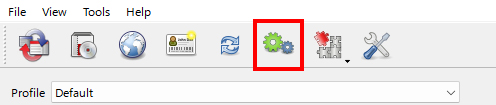
↑ MO2's Top Menu
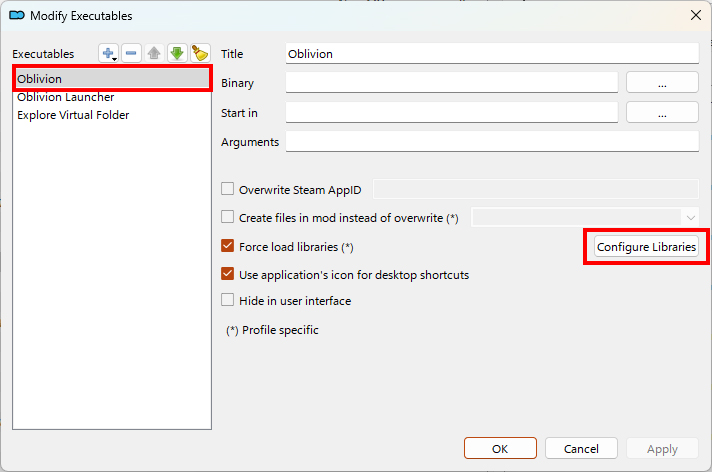
↑ Configure Libraries for Oblivion.exe
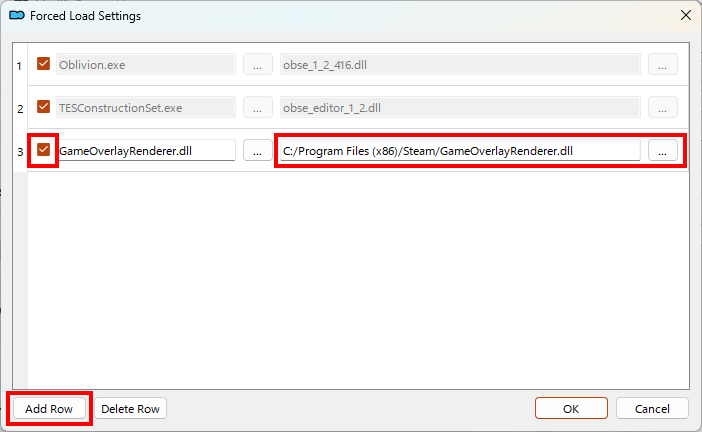
↑ Add entry for GameOverlayRenderer.dll
- Other than the Essential Mods, the list is meant to be semi-modular. So if you don't want some or even any of the Additional Mods, you don't have to use them, they are merely suggestions.
- If you choose to only use the Essential Mods, this list can be used as a good base for adding whatever you want on top. (Be sure to check for compatibility first)
- As for the Additional Mods, I picked these specifically for this guide as they fix some of the common oversights and balance issues in the game.
Overall, they don't change the feeling or function of the vanilla gameplay, they will simply make the experience a bit more balanced and rewarding.
Other Notes
◌ The End

⠀⠀⠀⠀⠀⠀⠀⠀⠀⠀⠀⠀⠀⠀ ⠀⠀ Thanks for reading
Congratulations, you've survived the guide,
I wrote this up back in 2023 to help people get Oblivion working on modern systems, without altering or overhauling the game. It became one of the most popular guides on here (thank you), so it was finally time to give it a refresh for 2025.
I wrote this up back in 2023 to help people get Oblivion working on modern systems, without altering or overhauling the game. It became one of the most popular guides on here (thank you), so it was finally time to give it a refresh for 2025.
⠀⠀⠀⠀ (I will try to keep the list updated, if anything changes let me know in the comments.)
⠀⠀⠀⠀⠀⠀⠀⠀ ⠀ Enjoy the updated guide, and have fun :3
⠀⠀⠀⠀⠀⠀⠀⠀⠀⠀⠀⠀⠀⠀⠀⠀⠀⠀⠀⠀⠀⠀⠀⠀ (Blessings of Akatosh upon ye..)Links:
Nexusmods Profile[next.nexusmods.com]▹ Where I post mods and such, mostly Fallout 4 related stuff.
Steam Profile
▹ My Steam, not really important I guess.
Future Plans:
- Keep this guide updated
- Nexusmods / Git page for better organization
- Provide pre-configured .ini files(?)
⠀⠀⠀⠀⠀⠀⠀⠀⠀⠀⠀⠀⠀⠀⠀⠀⠀⠀⠀⠀⠀- Calico :)
◌ F.A.Q & Resources
Resources
A list of helpful links, resources and other information.
▹ (Useful for beginners or just learning more about modding)- The Vanilla Experience Load Order[loadorderlibrary.com]
- Information about the 4GB Patch and what it does[en.uesp.net]
- Microsoft Docs on LAA[learn.microsoft.com]
- Troubleshooting for MO2[github.com]
- Running xOBSE with MO2[github.com]
F.A.Q
To address some common or frequently asked questions.
▹ (Some rhetorical, some not.)Q: Who is this guide meant for?
Anybody! It’s meant to be as simple as possible, and since it doesn’t touch the game’s major mechanics or features, it would be fine for a newcomer to use as well.
Q: Do I need the 4GB Patch?
Technically no, but there's no reason to not use it for 64bit users.
Oblivion is limited to using ~2GB of memory since its a 32bit application, the patch effectively raises it to ~4GB by making it Large Address Aware (See notes)
Q: Why not make a Nexus Collection or Wabbajack List?
This guide should take no more than 10-15 minutes from start to finish, so it’s hardly necessary. (Plus, it is good to learn the basics of modding yourself)
Q: Does this list overhaul the gameplay or mechanics?
No, it fixes issues and improves performance and stability, mainly for playing on modern hardware.
Q: What about the "Additional" sections?
They are entirely optional, I specifically chose them because they aren’t overhauls, they mainly fix bugs and oversights with gameplay and mechanics, or are just quality of life improvements.
More The Elder Scrolls IV: Oblivion Game of the Year Edition (2009) guides
- Essential Mods List★ 5 (1.1k)90k views3k ♥6 minUpdated Jun 7, 2022
- Almost Essential Mods★ 5 (1.2k)84k views2.5k ♥1 minUpdated Jan 16
- 1,200 Hours Played; What you NEED to know in Oblivion.★ 5 (1.2k)65k views2.3k ♥7 minUpdated Apr 25, 2025
- Русификация Oblivion + все DLC★ 5 (1.6k)65k views2.6k ♥1 minRussianUpdated Feb 23, 2025
- Oblivion 2024 Essential Modding Guide★ 5 (457)48k views1.5k ♥42 minUpdated Apr 25, 2025
- Quest Orders★ 5 (664)40k views1.3k ♥1 minUpdated May 26, 2020



This guide was created by its original author on the Steam Community. Are you the author and want it removed? Request removal.