Official Guide to the Map System in Update 9.15.21
Quick Summary
New map lists and button options will offer more variety of voted maps while keeping favored maps available, improving the map rotation. We are adding more customization power into the hands of server admins.
Server admins can customize the following data by modifying AAGame > Config > AAGame.ini, under [AAGame.AADataStore_OnlineGameSearch]
Server admins can customize the following data by modifying AAGame > Config > AAGame.ini, under [AAGame.AADataStore_OnlineGameSearch]
Map Lists
MapRotationList
The standard rotational list of maps. By default, map voting will pick out of this list from top to bottom.
MapVarietyList
An additional collection of maps that can optionally be picked from at random.
MapVoteList
A master list of all the maps available on a server, in alphabetical order.
Note: PC MapRotationList contains twice as many maps, to allow for 10 BDX maps and 10 FLO maps.
MapRotationList: The standard rotation of maps that will be suggested for voting after each match. These are typically the 10 most popular maps that players will want to play more frequently.
MapVarietyList: A mix of maps that are played less frequently. A random entry from this list will be selected during the map vote, offering players a chance to vote for less popular maps.
PC
MapRotationList
BDX_Crossfire_C4
BDX_Reaction_EX
BDX_Hydra_EX
BDX_Watchdog_C4
BDX_InnerHospital_EX
BDX_Intercept_EX
BDX_Breach_EX
BDX_Lockdown_EX
BDX_Shadowstep_EX
BDX_SpringStreet_VIP
FLO_Bridge_EX
FLO_Watchdog_C4
FLO_RedLine_VIP
FLO_InsurgentCamp_AC
FLO_InnerHospital_EX
FLO_Slums_VIP
FLO_Uptown_VIP
FLO_Reaction_EX
FLO_Checkout_EX
FLO_Intercept_VIP
MapVarietyList
BDX_Bridge_EX
BDX_Checkout_EX
BDX_Church_VIP
BDX_Crossfire_EX
BDX_Furious_TH
BDX_InnerHospital_VIP
BDX_Intercept_C4
BDX_OuterHospital_C4
BDX_Penitentiary_C4
BDX_Raptus_EX
BDX_Redline_C4
BDX_Redline_EX
BDX_Rusneyev_EX
BDX_Siege_C4
BDX_Siege_EX
BDX_Springstreet_EX
FLO_BridgeNight_EX
FLO_CabinFever_TH
FLO_ColdFront_C4
FLO_ColdFront_EX
FLO_Downtown_EX
FLO_Furious_TH
FLO_HarborAssault_TH
FLO_HarborAssaultNight_TH
FLO_Homestead_C4
FLO_Homestead_VIP
FLO_Hospital_EX
FLO_InnerHospital_VIP
FLO_Intercept_C4
FLO_Intercept_EX
FLO_Overload_C4
FLO_Overload_VIP
FLO_Raptus_EX
FLO_Redline_C4
FLO_Redline_EX
FLO_RockyRoad_EX
FLO_Rusneyev_EX
FLO_Sandstorm_TH
FLO_Slums_C4
FLO_Slums_TH
FLO_StoneRuins_C4
FLO_Uptown_EX
FLO_Watchdog_AC
PS4
MapRotationList
PS4_Uptown_EX
PS4_Sandstorm_TH
PS4_Intercept_EX
PS4_Intercept_VIP
PS4_Hydra_EX
PS4_Homestead_C4
PS4_Hospital_EX
PS4_Hospital_VIP
PS4_SpringStreet_EX
PS4_Redline_EX
PS4_Redline_VIP
PS4_Crossfire_C4
PS4_Checkout_EX
MapVarietyList
PS4_Checkout_EX
PS4_Crossfire_C4
PS4_Homestead_C4
PS4_Hospital_EX
PS4_Hospital_VIP
PS4_Hydra_EX
PS4_Intercept_EX
PS4_Intercept_VIP
PS4_Reaction_EX
PS4_Redline_EX
PS4_Redline_VIP
PS4_Sandstorm_TH
PS4_SpringStreet_EX
PS4_Uptown_EX
Map Vote Buttons
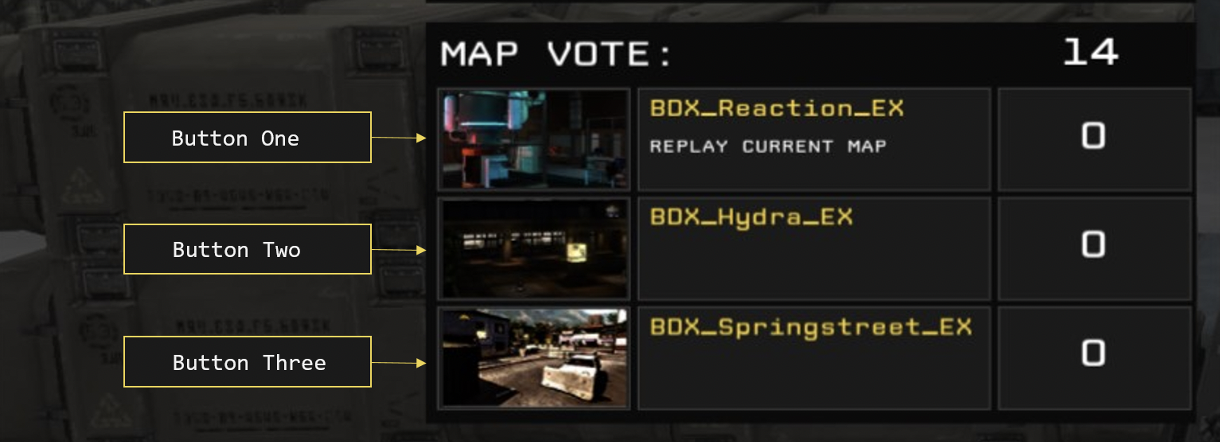
Each of the three map vote buttons visible in the After Action Report (AAR) have vote options assigned that determine how map vote candidates are selected. By assigning a Vote Type to each button (ButtonOneVoteType, ButtonTwoVoteType and ButtonThreeVoteType), server admins can tune map rotations to their liking.
Vote Types
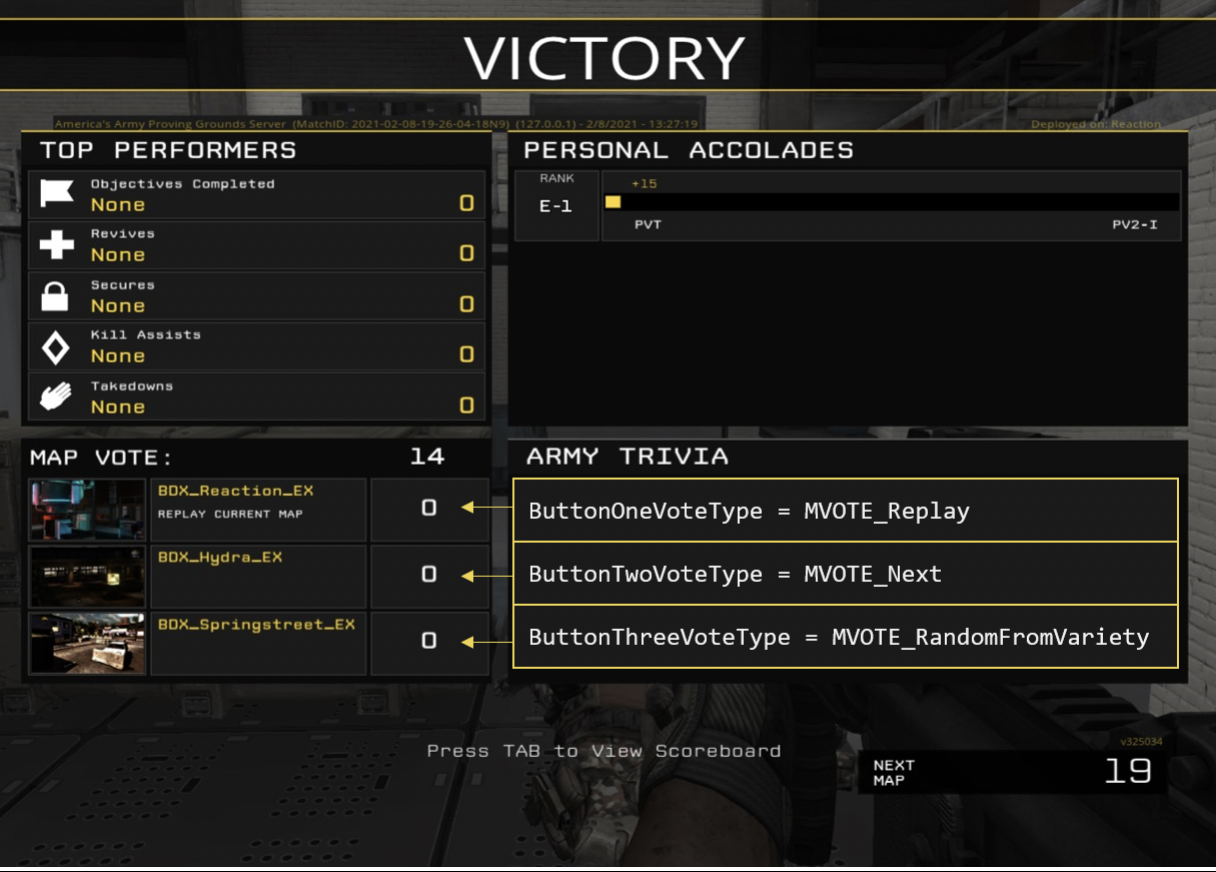
To better explain how these vote options work, an example map list is displayed below (Note that map names such as ‘BDX_Reaction_EX’ and ‘FLO_Watchdog_C4’ have been stripped down for clarity).
This chart documents the VoteType name that can be assigned to a button, a description of how it chooses a map, and an example of what will happen if a vote using that button type wins.
MapRotationList
MapVarietyList
MapVoteList
Reaction
Springstreet
Reaction
Hydra
BridgeNight
Hydra
Watchdog
Uptown
Watchdog
InnerHospital
ColdFront
InnerHospital
Springstreet
BridgeNight
Uptown
Coldfront
This chart documents the VoteType name that can be assigned to a button, a description of how it chooses a map, and an example of what will happen if a vote using that button type wins.
VoteType
Description
Example
MVOTE_Replay
Just like normal, this button will vote to replay the last map.
If we just played Reaction, we’ll play Reaction again.
MVOTE_Next
Map vote will be the next map in the Rotation List.
If we just played Reaction, we’ll play Hydra next.
MVOTE_NextPlusOne
Map vote will be based on the “Next” result, plus one space down in the map list.
If we just played Reaction, we’ll play Watchdog next.
MVOTE_NextPlusTwo
Map vote will be based on the “Next” result, plus two spaces down in the map list.
If we just played Reaction, we’ll play InnerHospital next.
MVOTE_RandomFromRotation
Chooses a completely random map from the MapRotationList.
This could be Reaction, Hydra, Watchdog, etc.
MVOTE_ RandomFromVariety
Chooses a completely random map from the variety list.
This could be SpringStreet, BridgeNight, Uptown, etc.
MVOTE_RandomFromVoteList
Chooses a completely random map from the VoteList.
This could be Reaction, Hydra, Watchdog, Springstreet, BridgeNight, Uptown, etc.
MVOTE_Prev
Chooses the next spot from the MapRotationList in the reverse order.
If we just played Hydra, we’ll play Reaction next.
MVOTE_Legacy
Classic method of button selections. Applying this to ANY of your buttons will result in ALL three of your buttons using it. This will effectively result in all buttons getting respectively assigned: ‘MVOTE_Replay’, ‘MVOTE_Next’ and ‘MVOTE_NextPlusOne’.
If we just played Reaction, the buttons will be assigned the following:
ButtonOne: Reaction
ButtonTwo: Hydra
ButtonThree: Watchdog
ButtonOne: Reaction
ButtonTwo: Hydra
ButtonThree: Watchdog
Advanced Map Vote Customization
Rotation Advancement Options
Rotation Advancement Options defines exactly how the MapRotationList is advanced forward after each successful vote. When the map voting selections are generated in the AAR, the index, or the current location of the map rotation list, is used to determine how far along we are in the list (Example: Using the example map list above, Reaction is at the 1st index, Hydra is at the 2nd index, Watchdog is at the 3rd index, etc).
By default, most voting options will place the map rotation’s index at the selected map’s location in the list (Example: If the last played map is the 3rd map in the MapRotationList, and our next voted map is the 5th map in the MapRotationList, then the next game’s vote list will be generated starting from the 5th map in the MapRotationList).
By using Rotation Advancement Options, we can customize exactly where the MapRotationList goes after a map vote, and assign that functionality to individual buttons. To do so, assign a RotationAdvancementOption to a button name in AAGame.ini, using:
MVOTE_ButtonName_ShouldAdvanceMapRotation=ADVMAP_YourAdvancementOption.
Examples:
MVOTE_Replay_ShouldAdvanceMapRotation=ADVMAP_AdvanceToSelectedMap
MVOTE_RandomFromVariety_ShouldAdvanceMapRotation=ADVMAP_CurPosPlusOne
This chart documents what each Rotation Advancement Option does, along with an example of how it would work using the example map list from above.
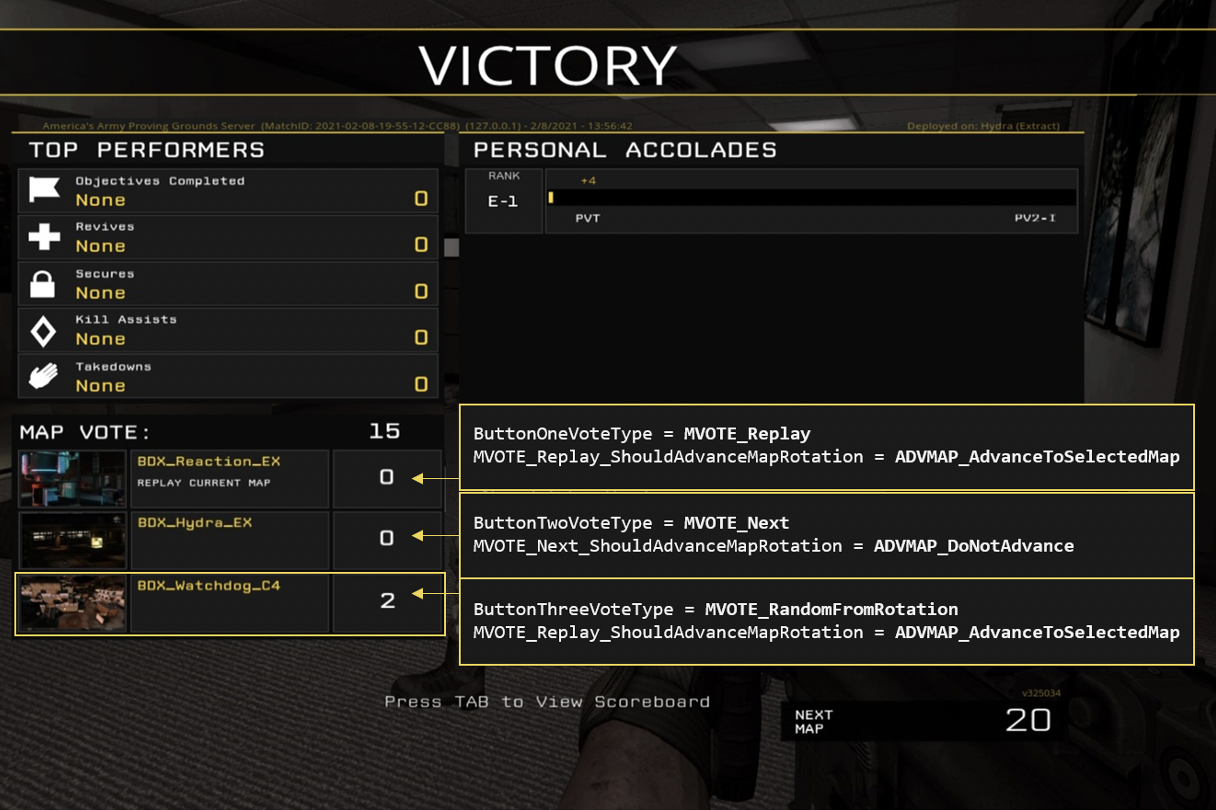
Here’s a visual example of ADVMAP_AdvanceToSelectedMap at play; In this scenario, Reaction was just played so our current rotation index is at #1. ButtonOne is set to Replay Reaction (Map #1) again, ButtonTwo is set to play the Next map in rotation, Hydra (Map #2). ButtonThree is set to select a RandomFromRotation, which just happens to be Watchdog (#3).
The players voted for ButtonThree, so Watchdog will be played next. Because ButtonThree‘s type was set to AdvanceToSelectedMap, the rotation index will jump straight from #1 (Reaction) to #3 (Watchdog).
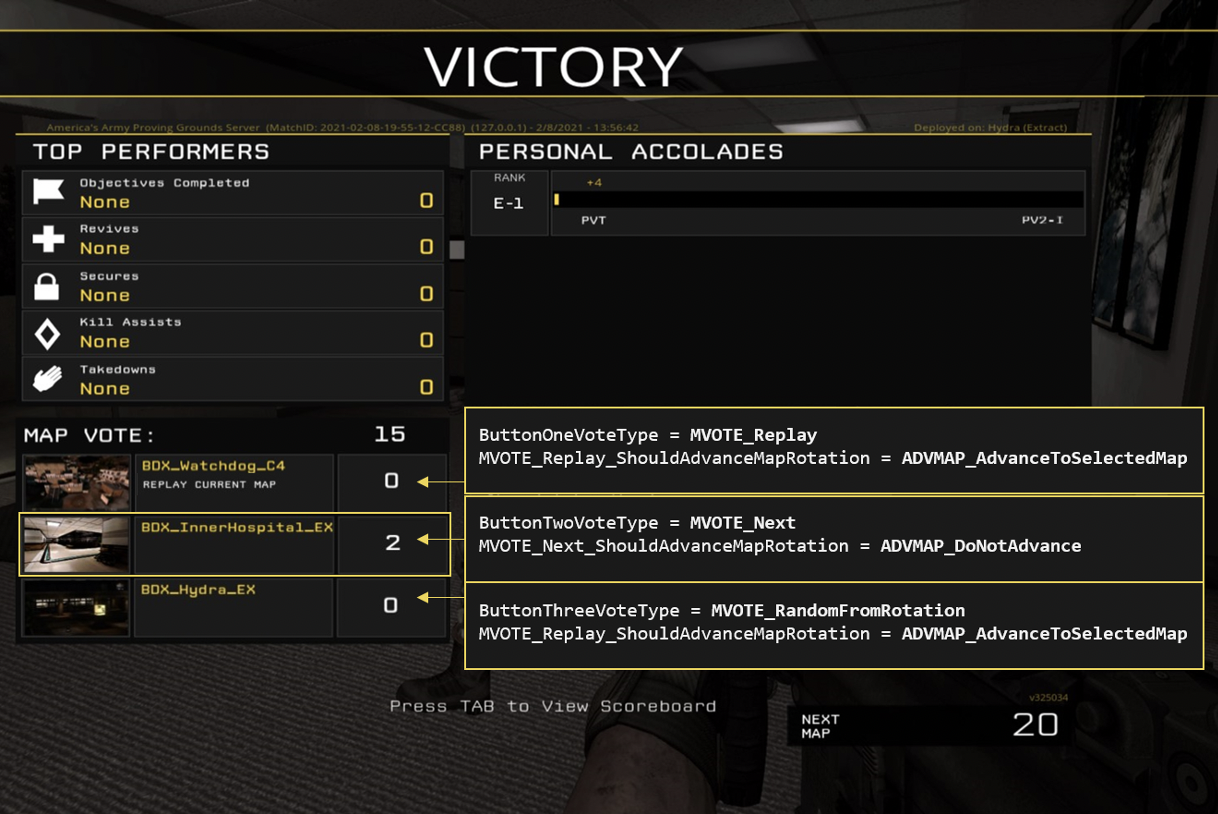
Once the match on Watchdog is finished, we’re brought back to the AAR screen to vote for the next match. With our current map rotation index now at #3, the button selections are now in order: We can Replay our last map Watchdog (#3), we can play the Next map InnerHospital (#4), or we can select another map RandomFromRotation, Hydra (which happens to be #2).
Rotation Advancement Options defines exactly how the MapRotationList is advanced forward after each successful vote. When the map voting selections are generated in the AAR, the index, or the current location of the map rotation list, is used to determine how far along we are in the list (Example: Using the example map list above, Reaction is at the 1st index, Hydra is at the 2nd index, Watchdog is at the 3rd index, etc).
By default, most voting options will place the map rotation’s index at the selected map’s location in the list (Example: If the last played map is the 3rd map in the MapRotationList, and our next voted map is the 5th map in the MapRotationList, then the next game’s vote list will be generated starting from the 5th map in the MapRotationList).
By using Rotation Advancement Options, we can customize exactly where the MapRotationList goes after a map vote, and assign that functionality to individual buttons. To do so, assign a RotationAdvancementOption to a button name in AAGame.ini, using:
MVOTE_ButtonName_ShouldAdvanceMapRotation=ADVMAP_YourAdvancementOption.
Examples:
MVOTE_Replay_ShouldAdvanceMapRotation=ADVMAP_AdvanceToSelectedMap
MVOTE_RandomFromVariety_ShouldAdvanceMapRotation=ADVMAP_CurPosPlusOne
This chart documents what each Rotation Advancement Option does, along with an example of how it would work using the example map list from above.
RotationAdvancementOption
Description
Example
ADVMAP_AdvanceToSelectedMap
Rotation advances to the map represented by the vote option.
We just finished playing Reaction, and Watchdog is voted as the next map. After next game, the rotation index will start at Watchdog. The vote option for NextMap would be InnerHospital.
ADVMAP_CurPosPlusOne
Rotation advances to the current rotation index, plus one.
We just finished playing Reaction, and Watchdog is voted as the next map. After next game, the rotation index will start at Hydra. The vote option for NextMap would be Watchdog.
ADVMAP_CurPosPlusTwo
Rotation advances to the current rotation index, plus two.
We just finished playing Reaction, and Watchdog is voted as the next map. After next game, the rotation index will start at Watchdog. The vote option for NextMap would be InnerHospital.
ADVMAP_CurPosMinusOne
Rotation goes backwards one position from the current index.
We just finished playing Hydra, and Watchdog is voted as the next map. After next game, the rotation index will start at Reaction. The vote option for NextMap would be Hydra.
ADVMAP_DoNotAdvance
Rotation does not advance.
We just finished playing Reaction, and Watchdog is voted as the next map. After next game, the rotation index will start at Reaction again. The vote option for NextMap would be Hydra.
Here’s a visual example of ADVMAP_AdvanceToSelectedMap at play; In this scenario, Reaction was just played so our current rotation index is at #1. ButtonOne is set to Replay Reaction (Map #1) again, ButtonTwo is set to play the Next map in rotation, Hydra (Map #2). ButtonThree is set to select a RandomFromRotation, which just happens to be Watchdog (#3).
The players voted for ButtonThree, so Watchdog will be played next. Because ButtonThree‘s type was set to AdvanceToSelectedMap, the rotation index will jump straight from #1 (Reaction) to #3 (Watchdog).
Once the match on Watchdog is finished, we’re brought back to the AAR screen to vote for the next match. With our current map rotation index now at #3, the button selections are now in order: We can Replay our last map Watchdog (#3), we can play the Next map InnerHospital (#4), or we can select another map RandomFromRotation, Hydra (which happens to be #2).
Button Priority
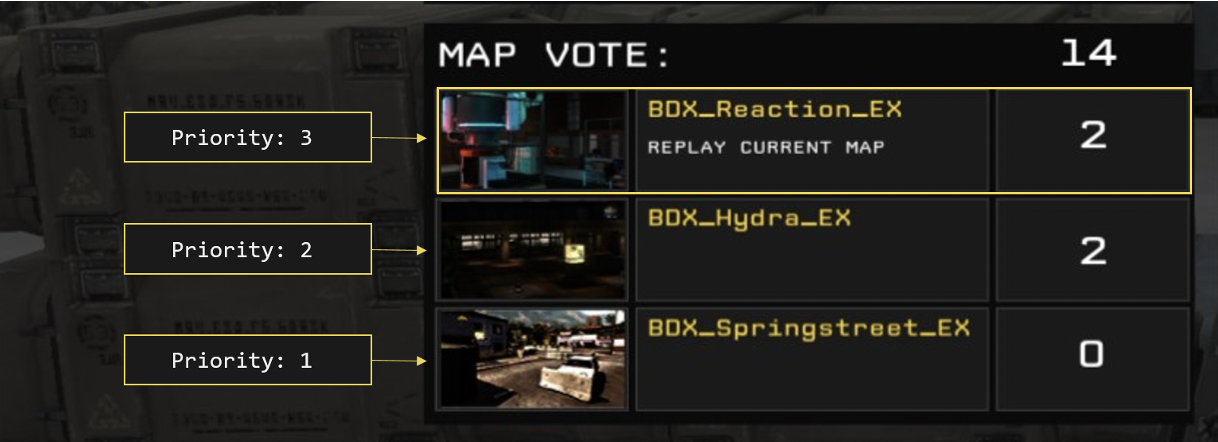
Button Priorities are used as tie breakers. Each button is assigned a priority, and if that button is tied with another one, the button with the highest priority will win the vote.
Note that all buttons MUST have different priorities (ie, ButtonOne and ButtonTwo can’t both have top priority).
Here is an example using the default button priorities:
ButtonOnePriority=3
ButtonTwoPriority=2
ButtonThreePriority=1
In this case, if ButtonOne and ButtonTwo are both tied with votes, ButtonOne will win because it has the highest priority (3 is greater than 1).
Note that all buttons MUST have different priorities (ie, ButtonOne and ButtonTwo can’t both have top priority).
Here is an example using the default button priorities:
ButtonOnePriority=3
ButtonTwoPriority=2
ButtonThreePriority=1
In this case, if ButtonOne and ButtonTwo are both tied with votes, ButtonOne will win because it has the highest priority (3 is greater than 1).
More America's Army: Proving Grounds guides
- America's Army: Proving Grounds Quick Start Guide★ 5 (203)11k views121 ♥14 minUpdated Jul 2, 2014
- Official Weapon Challenge Guide★ 5 (215)9k views250 ♥13 minUpdated Mar 4, 2016
- The Art of Takedown★ 4 (91)7.4k views59 ♥11 minUpdated Dec 30, 2023
- FPS improvement (AASystemSettings.ini tweaking)★ 4 (93)7.4k views157 ♥8 minUpdated Nov 22, 2015
- Using the nVidia Override for Anti-Aliasing★ 3 (33)5.7k views22 ♥4 minUpdated Jul 2, 2014
- Official XP and Leveling Guide★ 4 (80)3.8k views94 ♥2 minUpdated Dec 9, 2015





This guide was created by its original author on the Steam Community. Are you the author and want it removed? Request removal.