Persona 4 Golden Blackscreen/Crash fix Using Process Hacker (May 2022 Guide)
Installing and Using the Process Hacker Program with Persona 4 Golden.
1. Go to the Process Hacker official website and download the setup file see below links:
https://processhacker.sourceforge.io/downloads.php
2. After installing the "Process Hacker" open the application
3. Then run the Persona 4 Golden on Steam.
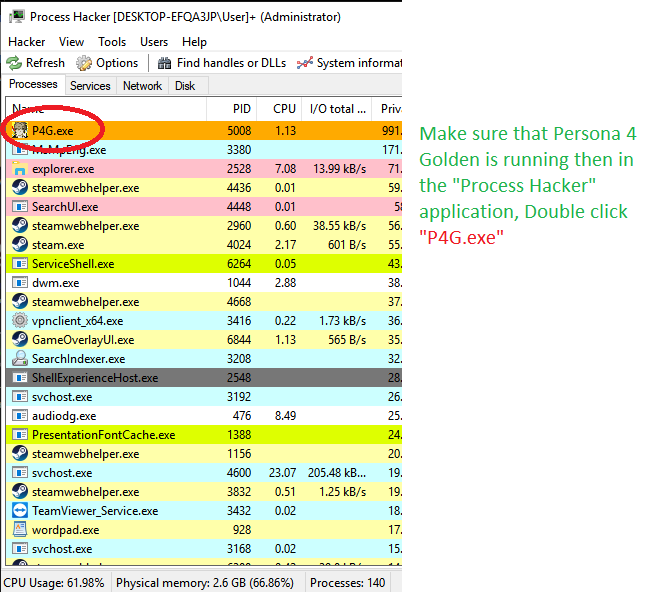
4. In the "Process Hacker" app look for "P4G.exe" then double click as shown below, a new window will appear.
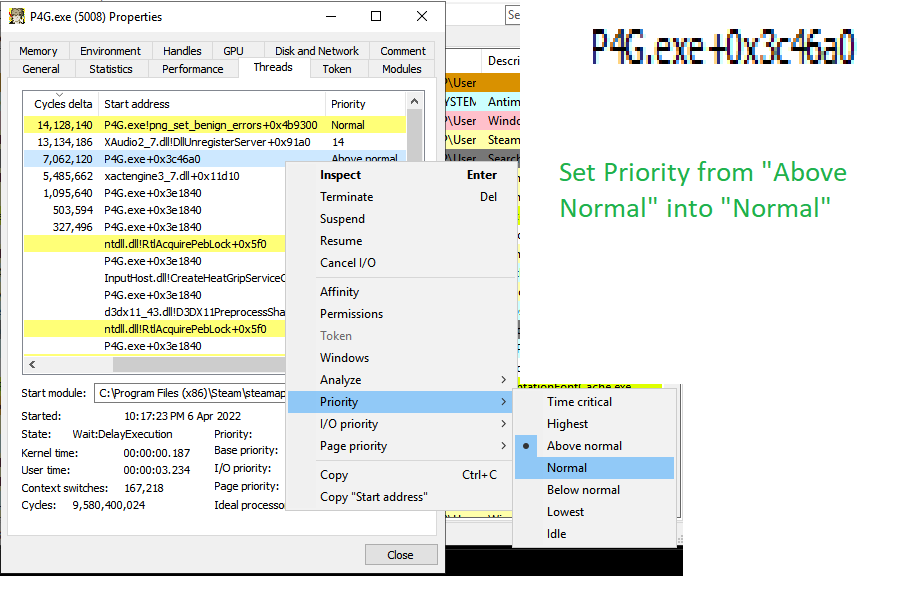
5. After double clicking "P4G.exe" a new window will appear. Then make sure to click the "Threads" Tab as shown in the picture so you can follow the steps in below images.
![]()
6. Right click then Set Priority to "Lowest" for the Start Address shown below or you can set Priority to "Below Normal" if crashes still occur.
![]()
7. Right click then Set Priority to "Normal" for the Start Address shown below
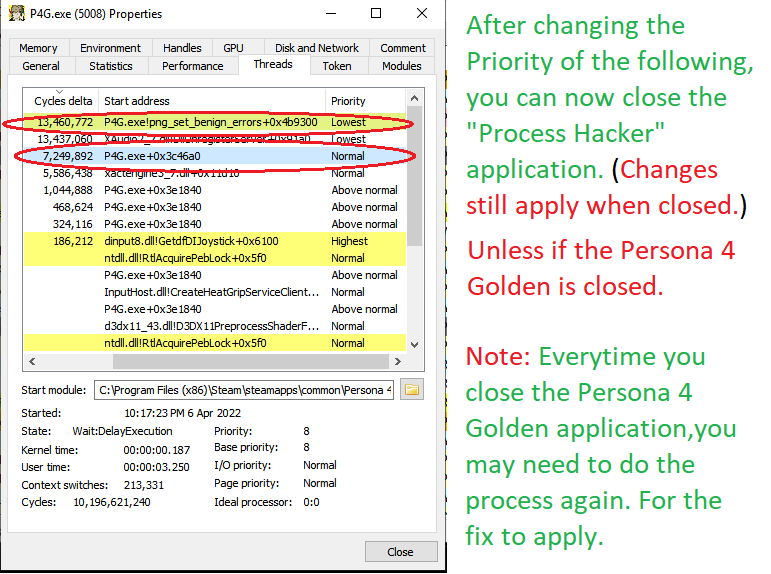
8. When done changing the priority for the following address as shown in the image, you may now close the "Process Hacker" app and Play Persona 4 Golden without crashes.
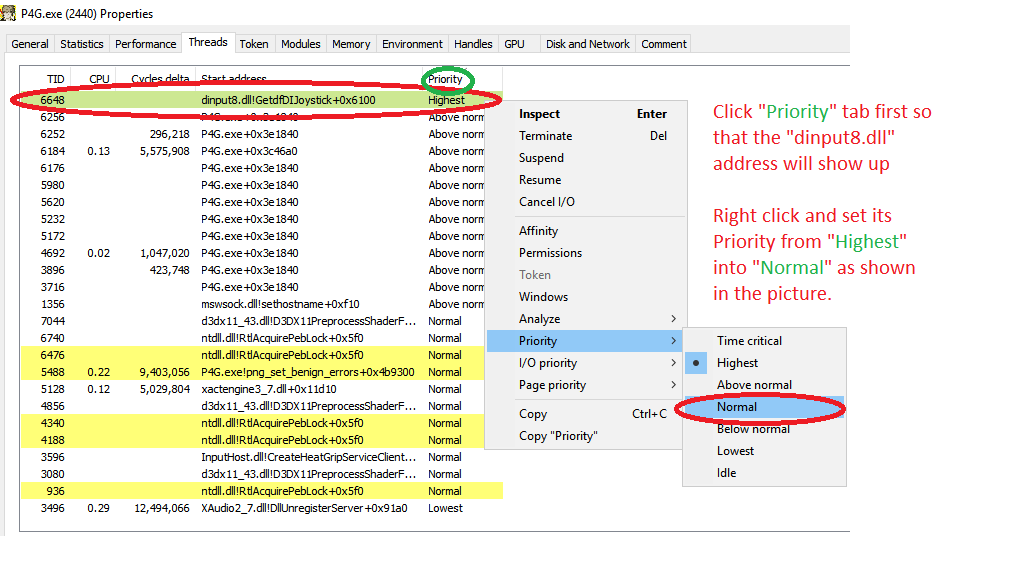
9. Added new Priority settings to further prevent random crashes especially on the game end locations like Heaven, Inaba (The culprits stage) also The Marie stage (Spoiler free).
https://processhacker.sourceforge.io/downloads.php
2. After installing the "Process Hacker" open the application
3. Then run the Persona 4 Golden on Steam.
4. In the "Process Hacker" app look for "P4G.exe" then double click as shown below, a new window will appear.
5. After double clicking "P4G.exe" a new window will appear. Then make sure to click the "Threads" Tab as shown in the picture so you can follow the steps in below images.
6. Right click then Set Priority to "Lowest" for the Start Address shown below or you can set Priority to "Below Normal" if crashes still occur.
7. Right click then Set Priority to "Normal" for the Start Address shown below
8. When done changing the priority for the following address as shown in the image, you may now close the "Process Hacker" app and Play Persona 4 Golden without crashes.
9. Added new Priority settings to further prevent random crashes especially on the game end locations like Heaven, Inaba (The culprits stage) also The Marie stage (Spoiler free).
Take Note: Every time you exit the Persona 4 Golden application and opening it again you need to run Process Hacker again and do the steps for changing the Priority as shown above for this fix to work.
Note 2: Or watch the video clip tutorial I made in the "Video Tutorial Guide Section" (Already Updated to May 2022 Guide).
Note 2: Or watch the video clip tutorial I made in the "Video Tutorial Guide Section" (Already Updated to May 2022 Guide).
Video Tutorial: Persona 4 Golden Blackscreen/Crash fix Using Process Hacker
1. Make Sure to run the Persona 4 Golden Application first,
2. Then run the Process Hacker app then watch the below video clip.
2. Then run the Process Hacker app then watch the below video clip.
Question and Answer/Frequently Ask Question
Still updating this portion.
More Persona 4 Golden guides
- The Hardcore Risette Fan Experience™️★ 5 (489)32k views985 ♥48 minUpdated Aug 7, 2020
- Recommended level for every boss and their affinities. No spoilers★ 5 (730)32k views1.9k ♥7 minUpdated Jun 30, 2025
- Persona 4 Golden 100% Achievements Guide | 2020 (This is not a strict-Everyday-Guide)★ 5 (706)30k views1.7k ♥58 minUpdated Dec 25, 2020
- 100% Achievements Guide for Persona 4 Golden★ 5 (1.2k)29k views3.6k ♥87 minUpdated Feb 23, 2025
- 100% Day By Day Guide by Hurricanehaon★ 5 (1.3k)28k views4.2k ♥102 minUpdated Oct 4, 2023
- All Social Links Guide★ 5 (1.4k)26k views4.6k ♥95 minUpdated Nov 22, 2020






This guide was created by its original author on the Steam Community. Are you the author and want it removed? Request removal.