THE NO BS GUIDE TO FIX YOUR BORDERLANDS 2! Performance improvements/Stutter fix/Configurations - - MAKING THE BEST BORDERLANDS 2
Bl2 Fix (OPTIONAL)
A quality of life mod, made by the community. Literally makes the game 10x better.
Showcase and how to install, can be found in the video above!
Showcase and how to install, can be found in the video above!
Compatibility improvements
Might give a boost in fps (some games benefit from this, bl2 being one of them)
----
1. Open game folder (right-click Borderlands 2 in Steam -> local files -> browse local files. Then go into the Binaries/Win32 folder)
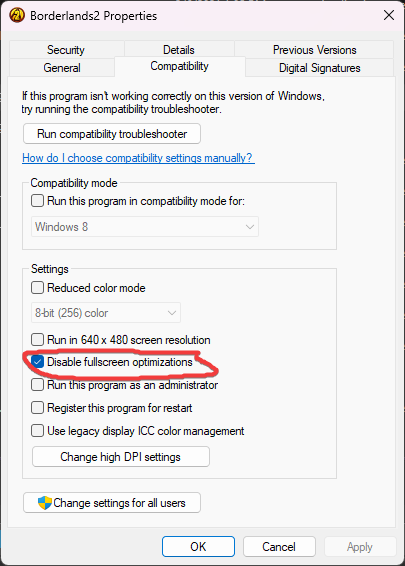
2. Right click Borderlands2.exe and open the Compatibility tab
3. Check "Disable full-screen optimisations"
----
1. Open game folder (right-click Borderlands 2 in Steam -> local files -> browse local files. Then go into the Binaries/Win32 folder)
2. Right click Borderlands2.exe and open the Compatibility tab
3. Check "Disable full-screen optimisations"
DISABLING CFG (Control Flow Guard) - OPTIONAL

-- Will fix minor stuttering (works for other games too)
1. Windows search "Exploit Protection" - or alternatively go to windows security > app & browser control > exploit protection > exploit protection settings
2. Under Program settings///// Add program to customize - then simply locate your borderlands2.exe and select it.
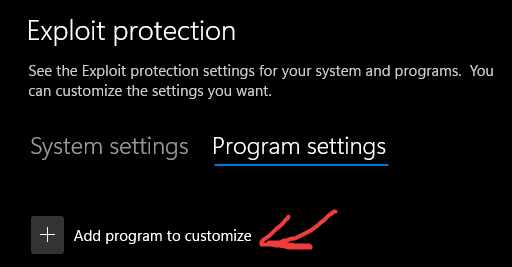 3. In the editing sceen scroll down to Control Flow Guard(CFG), check "override system settings" and toggle it to "off" and then hit apply
4. Profit
INI. Tweaks
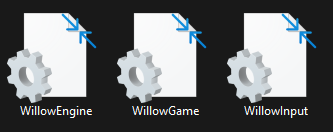
Configurations to improve performance/visuals
Locate - PC/documents/my games/borderlands 2/willowgame/Config/WillowEngine
Search for these configs-
DefaultPostProcessName=WillowEngineMaterials.WillowScenePostProcess
change to WillowEngineMaterials.RyanScenePostProcess (OPTIONAL)
-- Will remove the cel shading and give realistic lighting. If you want your Bl2 to look as good as it physically can, this is the change you want, but it might ruin the overall feel and style of Borderlands, so this is personal prefferece (I personally switch them from time to time, but tend to keep the normal postprocess, I love me some cel shading
OnlyStreamInTextures=False
Change it to True
-- Will fix blurry textures at short distance (crisper textures)
LensFlares=True
Change it to False
-- Removes "blinding light" from bl2 (Lensflare)
bAllowLightShafts=True
Change it to False
-- Will remove godrays
[MemoryBudgets] (Configure depending on your gpu's memory)
AnimationMB=5000
AudioMB=5000
CodeMB=5000
LevelObjectsMB=5000
TerrainMB=5000
GameDataMB=5000
MaterialMB=5000
ParticleMB=5000
PhysicsMB=5000
ScaleformMB=5000
ShadersMB=5000
SkelMeshMB=5000
StaticMeshMB=5000
TextureMB=1000
Change the Memorybudget section to these values, overall boost in performance, cause were giving the game more memory to work with.
as well as
[Engine.Engine]
MaxParticleResize=128
PhysXGpuHeapSize=512
PhysXMeshCacheSize=256
to these values as well.
Under [Engine.Engine] add - -
bDisablePhysXHardwareSupport=True
- - Disables PhysX entirely
DynamicShadows=True to DynamicShadows=False
-- big resource hog
PC/documents/my games/borderlands 2/willowgame/Config/Willowgame
Add this to the end of the file - - -
bPhysXEnabled=False (Or if you really like PhysX. Ignore this step)
Change the following:
SecondsBeforeConsideringRagdollRemoval=5.0
SecondsBeforeVisibleRagdollRemoval=10.0
SecondsBetweenRagdollRemovalAttempts=1.0
SecondsBeforePhysicsShutsDown=5.0
Now set the file to read only
------------------------
PC/documents/my games/borderlands 2/willowgame/Config/WillowInput
[Engine.Console]
ConsoleKey=F1
- - This will enable the ingame console, useful for some mods and inputting cheat codes.
You can set the key to whatever you want. (I recommend F1)
personal fav commands-
fov 140 (you can change this to whatever you desire)
set globals BaseEnemyExperienceFormula (BaseValueScaleConstant=1) (OPTIONAL)
change the 1 to whatever you want your multiplier to be. (If you desire more xp.)
list of all available commands - https://steamcommunity.com/sharedfiles/filedetails/?id=1090392695
Installing DXVK (Vulkan)
 A must for most old games, installing this will give a massive boost to fps and less stuttering. (MUST)
https://github.com/doitsujin/dxvk/releases/ - link to download the files necessary
- Extract /dxvk-2.0/x32/d3d9.dll
/dxvk-2.0/x32/dxgi.ddl
- to the borderlands 2.exe directory. That being
(where you installed the game) /Steamlibrary/steamapps/common/borderlands2/Binaries/win32
simply drag those two files to the directory and you should be good to go. Vulkan is now installed!
STEAM LAUNCH OPTIONS
-NoLauncher -high -USEALLAVAILABLECORES -maxMem=13000 (maxmem is optional)
sounds pretty clear on what these do (make sure there is no space in the beginning)
example- -

optional commands
-nostartupmovies
(will skip the beginning movies when launching the game, faster boot up.)
-nomovies
(skips all cutscenes from playing)
sounds pretty clear on what these do (make sure there is no space in the beginning)
example- -
optional commands
-nostartupmovies
(will skip the beginning movies when launching the game, faster boot up.)
-nomovies
(skips all cutscenes from playing)
BL2 Mods (OPTIONAL)
link to website - https://bl-sdk.github.io/mods/
here you can find all the mods the community has made for the game. You can select any mod you feel like can improve your overall bl2 experience, the way to install these mods is simple, simply drag the mod of the folder to
SteamLibrary\steamapps\common\Borderlands 2\sdk_mods
and they'll work, they'll have to enabled in the main menu, in the "MODS" section
and some mods can be configured in the settings as well as their keybindings which can be found in the keyboard/mouse section
You will need PythonSDK installed, which can be found in the "BL2 FIX" section above
If you don't care for bl2fix, then simply follow the video below :D
my persoanl mods that I always use/have on, are as follows--
- - bl2fix
- - configurableviewmodel (adjusting your weapon field of view)
- - commander (very useful for farming. Gives the ability to teleport to your own set locations (Up to three locations)
- - FPS Slider (optional)
- - Loot Notificator (let's you know if you got a legendary to drop)
- - Photomode (do I need to explain this one?)
- - Python Part Notifier (lists the weapon parts, a crucial element to bordelrands 2)
- - Respec Hotkey (respec your skills anywhere, no more going to sanctuary)
- - UberPostProcessing (make your game more shiny :D)
- - AutoPickup
- - BSABT
- - DialogSkipper
- - NoAds
- - OpenSesame
- - UnspecSkills
- - BeGoneOutOfBoundsLoot
- - AltUseVendos
BLCMM - Add mods through community made variables
Tutorial on how to use BLCMM -
INGAME SETTINGS
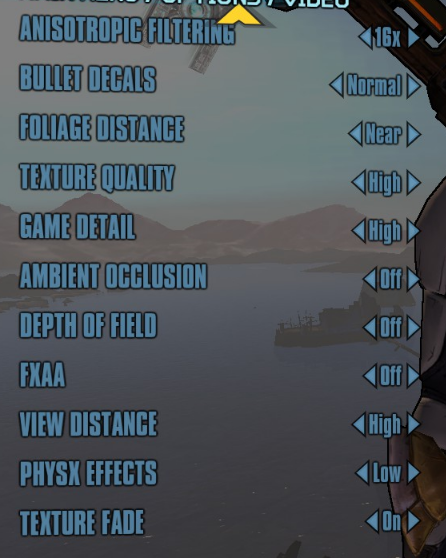
I rock these, gives me the best visuals
borderless windowed
vsync = off
Anisotropic Filtering = 16x
Bullet Decals = Normal
Foliage Distance = Near
Texture Quality = High
Game Detail = High
Ambient Occlusion =Off
Depth of Field =Off
FXAA = Off
View Distance = High
PhysX Effects = Low
Texture Fade = Off
Profit
You've now successfully perfected bl2! Hopefully the game will launch and not break :D
(modding can be a cruel mistress sometimes, but if it works, you're in heaven)
EXTRAS
Some useful websites to help figure out what's what :D
- https://bl2.parts/ - lists the game's parts and what they do
- https://www.lootlemon.com/ - Game's lootpedia

More Borderlands 2 guides
- Dashi's Comprehensive Guide to: Maya from LVL 1 to OP8★ 5 (2.6k)79k views6.1k ♥60 minUpdated Jul 4, 2019
- Leveling As: Gaige, the Mechromancer★ 5 (1.8k)78k views5k ♥18 minUpdated Jul 3, 2014
- Русификатор текста для EU версии + Epic Games★ 5 (1.8k)75k views2.8k ♥1 minRussianUpdated Jul 6, 2025
- Borderlands 2 | Ultimate Parts & Prefixes Guide★ 5 (2.2k)60k views5.9k ♥1 minUpdated Jun 15, 2020
- РУСИФИКАТОР звука и текста BORDERLANDS 2 от студии GamesVoice★ 5 (1k)53k views1.3k ♥1 minRussianUpdated Feb 2, 2022
- The Ultimate Badass Build Guide★ 5 (806)51k views2.4k ♥103 minUpdated Apr 13





This guide was created by its original author on the Steam Community. Are you the author and want it removed? Request removal.