Winwing Ursa Minor Fighter joystick configuration
Introduction
I made a configuration for the Ursa Minor but since the game doesn't support controller more than 32 buttons (Ursa minor has 44), I had to complete this configuration with a small JoyToKey[joytokey.net] mapping for 3 buttons.
Joystick layout
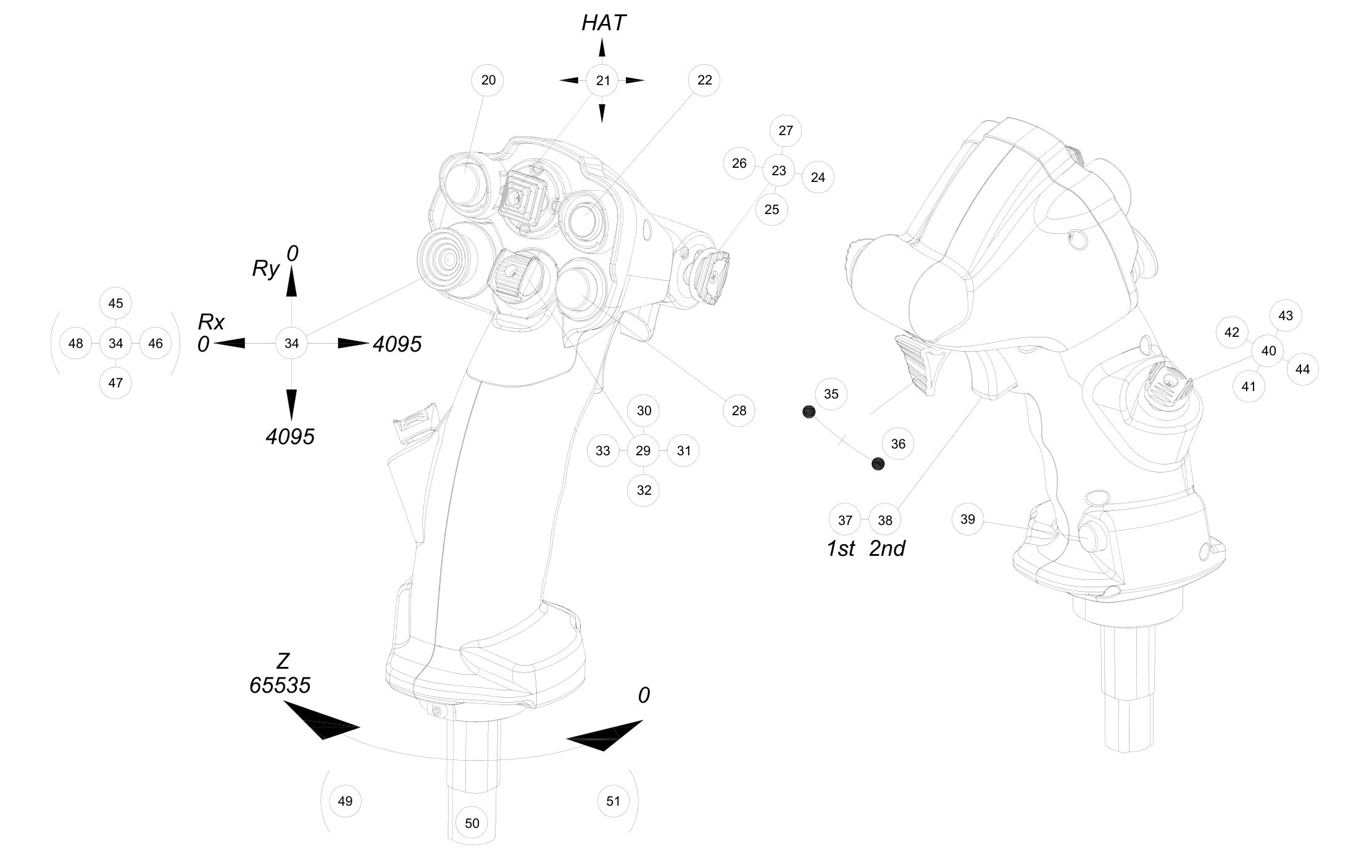
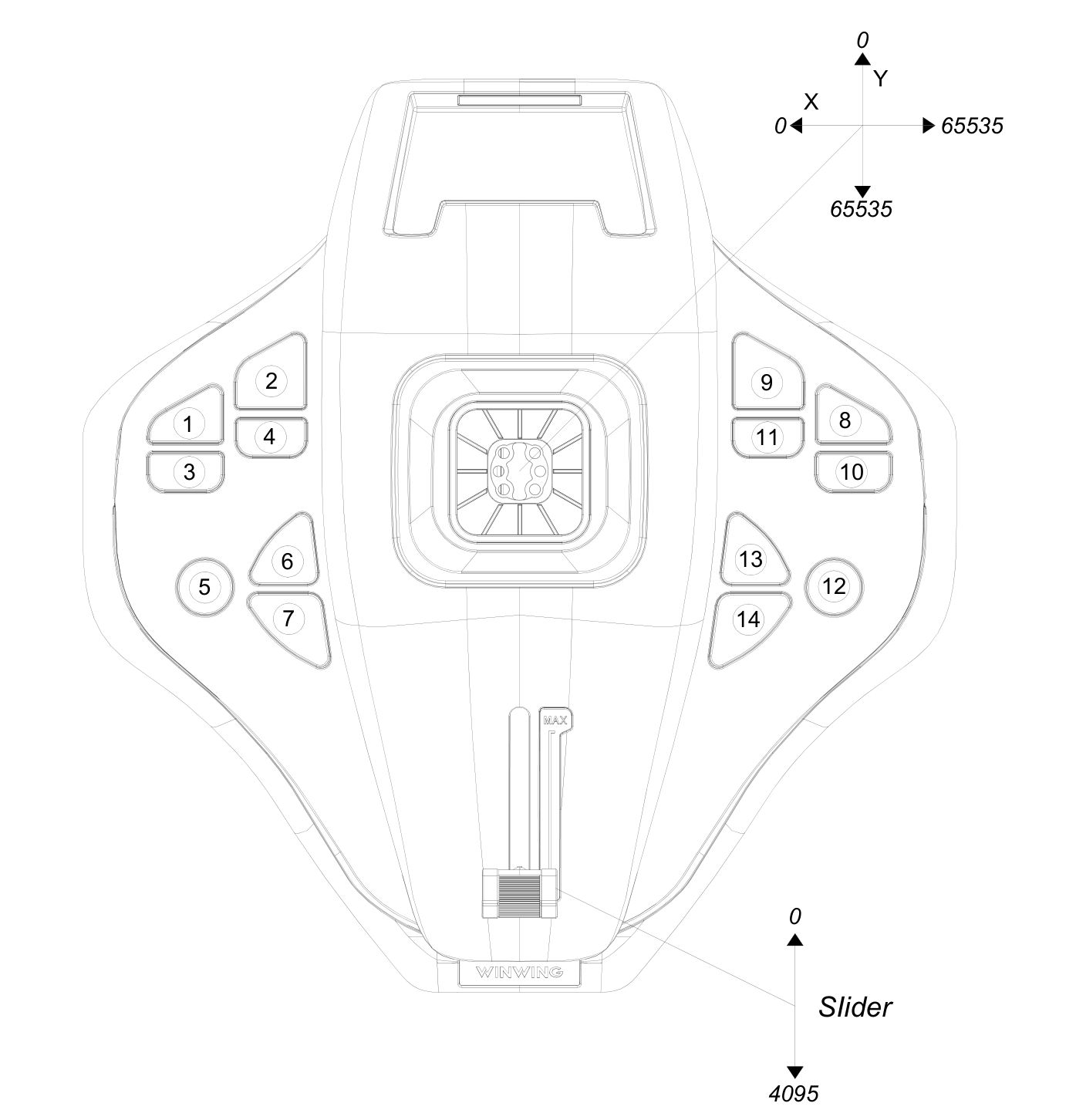
Function
Mapping
Key mapping
Roll / Pitch / Yawn
Joystick X / Y / Z axes
Throttle
Joystick slider
Change view
Left Hat (Ry / Rx axes)
Fire machine gun
Button 37
Left-Ctrl
Fire missile/weapon
Button 35
Space
Target
Button 20
Speed
Button 22
Change weapon
Button 39
C
Switch radar map
Button 7
Fire Flare
Button 28
Change view
Button 5
Autopilot
Button 6
Pause
Button 2
Install AC7 configuration
Edit the file C:\Users\<username>\AppData\Local\BANDAI NAMCO Entertainment\ACE COMBAT 7\Config\Input.ini and replace its content by the code below:
[JoystickSetting]
EnableJoystick=True
EnableDeviceJoystick=True
EnableDeviceFlight=True
EnableDevice1stPerson=True
[JoystickMappingFormat]
HelpComment=" ObjectFormat"
HelpComment=" X, Y, Z, Rx, Ry, Rz, Slider[1-2], POV_[U, D, L, R][1-4], Button[1-32]"
HelpComment=
HelpComment=" ValueFormat"
HelpComment=" Object, Object:[P, N, R, C]...[P, N, R, C]"
HelpComment=" P:PositiveValue / N:NegativeValue / R:ReverseSign / C:ConvertRange(+1.0~-1.0 -> 0.0~1.0)"
HelpComment=
HelpComment=" MappingFormat"
HelpComment=" Value, Value1 [&, !, +, >, <] Value2"
HelpComment=" &:IfValue2!=0 / !:IfValue2==0 / +:AddValue / >:SelectLarger / <:SelectSmaller"
HelpComment=
HelpComment=" Example"
HelpComment=" Flight_Pitch=Y:R ! Button10"
HelpComment=" Flight_HatSwitchRight=POV_R1"
[Joystick-BC2A4098-0000-0000-0000-504944564944]
ProductName=WINWING URSA MINOR FIGHTER FLIGHT STICK R
Flight_Gun=
Flight_Missile=
Flight_Weapon=
Flight_Target=Button20
Flight_Radar=Button7
Flight_Flare=Button28
Flight_View=Button5
Flight_AccelerationDeceleration=Button22
Flight_AutoPilot=Button6
Flight_Pause=Button2
Flight_HatSwitchUp=POV_U1
Flight_HatSwitchDown=POV_D1
Flight_HatSwitchLeft=POV_L1
Flight_HatSwitchRight=POV_R1
Flight_Pitch=Y:R
Flight_Roll=X
Flight_Yaw=Z
Flight_Throttle=Slider1
Flight_CameraPitch=Ry
Flight_CameraYaw=Rx
UI_B=
UI_A=
UI_X=
UI_Y=
UI_LB=
UI_RB=
UI_LT=
UI_RT=
UI_LeftStickPress=
UI_RightStickPress=
UI_DPadUp=
UI_DPadDown=
UI_DPadLeft=
UI_DPadRight=
UI_LeftStickUp=
UI_LeftStickDown=
UI_LeftStickLeft=
UI_LeftStickRight=
UI_RightStickUp=
UI_RightStickDown=
UI_RightStickLeft=
UI_RightStickRight=
UI_Menu=
Install JoyToKey configuration
Create a file named ac7_ursa-minor.cfg file in the Joy2key configuration folder. You can access it with the File > Open config data folder in Explorer function in JoyToKey.
Its content is:
Its content is:
[General]
FileVersion=70
NumberOfJoysticks=2
NumberOfButtons=44
DisplayMode=2
UseDiagonalInput=0
UseDiagonalInput2=0
UsePOV8Way=0
RepeatSameKeyInSequence=0
Threshold=20
Threshold2=20
KeySendMode=0
SoundFile=
ImageFile=
VibrationSpeed1=0
VibrationSpeed2=0
VibrationDuration=0
[Joystick 1]
DefaultDisplayName=
DefaultTemplateId=
Button35=1, 20:00:00:00, 0.000, 0, 0
Button37=1, A2:00:00:00, 0.000, 0, 0
Button39=1, 43:00:00:00, 0.000, 0, 0
More ACE COMBAT™7: SKIES UNKNOWN guides
- How to S rank all missions on ACE difficulty - ACE of ACES achievement★ 5 (717)26k views1.6k ♥23 minUpdated May 12, 2019
- Native Flightstick Configuration★ 5 (316)24k views670 ♥8 minUpdated Oct 15, 2025
- Named Aircraft/"Bird of Prey" Guide★ 5 (980)20k views1.9k ♥10 minUpdated Feb 8, 2019
- All Aircraft Skins {Detailed Unlocks}★ 5 (414)19k views873 ♥15 minUpdated Dec 13, 2022
- Quick Guide to Maximum Texture Quality★ 5 (405)19k views721 ♥2 minUpdated Jan 16, 2020
- The ultimate(ish) nugget's guide to Ace Combat 7★ 5 (290)17k views540 ♥27 minUpdated Sep 8, 2022




🔥 Popular guides
- Upgrading to PremiumTeam Fortress 2★ 5 (20k)1441k views11k ♥6 minUpdated May 11, 2022
- No More Room in Hell Official ManualNo More Room in Hell★ 5 (2.8k)569k views2.1k ♥29 minUpdated Apr 22, 2019
- NMRiH Community Hosting GuidesNo More Room in Hell★ 5 (526)351k views653 ♥1 minUpdated Aug 10, 2022
- ULTIMATE GUIDE FOR GAME DEV TYCOONGame Dev Tycoon★ 5 (5.8k)326k views10k ♥4 minUpdated 23 Jan, 2014
- How to 'Git Gud' Soon™MORDHAU★ 5 (2k)318k views3k ♥68 minUpdated Nov 16, 2024
- Лучшие кооперативные игры SteamPAYDAY 2★ 5 (1.5k)315k views2.1k ♥56 minRussianUpdated Apr 27, 2025






This guide was created by its original author on the Steam Community. Are you the author and want it removed? Request removal.