Export the Demo Save from Civilization VI Demo Into Civilization VI Full Version [Windows 11]
Warning
IF you already did relaunch it, sorry bruh, you lost it. This guide is useless now

From Civ 6 Demo to Civ 6 Full Game Intro
I saw someone asking this somewhere without answer few years ago and you are in this situation
- You have downloaded and played the Demo
- You have then bought the Full Game
- You want to continue in the Full Game your Demo game
I tried the Demo version. I heard the Italian Opera song playing about how great humanity is, I guess, got the Chinese empire to start out, I was friend with the Americans: I had to buy the game, 2 euro, man!
At a certain it pop up something for which you can't do ♥♥♥♥ anymore because they want you to buy the Full Version. So you kinda get confused over 9000. OK OK bruh, I was sold at the Italian Intro already, damn no need to slap me with a pop up and do me dirty like that.
First off, don't start over the Demo or try to load otherwise. I am pretty sure it overload the save in the Demo and you loose it all like I said in the beginning. In fact the saves from Demo and from Full Game are in completely different directory and structures as they are two different downloads. Demo has it directly on the game folder, the Full Version into the Operating System private directory of the Windows 11 account/user.
OK but where did I install my two Civ VI?
From the Steam Library, you go to your game, in general and click like in the picture
name-of-the game->mange->browse local files
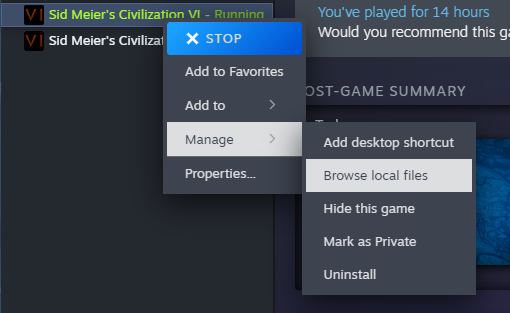
Where to get the save from Demo and where to Store in the Full Game

I assume <Installation Path> is where you installed the Civilization VI Demo (on windows).
To export the demo.Civ6Save into the full game:- Download and play Civilization VI Demo
- Quit / Exit Game
- Download and launch Civilization VI Full Game
- (Optional) launch a game in Civilization VI and save it (just to know there's a save folder already)
- Quit / (optional?) Exit to Desktop
- copy <Installation Path>:\SteamLibrary\steamapps\common\Sid Meier's Civilization VI Demo\Base\Assets\Demo\Saves\demo.Civ6Save
- paste it into <Win11 OS drive, C: most likely>\Users\<Your Username>\Documents\My Games\Sid Meier's Civilization VI\Saves\Single\
- Load the game from Civilization VI Full Game
You will see the saved game in the Load list for Single Player submenu
Last Notes
I Loaded it correctly but I did the mistake of trying to relaunch the Demo VI to continue my game there, wiping out the progress, so I could load a Chinese starting game only, let me know if your works, just to know someone didn't loose few hours of game by reading few minute of this.
I should not be a guide but a moderator told me to do this instead of just placing it into a discussion
Alos, I guess you can now Delete the Demo? I'll do right after publishing this guide, so don't ask me to test other stuff :D
- Better Balanced Game (BBG) Full Change Log (v6.0.x)★ 4 (120)62k views293 ♥62 minUpdated 27 Aug, 2025
- 100% achievements guide + tips & tricks (base game + all DLC's, include Gathering Storm)★ 5 (1.5k)57k views3.7k ♥146 minUpdated 4 Jan
- [EN] Early game strategy, or how not to get overwhelmed★ 5 (368)41k views1k ♥15 minUpdated 23 Jul, 2023
- All Victory Conditions and how to reach them!★ 5 (702)40k views1.2k ♥5 minUpdated Jun 17, 2020
- 新手指南 —— 从上手到上瘾! Civi-VI Game Guide★ 5 (1.7k)37k views3.2k ♥3 minSimplified ChineseUpdated 7 Sep, 2022
- Zigzagzigal's Guides - Japan (GS)★ 4 (141)34k views399 ♥67 minUpdated 2 Apr, 2023



- Upgrading to PremiumTeam Fortress 2★ 5 (20k)1441k views11k ♥6 minUpdated May 11, 2022
- No More Room in Hell Official ManualNo More Room in Hell★ 5 (2.8k)569k views2.1k ♥29 minUpdated Apr 22, 2019
- NMRiH Community Hosting GuidesNo More Room in Hell★ 5 (526)351k views653 ♥1 minUpdated Aug 10, 2022
- ULTIMATE GUIDE FOR GAME DEV TYCOONGame Dev Tycoon★ 5 (5.8k)326k views10k ♥4 minUpdated 23 Jan, 2014
- How to 'Git Gud' Soon™MORDHAU★ 5 (2k)318k views3k ♥68 minUpdated Nov 16, 2024
- Лучшие кооперативные игры SteamPAYDAY 2★ 5 (1.5k)315k views2.1k ♥56 minRussianUpdated Apr 27, 2025






This guide was created by its original author on the Steam Community. Are you the author and want it removed? Request removal.