Great One Tracker (including Torr Nan Sithean)
How to Use
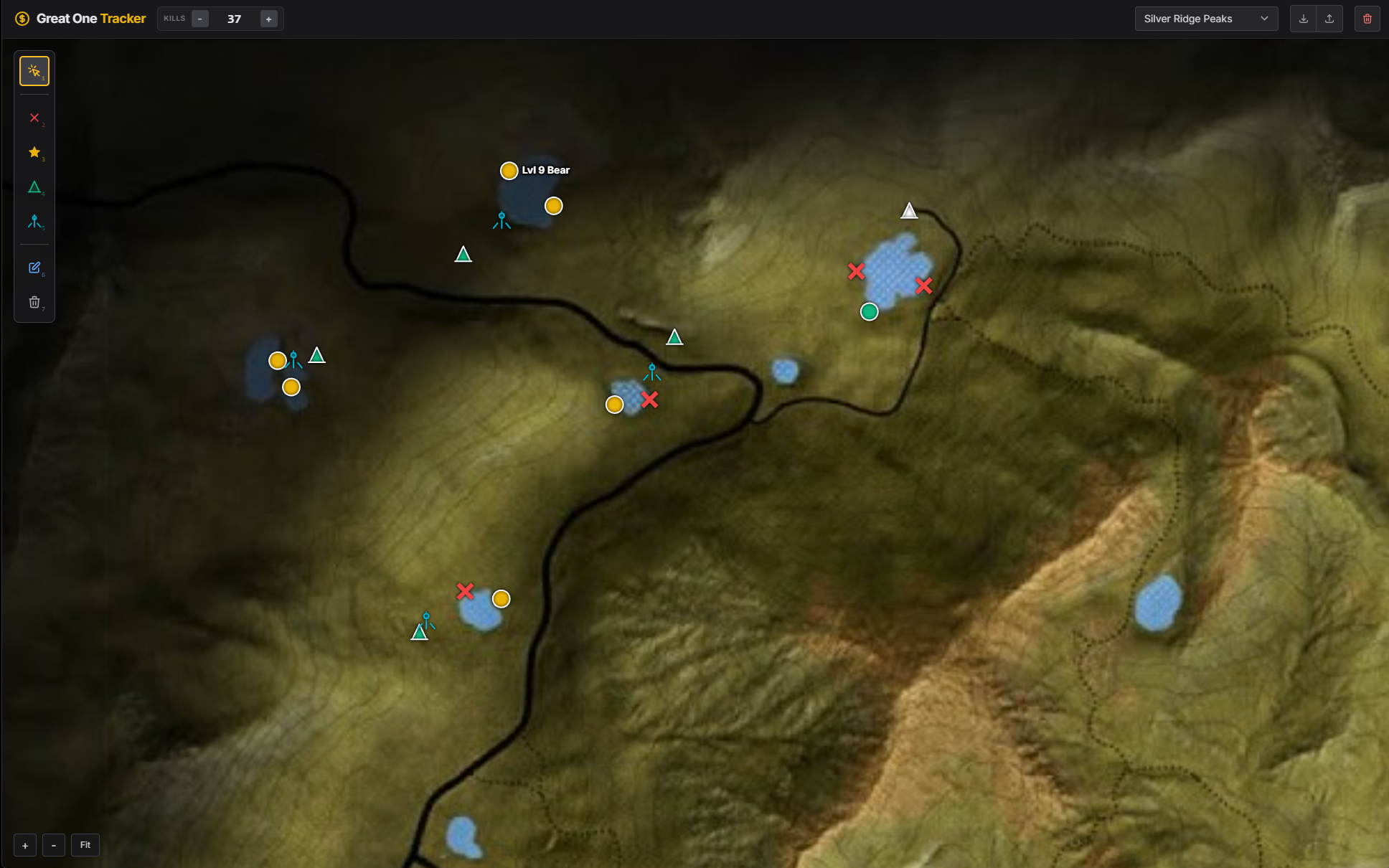
Just open the --> link <--[marleo.github.io]in your browser and use the tool. The main html file is hosted on GitHub, so feel free to download it and host it yourself/apply changes if you want to.
If you like the tool or if it helped you during your GO grind, like the guide and leave a comment!
Key Features
- Autosave: Saves everything automatically to your browser's local storage, so you don't lose progress when you close the tab.
- All Reserves Supported: Switch between any map (Base game + all DLCs).
- Smart Kill Counter: Click to type the number directly or use + / - buttons. Tracks kills per map separately.
- Custom Markers:
- Tents & Tripods: Mark where you put your tents and tripods.
- Dead Zones (Red X): Mark areas you don't need to shoot down anymore.
- High Value (Gold): Mark zones where high-level animals are.
- Tents & Tripods: Mark where you put your tents and tripods.
- Notes System: Click any marker to add details (e.g., "Level 9 Black Bear"). You can color-code markers to organize herds.
- Backup System: Export your data to a JSON file to move it to another PC or keep a backup.
Controls & Shortcuts
Tools:
Other:
- 1: Pan Map (Click & Drag)
- 2: Mark Dead Zone
- 3: Mark High Value Zone
- 4: Place Tent
- 5: Place Tripod
- 6: Edit Note
- 7: Eraser (Instant delete)
Other:
- Scroll Wheel: Zoom in/out
- Ctrl + Z: Undo last action (placements, deletions, edits)
- + / - keys: Quickly add or remove kills from the counter
More theHunter: Call of the Wild™ guides
- Animal Location Maps (Parque update!)★ 5 (1.7k)84k views4.4k ♥1 minUpdated 1 Jan, 2019
- NEW Animal Location Maps (Hi-Res) - INTISUYU PERU UPDATE!★ 5 (1.6k)55k views4.3k ♥1 minGermanUpdated 24 Jun
- Limit FPS using only Nvidia Control Panel42k views53 ♥1 minUpdated 24 Nov, 2024
- ALL NEED ZONE TIMES FOR EVERY ANIMAL (SUNDARPATAN NEPAL)★ 5 (754)36k views2k ♥19 minUpdated 28 Jun, 2024
- Beginner's Guide: New Players, New Hunters★ 5 (405)24k views681 ♥33 minUpdated 3 Jan, 2023
- Trophy Ratings & Fur Types★ 5 (800)24k views2k ♥36 minUpdated 10 Jun




🔥 Popular guides
- Upgrading to PremiumTeam Fortress 2★ 5 (20k)1441k views11k ♥6 minUpdated May 11, 2022
- No More Room in Hell Official ManualNo More Room in Hell★ 5 (2.8k)569k views2.1k ♥29 minUpdated Apr 22, 2019
- NMRiH Community Hosting GuidesNo More Room in Hell★ 5 (526)351k views653 ♥1 minUpdated Aug 10, 2022
- ULTIMATE GUIDE FOR GAME DEV TYCOONGame Dev Tycoon★ 5 (5.8k)326k views10k ♥4 minUpdated 23 Jan, 2014
- How to 'Git Gud' Soon™MORDHAU★ 5 (2k)318k views3k ♥68 minUpdated Nov 16, 2024
- Лучшие кооперативные игры SteamPAYDAY 2★ 5 (1.5k)315k views2.1k ♥56 minRussianUpdated Apr 27, 2025






This guide was created by its original author on the Steam Community. Are you the author and want it removed? Request removal.