How to Connect to Spore Servers (Steam/GOG/EA App)
The Problem
Connecting to the Spore servers allows you to:
If you already own the game on EA App, you're safe :)
If you own it on Steam or GOG, then you have to follow these steps to access the Spore servers on that platform:
The problem for Steam users however, is that EA revoked access to their CD keys due to a refund exploit where players could receive free games. This means that if you cannot access your CD keys, you cannot connect to the Spore servers.
All is not lost! There are several workarounds you can try.
PLEASE refer to this EA Answers forum post that explains the situation in greater detail.
- VIEW people's creations
- SHARE your creations to the Sporepedia (includes Captains & Adventures if you own the Galactic Adventures expansion)
- EARN more achievements
If you already own the game on EA App, you're safe :)
If you own it on Steam or GOG, then you have to follow these steps to access the Spore servers on that platform:
- Create an EA account
- Redeem your CD keys through EA website or EA App
- Sign into your EA account in-game
The problem for Steam users however, is that EA revoked access to their CD keys due to a refund exploit where players could receive free games. This means that if you cannot access your CD keys, you cannot connect to the Spore servers.
All is not lost! There are several workarounds you can try.
PLEASE refer to this EA Answers forum post that explains the situation in greater detail.
METHOD 1: Manually Redeem your CD Key(s)
Steam won't show you your CD key, but it does exist. Follow this guide to manually locate it and create a new spore account to access the servers.
For GOG owners - follow this support article[support.gog.com].
Once you have your CD key(s), redeem them at EA's website.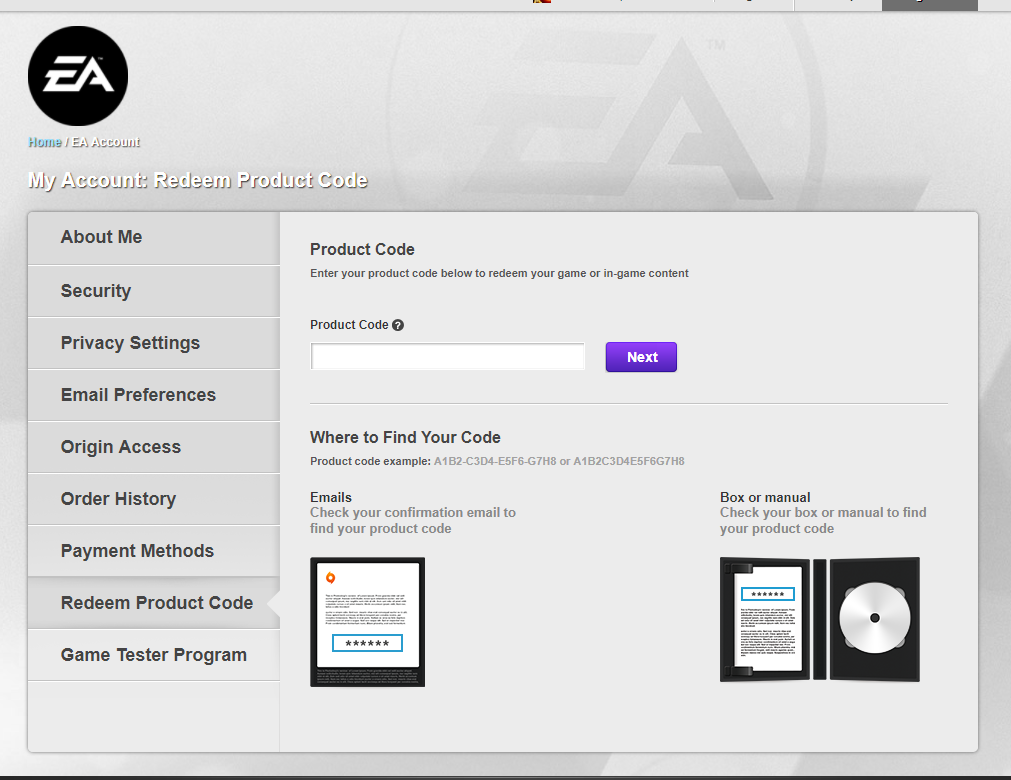
You can also redeem them through EA App itself, but the website is more stable.
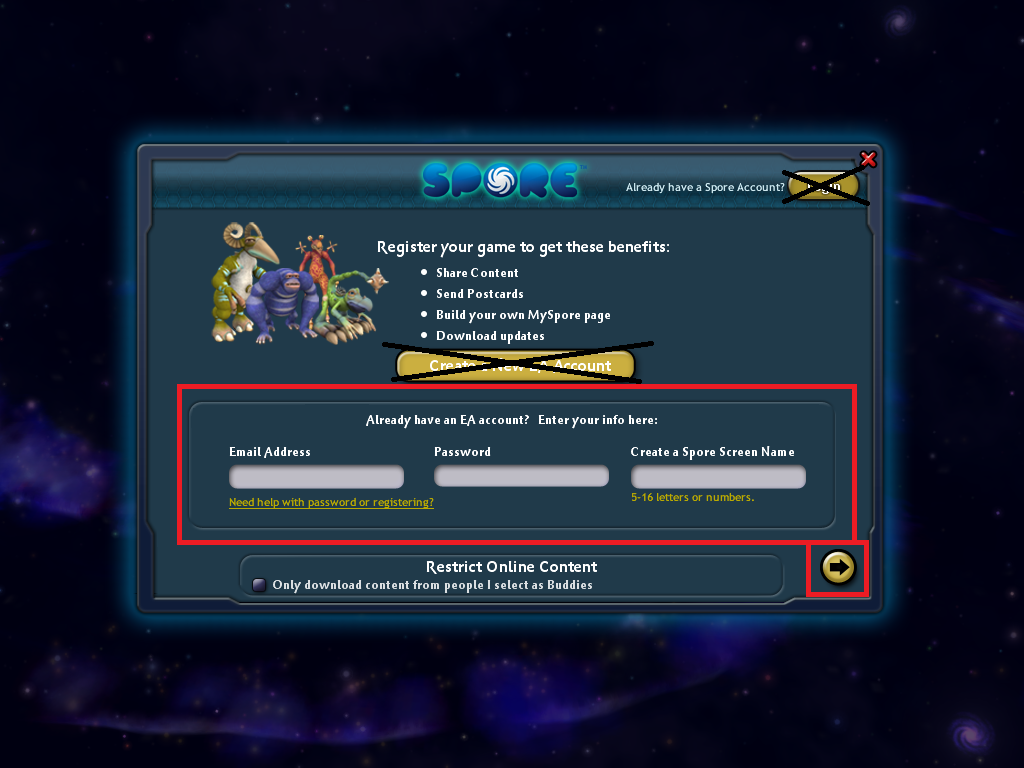
Then, run Spore through Steam and log in to your EA account using these fields:
For GOG owners - follow this support article[support.gog.com].
Once you have your CD key(s), redeem them at EA's website.
You can also redeem them through EA App itself, but the website is more stable.
Then, run Spore through Steam and log in to your EA account using these fields:
METHOD 2: Contact EA Support
If you were unable to find your CD key, your best bet is to contact EA Support, explain your situation and have them activate Spore to your EA App account.
Make sure you have your proof of purchase (receipt and email) ready to show them.
To access your proof of purchases in Steam:
They will hopefully redeem it themselves or provide the CD key for you to do it (follow Method 1).
Not all EA Support staff are helpful. If they aren't helping you redeem Spore through EA App, try again the next day.
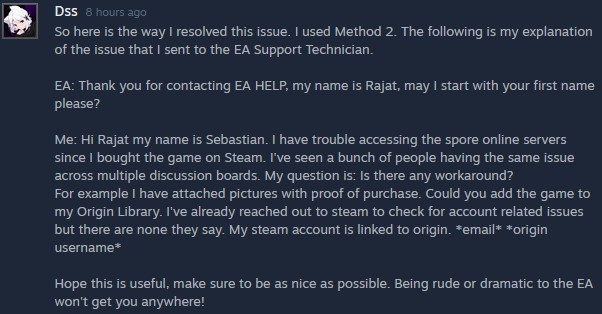
Make sure you have your proof of purchase (receipt and email) ready to show them.
To access your proof of purchases in Steam:
- Click your profile name and select "Account details" from the drop-down menu,
- In the Store & Purchase History section, select "View purchase history",
- Find the entry with your purchase of Spore and select it,
- Desktop-screenshot the details.
They will hopefully redeem it themselves or provide the CD key for you to do it (follow Method 1).
Not all EA Support staff are helpful. If they aren't helping you redeem Spore through EA App, try again the next day.
METHOD 3: Last Resort
ONLY CONSIDER THIS IF YOU ARE ABSOLUTELY DESPERATE TO ACCESS MYSPORE AND HAVE EXHAUSTED ALL OTHER OPTIONS!
Many people are reporting that if you purchase SPORE™ Creature Creator, then your EA account will register as owning the regular game and you can successfully log in through Steam.
You do not need to install Creature Creator. It just has to be purchased. If you refund it, then you will lose access to the servers again.
I do not recommend buying another game, but people have claimed it's worked. Some even convinced EA Support to give them Creature Creator, though that is rare.
Things To Be Aware Of
- Make sure your EA account password is alphanumerical in nature (letters and numbers only). The game can't handle certain symbols.
- DO NOT change your password in-game. Do it through EA's website in a browser.
- DO NOT have more than one installation of Spore at once. Only have it installed through one platform at a time.
- If Sporepedia isn't behaving properly in-game, open the file explorer and go to where your AppData is located (for example, C:\Users\Admin\AppData\Roaming\Spore) and delete the files "Pollination.package" and "GraphicsCache.package". That will reset Sporepedia.
If you are still encountering issues, please go over the two links I sent to see if you missed anything. They are this EA Answers forum post and this Steam guide.
- DO NOT change your password in-game. Do it through EA's website in a browser.
- DO NOT have more than one installation of Spore at once. Only have it installed through one platform at a time.
- If Sporepedia isn't behaving properly in-game, open the file explorer and go to where your AppData is located (for example, C:\Users\Admin\AppData\Roaming\Spore) and delete the files "Pollination.package" and "GraphicsCache.package". That will reset Sporepedia.
If you are still encountering issues, please go over the two links I sent to see if you missed anything. They are this EA Answers forum post and this Steam guide.
More Spore guides
- How to Register a NEW Spore account in 2026★ 5 (593)49k views1.3k ♥12 minUpdated Jul 16
- Spore Cheats★ 5 (1k)41k views2.1k ♥3 minUpdated May 28, 2023
- How to "cheat" in Spore★ 5 (593)38k views939 ♥1 minUpdated Mar 12, 2017
- How to configure Spore to run at 60fps★ 5 (457)36k views682 ♥3 minUpdated May 25, 2024
- How to access the Secret Editors★ 5 (321)24k views597 ♥1 minUpdated Oct 3, 2020
- Spore: Чит-коды★ 5 (513)24k views875 ♥3 minRussianUpdated Jun 18, 2020






This guide was created by its original author on the Steam Community. Are you the author and want it removed? Request removal.