How to REALLY skip the new ID-Launcher (+Intro/Startup Movies)!!!
HOW???
It is easy enough to REALLY Skip the new (August 2025) Id Tech Launcher COMPLETELY and as a Bonus ALSO still Skip the Intro/Startup Movies for Doom Eternal...
If you just choose to skip the new Launcher by checking that little Box in the ID-Launcher itself, it still is started when you click on "Play" in your Steam Library and it is running in the Background as long as you play your Game!! By following this Guide, the Game itself is being started (as it has been before) and you keep the possibility to skip the Intro Videos if you choose so...!
Just follow these Steps:
1. Rightclick "Doom Eternal" in your Steam Games Library
2. Select "Properties"
3. In the Section "Launch Options" you have to insert something like this:
"D:\STEAM GAMES\steamapps\common\DOOMEternal\DOOMEternalx64vk.exe" %command%
(The Space between the " " should be the complete Path of the Executable of Doom Eternal, "DOOMEternalx64vk.exe")
4. If you also want to skip the Intro/Startup Movies, you can add this in the Launch Options as well: +com_skipIntroVideo 1
The Launch Options should look similar to this now:
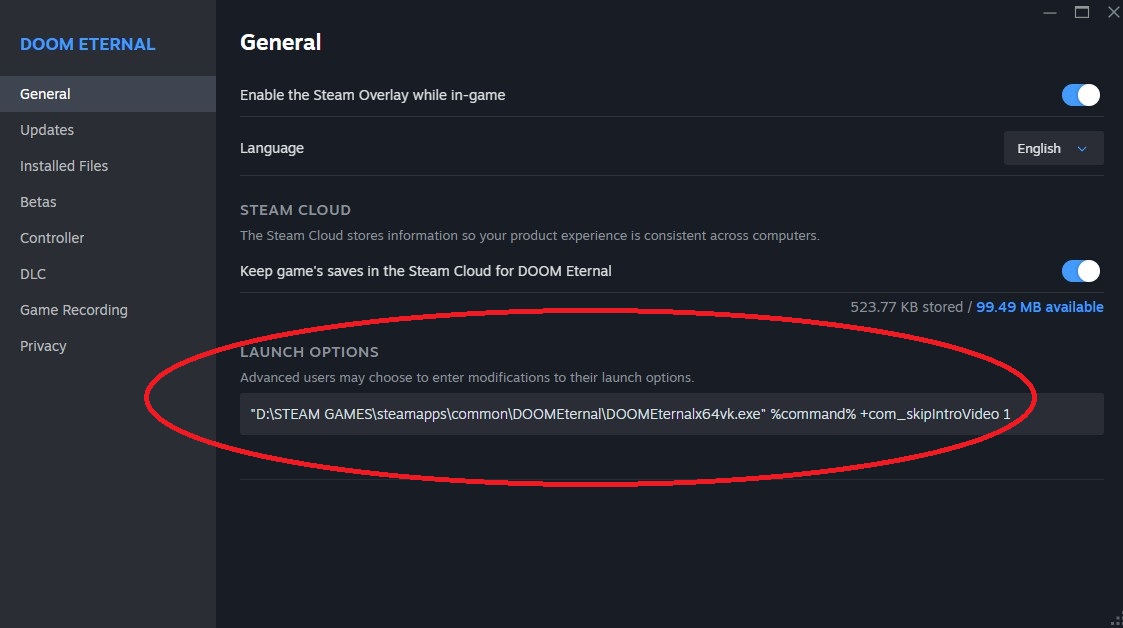
In my Case the FULL Path for the Launch Options is:
"D:\STEAM GAMES\steamapps\common\DOOMEternal\DOOMEternalx64vk.exe" %command% +com_skipIntroVideo 1
5. If you liked this Guide and it worked for you, you may Rate it Up or leave a nice Comment=)
If you just choose to skip the new Launcher by checking that little Box in the ID-Launcher itself, it still is started when you click on "Play" in your Steam Library and it is running in the Background as long as you play your Game!! By following this Guide, the Game itself is being started (as it has been before) and you keep the possibility to skip the Intro Videos if you choose so...!
Just follow these Steps:
1. Rightclick "Doom Eternal" in your Steam Games Library
2. Select "Properties"
3. In the Section "Launch Options" you have to insert something like this:
"D:\STEAM GAMES\steamapps\common\DOOMEternal\DOOMEternalx64vk.exe" %command%
(The Space between the " " should be the complete Path of the Executable of Doom Eternal, "DOOMEternalx64vk.exe")
4. If you also want to skip the Intro/Startup Movies, you can add this in the Launch Options as well: +com_skipIntroVideo 1
The Launch Options should look similar to this now:
In my Case the FULL Path for the Launch Options is:
"D:\STEAM GAMES\steamapps\common\DOOMEternal\DOOMEternalx64vk.exe" %command% +com_skipIntroVideo 1
5. If you liked this Guide and it worked for you, you may Rate it Up or leave a nice Comment=)
More DOOM Eternal guides
- DOOM Eternal 100% Achievement Guide★ 5 (677)39k views1.6k ♥15 minUpdated Apr 9, 2024
- DOOM Eternal Written Guide/Walkthrough for all collectables and secrets inc DLC.★ 5 (1.7k)36k views3.9k ♥129 minUpdated May 22, 2025
- Секреты Doom Eternal★ 5 (874)32k views1.7k ♥23 minRussianUpdated Apr 17, 2023
- Console Commands for DOOM Eternal★ 5 (213)29k views502 ♥18 minUpdated Mar 30, 2021
- Collectibles and Secrets Guide 100% DOOM Eternal★ 4 (370)26k views589 ♥1 minBulgarianUpdated Apr 2, 2021
- DOOM for Dummies [Tweaks, Fixes, Problem solving] [EN]★ 5 (720)23k views878 ♥15 minUpdated Jun 18, 2020




This guide was created by its original author on the Steam Community. Are you the author and want it removed? Request removal.