RE 5: Achievements for Xbox (GFWL)
Informations / Recommendation
● Estimated download time: 44,000/Speed (in Mbps) = ... seconds.
● Estimated time: ~48.5 hours[howlongtobeat.com]
● Achievement guide: Steam Hunters; Resident Evil 5[steamhunters.com]
First Step: Open Resident Evil 5's Properties
Right-click the game in your Steam Library and select Properties. Head to the Betas tab and in the field labeled "Enter a beta access code to unlock private betas", enter the following code: G4WLOriginalVersion
Then click Check Code.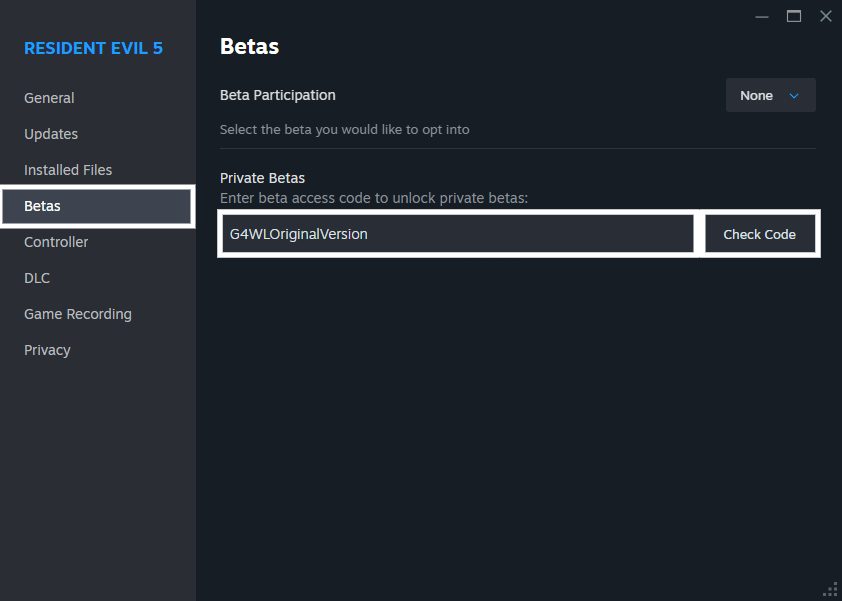
Second Step: Select the Right Version
Once the code is accepted, select the original - original GFWL version from the dropdown menu.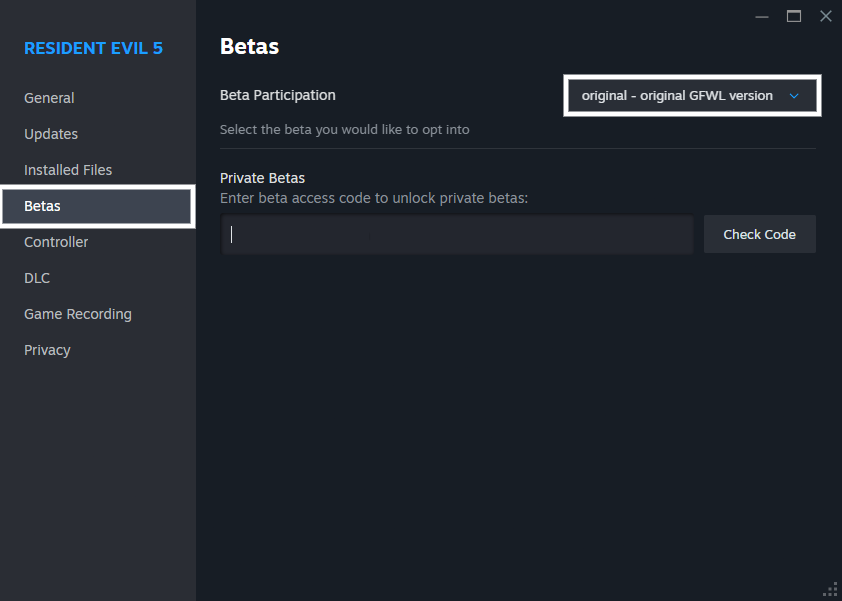
Third Step: Update Resident Evil 5
Let the game update to the Games for Windows Live version and wait for it to finish before moving on.
Fourth Step: Download Microsoft Games for Windows - LIVE
You'll need to download a working version of Microsoft Games for Windows LIVE. I recommend using Microsoft Games for Windows LIVE 3.5.95.0[community.pcgamingwiki.com] available on PCGamingWiki.Once downloaded, extract all the files and install them in this order:
1. xliveredist.msi
2. gfwlclient.msi
3. gfwlivesetup.exe
⚠️ If you are running Windows 7 or earlier, you'll also need to install wllogin_32.msi or wllogin_64.msi depending on your system architecture.
Once installation is complete, launch Resident Evil 5 [original] and the in-game GFWL overlay and sign-in prompt will appear. Keep in mind that the first sign-in can take anywhere from 5 to 10 minutes.
Images coming soon, didn't Dual boot my SteamDeck yet

🏆
Beat Resident Evil 5's achievements?
Flex it — let your friends know you pulled it off.
More Resident Evil 5 guides
- Resident Evil 5 - Fixes★ 5 (2k)119k views2.4k ♥9 minUpdated Aug 2, 2025
- Resident Evil 5 Quality of Life Fixes★ 5 (1.5k)78k views2.1k ♥4 minUpdated Mar 9
- Resident Evil 5: Gold Edition 100% Achievement Guide★ 5 (1.3k)42k views2.6k ♥24 min
- getting multiplayer achievements with bots★ 5 (876)33k views1.7k ♥11 minBulgarianUpdated Aug 27, 2023
- Farming Gold (15K), ammo and eggs★ 5 (459)33k views423 ♥1 minBulgarianUpdated Sep 24, 2018
- Полный русификатор (текст+звук) {1C} Gold Edition★ 5 (674)30k views778 ♥1 minRussianUpdated Feb 3, 2024



🔥 Popular guides
- Upgrading to PremiumTeam Fortress 2★ 5 (20k)1441k views11k ♥6 minUpdated May 11, 2022
- No More Room in Hell Official ManualNo More Room in Hell★ 5 (2.8k)569k views2.1k ♥29 minUpdated Apr 22, 2019
- NMRiH Community Hosting GuidesNo More Room in Hell★ 5 (526)351k views653 ♥1 minUpdated Aug 10, 2022
- ULTIMATE GUIDE FOR GAME DEV TYCOONGame Dev Tycoon★ 5 (5.8k)326k views10k ♥4 minUpdated 23 Jan, 2014
- How to 'Git Gud' Soon™MORDHAU★ 5 (2k)318k views3k ♥68 minUpdated Nov 16, 2024
- Лучшие кооперативные игры SteamPAYDAY 2★ 5 (1.5k)315k views2.1k ♥56 minRussianUpdated Apr 27, 2025






This guide was created by its original author on the Steam Community. Are you the author and want it removed? Request removal.