[RU/ENG]How to disable DOOM Eternal Launcher completely
[RU]Полное отключение Bethesda Launcher при запуске игры
Руководство создано по причине того, что чек-бокс в самом лаунчере не делает ничего, при поставленной галочке, лаунчер все еще включается при запуске игры через STEAM.
На 12.04.2026 чек-бокс все еще бесполезен, может позже это исправят.
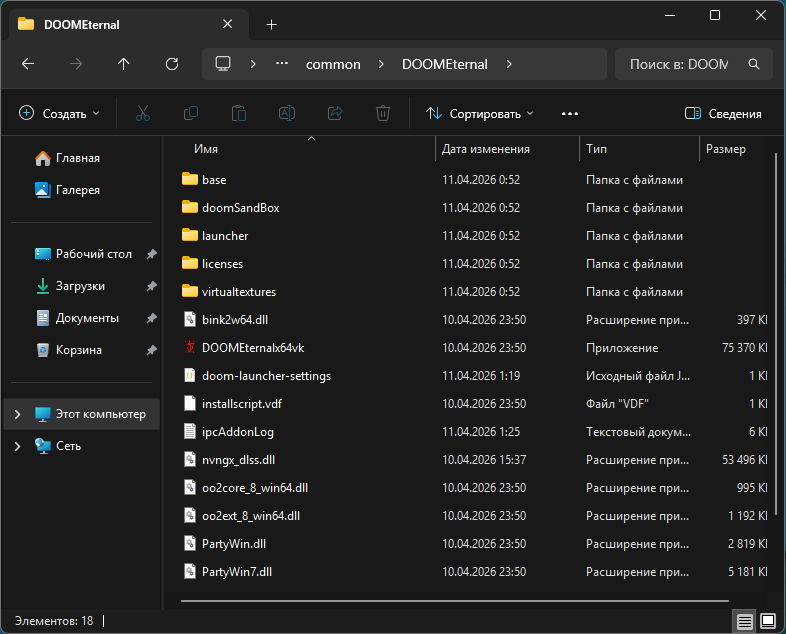 Путь к игре выглядит так:
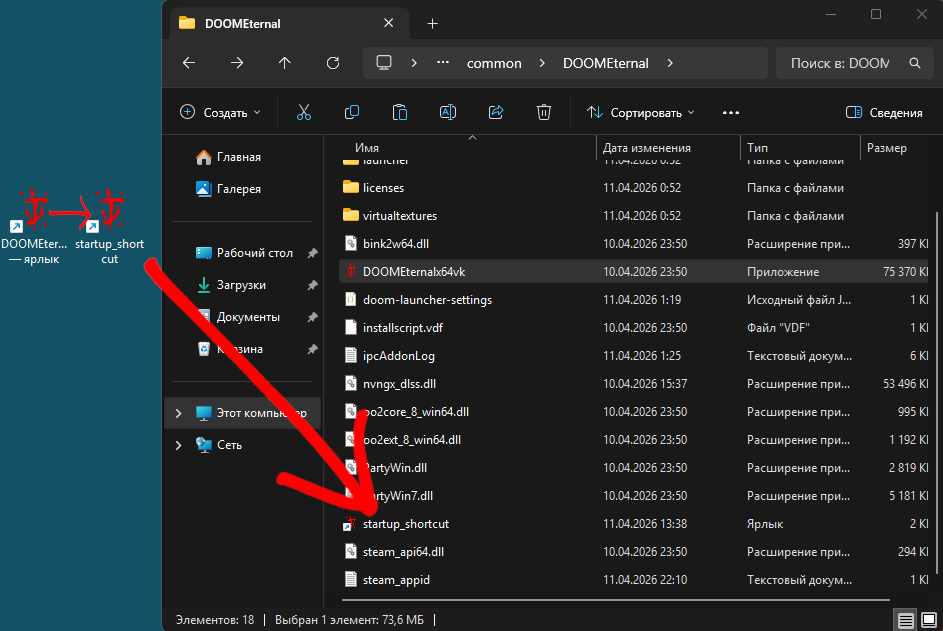
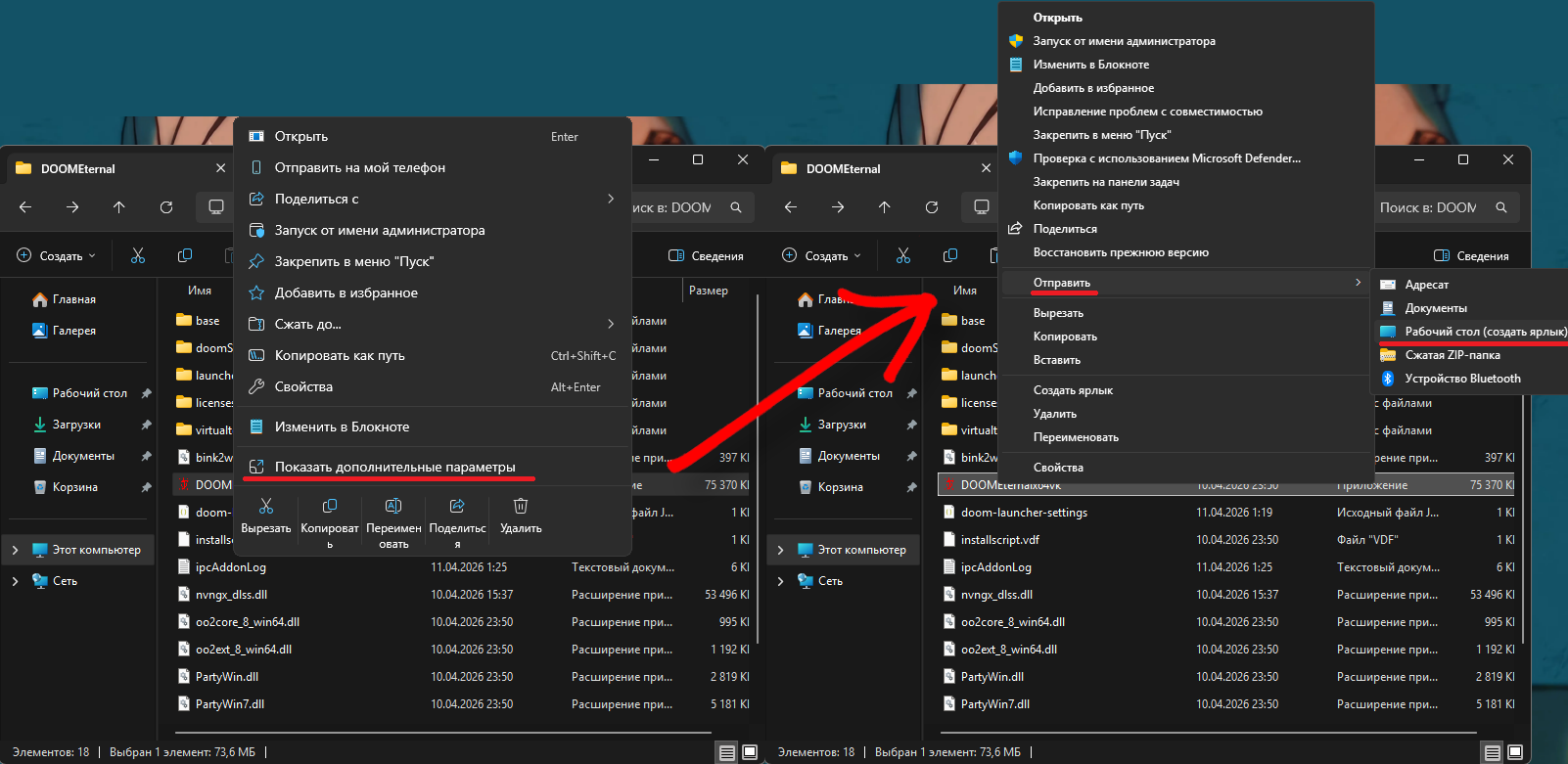 На рабочем столе у вас появляется ярлык, переименовываем его в startup_shortcut, этот ярлык переносим в папку с игрой.
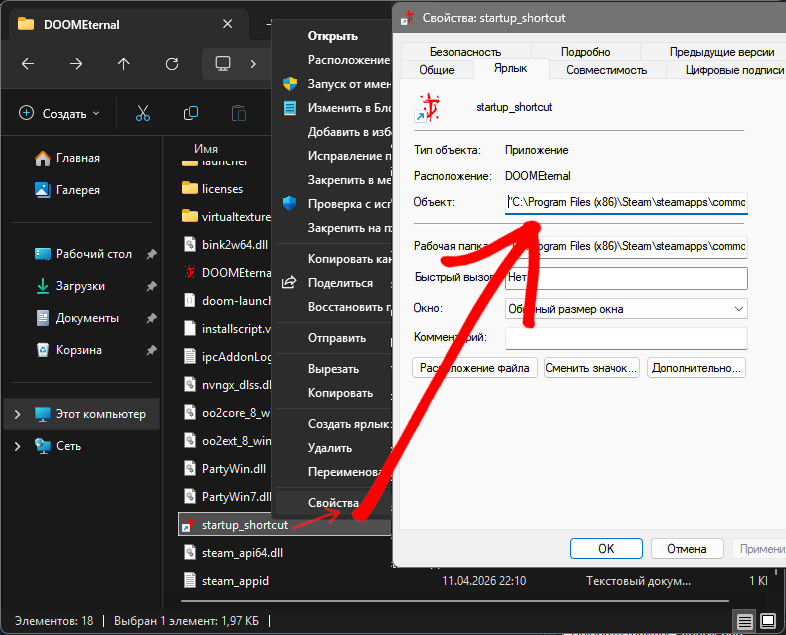 Мой путь выглядит так:
Это будет выглядеть так:
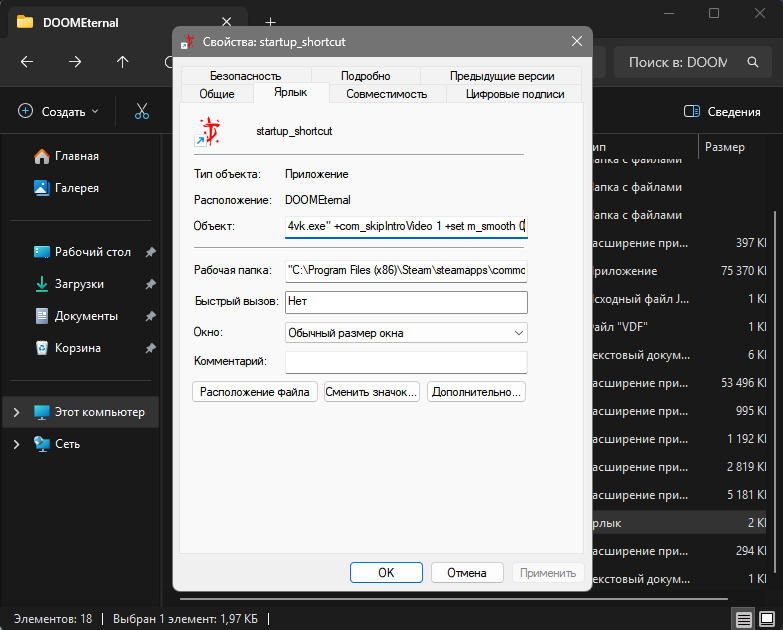 Путь вместе с параметрами запуска:
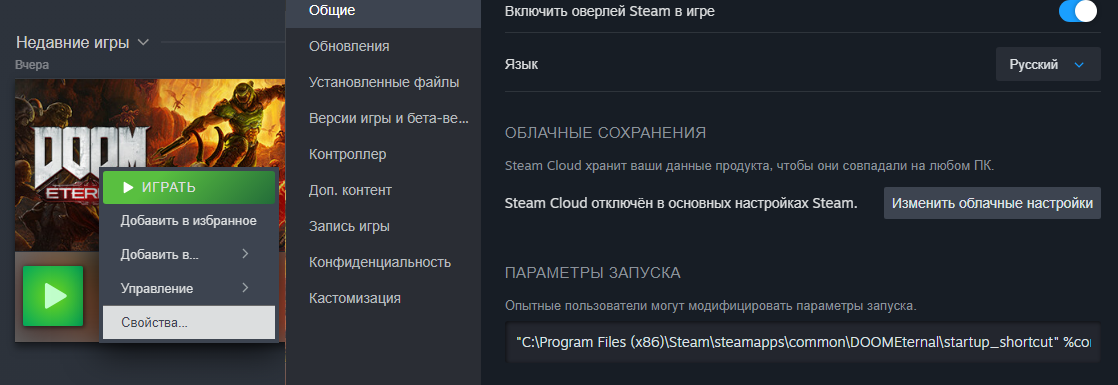 Мой путь в параметрах запуска выглядит так:
На 12.04.2026 чек-бокс все еще бесполезен, может позже это исправят.
Стартуем
Папка
Открываем папку с игрой, моя папка выглядит такПуть к игре выглядит так:C:\Program Files (x86)\Steam\steamapps\common\DOOMEternal
Ярлык
Жмем ПКМ по DOOMEternalx64vk.exe и создаем обычный ярлык.На рабочем столе у вас появляется ярлык, переименовываем его в startup_shortcut, этот ярлык переносим в папку с игрой.Путь
Жмем ПКМ по только что созданному ярлыку startup_shortcut, открываем свойства. В поле Объект: указываем путь к DOOMEternalx64vk.exe.Мой путь выглядит так:"C:\Program Files (x86)\Steam\steamapps\common\DOOMEternal\DOOMEternalx64vk.exe"
кавычки важны.Важно!
Если у вас есть какие-либо параметры запуска (например на пропуск интро), прописанные в STEAM к DOOM Eternal. Теперь их нужно будет прописывать в новом ярлыке startup_shortcut.Это будет выглядеть так:
Путь вместе с параметрами запуска:"C:\Program Files (x86)\Steam\steamapps\common\DOOMEternal\DOOMEternalx64vk.exe" +com_skipIntroVideo 1 +set m_smooth 0
Дальше будет понятно, почему параметры запуска переехали сюда.Параметры запуска в STEAM
Переходим в STEAM жмем ПКМ по игре DOOM Eternal переходим в свойства и пишем ваш путь в параметры запуска к ярлыку startup_shortcut и добавляем %command%".Мой путь в параметрах запуска выглядит так:"C:\Program Files (x86)\Steam\steamapps\common\DOOMEternal\startup_shortcut" %command%"
Всё, конец.
Дальше можете нажимать в STEAM зеленую кнопку плей, игра будет включаться без лаунчера.Источник:
Нашел это на reddit
[ENG]Completely disabling the Bethesda launcher when launching a game
This guide was created because the checkbox in the launcher itself does nothing; when checked, the launcher still turns on when launching the game through STEAM.
As of 12.04.2026 the checkbox is still useless, maybe they'll fix it later.
The path to the game looks like this:
A shortcut will appear on your desktop, rename it to startup_shortcut, and move this shortcut to the game folder.
My path looks like this:
It will look like this:
Path with launch parameters:
My path in launch options looks like:
As of 12.04.2026 the checkbox is still useless, maybe they'll fix it later.
Start
Folder
Open the game folder. Mine looks like this.The path to the game looks like this:C:\Program Files (x86)\Steam\steamapps\common\DOOMEternal
Shortcut
Right-click DOOMEternalx64vk.exe and create a regular shortcut.A shortcut will appear on your desktop, rename it to startup_shortcut, and move this shortcut to the game folder.Path
Right-click the newly created startup_shortcut shortcut, open properties. In the Object: field, enter the path to DOOMEternalx64vk.exe.My path looks like this:"C:\Program Files (x86)\Steam\steamapps\common\DOOMEternal\DOOMEternalx64vk.exe"
Quotation marks are important.Important!
If you have any launch parameters (for example, skipping the intro) defined in STEAM for DOOM Eternal, you will now need to define them in the new startup_shortcut.It will look like this:
Path with launch parameters:"C:\Program Files (x86)\Steam\steamapps\common\DOOMEternal\DOOMEternalx64vk.exe" +com_skipIntroVideo 1 +set m_smooth 0
It will become clear later why the launch parameters were moved here.Launch options in STEAM
Go to STEAM press RMB on the game DOOM Eternal go to properties and write your path in the launch parameters to the startup_shortcut shortcut and add %command%".My path in launch options looks like:"C:\Program Files (x86)\Steam\steamapps\common\DOOMEternal\startup_shortcut" %command%"
This is the end.
Then you can click on STEAM green button play, the game will start without a launcher.Source:
Found this on reddit
More DOOM Eternal guides
- DOOM Eternal 100% Achievement Guide★ 5 (677)39k views1.6k ♥15 minUpdated Apr 9, 2024
- DOOM Eternal Written Guide/Walkthrough for all collectables and secrets inc DLC.★ 5 (1.7k)36k views3.9k ♥129 minUpdated May 22, 2025
- Секреты Doom Eternal★ 5 (874)32k views1.7k ♥23 minRussianUpdated Apr 17, 2023
- Console Commands for DOOM Eternal★ 5 (213)29k views502 ♥18 minUpdated Mar 30, 2021
- Collectibles and Secrets Guide 100% DOOM Eternal★ 4 (370)26k views589 ♥1 minBulgarianUpdated Apr 2, 2021
- DOOM for Dummies [Tweaks, Fixes, Problem solving] [EN]★ 5 (720)23k views878 ♥15 minUpdated Jun 18, 2020




This guide was created by its original author on the Steam Community. Are you the author and want it removed? Request removal.