AC4 Black Flag - Back-up for save files
Steps
 Create a new file using Notepad, add this line (just make sure it uses the path to your UPlay installation directory)
xcopy "<uplay_installation_directory>\Ubisoft Game Launcher\savegames\<your_uplay_id>\437" "C:\Backup\AC4BF" /Y /S
Save this file as a batch file, e.g backup_AC.bat
I use this line in my file:
xcopy "C:\Program Files (x86)\Ubisoft\Ubisoft Game Launcher\savegames\<my_uplay_id>\437" "C:/Saves/AC4BF" /Y /S
Just run the .bat file after you exit the game - you should now have a back-up of your files.
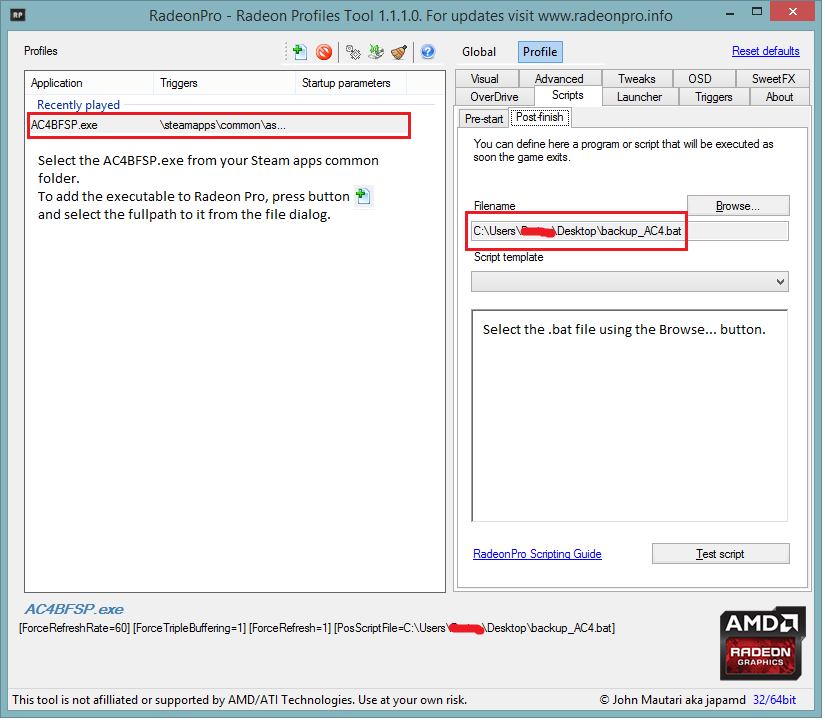
Using Radeon Pro (if you have an AMD video card) you can even run the .bat file automatically when you exit the game.
To automatically run the batch file from Radeon Pro, see the attached screenshot.
More Assassin's Creed IV Black Flag guides
- Kenway's Fleet Basics★ 5 (272)36k views352 ♥19 minUpdated Jul 10
- Legendary Ships★ 5 (300)36k views319 ♥3 minUpdated Nov 21, 2013
- Особые чертежи★ 5 (598)28k views915 ♥1 minRussian
- How to remove stutter and lag from the game + Fix for the Vsync bug★ 5 (278)23k views569 ♥5 minUpdated Jan 31
- Руководство для получения Брони Тамплиера★ 5 (251)23k views334 ♥4 minRussianUpdated Sep 2, 2017
- Assassins Creed 4 Black Flag все карты сокровищ★ 5 (416)22k views508 ♥6 minRussian





🔥 Popular guides
- Upgrading to PremiumTeam Fortress 2★ 5 (20k)1441k views11k ♥6 minUpdated May 11, 2022
- No More Room in Hell Official ManualNo More Room in Hell★ 5 (2.8k)569k views2.1k ♥29 minUpdated Apr 22, 2019
- NMRiH Community Hosting GuidesNo More Room in Hell★ 5 (526)351k views653 ♥1 minUpdated Aug 10, 2022
- ULTIMATE GUIDE FOR GAME DEV TYCOONGame Dev Tycoon★ 5 (5.8k)326k views10k ♥4 minUpdated 23 Jan, 2014
- How to 'Git Gud' Soon™MORDHAU★ 5 (2k)318k views3k ♥68 minUpdated Nov 16, 2024
- Лучшие кооперативные игры SteamPAYDAY 2★ 5 (1.5k)315k views2.1k ♥56 minRussianUpdated Apr 27, 2025






This guide was created by its original author on the Steam Community. Are you the author and want it removed? Request removal.