BULLY PC: MUST HAVE FIXES!
INTRO
So welcome to my guide on how to completely fix Bully on PC.
Even though I'm writing this on Steam, I'll also be covering the official DVD copies that don't use Steam.
All you need to follow this guide is some very basic knowledge. Either way I'll try to make it as easy as possible.
Even though I'm writing this on Steam, I'll also be covering the official DVD copies that don't use Steam.
All you need to follow this guide is some very basic knowledge. Either way I'll try to make it as easy as possible.
OFFICIAL PATCHES BY ROCKSTAR
NOTICE: IF YOU OWN THE STEAM VERSION YOU CAN IGNORE THIS PART. THIS IS FOR THE DVD COPIES!
BULLY: Scholarship Edition Patch 1.200
Link: https://support.rockstargames.com/articles/200149976/Bully-Scholarship-Edition-Patch-1-200-PC-Only
How to install:
Download the patch in your language, and run it.
If Bully is installed correctly, the patch will install without any issues.
What it does:
When Bully was first released on PC, there was a load of nasty horrible issues, such as memory leaks, and infinite loading after talking to Dr Crabblesnitch.
If your system had over 2GB RAM, these issues would be unavoidable without this patch. Seriously if you have the DVD copy, for the love of God, download this patch and install it.
BULLY: Scholarship Edition Patch 1.200
Link: https://support.rockstargames.com/articles/200149976/Bully-Scholarship-Edition-Patch-1-200-PC-Only
How to install:
Download the patch in your language, and run it.
If Bully is installed correctly, the patch will install without any issues.
What it does:
When Bully was first released on PC, there was a load of nasty horrible issues, such as memory leaks, and infinite loading after talking to Dr Crabblesnitch.
If your system had over 2GB RAM, these issues would be unavoidable without this patch. Seriously if you have the DVD copy, for the love of God, download this patch and install it.
FANMADE PATCHES
These patches are made by fans and are NOT official, if there are any issues, contact the mod author, not Rockstar.
SILENTPATCH: https://github.com/CookiePLMonster/SilentPatchBully/releases
What it does:
As many reviews have stated, Bully crashes a LOT on Windows 10, with and without mods.
SilentPatch fixes this, and also allows you to uncap the FPS without needing a dodgy file. So you can now enjoy Bully at a proper 60 FPS.
How to install:
Download the archive (SilentPatchBully.zip) and extract the files to your Bully folder.
Don't know where it is?
On Steam, it's in your SteamApps folder -> common -> Bully Scholarship Edition.
Need a vid?
I did make a mistake with this video: set your FPS limit to your monitors' refresh rate and enable VSync. Otherwise the game may play at double speed if your FPS exceeds your monitors' refresh rate.
Known Issues with 60 fps
Since Bully was never intended to be played at 60 fps, some issues are known to occur. (This is not a fault of Rockstar's, just the game engine)
These issues can be fixed by temporarily reverting back to 30 fps.
The game MIGHT softlock during the mission "Balls of Snow" in Chapter 3, where there's a chance Jimmy may either have rapid fire, or he'll freeze in place unable to move.
During the Chapter 5 mission "Finding Johnny Vincent", you may have problems opening a gate which requires you to mash a button. Either revert to 30 FPS, or temporarily use keyboard controls.
WIDESCREEN FIX: https://github.com/ThirteenAG/WidescreenFixesPack/releases/tag/bully
What it does:
If you play Bully on a widescreen monitor, or ultrawide, you might notice the game does look a bit stretched, and this mod fixes that.
The HUD no longer appears stretched, and Jimmy looks slimmer.
You can also change the FOV in this too, but don't change it too much, because otherwise clipping in cutscenes occurs and sometimes, also in cutscenes you might see stuff you shouldn't, like characters "freezing" in their animations when they should be off screen.
Also, ThirteenAG has widescreen fixes for many other games like the older GTAs, the Tony Hawk games, Mass Effect etc. So if you have any of those games, check out his site as there are a load of fixes for older games.
How to install:
Download the archive, and extract "Dinput8.dll" and the plugins folder to your Bully folder. Just like SilentPatch basically.
In the plugins folder, you can find an editable INI, where you can change the FOV if you want.
By default it's: FOVFactor = 1.0
Change this too high and it'll look ugly.
Personally, 1.2 is the sweet spot for me, but that's down to your own preference.
DERPY'S SCRIPT LOADER https://www.nexusmods.com/bullyscholarshipedition/mods/43
What it does: Adds support for more powerful script mods akin to GTA SA's CLEO
This mod enables all sorts of script mods without you needing to touch the game files, it's more of a simple mod loader, since the majority of the mods can be dragged and dropped.
Yes, this guide is intended for bug fixes than whatever wacky mods the community have cooked up, but there are a few bug fixes that require DSL and won't work without it
It's recommended for most people to use the "s" version of the mod.
To install, drag and drop derpy_script_loader.asi into your Bully folder.
BALLS OF SNOW - HIGH FPS FIXER https://www.nexusmods.com/bullyscholarshipedition/mods/141 - DERPY
What it does: Fixes Balls of Snow softlocking on 60FPS and higher
Because Bully was never intended to be played at 60 FPS, the mission Balls of Snow is known to softlock, where Jimmy throws a snowball and freezes, sometimes for a few seconds, othertimes for the entire mission and it makes it genuinely unplayable.
This mod for DSL fixes that, you need to put the file inside _derpy_script_loader -> scripts and then it's fixed.
BETTER SOUNDS https://www.nexusmods.com/bullyscholarshipedition/mods/74
What it does: Fixes & improves the quality of some of Bully's audio
When Rockstar went ahead and ported Bully to PC/Xbox 360, they downgraded a lot of the audio, because of that, a few audio oddities occur, including but not limited to: really low quality audio bites (Pete Kowalski greeting, The Candidate's mission theme) or really loud audio (Pinky's "THANKS FOR A GREAT DATE JIMMY!" & some ambience) plus most character dialogue isn't as crisp as it was on the PS2.
This mod, made by Cos2 brings back most of the PS2 audio back to PC, so some of the inconsistencies aren't around anymore.
So far, Cos2 has ported all PS2 sounds of the soundtrack, cutscene audio, ambience and character audio. Not yet known if the PS2 sound effects (ie weapons, mission specific stuff) will be ported, but as of now, it's good enough
It's a big download, over 1GB, and to install just drag and drop the AUDIO folder into the main Bully folder and select "yes" to overwrite.
BULLY MULTIPLAYER
What it does: Adds online multiplayer to Bully, much like GTA SA:MP.
If you've ever played GTA SA:MP then you'll probably already have an idea of what Bully MP will be like, but if you haven't Bully MP is basically an unofficial multiplayer mod that lets you play online. It does NOT let you play through the story, but instead in custom game modes, or freeroaming etc. Lets you play as anyone, the clique leaders, adults, prefects.
Link: http://www.bully-mp.com/
How to Install:
SILENTPATCH: https://github.com/CookiePLMonster/SilentPatchBully/releases
What it does:
As many reviews have stated, Bully crashes a LOT on Windows 10, with and without mods.
SilentPatch fixes this, and also allows you to uncap the FPS without needing a dodgy file. So you can now enjoy Bully at a proper 60 FPS.
How to install:
Download the archive (SilentPatchBully.zip) and extract the files to your Bully folder.
Don't know where it is?
On Steam, it's in your SteamApps folder -> common -> Bully Scholarship Edition.
Need a vid?
I did make a mistake with this video: set your FPS limit to your monitors' refresh rate and enable VSync. Otherwise the game may play at double speed if your FPS exceeds your monitors' refresh rate.
Known Issues with 60 fps
Since Bully was never intended to be played at 60 fps, some issues are known to occur. (This is not a fault of Rockstar's, just the game engine)
These issues can be fixed by temporarily reverting back to 30 fps.
The game MIGHT softlock during the mission "Balls of Snow" in Chapter 3, where there's a chance Jimmy may either have rapid fire, or he'll freeze in place unable to move.
During the Chapter 5 mission "Finding Johnny Vincent", you may have problems opening a gate which requires you to mash a button. Either revert to 30 FPS, or temporarily use keyboard controls.
WIDESCREEN FIX: https://github.com/ThirteenAG/WidescreenFixesPack/releases/tag/bully
What it does:
If you play Bully on a widescreen monitor, or ultrawide, you might notice the game does look a bit stretched, and this mod fixes that.
The HUD no longer appears stretched, and Jimmy looks slimmer.
You can also change the FOV in this too, but don't change it too much, because otherwise clipping in cutscenes occurs and sometimes, also in cutscenes you might see stuff you shouldn't, like characters "freezing" in their animations when they should be off screen.
Also, ThirteenAG has widescreen fixes for many other games like the older GTAs, the Tony Hawk games, Mass Effect etc. So if you have any of those games, check out his site as there are a load of fixes for older games.
How to install:
Download the archive, and extract "Dinput8.dll" and the plugins folder to your Bully folder. Just like SilentPatch basically.
In the plugins folder, you can find an editable INI, where you can change the FOV if you want.
By default it's: FOVFactor = 1.0
Change this too high and it'll look ugly.
Personally, 1.2 is the sweet spot for me, but that's down to your own preference.
DERPY'S SCRIPT LOADER https://www.nexusmods.com/bullyscholarshipedition/mods/43
What it does: Adds support for more powerful script mods akin to GTA SA's CLEO
This mod enables all sorts of script mods without you needing to touch the game files, it's more of a simple mod loader, since the majority of the mods can be dragged and dropped.
Yes, this guide is intended for bug fixes than whatever wacky mods the community have cooked up, but there are a few bug fixes that require DSL and won't work without it
It's recommended for most people to use the "s" version of the mod.
To install, drag and drop derpy_script_loader.asi into your Bully folder.
BALLS OF SNOW - HIGH FPS FIXER https://www.nexusmods.com/bullyscholarshipedition/mods/141 - DERPY
What it does: Fixes Balls of Snow softlocking on 60FPS and higher
Because Bully was never intended to be played at 60 FPS, the mission Balls of Snow is known to softlock, where Jimmy throws a snowball and freezes, sometimes for a few seconds, othertimes for the entire mission and it makes it genuinely unplayable.
This mod for DSL fixes that, you need to put the file inside _derpy_script_loader -> scripts and then it's fixed.
BETTER SOUNDS https://www.nexusmods.com/bullyscholarshipedition/mods/74
What it does: Fixes & improves the quality of some of Bully's audio
When Rockstar went ahead and ported Bully to PC/Xbox 360, they downgraded a lot of the audio, because of that, a few audio oddities occur, including but not limited to: really low quality audio bites (Pete Kowalski greeting, The Candidate's mission theme) or really loud audio (Pinky's "THANKS FOR A GREAT DATE JIMMY!" & some ambience) plus most character dialogue isn't as crisp as it was on the PS2.
This mod, made by Cos2 brings back most of the PS2 audio back to PC, so some of the inconsistencies aren't around anymore.
So far, Cos2 has ported all PS2 sounds of the soundtrack, cutscene audio, ambience and character audio. Not yet known if the PS2 sound effects (ie weapons, mission specific stuff) will be ported, but as of now, it's good enough
It's a big download, over 1GB, and to install just drag and drop the AUDIO folder into the main Bully folder and select "yes" to overwrite.
BULLY MULTIPLAYER
What it does: Adds online multiplayer to Bully, much like GTA SA:MP.
If you've ever played GTA SA:MP then you'll probably already have an idea of what Bully MP will be like, but if you haven't Bully MP is basically an unofficial multiplayer mod that lets you play online. It does NOT let you play through the story, but instead in custom game modes, or freeroaming etc. Lets you play as anyone, the clique leaders, adults, prefects.
Link: http://www.bully-mp.com/
How to Install:
BULLY ANNIVERSARY EDITION HUD
Due to the fact that Bully was originally a PS2 title, the HUD the game uses hasn't aged that well on more modern resolutions, as they do look rather low quality on high resolutions.
Thankfully, when Rockstar released Bully Anniversary Edition for iOS/Android in 2016, they went through the effort to completely remaster all the HUD elements, inc weapon icons, the map etc, which look much more beautiful.
Modder AuraShadow has gone to the effort to attempt to port the entire HUD from mobile and some extra bonuses, to the PC version.
INCLUDES:
* All weapon icons changed
* All HUD elements changed
* Loading screen changes
* Classes upgraded
* Bully AE intro credits
* Higher quality radar
* Changes to obscure things like the bulletin boards
* Pause menu changed
* New yearbook photos
* A choice between PS/Xbox/Android controller icons
* Steam covers & logo
Note: it won't change the keyboard icons if you use them.
LINK: https://www.moddb.com/games/bully-scholarship-edition/downloads/bully-scholarship-edition-anniversary-edition-hud
GAME BREAKING BUG: DO NOT COPY THE "fade.nft" FILE LOCATED IN "TXD/LS FOLDER". IT WILL CRASH IF THAT FILE GETS REPLACED!
MAKE A BACKUP OF THAT ONE FILE BEFORE INSTALLING!
TO INSTALL:
1. Go to the "#1 Important files" folder
2. Extract all contents inside into your Bully folder
3. Select "yes" to overwrite all files
4. Overwrite the NEW fade.nft file with the OLD fade.nft to prevent crashing
5. Enter the "stream" folder in your Bully SE main folder
6. Double click "install.exe" and wait about 3 minutes
7. DONE!
Thankfully, when Rockstar released Bully Anniversary Edition for iOS/Android in 2016, they went through the effort to completely remaster all the HUD elements, inc weapon icons, the map etc, which look much more beautiful.
Modder AuraShadow has gone to the effort to attempt to port the entire HUD from mobile and some extra bonuses, to the PC version.
INCLUDES:
* All weapon icons changed
* All HUD elements changed
* Loading screen changes
* Classes upgraded
* Bully AE intro credits
* Higher quality radar
* Changes to obscure things like the bulletin boards
* Pause menu changed
* New yearbook photos
* A choice between PS/Xbox/Android controller icons
* Steam covers & logo
Note: it won't change the keyboard icons if you use them.
LINK: https://www.moddb.com/games/bully-scholarship-edition/downloads/bully-scholarship-edition-anniversary-edition-hud
GAME BREAKING BUG: DO NOT COPY THE "fade.nft" FILE LOCATED IN "TXD/LS FOLDER". IT WILL CRASH IF THAT FILE GETS REPLACED!
MAKE A BACKUP OF THAT ONE FILE BEFORE INSTALLING!
TO INSTALL:
1. Go to the "#1 Important files" folder
2. Extract all contents inside into your Bully folder
3. Select "yes" to overwrite all files
4. Overwrite the NEW fade.nft file with the OLD fade.nft to prevent crashing
5. Enter the "stream" folder in your Bully SE main folder
6. Double click "install.exe" and wait about 3 minutes
7. DONE!
CONTROLLER SUPPORT - XBOX / PLAYSTATION / 3RD PARTY
Say you want to play Bully with a controller, but you're unsure if your controller will work?
WARNING: There is a known bug with Bully where, if you start the game BEFORE your controller is turned on, the controller will NOT work until the game is restarted. Your controller MUST be on before launching the game, you cannot enable a controller afterwards.
XBOX CONTROLLERS
Bully natively supports the Xbox 360 and Xbox One controllers only.
If you set up those controllers correctly, they'll work right out the box, nothing more needs to be done.
PLAYSTATION CONTROLLERS
Bully does NOT support PlayStation controllers on PC. PS3, or PS4. Officially anyway.
Thankfully, due to a Steam update a few years ago, PS3/4/5 controllers will work just the same as Xbox controllers. So nothing else really needs to be done.
However for non-Steam users, ie PC-DVD or Rockstar Launcher, you can force them to work with a program called x360ce, a program that tricks games into thinking you're using an Xbox 360 controller when you're not.
But keep in mind that all the controller inputs will be with Xbox prompts, if you do use a PlayStation controller, I recommend the PlayStation icons "mod" which will change all the Xbox inputs to the PlayStation ones, or use the PlayStation setting from the Anniversary Edition HUD mod.
https://gtaforums.com/topic/785063-relbully-playstation-23-button-prompts/
STEAM CONTROLLER
Steam controller will only work if you enable the Xbox config in Steam itself.
WARNING: There is a known bug with Bully where, if you start the game BEFORE your controller is turned on, the controller will NOT work until the game is restarted. Your controller MUST be on before launching the game, you cannot enable a controller afterwards.
XBOX CONTROLLERS
Bully natively supports the Xbox 360 and Xbox One controllers only.
If you set up those controllers correctly, they'll work right out the box, nothing more needs to be done.
PLAYSTATION CONTROLLERS
Bully does NOT support PlayStation controllers on PC. PS3, or PS4. Officially anyway.
Thankfully, due to a Steam update a few years ago, PS3/4/5 controllers will work just the same as Xbox controllers. So nothing else really needs to be done.
However for non-Steam users, ie PC-DVD or Rockstar Launcher, you can force them to work with a program called x360ce, a program that tricks games into thinking you're using an Xbox 360 controller when you're not.
But keep in mind that all the controller inputs will be with Xbox prompts, if you do use a PlayStation controller, I recommend the PlayStation icons "mod" which will change all the Xbox inputs to the PlayStation ones, or use the PlayStation setting from the Anniversary Edition HUD mod.
https://gtaforums.com/topic/785063-relbully-playstation-23-button-prompts/
STEAM CONTROLLER
Steam controller will only work if you enable the Xbox config in Steam itself.
LANGUAGE SUPPORT AND FAN TRANSLATIONS
Bully will ONLY play in the English language, unlike some other games, ie Yakuza, you do not get any dubs.
However, Bully does have support for multiple languages via subtitles, the game itself officially has support for the following languages which I believe are automatically set by your PC's language:
**: Rockstar Launcher Version ONLY! No native support on regular PC-DVD or Steam. See below on how to get Russian and Polish working on other versions.
The game files do have files for Japanese and Russian leftover, but they do not work for whatever reason and forcing them to be default will result in missing text entirely.
ARABIC / عربي
Made by PotatoxxD, this one translates Bully into Arabic.
It is currently awaiting approval on NexusMods, so no download for now, but the mod page is up:
https://www.nexusmods.com/bullyscholarshipedition/mods/220
🇧🇷 BRAZILIAN PORTUGUESE / PORTUGUÊS BRASILEIRO 🇧🇷
This translation was made by DIRECREEP, and you will need to manually install this language pack, you need to go to your main Bully folder, and drag and drop config and movies into the folder, select YES to overwrite.
This mod also comes with a translation of the intro credits scene too.
https://www.nexusmods.com/bullyscholarshipedition/mods/214
🇬🇧 BRITISH ENGLISH (Unused) 🇬🇧
There are also leftover files for British English, which was a thing on the original PS2 versions, which can only be accessed by renaming "British.img" and "British.dir" to "American.img & .dir", since British English and US English are similar, you'll only see slight differences like "Principal" will be called Headmaster and "pants" will be called trousers.
Despite this however, there have been a few other fan translations into other languages:
🇭🇺 HUNGARIAN / Magyar 🇭🇺
Similar to the Indonesian/Turkish patches, this one translates most of Bully into Hungarian.
LINK: https://magyaritasok.hu/download/3262/bully-scholarship-edition
Link comes with a .exe installer, which auto-installs it for you.
🇮🇩 INDONESIAN / bahasa Indonesia 🇮🇩
This translation is made by "IGTCTeam" and much like the Ukrainian one above, aims to translate as much of Bully into Indonesian.
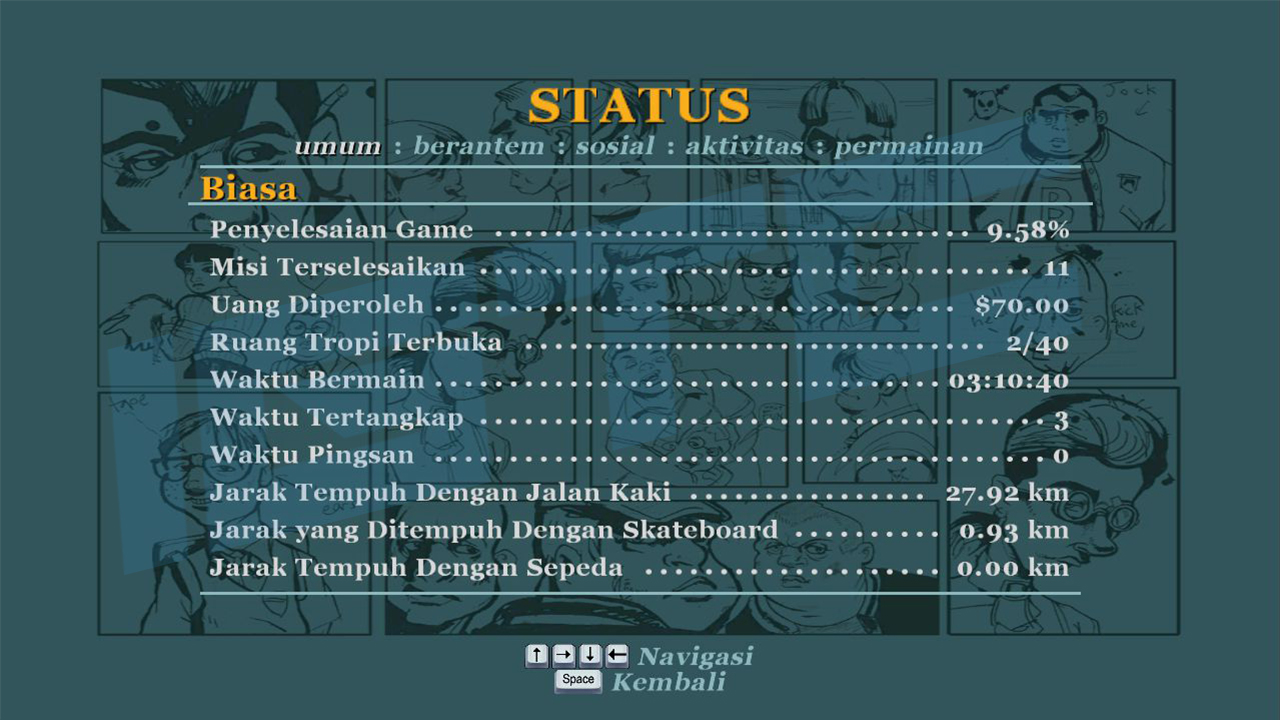
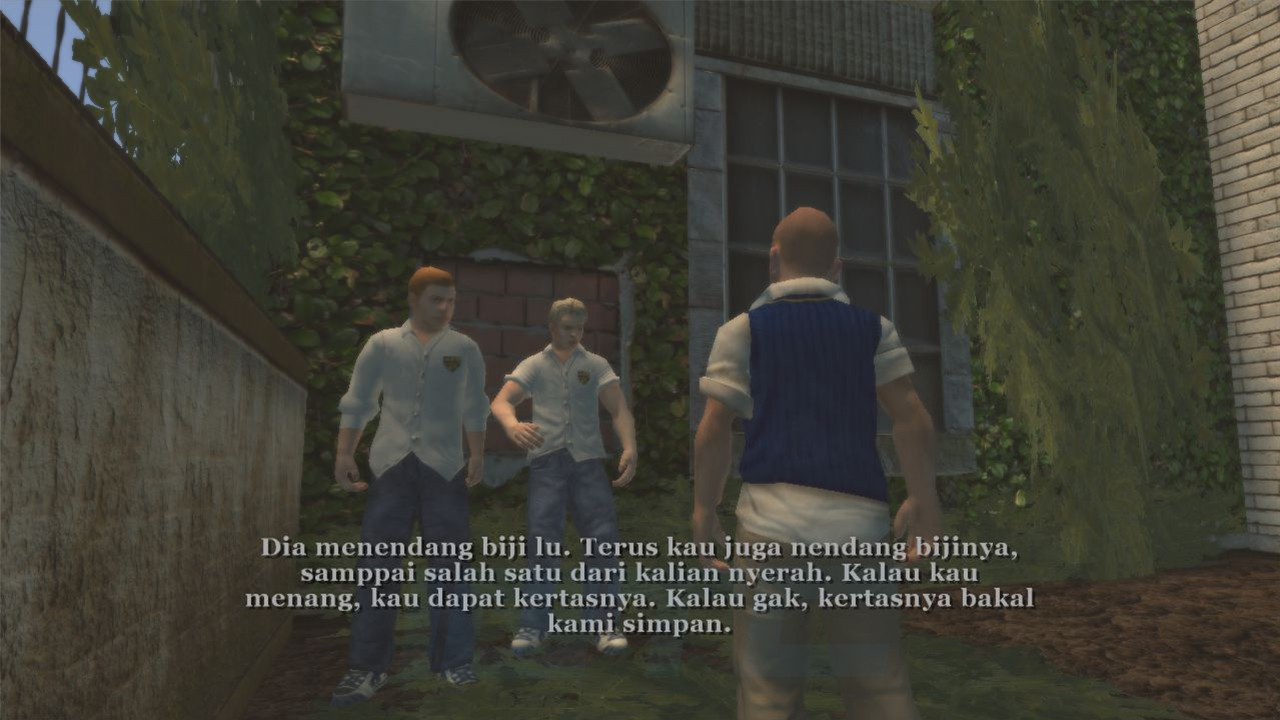
This one has a setup.exe, but appears to be safe to use as it has been scanned by NexusMods before it was approved.
MOD LINK: https://www.nexusmods.com/bullyscholarshipedition/mods/11?tab=description
🇵🇱 POLISH / Polski 🇵🇱
Very similar to how Bully handles Russian, as in, if you're on the Rockstar Launcher version, Polish is fully supported.
However, on PC-DVD/Steam, you need to download this translation pack made by BDIP Translation Group.
Link: https://www.polonizacje.pl/bully-spolszczenie/
Similar to the Hungarian one, it's an auto installer that will do everything for you, just need to select where your Bully folder is located.
🇷🇺 RUSSIAN / русский 🇷🇺
Strangely, Bully has files for the Russian language on Steam and PC DVD, but it's empty if it's manually forced to load, however it works out of the box on the Rockstar Launcher versions of the game.
If you speak Russian, Steam user Walldos found a way to force Steam to load the game in full, functional Russian: https://steamcommunity.com/sharedfiles/filedetails/?id=362120983
Directly copy and pasted from his guide:
Итак, для того чтобы включить в игре русский язык нужно проделать следующие действия:
- Переходим в основную директорию игры (Steam\steamapps\common\Bully Scholarship Edition)
- Находим в главной папке с игрой файл с названием "12200_install.vdf" и открываем его при помощи блокнота.
-Находим в открытом файле следующую строку:
"english"
{
"Language" "1033"
- Меняем значение 1033 на 1049.
- Переключаем язык игры в самом стиме на английский, если стоит иное. (ПКМ на игре-свойства-вкладка язык)
🇺🇦 UKRAINIAN / українська 🇺🇦
A mod by a team (Videntium, Den116pro, blackdot., Cos2 and Nanoposan69) which aims to translate most, if not all, of Bully's subtitles into Ukrainian.
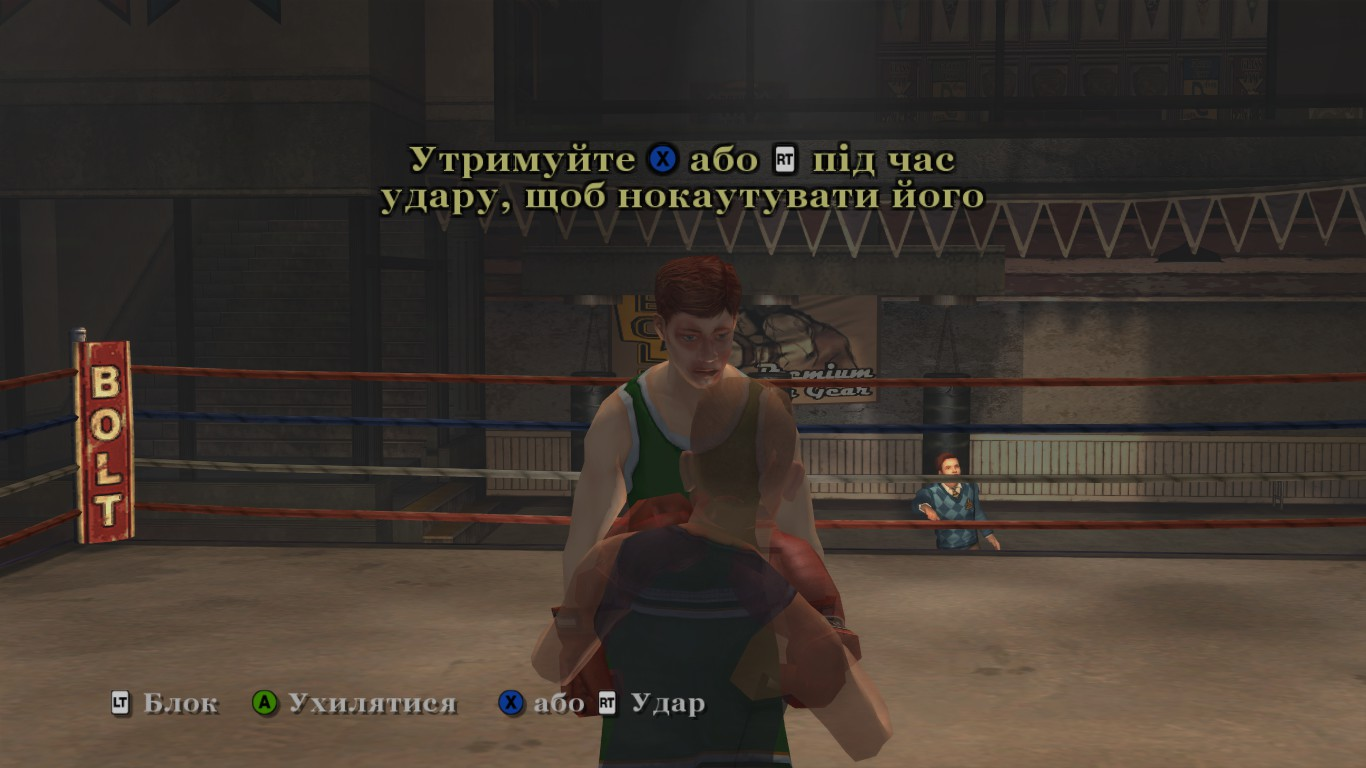
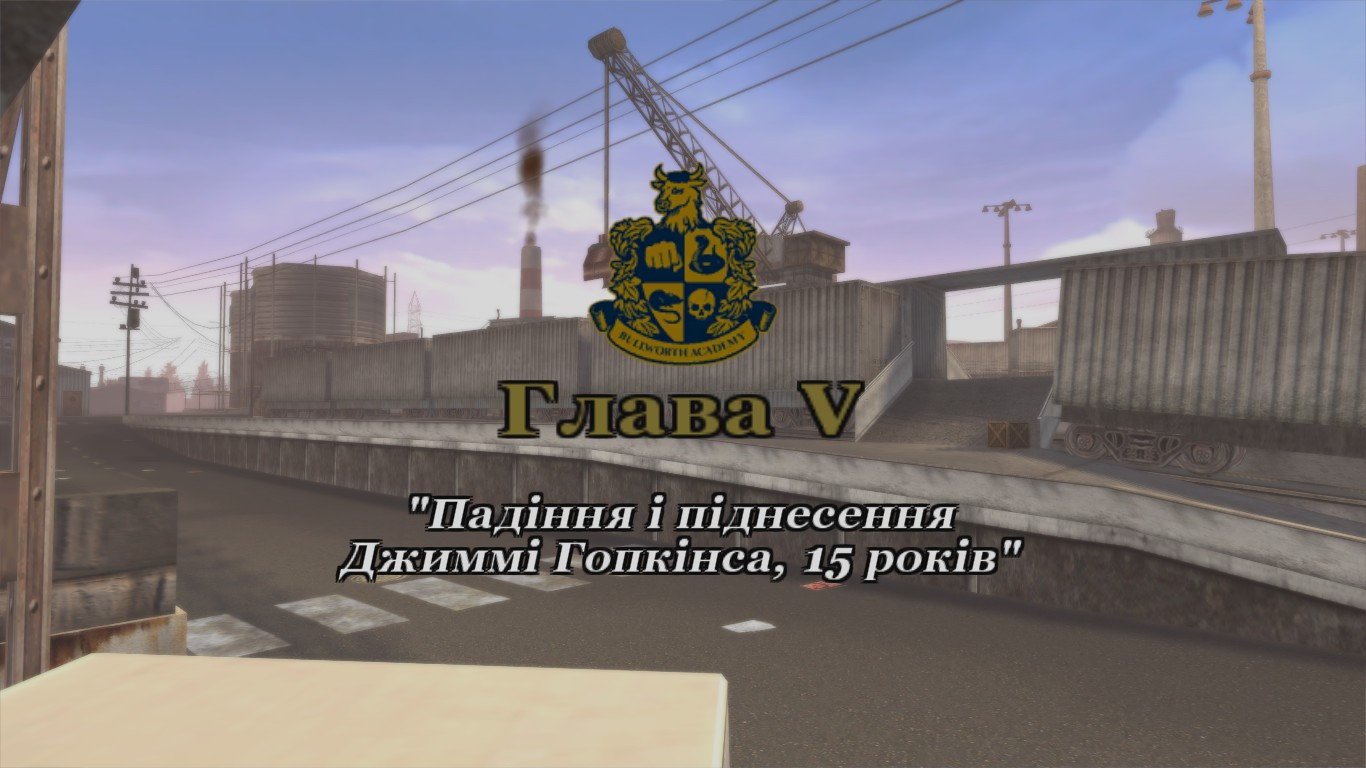
MOD LINK: https://www.nexusmods.com/bullyscholarshipedition/mods/29
To install, replace "american.img and american.dir" located inside "Bully Scholarship Edition\Config\Text"
🇹🇷 TURKISH / Türkçe 🇹🇷
Another fan made translation, known as "Bully Scholarship Edition Türkçe Yama" (Turkish Patch)
Link: https://www.turkce-yama.org/bully-scholarship-edition-turkce-yama/
However, Bully does have support for multiple languages via subtitles, the game itself officially has support for the following languages which I believe are automatically set by your PC's language:
- English (American)
- French (Français)
- German (Deutsch)
- Italian (Italiana)
- Polish** (Polski)
- Russian** (русский)
- Spanish (Española)
**: Rockstar Launcher Version ONLY! No native support on regular PC-DVD or Steam. See below on how to get Russian and Polish working on other versions.
The game files do have files for Japanese and Russian leftover, but they do not work for whatever reason and forcing them to be default will result in missing text entirely.
ARABIC / عربي
Made by PotatoxxD, this one translates Bully into Arabic.
It is currently awaiting approval on NexusMods, so no download for now, but the mod page is up:
https://www.nexusmods.com/bullyscholarshipedition/mods/220
🇧🇷 BRAZILIAN PORTUGUESE / PORTUGUÊS BRASILEIRO 🇧🇷
This translation was made by DIRECREEP, and you will need to manually install this language pack, you need to go to your main Bully folder, and drag and drop config and movies into the folder, select YES to overwrite.
This mod also comes with a translation of the intro credits scene too.
https://www.nexusmods.com/bullyscholarshipedition/mods/214
🇬🇧 BRITISH ENGLISH (Unused) 🇬🇧
There are also leftover files for British English, which was a thing on the original PS2 versions, which can only be accessed by renaming "British.img" and "British.dir" to "American.img & .dir", since British English and US English are similar, you'll only see slight differences like "Principal" will be called Headmaster and "pants" will be called trousers.
Despite this however, there have been a few other fan translations into other languages:
🇭🇺 HUNGARIAN / Magyar 🇭🇺
Similar to the Indonesian/Turkish patches, this one translates most of Bully into Hungarian.
LINK: https://magyaritasok.hu/download/3262/bully-scholarship-edition
Link comes with a .exe installer, which auto-installs it for you.
🇮🇩 INDONESIAN / bahasa Indonesia 🇮🇩
This translation is made by "IGTCTeam" and much like the Ukrainian one above, aims to translate as much of Bully into Indonesian.
This one has a setup.exe, but appears to be safe to use as it has been scanned by NexusMods before it was approved.
MOD LINK: https://www.nexusmods.com/bullyscholarshipedition/mods/11?tab=description
🇵🇱 POLISH / Polski 🇵🇱
Very similar to how Bully handles Russian, as in, if you're on the Rockstar Launcher version, Polish is fully supported.
However, on PC-DVD/Steam, you need to download this translation pack made by BDIP Translation Group.
Link: https://www.polonizacje.pl/bully-spolszczenie/
Similar to the Hungarian one, it's an auto installer that will do everything for you, just need to select where your Bully folder is located.
🇷🇺 RUSSIAN / русский 🇷🇺
Strangely, Bully has files for the Russian language on Steam and PC DVD, but it's empty if it's manually forced to load, however it works out of the box on the Rockstar Launcher versions of the game.
If you speak Russian, Steam user Walldos found a way to force Steam to load the game in full, functional Russian: https://steamcommunity.com/sharedfiles/filedetails/?id=362120983
Directly copy and pasted from his guide:
Итак, для того чтобы включить в игре русский язык нужно проделать следующие действия:
- Переходим в основную директорию игры (Steam\steamapps\common\Bully Scholarship Edition)
- Находим в главной папке с игрой файл с названием "12200_install.vdf" и открываем его при помощи блокнота.
-Находим в открытом файле следующую строку:
"english"
{
"Language" "1033"
- Меняем значение 1033 на 1049.
- Переключаем язык игры в самом стиме на английский, если стоит иное. (ПКМ на игре-свойства-вкладка язык)
🇺🇦 UKRAINIAN / українська 🇺🇦
A mod by a team (Videntium, Den116pro, blackdot., Cos2 and Nanoposan69) which aims to translate most, if not all, of Bully's subtitles into Ukrainian.
MOD LINK: https://www.nexusmods.com/bullyscholarshipedition/mods/29
To install, replace "american.img and american.dir" located inside "Bully Scholarship Edition\Config\Text"
🇹🇷 TURKISH / Türkçe 🇹🇷
Another fan made translation, known as "Bully Scholarship Edition Türkçe Yama" (Turkish Patch)
Link: https://www.turkce-yama.org/bully-scholarship-edition-turkce-yama/
RESHADE
Bully does work with ReShade, but please be aware that Bully, unlike many games today, are a bit buggier than more modern titles with it.
I recommend at least a GTX 1060 or AMD equivalent GPU or stronger.
Anyway, many ReShade effects will work and apply without any problems, while some other effects seemingly will not do anything. Other effects may give you graphical glitches.
There are some good presets out that that improve clarity, since Bully SE does look a little smudged at times.
Installation video:
I recommend at least a GTX 1060 or AMD equivalent GPU or stronger.
Anyway, many ReShade effects will work and apply without any problems, while some other effects seemingly will not do anything. Other effects may give you graphical glitches.
There are some good presets out that that improve clarity, since Bully SE does look a little smudged at times.
Installation video:
SPACE SAVING - For those on tight storage
Bully is a relatively small game by today's standards, it's only around 5GB, so hardly a game to free up HDD space for like Red Dead 2, but if you're on a very small HDD/SSD, like 128GB, then you might find this useful
COMPACTGUI
What it does: Compresses Bully's folder size down without performance loss
CompactGUI is a free tool that lets you compress games down without performance loss, so you free up space and still keep the exact same game.
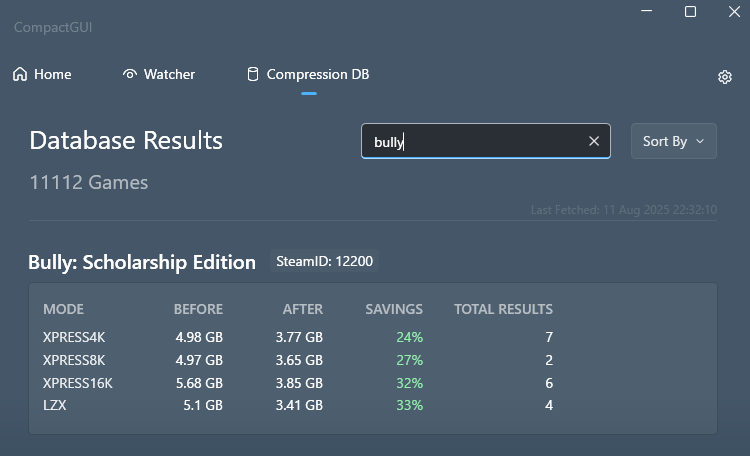
It works with any and all games, but some games will compress heavily (ie Payday 2/Killing Floor 2 get halved) and other games like Call of Duty barely get any space freed. The app even comes with a database that'll give you an idea of much space a game will give you.
All you do is select your Bully folder (or drag it into the app) then select what compression you'd like to use, then click compress and wait. What setting should you use? Well, LZX compression is the heaviest and most space saving
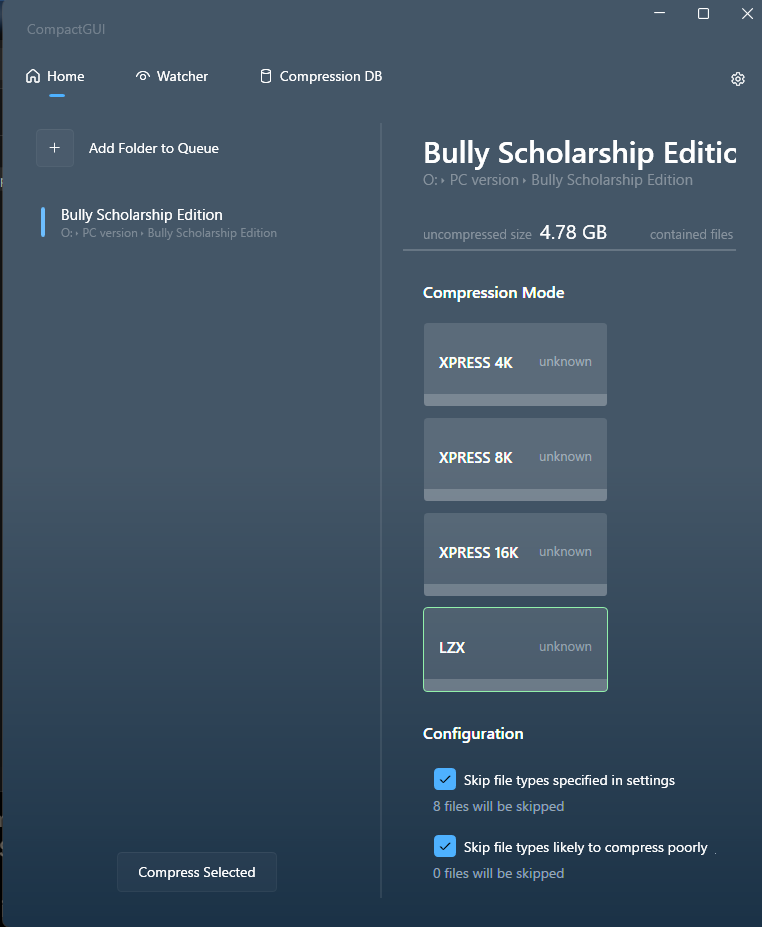
In Bully's case, as you can see by the screen below, you ca save around 25% off the game at lowest compression, or 33% at the highest, just shy of 2GB. I know 2GB space in 2025 is pitifully tiny, but again, this may be useful to those on tight storage space. Plus you can delete the soundtrack (check below) and get an extra 135mb back too.
LINK: https://github.com/IridiumIO/CompactGUI
THE OFFICIAL SOUNDTRACK
Bully on PC comes with the official OST bundled at no extra cost, and it takes up about 135mb.
The OST is located in your main Bully folder, at steamapps\common\Bully Scholarship Edition\Bully Original Soundtrack
You can safely delete or move this. It won't improve game performance in any way, but if you want to free up some extra space, or want to put the soundtrack on your phone/music library, you can do so without damaging the actual game files.
Soundtrack contains everything you would find on the official iTunes/CD release and comes with metadata and the album artwork etc.
Some metadata for Audiophiles out there:
ARTIST: Shawn Lee
ALBUM: Bully Original Soundtrack
FORMAT: MP3 (NO FLAC)
BIT RATE: Around 300 kbps
Also, this OST will be redownloaded if you reinstall Bully or if you verify game files, so you'll probably need to delete it again afterwards.
COMPACTGUI
What it does: Compresses Bully's folder size down without performance loss
CompactGUI is a free tool that lets you compress games down without performance loss, so you free up space and still keep the exact same game.
It works with any and all games, but some games will compress heavily (ie Payday 2/Killing Floor 2 get halved) and other games like Call of Duty barely get any space freed. The app even comes with a database that'll give you an idea of much space a game will give you.
All you do is select your Bully folder (or drag it into the app) then select what compression you'd like to use, then click compress and wait. What setting should you use? Well, LZX compression is the heaviest and most space saving
In Bully's case, as you can see by the screen below, you ca save around 25% off the game at lowest compression, or 33% at the highest, just shy of 2GB. I know 2GB space in 2025 is pitifully tiny, but again, this may be useful to those on tight storage space. Plus you can delete the soundtrack (check below) and get an extra 135mb back too.
LINK: https://github.com/IridiumIO/CompactGUI
THE OFFICIAL SOUNDTRACK
Bully on PC comes with the official OST bundled at no extra cost, and it takes up about 135mb.
The OST is located in your main Bully folder, at steamapps\common\Bully Scholarship Edition\Bully Original Soundtrack
You can safely delete or move this. It won't improve game performance in any way, but if you want to free up some extra space, or want to put the soundtrack on your phone/music library, you can do so without damaging the actual game files.
Soundtrack contains everything you would find on the official iTunes/CD release and comes with metadata and the album artwork etc.
Some metadata for Audiophiles out there:
ARTIST: Shawn Lee
ALBUM: Bully Original Soundtrack
FORMAT: MP3 (NO FLAC)
BIT RATE: Around 300 kbps
Also, this OST will be redownloaded if you reinstall Bully or if you verify game files, so you'll probably need to delete it again afterwards.
END
So that's it for this guide really.
Will update if anything new comes along, but that's all for now.
Will update if anything new comes along, but that's all for now.
More Bully: Scholarship Edition guides
- Bully Crash Patch - SilentPatch★ 5 (978)79k views1.5k ♥1 minUpdated Dec 28, 2023
- How to Play the Damn Game★ 5 (761)57k views1.4k ♥3 minUpdated Feb 22, 2025
- Updated Classic: Bully Scholarship Edition [ENG]★ 5 (471)28k views1.1k ♥9 minRussianUpdated Jun 22
- Русификатор БЕЗ СКАЧИВАНИЯ★ 5 (826)28k views1.1k ♥1 minUpdated Feb 25
- Unlockables and tips *Updated*★ 5 (942)27k views1.4k ♥10 minUpdated Mar 10, 2017
- Full English Class 1-5 Guide /MAY 2026★ 5 (238)25k views476 ♥3 minUpdated May 11



This guide was created by its original author on the Steam Community. Are you the author and want it removed? Request removal.