Disable game INTRO and setup High Resolution
Disable game INTRO, Setup HIGH resolution
To disable game INTRO you need to first launch game because file "conquests.ini" will be genereted after first run. Close game and in next step add the following line to the conquests.ini file:
PlayIntro=0
File location will vary depending on where your Steam games are installed, but the path normally looks similar to this:
C:\Program Files (x86)\Steam\SteamApps\common\Sid Meier's Civilization III Complete\Conquests\
Additional if you want play in native system resolution place in conquests.ini file:
KeepRes=1
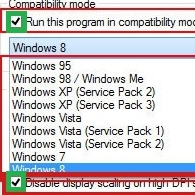
For resolution 1920x1080 on WIndows 10/11 You need to also go into properties of Civ3Conquests.exe file. On Compability tab, find DPI button, click it and turn on both checkboxes for DPI option.
ENJOY!! :D
PlayIntro=0
File location will vary depending on where your Steam games are installed, but the path normally looks similar to this:
C:\Program Files (x86)\Steam\SteamApps\common\Sid Meier's Civilization III Complete\Conquests\
Additional if you want play in native system resolution place in conquests.ini file:
KeepRes=1
For resolution 1920x1080 on WIndows 10/11 You need to also go into properties of Civ3Conquests.exe file. On Compability tab, find DPI button, click it and turn on both checkboxes for DPI option.
ENJOY!! :D
More Sid Meier's Civilization III: Complete guides
- HOW TO WIDESCREEN ON WINDOWS 11 (Windows 10, Windows 8 and 7 too)★ 5 (224)18k views284 ♥3 minUpdated Mar 19, 2025
- Modding and Mods★ 4 (93)11k views182 ♥3 minUpdated Jul 9, 2022
- Keyboard Shortcuts★ 5 (157)6.2k views239 ♥2 minUpdated Sep 3, 2020
- Suede's 12 Turn Start Guide to QC★ 4 (45)5k views45 ♥8 minUpdated Aug 24, 2017
- Reference tables and notes★ 4 (96)4.3k views173 ♥13 minUpdated Jun 22, 2018
- Civilization III Conquests: The Army unit★ 4 (39)3.8k views20 ♥5 minUpdated May 2, 2015




This guide was created by its original author on the Steam Community. Are you the author and want it removed? Request removal.