Solution for changing to the best possible widescreen resolution easily
Step I - Resolution Wars
Using KeepRes=1 to maintain your resolution can be problematic if you're using a higher resolution, since the UI screens will all shrink. But if you change your resolution to a widescreen resolution that isn't quite as high, you can potentially avoid this issue.
Before you even move onto step 2, you'll want to make sure you have KeepRes=1 in your conquests.ini file.
It will be located in your conquests directory.
Step II - High Resolution Strikes Back
You'll want to play around with your resolutions to find out which widescreen resolution causes the least graphical shrinkage for you, but provides the crisp ample graphics you want.
For me, this resolution was 1366x768; the UI is a good manageable size, but provides crisp ample widescreen graphics.
Once you've determined what resolution works best for you, you'll want to download the Reso-O-Matic utility linked in the next step.
You can skip the next step, but you'd have to change your resolution ever every time you play.

Step III - Return of Ancient Utilities on Modern Computers
Download this utility:
http://www.bcheck.net/apps/reso.htm
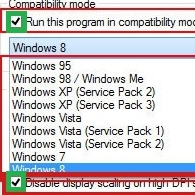
If you're using Windows 7 or later download the latest version. If you happen to be using XP, then there is a version for that as well.
Note: I do not know if the Windows 7 version will work with anything beyond Windows 8. You'll have to try it to find out.
Once you've downloaded the utility you'll be able to create a custom shortcut that will launch the game in your preferred resolution and then revert back to your standard desktop resolution when you exit the game.
Now you should have a game that's at least tolerable to launch and look at!
http://www.bcheck.net/apps/reso.htm
If you're using Windows 7 or later download the latest version. If you happen to be using XP, then there is a version for that as well.
Note: I do not know if the Windows 7 version will work with anything beyond Windows 8. You'll have to try it to find out.
Once you've downloaded the utility you'll be able to create a custom shortcut that will launch the game in your preferred resolution and then revert back to your standard desktop resolution when you exit the game.
Now you should have a game that's at least tolerable to launch and look at!
Version Notes
Images used are not final.
More Sid Meier's Civilization III: Complete guides
- HOW TO WIDESCREEN ON WINDOWS 11 (Windows 10, Windows 8 and 7 too)★ 5 (224)18k views284 ♥3 minUpdated Mar 19, 2025
- Disable game INTRO and setup High Resolution★ 5 (198)14k views167 ♥1 minUpdated Feb 27, 2025
- Modding and Mods★ 4 (93)11k views182 ♥3 minUpdated Jul 9, 2022
- Keyboard Shortcuts★ 5 (157)6.2k views239 ♥2 minUpdated Sep 3, 2020
- Suede's 12 Turn Start Guide to QC★ 4 (45)5k views45 ♥8 minUpdated Aug 24, 2017
- Reference tables and notes★ 4 (96)4.3k views173 ♥13 minUpdated Jun 22, 2018



This guide was created by its original author on the Steam Community. Are you the author and want it removed? Request removal.