HOW TO WIDESCREEN ON WINDOWS 11 (Windows 10, Windows 8 and 7 too)
How to
UPD 2025
1. Run the game once and exit it.
2. At the very bottom of the conquests.ini add BOTH lines:
KeepRes=1
PlayIntro=0
3. Run the game
That's it, you are incredible.
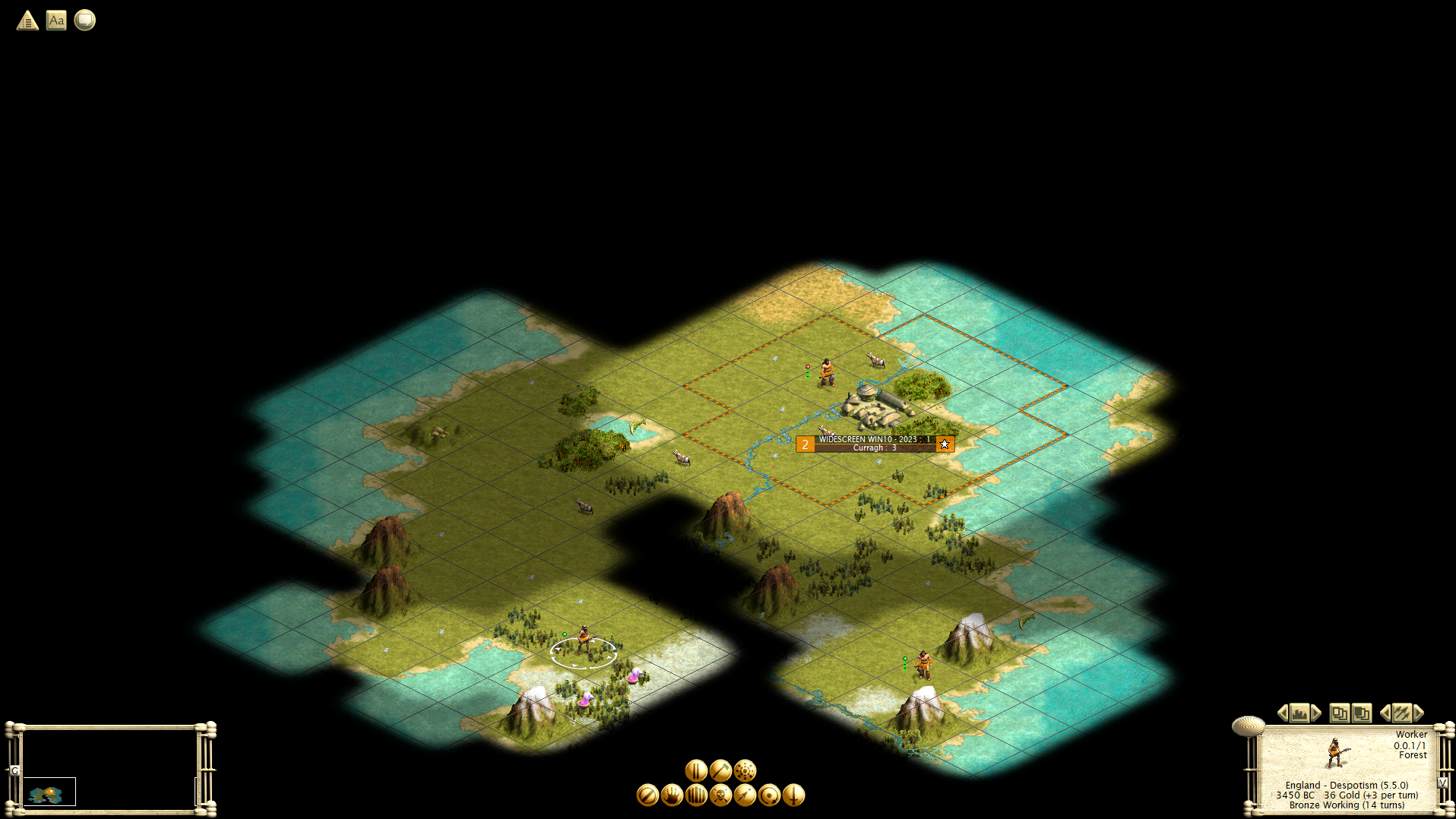
Below is some additional information that you probably won't need. Just follow the three steps above and enjoy the game. But, If something goes wrong, here's what else you can try:
--- legacy text if you need more info ---
CIV3 HOW TO WIDESCREEN ON WINDOWS 7 and 8
Step by step (every little step).
p.s. Main menu of the game does'nt have widescreen version. Don't worry.
But game itself (world map) works just fine!
p.s.s. SkipIntro=1 will also skip Intro movie
ABOUT FOLDERS, FILENAMES AND EXTENTIONS
*I mean file conquests.ini (the one with ".ini" extention) A file name extension is a set of characters added to the end of a file name that determine which program should open it.
Windows hides file name extensions by default, but you can choose to make them visible.
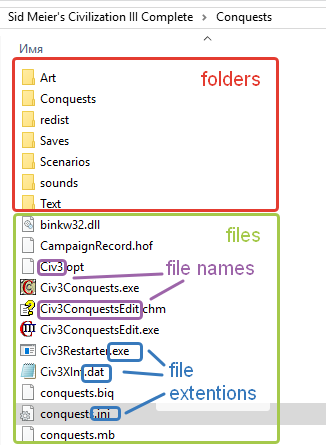
TO SHOW FILE NAME EXTENTIONS
1. Open Folder Options by clicking the Start button Picture of the Start button, clicking Control Panel, clicking Appearance and Personalization, and then clicking Folder Options.
2. Click the View tab, and then, under Advanced settings:
3. Clear the Hide extensions for known file types check box, and then click OK.
UPD. DimFX:
You have to keep system interface scaling at 100%. If the scaling is set to another value - game just didn't start. (Windows 10)
UPD2. ʟᴜɴΛʀᴛɪᴋᴀ:
Using Win 10. For me I did not need to change compatiablity.
Change compatibility setting to Windows 7 made the game crash.
UPD3. F-3000:
With Windows 7 and 1600x900 resolution, all I needed to do was adding KeepRes=1 and it worked like a charm. No need to set compatibility or disabling display scaling
HOW TO SETUP WIDESCREEN ON WINDOWS 11
1. Run the game once and exit it.
2. At the very bottom of the conquests.ini add BOTH lines:
KeepRes=1
PlayIntro=0
3. Run the game
That's it, you are incredible.
Below is some additional information that you probably won't need. Just follow the three steps above and enjoy the game. But, If something goes wrong, here's what else you can try:
--- legacy text if you need more info ---
CIV3 HOW TO WIDESCREEN ON WINDOWS 7 and 8
Step by step (every little step).
- Don't run Civilization III. *
*You literally need to run ONCE the game first for it to create the .ini file. It is not just there by default after the game is installed. (Thanx to guy from China without name for note) - Right-click on the Civilization III from the Steam Library and select Properties.
Select Local Files tab and press [Browse local files...] button.
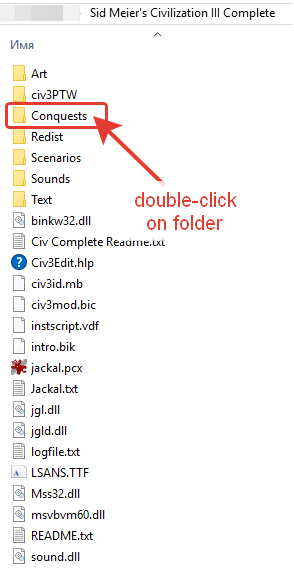
Now double left-click on Conquests folder.
KeepRes=1Click File section of Top Menu, then select Save.
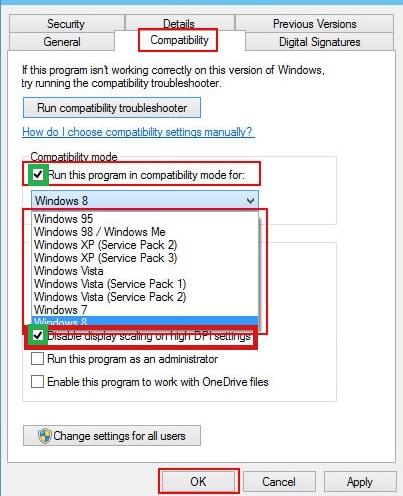
Click File section of Top Menu, then select Exit. - Right-click the Civ3Conquests.exe, click Properties, and then click the Compatibility tab
Tick the box labeled Run this program in compatibility mode for and select Windows 7 version.
Tick the box labeled Disable display scaling on high DPI settings.
Once you are done, click [OK] button. - Run Civilization III as usual from Steam library.
- Enjoy!
p.s. Main menu of the game does'nt have widescreen version. Don't worry.
But game itself (world map) works just fine!
p.s.s. SkipIntro=1 will also skip Intro movie
ABOUT FOLDERS, FILENAMES AND EXTENTIONS
*I mean file conquests.ini (the one with ".ini" extention) A file name extension is a set of characters added to the end of a file name that determine which program should open it.
Windows hides file name extensions by default, but you can choose to make them visible.
TO SHOW FILE NAME EXTENTIONS
1. Open Folder Options by clicking the Start button Picture of the Start button, clicking Control Panel, clicking Appearance and Personalization, and then clicking Folder Options.
2. Click the View tab, and then, under Advanced settings:
3. Clear the Hide extensions for known file types check box, and then click OK.
UPD. DimFX:
You have to keep system interface scaling at 100%. If the scaling is set to another value - game just didn't start. (Windows 10)
UPD2. ʟᴜɴΛʀᴛɪᴋᴀ:
Using Win 10. For me I did not need to change compatiablity.
Change compatibility setting to Windows 7 made the game crash.
UPD3. F-3000:
With Windows 7 and 1600x900 resolution, all I needed to do was adding KeepRes=1 and it worked like a charm. No need to set compatibility or disabling display scaling
conquests.ini
[Conquests]
Voice Quality=0
Prefs Format=2
Difficulty=2
Aggression=2
Top Menu=1
Faction0=1
Faction1=3
Faction2=4
Faction3=2
Faction4=2
Faction5=8
Faction6=10
Faction7=7
Faction8=-1
Faction9=-1
Faction10=-1
Faction11=-1
Faction12=-1
Faction13=-1
Faction14=-1
Faction15=-1
Faction16=-1
Faction17=-1
Faction18=-1
Faction19=-1
Faction20=-1
Faction21=-1
Faction22=-1
Faction23=-1
Faction24=-1
Faction25=-1
Faction26=-1
Faction27=-1
Faction28=-1
Faction29=-1
Faction30=-1
num cities to eliminate=1
one city culture to win=20000
all cities culture to win=100000
domination pct terrain=66
domination % pop=66
building wonders=10
killing units=10
researching advances=5
capture cities=100
holding vp locations=25
capturing princess=1000
Victory Point Limit=50000
Turn Limit=540
Preferences=00000001100110001010011111111110
Rules=00000000000001001000000111011111
Main Volume=127
Sound Volume=127
Music Volume=127
CleanMap=00000000000000011010111010000000
Governor=00000000000000000000000000000000
Gov Prod Never=00000000000000000000000000011000
Gov Prod Often=00000000000000000000000000000000
CustomLeaderName=
CustomLeaderTitle=
CustomFormalName=
CustomNoun=
CustomAdjective=
CustomGender=0
WorldAridity=1
BarbarianActivity=1
WorldLandmass=1
WorldOceanCoverage=1
WorldTemperature=1
WorldAge=1
WorldSize=0
WorldSeed=180339316
WorldSeedName=0
ActualWorldAridity=1
ActualBarbarianActivity=1
ActualWorldLandmass=1
ActualWorldOceanCoverage=1
ActualWorldTemperature=1
ActualWorldAge=1
ActualWorldSize=0
ActualCiv0=1
ActualCiv1=3
ActualCiv2=4
ActualCiv3=2
ActualCiv4=-1
ActualCiv5=8
ActualCiv6=10
ActualCiv7=7
ActualCiv8=-1
ActualCiv9=-1
ActualCiv10=-1
ActualCiv11=-1
ActualCiv12=-1
ActualCiv13=-1
ActualCiv14=-1
ActualCiv15=-1
ActualCiv16=-1
ActualCiv17=-1
ActualCiv18=-1
ActualCiv19=-1
ActualCiv20=-1
ActualCiv21=-1
ActualCiv22=-1
ActualCiv23=-1
ActualCiv24=-1
ActualCiv25=-1
ActualCiv26=-1
ActualCiv27=-1
ActualCiv28=-1
ActualCiv29=-1
ActualCiv30=-1
Seafaring=0
ScrollSpeed=1
GridOn=1
WindowsFileBox=0
SkipIntro=1
KeepRes=1
Voice Quality=0
Prefs Format=2
Difficulty=2
Aggression=2
Top Menu=1
Faction0=1
Faction1=3
Faction2=4
Faction3=2
Faction4=2
Faction5=8
Faction6=10
Faction7=7
Faction8=-1
Faction9=-1
Faction10=-1
Faction11=-1
Faction12=-1
Faction13=-1
Faction14=-1
Faction15=-1
Faction16=-1
Faction17=-1
Faction18=-1
Faction19=-1
Faction20=-1
Faction21=-1
Faction22=-1
Faction23=-1
Faction24=-1
Faction25=-1
Faction26=-1
Faction27=-1
Faction28=-1
Faction29=-1
Faction30=-1
num cities to eliminate=1
one city culture to win=20000
all cities culture to win=100000
domination pct terrain=66
domination % pop=66
building wonders=10
killing units=10
researching advances=5
capture cities=100
holding vp locations=25
capturing princess=1000
Victory Point Limit=50000
Turn Limit=540
Preferences=00000001100110001010011111111110
Rules=00000000000001001000000111011111
Main Volume=127
Sound Volume=127
Music Volume=127
CleanMap=00000000000000011010111010000000
Governor=00000000000000000000000000000000
Gov Prod Never=00000000000000000000000000011000
Gov Prod Often=00000000000000000000000000000000
CustomLeaderName=
CustomLeaderTitle=
CustomFormalName=
CustomNoun=
CustomAdjective=
CustomGender=0
WorldAridity=1
BarbarianActivity=1
WorldLandmass=1
WorldOceanCoverage=1
WorldTemperature=1
WorldAge=1
WorldSize=0
WorldSeed=180339316
WorldSeedName=0
ActualWorldAridity=1
ActualBarbarianActivity=1
ActualWorldLandmass=1
ActualWorldOceanCoverage=1
ActualWorldTemperature=1
ActualWorldAge=1
ActualWorldSize=0
ActualCiv0=1
ActualCiv1=3
ActualCiv2=4
ActualCiv3=2
ActualCiv4=-1
ActualCiv5=8
ActualCiv6=10
ActualCiv7=7
ActualCiv8=-1
ActualCiv9=-1
ActualCiv10=-1
ActualCiv11=-1
ActualCiv12=-1
ActualCiv13=-1
ActualCiv14=-1
ActualCiv15=-1
ActualCiv16=-1
ActualCiv17=-1
ActualCiv18=-1
ActualCiv19=-1
ActualCiv20=-1
ActualCiv21=-1
ActualCiv22=-1
ActualCiv23=-1
ActualCiv24=-1
ActualCiv25=-1
ActualCiv26=-1
ActualCiv27=-1
ActualCiv28=-1
ActualCiv29=-1
ActualCiv30=-1
Seafaring=0
ScrollSpeed=1
GridOn=1
WindowsFileBox=0
SkipIntro=1
KeepRes=1
More Sid Meier's Civilization III: Complete guides
- Disable game INTRO and setup High Resolution★ 5 (198)14k views167 ♥1 minUpdated Feb 27, 2025
- Modding and Mods★ 4 (93)11k views182 ♥3 minUpdated Jul 9, 2022
- Keyboard Shortcuts★ 5 (157)6.2k views239 ♥2 minUpdated Sep 3, 2020
- Suede's 12 Turn Start Guide to QC★ 4 (45)5k views45 ♥8 minUpdated Aug 24, 2017
- Reference tables and notes★ 4 (96)4.3k views173 ♥13 minUpdated Jun 22, 2018
- Civilization III Conquests: The Army unit★ 4 (39)3.8k views20 ♥5 minUpdated May 2, 2015




This guide was created by its original author on the Steam Community. Are you the author and want it removed? Request removal.