Guide To Economic Success
Introduction
Hello everyone! I've been meaning to share some thoughts on business management in this game, and I hope you’ll find these tips helpful for managing your next garage. Feel free to share your own strategies or point out anything I might have missed in the comments below!
Step 1: A New Game
Let’s start with day one of creating a new game! You’ll be prompted to choose a city as the headquarters for your garage. At this point, you won’t have access to many of the tools needed to fully follow this guide. However, if you already have an established save, feel free to skip ahead to "Part 10."
For beginners, major cities often provide plenty of opportunities to get started. I recommend selecting a capital city based on the state you want to play in. Below, I’ve included a list of capital cities to consider—including a few that may be added in future updates—to have everything in one place.
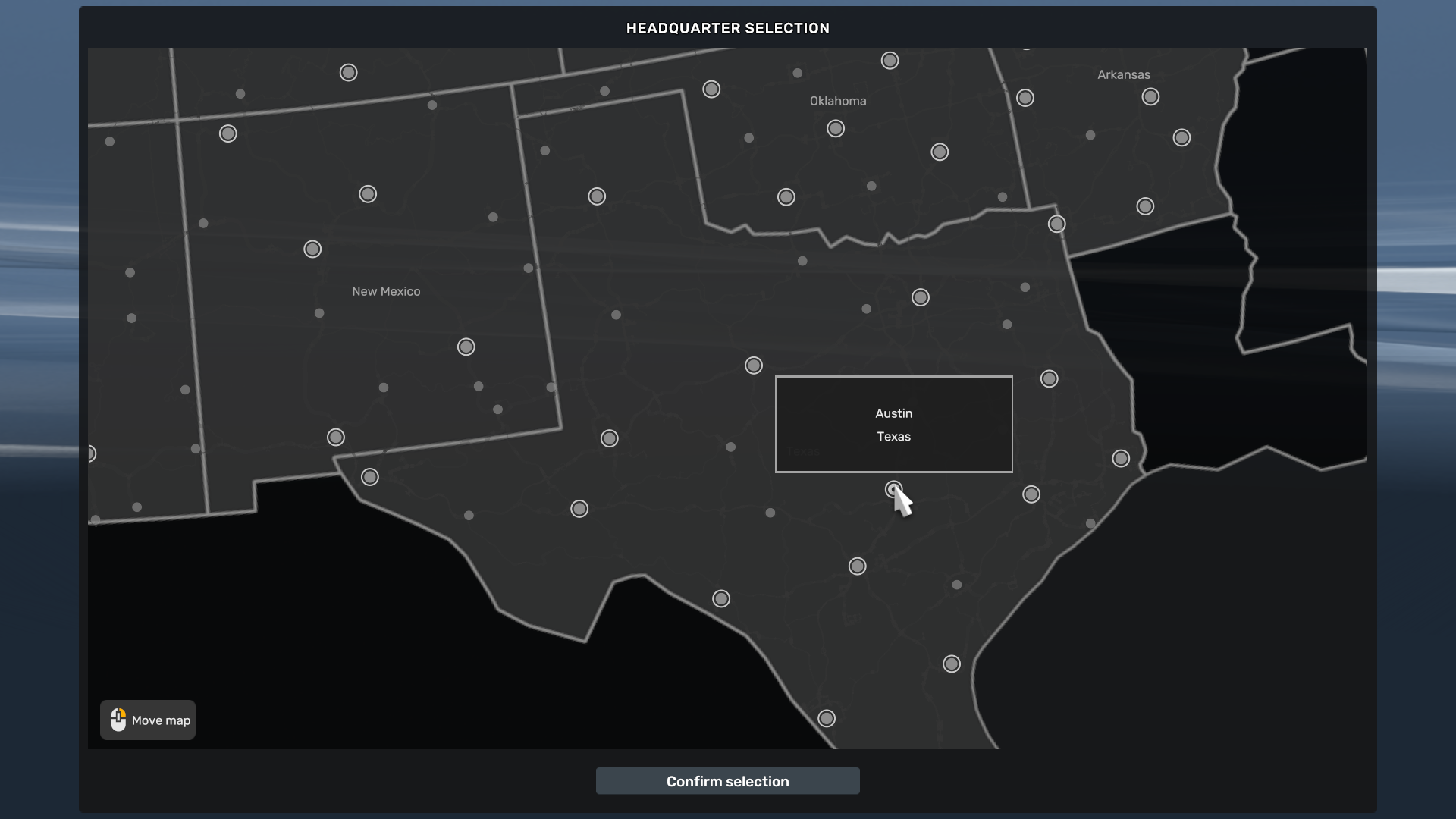
For beginners, major cities often provide plenty of opportunities to get started. I recommend selecting a capital city based on the state you want to play in. Below, I’ve included a list of capital cities to consider—including a few that may be added in future updates—to have everything in one place.
State
Capital City
Alabama
Montgomery
Alaska
Juneau
Arazona
Phoenix
Arkansas
Little Rock
California
Sacramento
Colorado
Denver
Connecticut
Hartford
Delaware
Dover
Florida
Tallahassee
Georgia
Atlanta
Hawaii
Honolulu
Idaho
Boise
Illinois
Springfield
Indiana
indianapolis
Iowa
Das Moines
Kansas
Topeka
Kentucky
Frankfort
Louisiana
Baton Rouge
Maine
Augusta
Maryland
Annopolis
Massachusetts
Boston
Michigan
Lansing
Minnesota
Saint Paul
Mississippi
Jackson
Missouri
Jefferson City
Montana
Helena
Nebraska
Lincoln
Nevada
Carson City
New Hampshire
Concord
New Jersey
Trenton
New Mexico
Santa Fe
New York
Albany
North Carolina
Raleigh
North Dakota
Bismarck
Ohio
Columbus
Oklahoma
Oklahoma City
Oregon
Salem
Pennsylvania
Harrisburg
Rhode Island
Providence
South Carolina
Columbia
South Dakota
Pierre
Tennessee
Nashvill
Texas
Austin
Utah
Salt Lake City
Vermont
Montpelier
Virginia
Richmond
Washington
Olympia
West Virginia
Charleston
Wisconsin
Madison
Wyoming
Cheyenne
Step 2: First Five Skill Rule
When leveling up your profile, it's important to follow the First Five Skill Rule. This approach will unlock a wider variety of cargo types and increase your income, rather than focusing on just one or two skill types. The First Five Skills should bring you to the following skill list:
The First Five Skills
Skill Name
Points
Long Distance
1
Fragile Cargo
1
High Value Cargo
1
Just In Time Delivery
2
Step 3: Make Some Money
Making money early on can be challenging, but skipping a loan to buy your first truck can actually work out better in the long run. I recommend saving up by doing quick jobs until you can afford the bare essentials of your first truck, with enough left over for fuel and maintenance if needed.
This approach not only avoids loan debt but also gives you time to level up, which will be crucial for unlocking better jobs and higher profits later on.
This approach not only avoids loan debt but also gives you time to level up, which will be crucial for unlocking better jobs and higher profits later on.
Step 4: First Truck
When buying your first truck, you have a couple of options.
One option is to take out a loan, which the bank will usually offer via the email app after you’ve completed a few jobs. However, loans can become expensive over time due to interest. It’s best to pay them off as quickly as possible to minimize the extra cost.
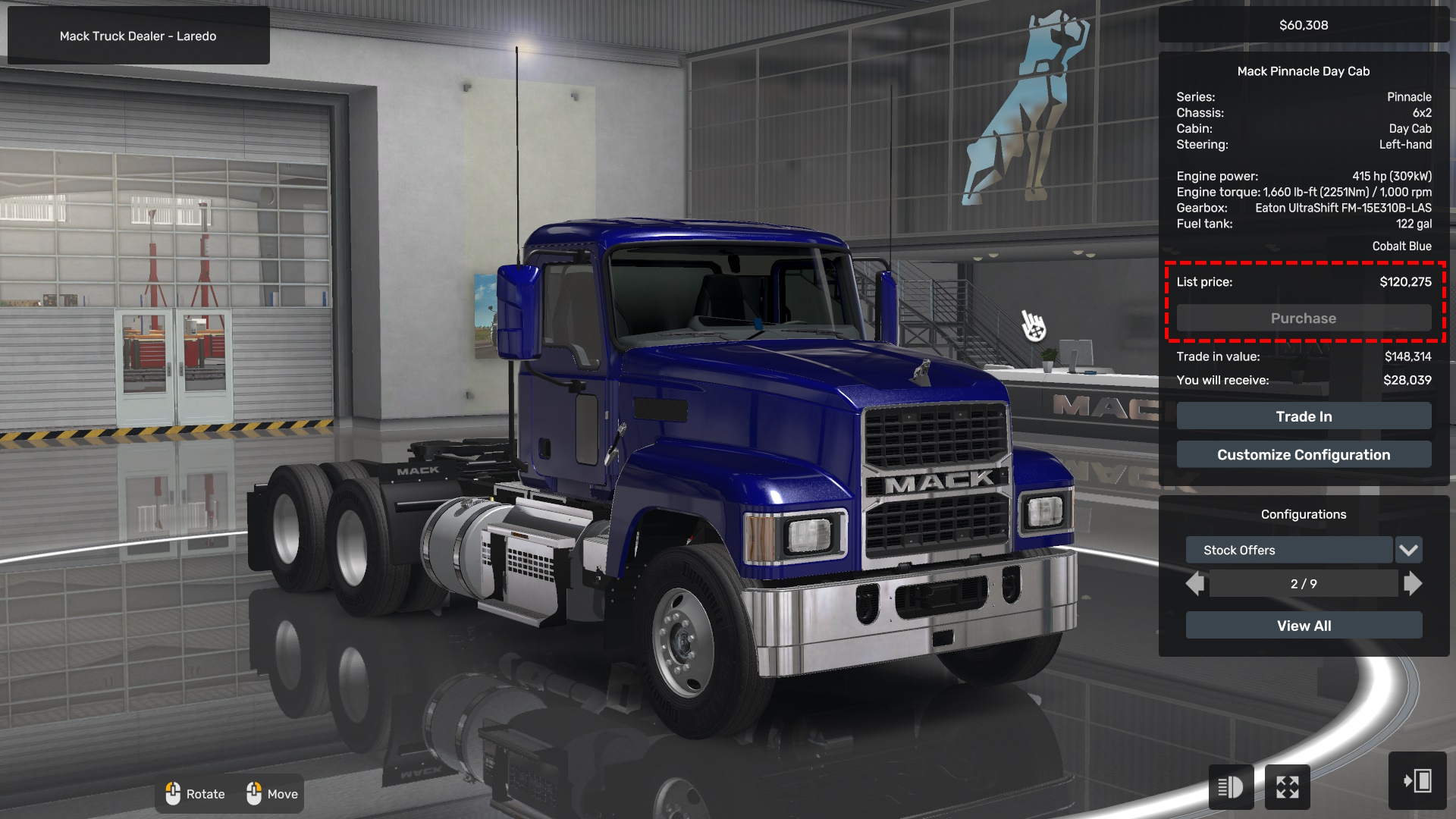
The other option is to stick with Quick Jobs until you’ve saved enough money to buy a truck outright. Depending on your preferred model, most trucks fall in the $120,000 range, though some may cost a bit more.
One option is to take out a loan, which the bank will usually offer via the email app after you’ve completed a few jobs. However, loans can become expensive over time due to interest. It’s best to pay them off as quickly as possible to minimize the extra cost.
The other option is to stick with Quick Jobs until you’ve saved enough money to buy a truck outright. Depending on your preferred model, most trucks fall in the $120,000 range, though some may cost a bit more.
Step 5: Upgrading The Garage
The next step is upgrading your garage. You’ll need enough space to buy a truck and hire one driver. At this point, doing freight jobs should be sufficient to keep things running smoothly.
Before you spend more money, make sure to pay off any loans you’ve taken out for purchasing your truck. It’s always a good idea to pay them off as quickly as possible to avoid unnecessary interest.
Before you spend more money, make sure to pay off any loans you’ve taken out for purchasing your truck. It’s always a good idea to pay them off as quickly as possible to avoid unnecessary interest.
Step 6: Second Truck
Once your garage is upgraded, the next step is to get a second truck and hire a driver for it. If you haven’t located a recruitment agency yet, don’t worry—just focus on purchasing the second truck for now.
This is also a great time to start locating a recruitment agency during your journeys. You’ll need one soon for the next step in expanding your business.
This is also a great time to start locating a recruitment agency during your journeys. You’ll need one soon for the next step in expanding your business.
Step 7: Recruitment Agencies
To hire a driver, you’ll first need to find a recruitment agency. On the world map, look for small buildings marked with a ? icon—these are the points of interest you’ll want to visit.
It’s a good idea to locate a few recruitment agencies before hiring, as each one unlocks an additional driver in the pool of available candidates. This will give you more options to choose from and help you find the best fit for your needs. Each state has at least one so you won't need to go to far to find one.
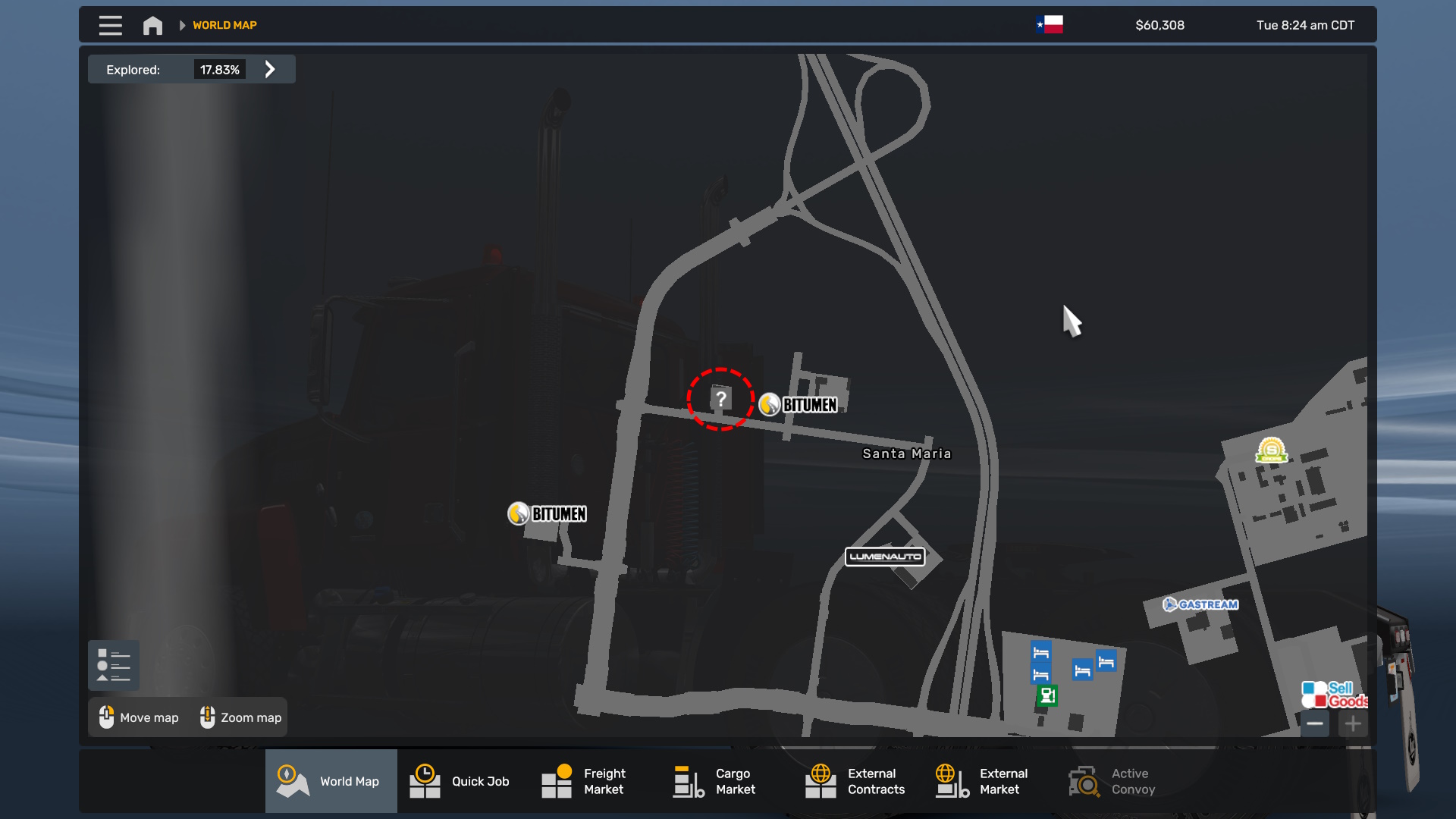
It’s a good idea to locate a few recruitment agencies before hiring, as each one unlocks an additional driver in the pool of available candidates. This will give you more options to choose from and help you find the best fit for your needs. Each state has at least one so you won't need to go to far to find one.
Step 8: First Driver
The next step is to hire a driver with one of four key skills: Long Distance, Fragile Cargo, High-Value Cargo, or Just-in-Time Delivery. Ideally, look for a driver who has Fragile Cargo along with either Long Distance or Just-in-Time Delivery.
This combination will maximize their profitability, especially with the first trailer you’ll be purchasing.
Once you’ve hired your driver, assign them to your second truck in your medium garage. For now, this setup will work perfectly, and your driver will automatically source any available jobs in the area.
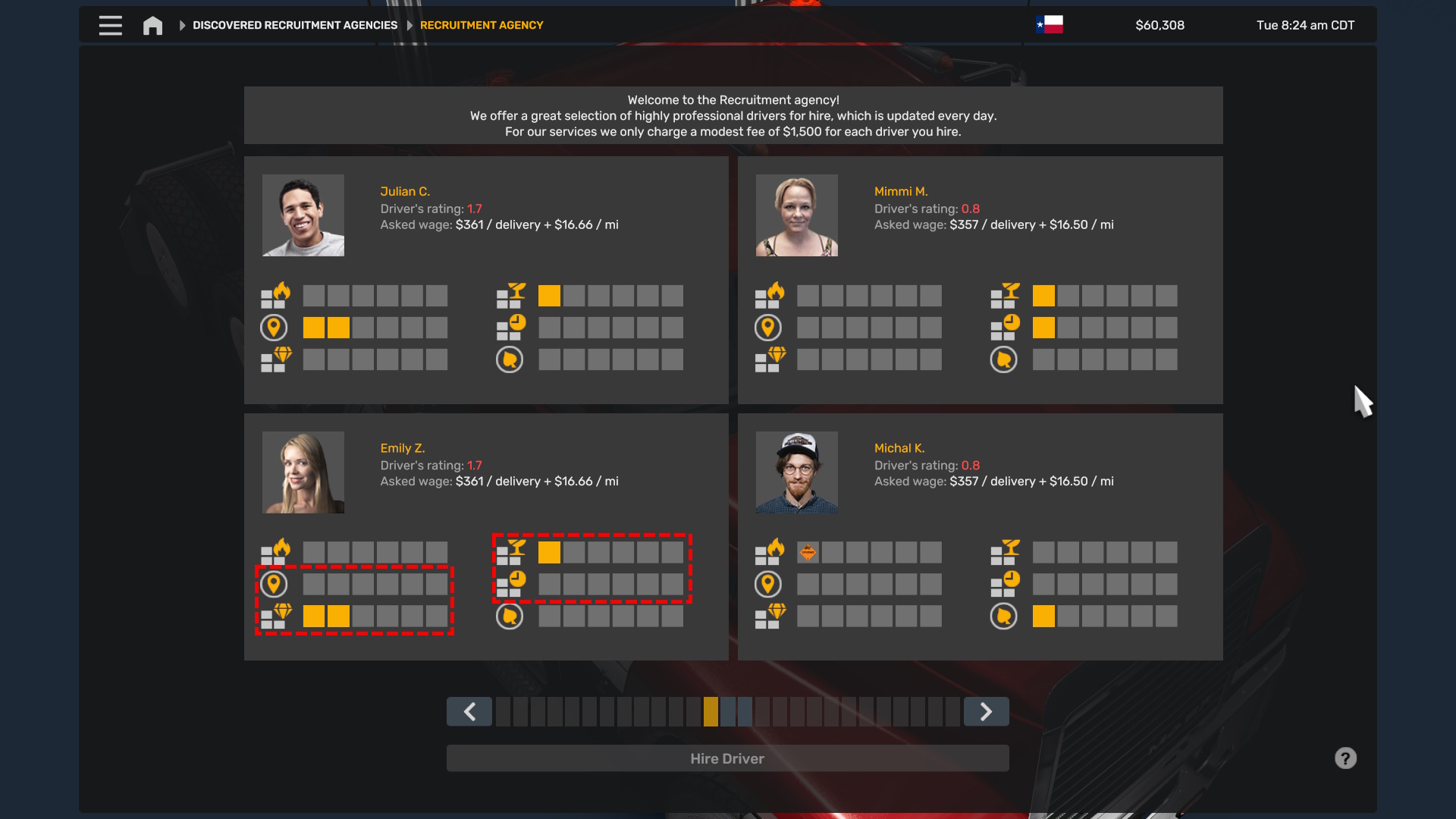
This combination will maximize their profitability, especially with the first trailer you’ll be purchasing.
Once you’ve hired your driver, assign them to your second truck in your medium garage. For now, this setup will work perfectly, and your driver will automatically source any available jobs in the area.
Step 9: First Trailer
Now that you have a driver and a truck, it’s time to start maximizing their profits. Begin by having your driver haul general cargo. While upgrading their trailer for higher earnings will come later, focus on improving their skills in Long Distance, Fragile Cargo, High-Value Cargo, and Just-in-Time Delivery for now.
Once their skills are underway, it’s time to get a basic trailer. Purchase a standard Dry Van for them to use.
Dry Vans are an excellent early-game choice due to their affordability and ability to carry a wide range of cargo. Later in this guide, we’ll discuss expanding with a new garage and tailoring drivers for maximum profits, but for now, it’s all about building a strong foundation.
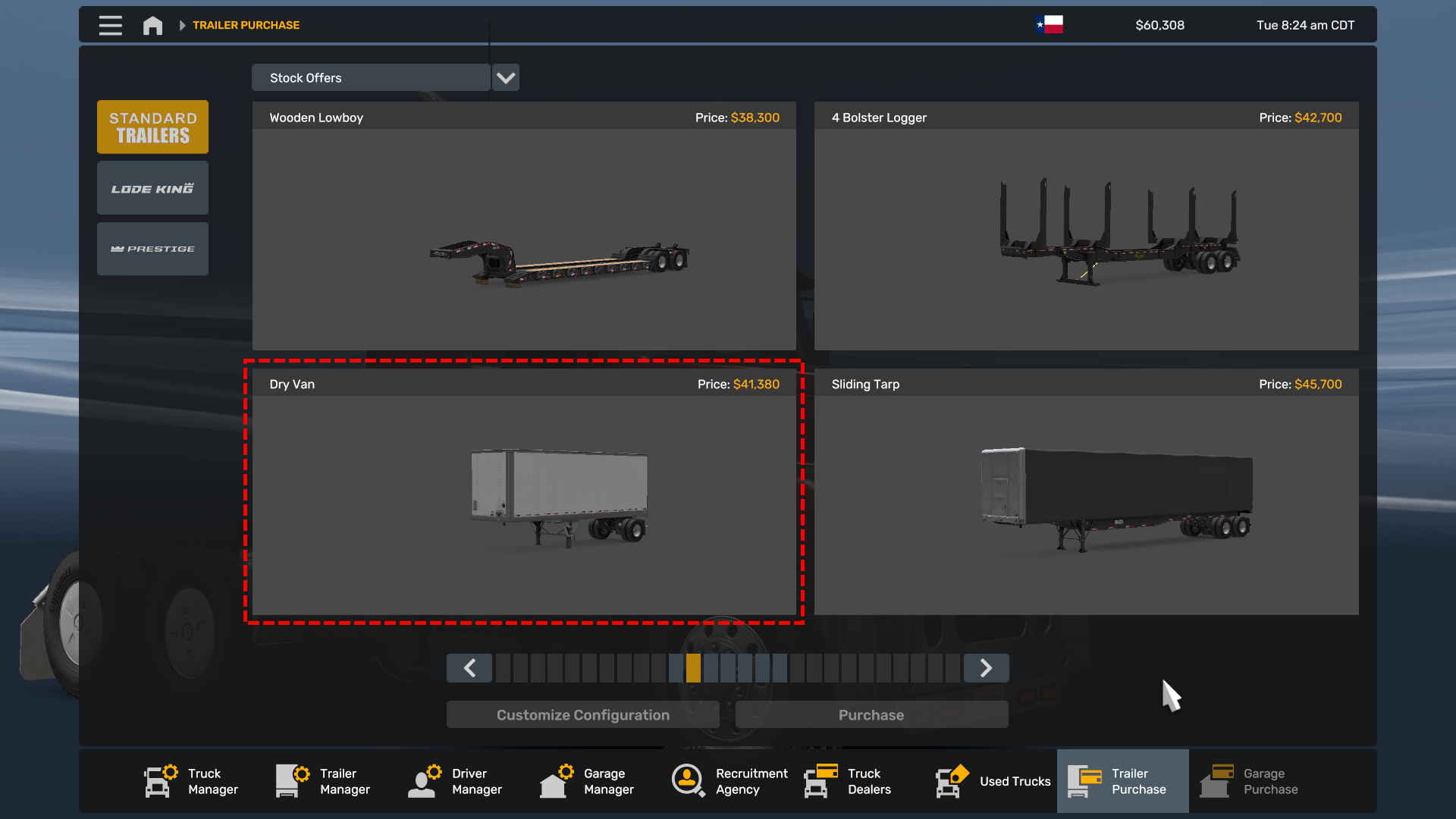
Once their skills are underway, it’s time to get a basic trailer. Purchase a standard Dry Van for them to use.
Dry Vans are an excellent early-game choice due to their affordability and ability to carry a wide range of cargo. Later in this guide, we’ll discuss expanding with a new garage and tailoring drivers for maximum profits, but for now, it’s all about building a strong foundation.
Step 10: Driver Logic
Before progressing further in this guide, let’s review how drivers work in the game. Understanding their mechanics is crucial for making the right skill investments and optimizing their efficiency.
However, make sure the driver has the required skills to handle the job. If they lack the skills, or if the destination is too far for the export, they may not use the owned trailer—or may skip that cargo type entirely.
With this knowledge of driver mechanics, the next step is analyzing your city’s economy to optimize your setup further.
How Drivers Operate
- Job Selection: Drivers will first pick up a job from a business in the garage’s city and transport it to another city. They’ll use any available trailer stored in the garage. If no owned trailer is available, they’ll use an unowned trailer—this works but is less profitable.
- Return Jobs: After delivering the cargo, drivers will search for a job in the delivery city to bring them back to the garage city.
- Trailer Limitations: If they’ve used an owned trailer, the return city may not always have compatible cargo for that trailer type. In such cases, you’ll see a message in the F5 window stating that the driver couldn’t find a job, resulting in fuel and maintenance costs without income.
- Specialized Cargo Challenges: Cargo like gas or fuel often lacks return options, meaning the driver may return empty-handed more frequently. To offset this, invest in Fuel Economy to reduce costs and encourage drivers to take longer-distance jobs.
Understanding Job Requirements
In the Cargo Jobs window, icons indicate the skills required for each job. More icons typically mean higher-paying jobs. By focusing on these skills, you’ll improve your driver’s profitability.However, make sure the driver has the required skills to handle the job. If they lack the skills, or if the destination is too far for the export, they may not use the owned trailer—or may skip that cargo type entirely.
With this knowledge of driver mechanics, the next step is analyzing your city’s economy to optimize your setup further.
Step 11: Logistic Map
To analyze export options for your garage city, navigate to the Logistic Map and use the available filters:
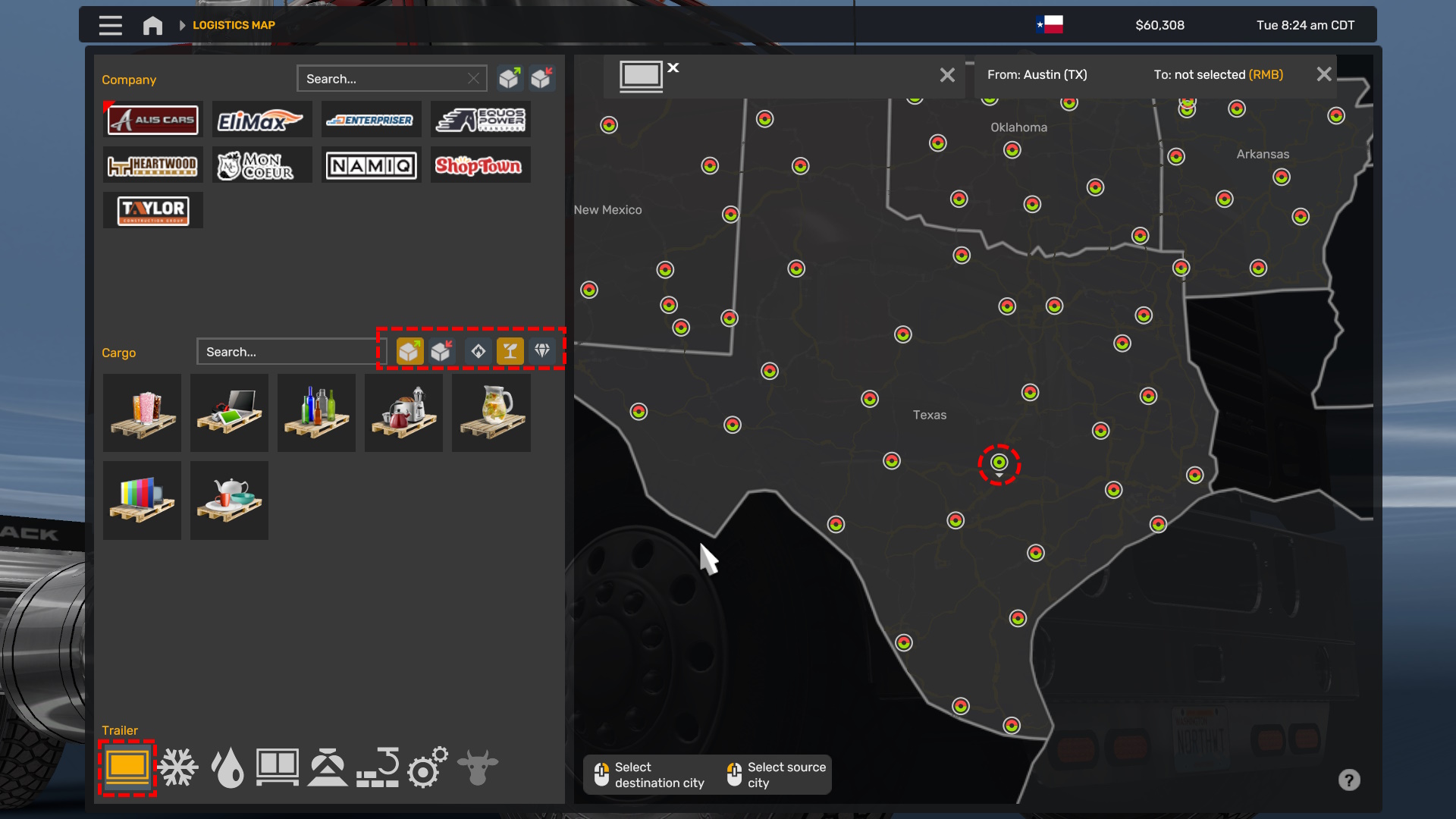
Now is a good time to explain how the Import/Export Icons work on the cargo blocks and what they signify:
For example, in Austin, Texas, fragile cargo is limited and may not always be an option. In such cases, drivers often work with other available cargo types. This variability can significantly impact profits, which has been evident in my drivers’ performance in this save.
- Select Your City: Left-click the bullet point representing your city on the map. This sets it as the "From" location.
- Filter for Exports: Use the filter panel on the left to display only Exports.
- Skill-Specific Cargo: Select the skill type you want to focus on—for example, Fragile Cargo. This helps identify whether your location has jobs matching that skill type, even if your trailer doesn’t currently meet all requirements.
- Narrow by Trailer Type: Use the filter in the bottom-left window to choose your trailer type (e.g., Dry Van). This will show a list of Fragile Cargo options compatible with your trailer. Keep in mind that while these jobs are exportable, they may not always be available.
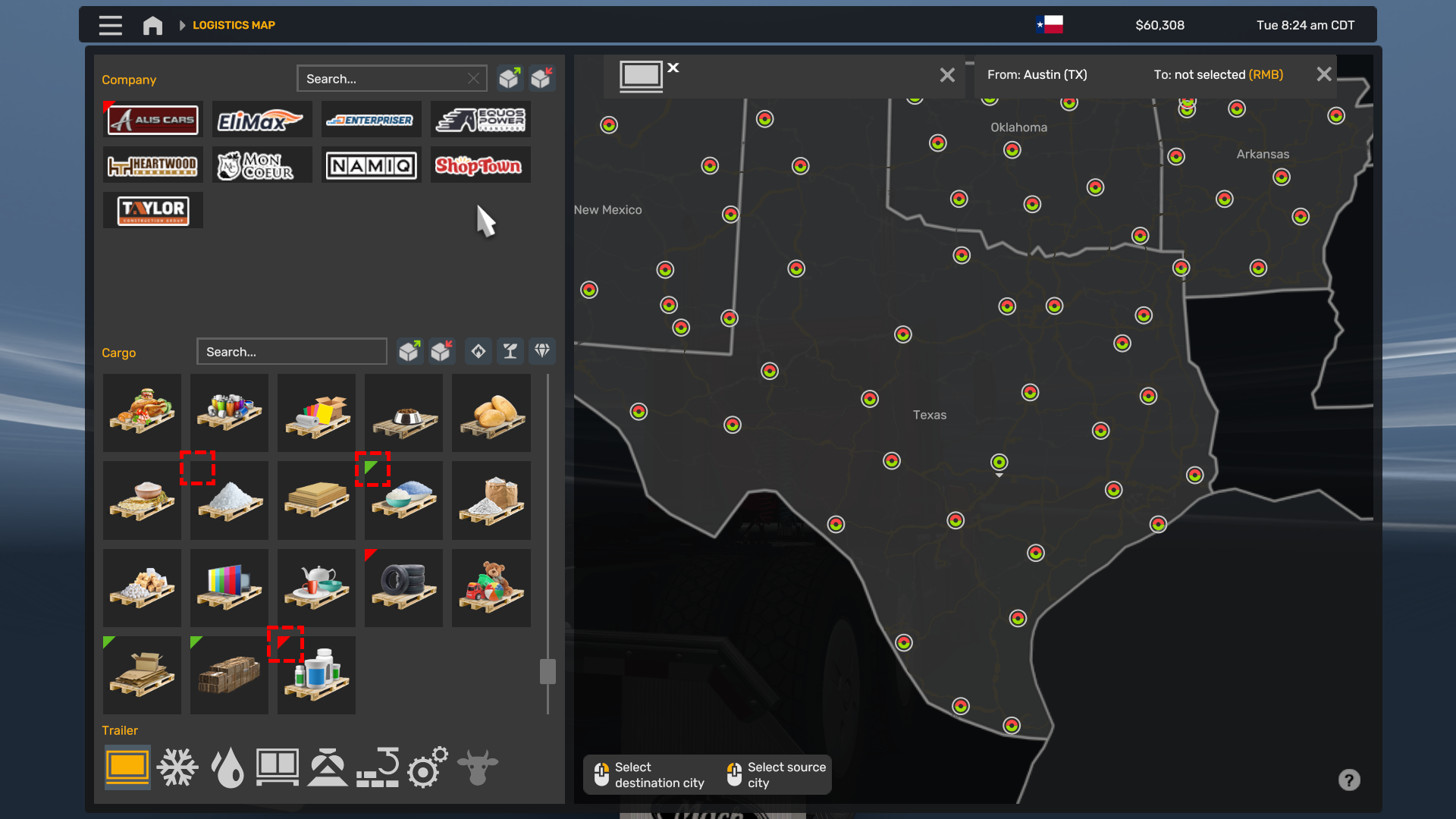
Now is a good time to explain how the Import/Export Icons work on the cargo blocks and what they signify:
- Green Bookmark: Indicates Export Cargo Only. Cargo with this icon is always available for exporting to other locations. Ideally, aim for cities with green icons for your preferred cargo type to ensure consistent profit.
- Red Bookmark: Represents Import Cargo Only. This is cargo being brought into the city and cannot be exported from it.
- No Bookmark: Means the cargo can both Import and Export, but availability may vary.
For example, in Austin, Texas, fragile cargo is limited and may not always be an option. In such cases, drivers often work with other available cargo types. This variability can significantly impact profits, which has been evident in my drivers’ performance in this save.
Step 12: Trailer Upgrades
Next, we’ll dive into optimizing profit through trailer upgrades. By now, you’ve probably noticed that articulated trailers generally yield more profit than standard trailers. And yes, upgrading your trailers to support dolly trailers, with two or more connected trailers, can increase your profit for that trailer type.
However, there’s a catch:
However, there’s a catch:
- State Restrictions: Some states don’t support all types of articulated trailers. When you go to buy a new trailer from your garage, you’ll receive a warning if the state doesn’t support it.
- Trailer Compatibility: Not all trailers can be upgraded to articulated versions, so in some cases, this won’t be a viable option for boosting profits.
Step 13: Second Garage
Now, let’s take a look at my options for purchasing a gas trailer in Corpus Christi, where my new garage is located.
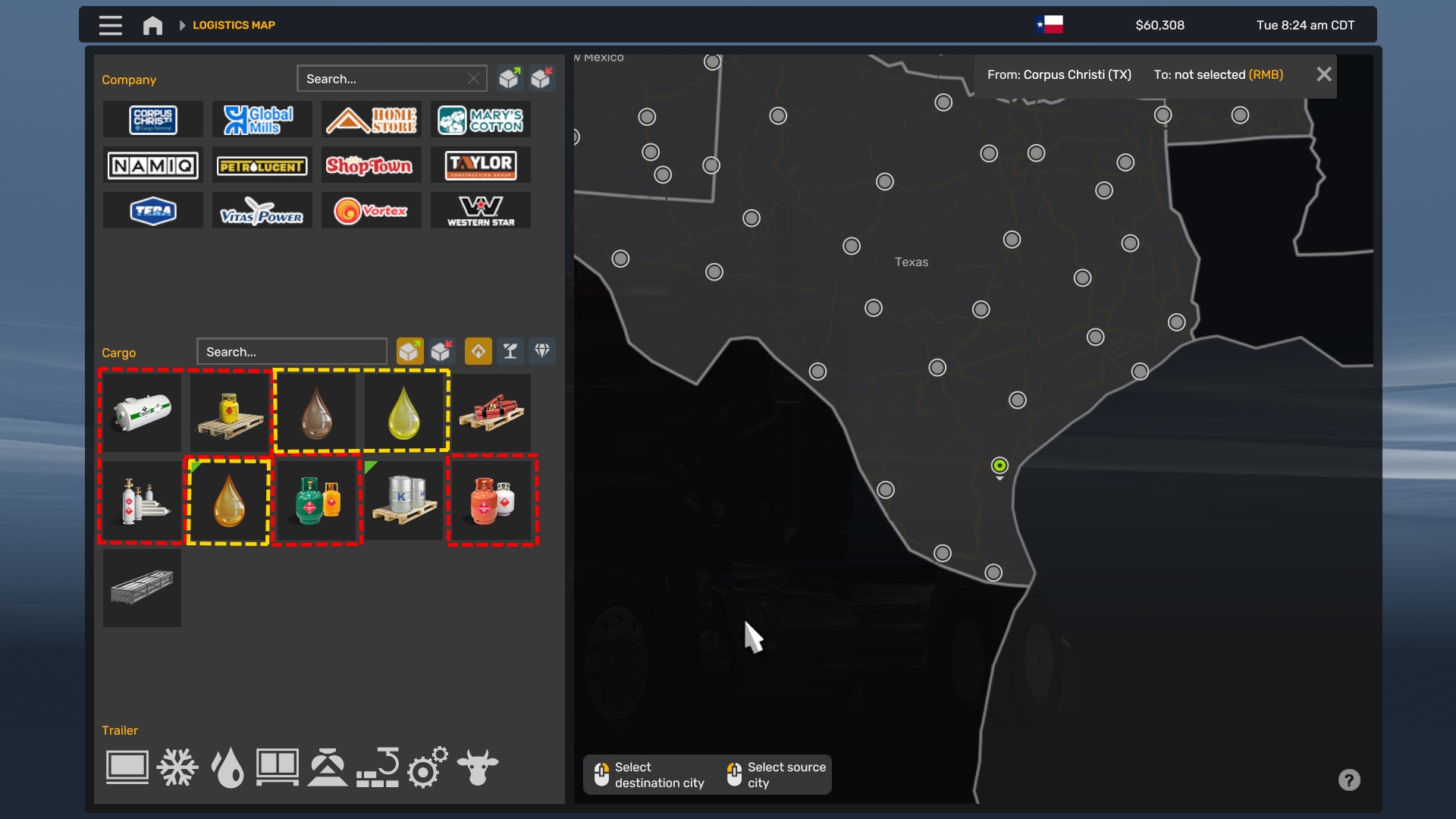
As you can see in the boxes I’ve marked, gas types are outlined with red dotted lines, and fuel types are outlined with yellow dotted lines. We definitely have some export options available in Corpus Christi, Texas, so I went ahead and purchased the garage. Now, all that’s left is to get a trailer and driver to get things up and running.
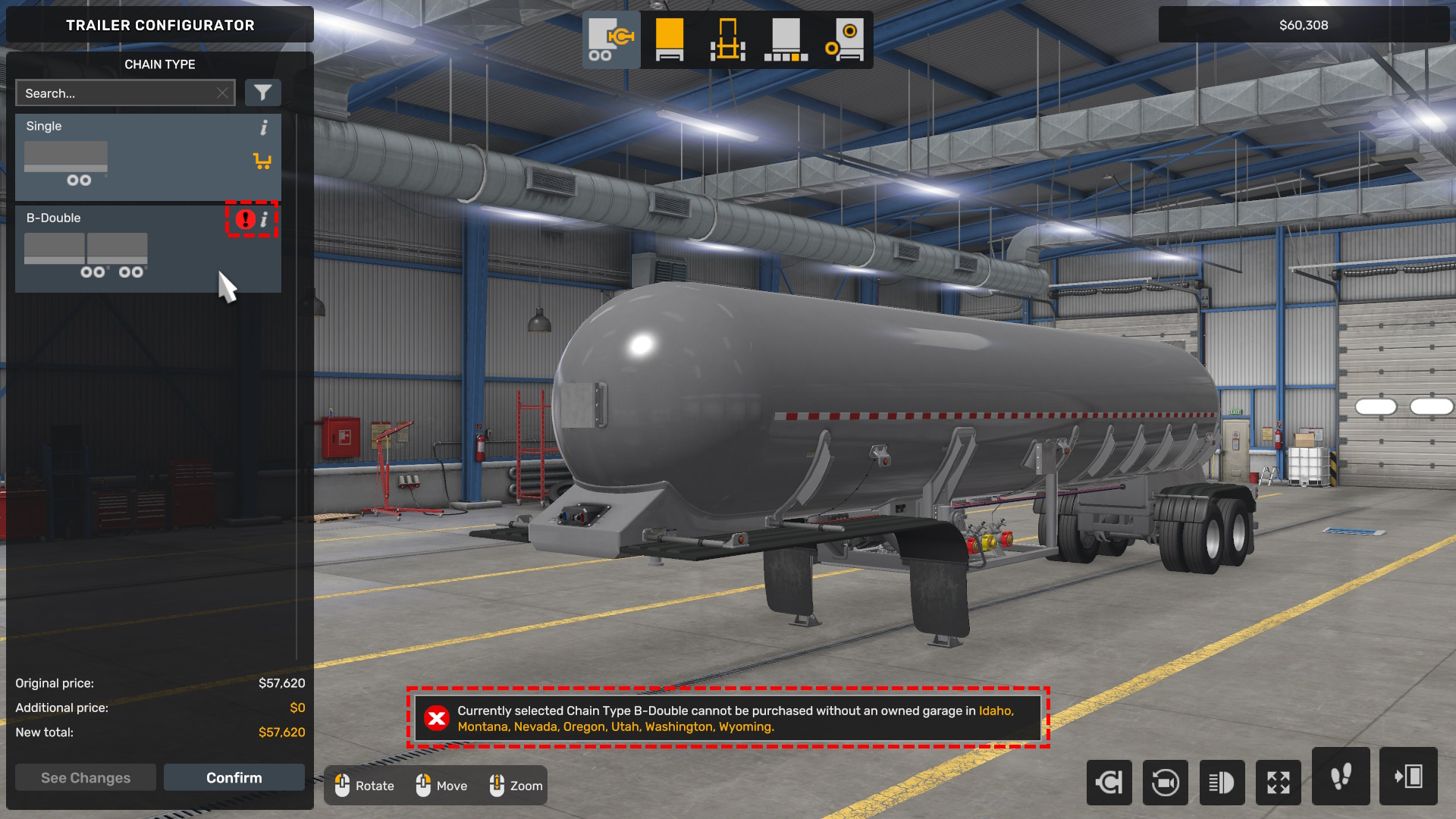
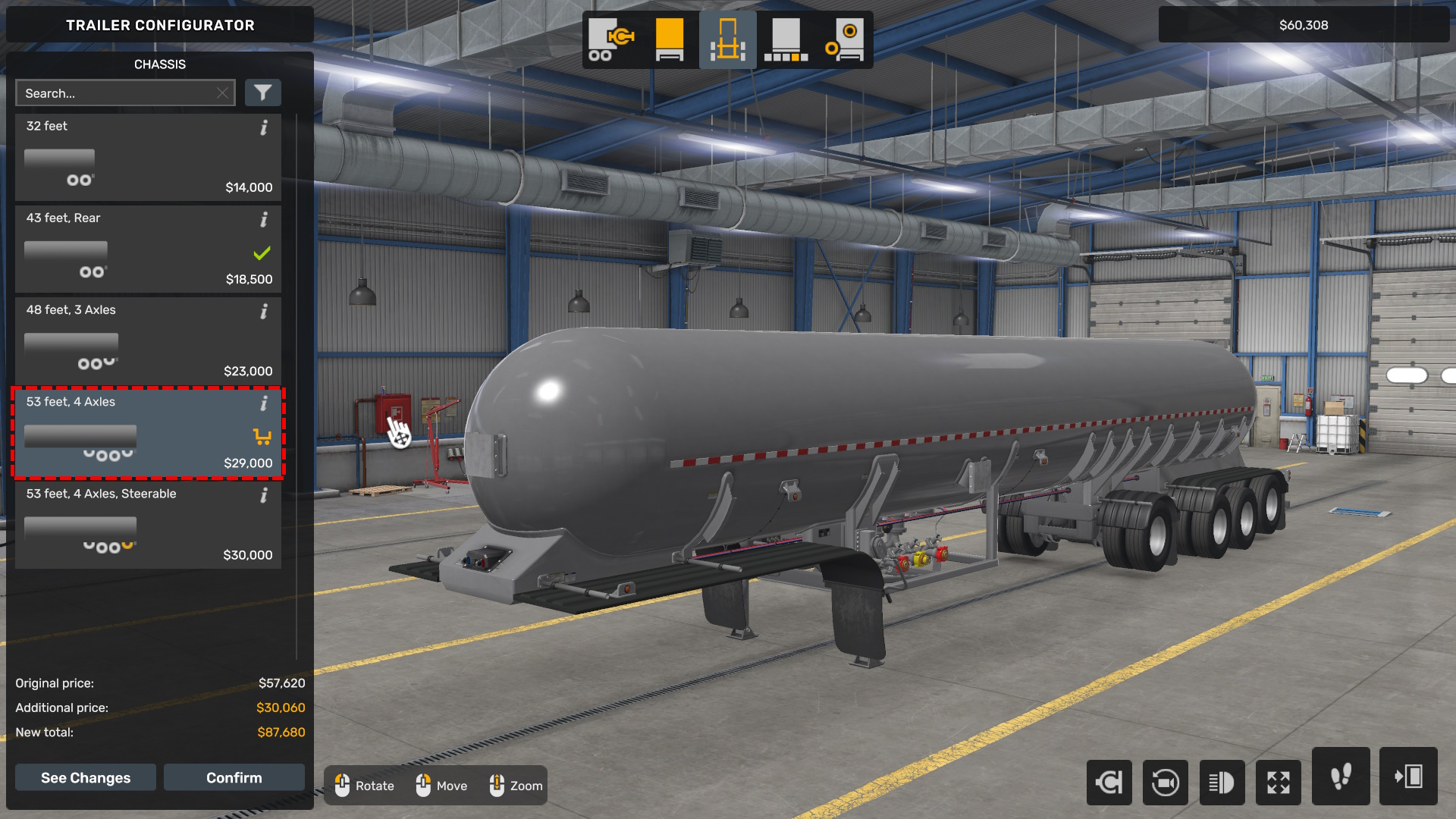
Unfortunately, articulated trailers aren’t supported for the gas trailer in Texas, so I’ll settle for a 53-foot long gas trailer instead, which will work fine for now. I still need to find a driver, though. Rather than spending $30,000 on the premium 53-foot trailer with turnable rear wheels, I’ll opt for the $29,000 version. There’s no real benefit to the turnable wheels for the NPC driver, so I’ll save that $1,000 and use it to hire a driver, which costs $1,500 each.
I got lucky while searching for a driver and found one with explosive and gas hazmat training, along with long distance skills, which will be perfect for our new garage. Even better, he’s already putting the trailer to good use—he’s hauling propane at the moment, which is great news!
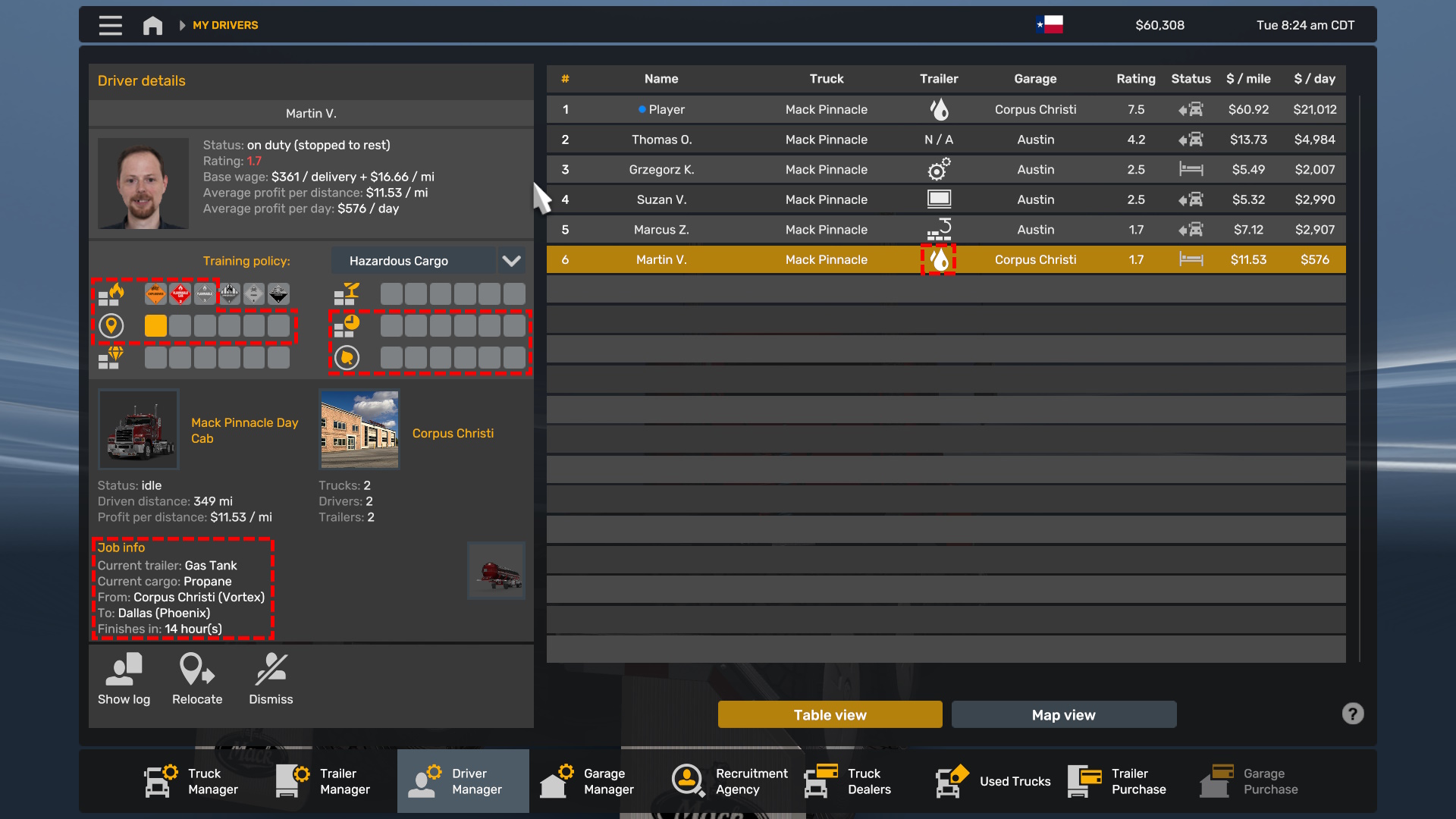
I will focus on upgrading his hazmat skill to fuel, then maxing out long distance, just in time delivery, and fuel economy for jobs where no return trip is possible.
As you can see in the boxes I’ve marked, gas types are outlined with red dotted lines, and fuel types are outlined with yellow dotted lines. We definitely have some export options available in Corpus Christi, Texas, so I went ahead and purchased the garage. Now, all that’s left is to get a trailer and driver to get things up and running.
Unfortunately, articulated trailers aren’t supported for the gas trailer in Texas, so I’ll settle for a 53-foot long gas trailer instead, which will work fine for now. I still need to find a driver, though. Rather than spending $30,000 on the premium 53-foot trailer with turnable rear wheels, I’ll opt for the $29,000 version. There’s no real benefit to the turnable wheels for the NPC driver, so I’ll save that $1,000 and use it to hire a driver, which costs $1,500 each.
I got lucky while searching for a driver and found one with explosive and gas hazmat training, along with long distance skills, which will be perfect for our new garage. Even better, he’s already putting the trailer to good use—he’s hauling propane at the moment, which is great news!
I will focus on upgrading his hazmat skill to fuel, then maxing out long distance, just in time delivery, and fuel economy for jobs where no return trip is possible.
General Tips
Profitable Cargo
HAZMAT
There are some really well profitable cargo types, pretty much any HAZMAT cargo will generate a lot of income, but may not be widely available in all cities, some places like rail exports do have fuel being exported so even if the industry does not directly support it there may be some work. Good rule of thumb though regarding hazmat is make sure there is some kind of dedicated export in the economy logistic map, this will ensure there is work for your drivers regardless. Heavy Machinery
If the garage does not support hazmat such as fuel or Chemicals no worries, heavy machinery can be a good fall back option for most garages. They offer more coverage and less long distance skills to open up job opportunities for AI drivers. Other Cargo
Some other cargo may also be profitable, but use the 10 point rule when planning your drivers skills. See below for leveling your AI drivers Trailer
Cargo
Primary Skill
Secondary Skill
Late Game Skill
Fuel Tank
Combustible Liquids
Hazmat Level 3
Long Distance
Just In Time
D-shaped Tank
Chemicals
Hazmat Level 4
Long Distance
Just In Time
Wooden Lowboy
Heavy machinery and high cargo
High Value
Long Distance
Just In Time
AI Driver Leveling
10 Point Rule
The most important thing to consider is right when you higher your driver. First figure out what skills your going to need for the desired cargo you want the garage to deliver. After that think about what your primary skill needed to level, put 4 points into that skill first. After focus in on long distance add 4 points into this, Lastly add your just in time delivery at least 2 points.Sills take more time to level up over time so plan them wisely when your leveling your drivers up, once you have 10 levels with the driver go back to your primary and secondary skills and max those out, lastly any additional skills you want to max out max out those last.
Never make your divers level on balanced if you want to focus on a specific trailer type, skills not needed for a desired trailer will be wasted and you will earn less actually then if someone with a skill points planned does the delivery.
Primary Skills
Below are what you should focus on for your primary skills. Check the logistics tab to see what cargo is marked as these skill types before picking a driver and leveling them.- HAZMAT
- High Value
- Fragile
Secondary Skills
Long distance should always be your second priority, this increases the range but also profit for your cargo type.- Long Distance
Final Skills
This skill can unlock more money though does not operate the same as the player drivers will always deliver on time but they get the same perks from delivering with this skill point.- Just In Time
Useless / Optional Skills
This one is not really god for much other then making your driver have a higher rating as we will cover a bit lower what rating happen this should always be your last thing your upgrade if you even decided to add it. Overall I have not noticed any difference in fuel costs directly and would only really apply if the driver needed to return with a empty load, However if I am wrong let me know in the comments.- Fuel Economy
AI Driver Rating
Rating will impact how reliable the driver is and if they return with a empty load. It takes time to level your drivers up to a good rating but below are from my observations. Below 4.0 Rating
Don't judge them when they are directly under 4.0 rating, the game is designed to make them worse then drivers you have leveled up and had work for you for longer.- Drivers will commonly return with empty loads
- Drivers will be paid less then higher rating drivers.
4.0 to 5.0 Rating
These drivers get paid more and are more reliable then new drivers.- Less common to return with empty loads
- Drivers will be paid a bit more then lower ratings.
- More reliable workers.
Above 6.0 Rating
These drivers get paid more and are more reliable then new drivers.- Less common to return with empty loads
- Drivers make the most money.
- Most reliable workers.
Trailer & Truck Configuration
There is a lot to note here but will break it down into a few core bullets. Things That Matter
- Drivers will not use trailers that break state trailer laws.
- Drivers require a truck that can reasonable haul the trailer.
- Transmission and Engine do matter, heavy loads require more power.
- Wheel configuration does matter, long trailers or heavy loads should use 4x6 not 2x4 or 2x6.
- Heavy loads should use 500+ HP and 4x6 wheel configurations.
- Don't buy used trucks, often they are more hassle then they are really worth.
Things That DONT Matter
- Fuel tank size does not matter.
- Cab type does not matter, day cabs are fine.
- Decorations such as beacons, flags, load signs, don't matter for AI Drivers
- Decorations in general don't matter like paint or customizations.
Conclusion
Depending on your location, the trailer you have, and the driver's skills, the return on your assets may vary. However, I've found that focusing on skills related to the exports of that specific city works best, rather than opting for a balanced approach. Not all skills are needed for every type of cargo.
With the relatively new tool for viewing city imports and exports, it's become much easier to maximize profits based on the cargo being shipped out. I hope this guide has been helpful! Feel free to share any strategies you've used or if I've missed anything. I'll do my best to improve it when I have some time.
With the relatively new tool for viewing city imports and exports, it's become much easier to maximize profits based on the cargo being shipped out. I hope this guide has been helpful! Feel free to share any strategies you've used or if I've missed anything. I'll do my best to improve it when I have some time.
More American Truck Simulator guides
- Hidden and unmarked roads - USA - WEST - updated 2026/02/20★ 5 (1.3k)38k views1.9k ♥73 minUpdated Feb 19
- The American Truckers Guide to everything!★ 5 (960)34k views1.5k ♥53 minUpdated Aug 16, 2020
- American Truck Simulator 100% Achievement-Guide [ENG]★ 5 (704)15k views1.3k ♥8 minUpdated May 16
- Все достижения American Truck Simulator + все DLC [100% Achievement-Guide] [upd: 15.05.26]★ 5 (1.2k)14k views1.7k ♥42 minRussianUpdated Jul 12
- Texas 100% Achievement-Guide [ENG]★ 5 (443)12k views595 ♥7 minUpdated May 16
- Washington - 100% Achievement-Guide [ENG]★ 5 (503)12k views532 ♥2 minUpdated Mar 24, 2023



This guide was created by its original author on the Steam Community. Are you the author and want it removed? Request removal.