HOW TO ADD A GANG LEADER TO YOUR LEVEL (NO CUTSCENE CRASH)
QUICK ANSWER FOR ONES WHO KNOW
So, basically all you need is to add a cutscene with 130 frames wait action before dialogue. After this, the cutscene should not crash even if dialogue is skipped right after level start.
Creating Waypoints and Gang Boss
Create a level trough in-game editor (BetterHLMEditor is too unstable, use it only for EDITING existing levels). Then go and create your level, add enemies, props, and stuff.
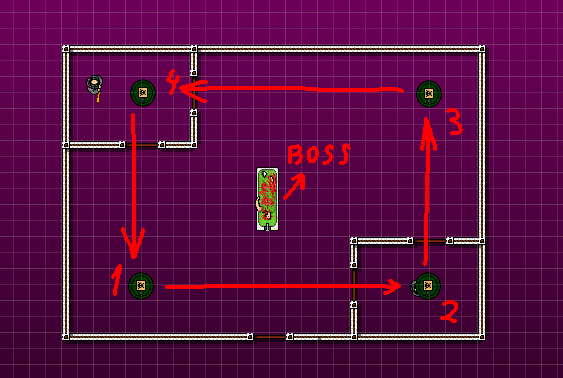
After that, place another prop that was not used in your level in position where you want gang leader to spawn.
Should look like this:
At this moment i hoping that you understand the basics of notepad++ editing, if you dont, then proceed here:
https://steamcommunity.com/sharedfiles/filedetails/?id=676175384
You can find all sprites' ids here:
https://vlad-tarabukin.github.io/hlm-developer-encyclopedia/
Replace id of every object that is going to be waypoint to "1881" and sprite to "-1" to make it invisible.
The object that is going to be the gang boss is "1880" and the sprite is "3278".
If you have done everything right. It should be something like this:
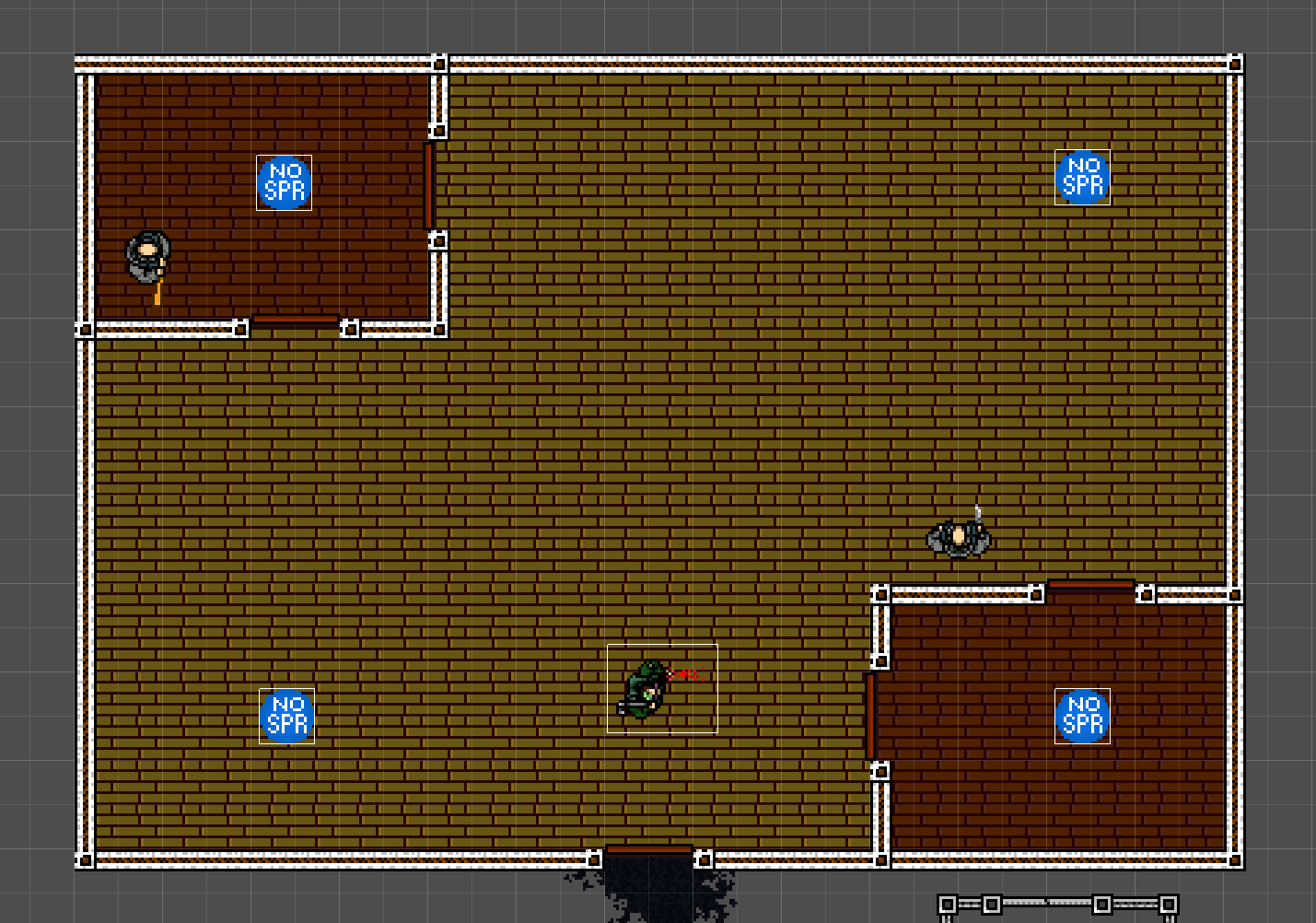
(Showing this in BetterHlmEditor because the waypoint cannot be seen in the in-game editor).
Half of the work is done, now let's make it not crash.
Now, do everything in the exact order as I'm writing!!!! If you add Boss sooner than the waypoints, the game will crash!!!!!!!!!!!!
When you finish, choose an object that you haven't used for the level and place it that way to make a looped path for our boss (no need to place props every inch, the boss has a basic AI, just like mobsters, and will try to find a path to the waypoint, but still don't make it too difficult for him to move from point to point). Boss will move to points in order of placement.After that, place another prop that was not used in your level in position where you want gang leader to spawn.
Should look like this:
At this moment i hoping that you understand the basics of notepad++ editing, if you dont, then proceed here:
https://steamcommunity.com/sharedfiles/filedetails/?id=676175384
You can find all sprites' ids here:
https://vlad-tarabukin.github.io/hlm-developer-encyclopedia/
REPLACING OBJECTS IDS
Replace id of every object that is going to be waypoint to "1881" and sprite to "-1" to make it invisible.
The object that is going to be the gang boss is "1880" and the sprite is "3278".
If you have done everything right. It should be something like this:
(Showing this in BetterHlmEditor because the waypoint cannot be seen in the in-game editor).
Half of the work is done, now let's make it not crash.
Fixing crashes
If you're going to leave everything as it is, then the game will crash. So let's make it not.
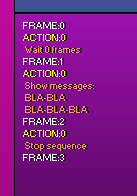
Open the level through the in-game editor. Create a cutscene on the floor with the gang boss; place the trigger where the player is going to be. The first frame should contain a wait action, you can set any time for now. After that, create a new frame with 2-line dialogue action (not the 2-line top/bottom text, but the two dialogue screens with text). The text can be anything you like, while it fits in 2-line dialogue. And finish this with stop-scene action in a new frame.
The sequence should look like this:
Wait; 2-line dialogue; stop sequence.
To be able to finish the level, create a new floor and place a cutscene with a stop sequence (scene complete) action.
Go back to the gang boss floor cutscene and find your number in
Wait NUMBER frames
Remember it.
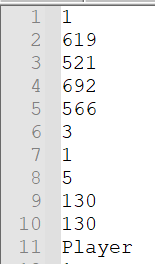
Go to the level folder and open file levelFLOORNUMBER.csf
Find there your number and replace it with 130 on both occasions.
Sould look like this:
Open the level through the in-game editor. Create a cutscene on the floor with the gang boss; place the trigger where the player is going to be. The first frame should contain a wait action, you can set any time for now. After that, create a new frame with 2-line dialogue action (not the 2-line top/bottom text, but the two dialogue screens with text). The text can be anything you like, while it fits in 2-line dialogue. And finish this with stop-scene action in a new frame.
The sequence should look like this:
Wait; 2-line dialogue; stop sequence.
BECAUSE THE CUTSCENE IS SITUATED ON A FLOOR WITH ENEMIES, "FLOOR CLEARED" AND "LEVEL CLEAR" TEXTS MAY NOT APPEAR.
To be able to finish the level, create a new floor and place a cutscene with a stop sequence (scene complete) action.
Go back to the gang boss floor cutscene and find your number in
Wait NUMBER frames
Remember it.
Go to the level folder and open file levelFLOORNUMBER.csf
Find there your number and replace it with 130 on both occasions.
Sould look like this:
Conclusion
Demonstration:

If you skip cutscene it still works:

Link to the level, if you want to test it:
https://drive.google.com/file/d/1o1CPFqG9odQZXWmSvKfxt2AMo_y2w2U1/view?usp=sharing
If you skip cutscene it still works:
Link to the level, if you want to test it:
https://drive.google.com/file/d/1o1CPFqG9odQZXWmSvKfxt2AMo_y2w2U1/view?usp=sharing
GOOD LUCK IN LEVEL MAKING!
More Hotline Miami 2: Wrong Number guides
- How to Install Hotline Miami 2 Music Mods★ 5 (807)44k views1.3k ♥3 minUpdated Oct 23, 2017
- Гайд по достижениям Hotline Miami 2: Wrong Number★ 5 (1.7k)40k views2.6k ♥6 minRussianUpdated Dec 20, 2016
- Weapons list / A box full of sharp objects guide / Список оружия [ENG/RU]★ 5 (1.5k)36k views1.5k ♥6 minUpdated Aug 5, 2025
- Full Achievement Guide[ENG/PL]★ 5 (1k)31k views1.8k ♥6 minUpdated Nov 27, 2016
- Hotline Miami - The Lore Explained★ 5 (2k)28k views1.8k ♥24 minUpdated Oct 30, 2016
- Хронология событий и сюжет Hotline Miami★ 5 (912)15k views805 ♥10 minRussianUpdated May 18, 2017



This guide was created by its original author on the Steam Community. Are you the author and want it removed? Request removal.