How to easily use mods with friends
Setup
Create a new folder that you will need to use for the files you'll need to copy (the name doesn't matter)
Make sure you have two subfolders in them one named appdata and one named data, these will keep you organized through the process
Make sure you have two subfolders in them one named appdata and one named data, these will keep you organized through the process
Step one: have your mods ready and installed
The basic normal way you install mods (x2m)
Step 2: %appdata%
Type in %appdata% in the windows search bar and look for a file named "XV2INS", after you've found it you need to copy it into the new folder you created earlier, it will take a little time to copy depending on how good your PC Make sure you copy everything from here in the appdata folder you created earlier
Make sure you copy everything from here in the appdata folder you created earlier
Your game directory
Find your game directory (This can be done by right clicking the game on steam and clicking the properties button).
After you have found your directory go into the data folder.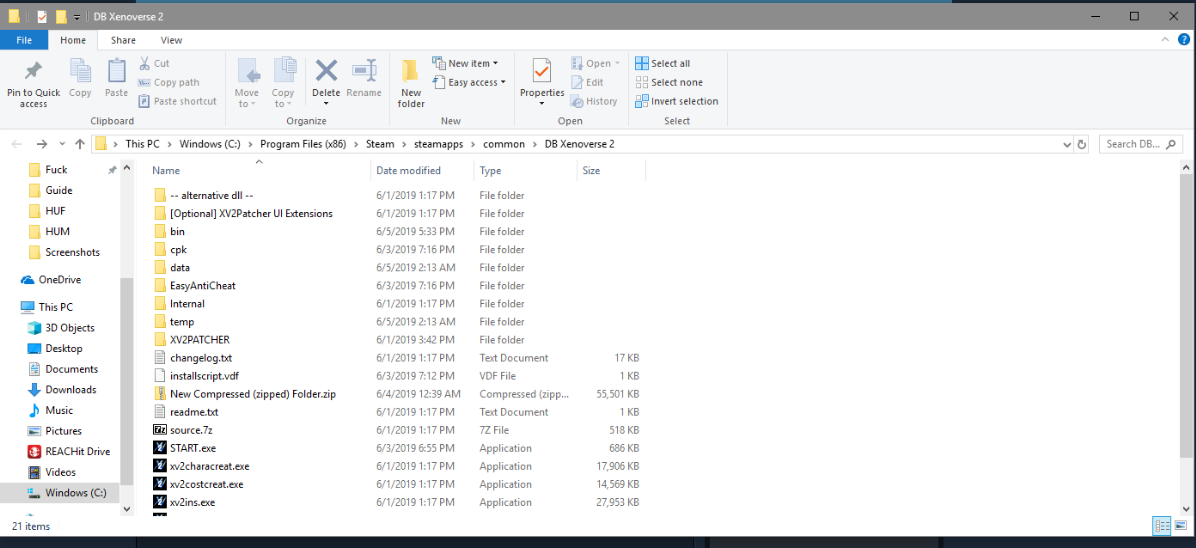 After you are in the data folder copy the selected files in the image into the new data folder you created earlier: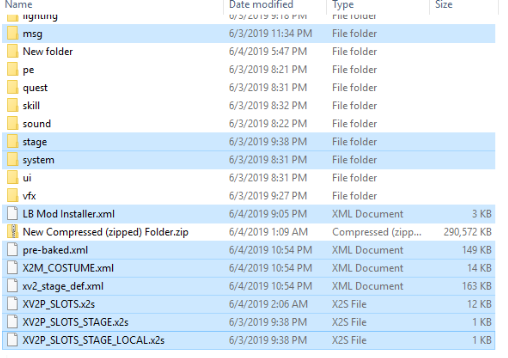
(Note: if they are missing any of the patcher files it's because they haven't installed mods and if this is the case you should just copy the entire data folder to be safe)-----> do this regardless because some mods actually use other files that were not included in the selection that I did, like aura mods
(Note: Ignore the ZIP and the "New Folder" folder
After you have found your directory go into the data folder.
After you are in the data folder copy the selected files in the image into the new data folder you created earlier:(Note: if they are missing any of the patcher files it's because they haven't installed mods and if this is the case you should just copy the entire data folder to be safe)-----> do this regardless because some mods actually use other files that were not included in the selection that I did, like aura mods
(Note: Ignore the ZIP and the "New Folder" folder
Final Step: Pasting
First things first, make sure all the files you copied are in a reliable place to transport (USB, Dropbox, Mediafire, ECT.) This will help you get the files to the other PC.
After the other person has downloaded or copied the files from you you'll have to open their %appdata% (roaming) folder on their PC after you've opened the folder copy the XV2INS folder into it (This might take a while depending on how many mods you had)
After they've done that they will need to open the directory and then open their data folder and copy these selected files from earlier (the ones in the data folder you created)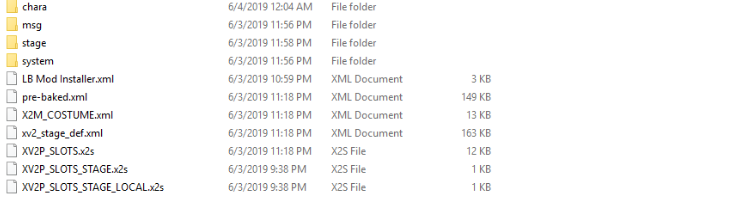
After everything is done pasting the install is done!
After the other person has downloaded or copied the files from you you'll have to open their %appdata% (roaming) folder on their PC after you've opened the folder copy the XV2INS folder into it (This might take a while depending on how many mods you had)
After they've done that they will need to open the directory and then open their data folder and copy these selected files from earlier (the ones in the data folder you created)
After everything is done pasting the install is done!
Need to knows
2/13 :There's a weird glitch that makes mods not work with ethernet, so if you can't play with your friends and get an infinite loading lobby try switching to wifi. I have no Idea why this fixes things.
More DRAGON BALL XENOVERSE 2 guides
- Dragon Ball Xenoverse 2 - All 186 Parallel Quests - RANK Z - Videos★ 5 (738)33k views1.9k ♥77 minUpdated Jul 11
- How to play a Female Majin★ 5 (404)28k views807 ♥13 minUpdated Dec 23, 2016
- The Numbers Guide★ 5 (625)27k views1.3k ♥9 minUpdated Dec 16, 2016
- Buu's house : Majin kids foods & rewards★ 5 (454)25k views929 ♥14 minUpdated May 1, 2017
- I wish for... a simple Wish Guide!★ 5 (484)25k views1k ♥2 minUpdated Apr 13, 2022
- Definitive Xenoverse 2 Transformation stats 2026 (Updated with Final DLC and New Transformation★ 5 (229)22k views495 ♥20 minUpdated 8 Jul





This guide was created by its original author on the Steam Community. Are you the author and want it removed? Request removal.