Manifest IDs for downgrading
- - READ THIS FIRST - -
YOU MUST OWN THE GAME.
THESE TOOLS WILL NOT WORK OTHERWISE.
https://store.steampowered.com/app/454650/DRAGON_BALL_XENOVERSE_2/
This is not a piracy guide, and I will not be aiding piracy.
With that out of the way, we can now move onto how to download older versions.
There's two methods.
1. Through Steam itself.
2. Through DepotDownloader.
THESE TOOLS WILL NOT WORK OTHERWISE.
https://store.steampowered.com/app/454650/DRAGON_BALL_XENOVERSE_2/
This is not a piracy guide, and I will not be aiding piracy.
With that out of the way, we can now move onto how to download older versions.
There's two methods.
1. Through Steam itself.
2. Through DepotDownloader.
Steam Method
DepotDownloader Method
This is the method I prefer.
DepotDownloader connects to Steam's API via your account and downloads games (that you own on your account) based on certain command line parameters.
The basic command line is as follows:
DepotDownloader connects to Steam's API via your account and downloads games (that you own on your account) based on certain command line parameters.
The basic command line is as follows:
DepotDownloader.exe -app APP-ID -depot DEPOT-ID -manifest MANIFEST-ID -username ACCOUNTNAME
For Dragon Ball Xenoverse 2, it'll look like this:DepotDownloader.exe -app 454650 -depot 454651 -manifest MANIFEST-ID -username ACCOUNTNAME
Versions and Manifests
Despite the version number for multiple manifests being the same, each manifest IS different. Executable file-size changes despite the same version being listed, meaning game files were also probably changed. It's probably best to use the most recent manifest for each numbered game version.
Game Version
Manifest ID
1.21.2.0
2095958944427690042
1.21.1.0
1784750431379628381
1.21.0.0
1268039301670284179
1.21.0.0
5536446614027988721
1.20.1.0
6515942529072239753
1.20.0.0
6099451522219616194
1.19.1.0
1187541358151095093
1.19.0.0
6647209413337367078
1.18.1.0
3639472160657652123
1.18.0.0
4684708141099351223
1.17.2.0
1434546612693790835
1.17.1.0
6995084136917285795
1.17.0.0
6079544081802474121
1.16.1.0
1892689739910861020
1.16.0.0
1778347931148684772
1.15.0.0
1927767291873299028
1.15.0.0
6485183205206993945
1.14.0.0
8804310811919528573
1.14.0.0
2160341546847685387
1.14.0.0
8054638433613201118
1.10.0.0
7762111092763857007
1.10.0.0
1088926131568374667
1.10.0.0
1580963209003248449
1.10.0.0
8876721515142404407
1.10.0.0
1825750157775092327
1.10.0.0
388097004349659459
1.10.0.0
4393150183883146360
1.10.0.0
3943548381364530420
1.10.0.0
4634057086994511147
1.9.1.0
144971219714116280
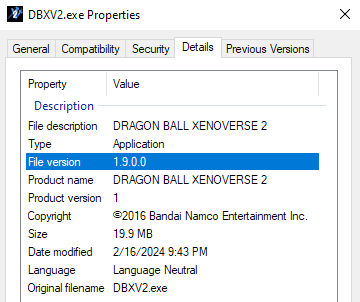
1.9.0.0
1086578134005202456
1.8.0.0
3474136278128355786
1.7.2.0
267311934730179149
1.7.2.0
3604019851801707242
1.7.1.0
8380179503670720944
1.7.0.0
6083214136487989540
1.6.1.0
88250429013783738
1.6.0.0
7323718972237449369
1.5.0.0
3523062292043221040
1.4.1.0
4214689094972294478
1.4.1.0
8997118706958563094
1.3.0.0
8256181703257878305
1.0.0.0
631135294371954874
"How did you do this?"
Batch script, of course. Example:
xenoverse.bat:
-remember-password ensures that I don't need to be present, allowing me to leave the room or do something else while the script runs minimized.
xenofile.txt:
xenoverse.bat:
@echo OFF
DepotDownloader.exe -app 454650 -depot 454651 -username REDACTED -remember-password -manifest 2095958944427690042 -filelist xenofile.txt -validate -dir 01_2095958944427690042
timeout /t 120 /nobreak
DepotDownloader.exe -app 454650 -depot 454651 -username REDACTED -remember-password -manifest 1784750431379628381 -filelist xenofile.txt -validate -dir 02_1784750431379628381
timeout /t 120 /nobreak
DepotDownloader.exe -app 454650 -depot 454651 -username REDACTED -remember-password -manifest 1268039301670284179 -filelist xenofile.txt -validate -dir 03_1268039301670284179
timeout /t 120 /nobreak
etc...
Downloads each manifest, with a delay between each to avoid getting rate limited by Steam's servers.-remember-password ensures that I don't need to be present, allowing me to leave the room or do something else while the script runs minimized.
xenofile.txt:
bin/DBXV2.exe
Specifies to only download the game's exe, saving time. This is all that is needed to determine the game version.
More DRAGON BALL XENOVERSE 2 guides
- Dragon Ball Xenoverse 2 - All 186 Parallel Quests - RANK Z - Videos★ 5 (738)33k views1.9k ♥77 minUpdated Jul 11
- How to play a Female Majin★ 5 (404)28k views807 ♥13 minUpdated Dec 23, 2016
- The Numbers Guide★ 5 (625)27k views1.3k ♥9 minUpdated Dec 16, 2016
- Buu's house : Majin kids foods & rewards★ 5 (454)25k views929 ♥14 minUpdated May 1, 2017
- I wish for... a simple Wish Guide!★ 5 (484)25k views1k ♥2 minUpdated Apr 13, 2022
- Definitive Xenoverse 2 Transformation stats 2026 (Updated with Final DLC and New Transformation★ 5 (229)22k views495 ♥20 minUpdated 8 Jul





This guide was created by its original author on the Steam Community. Are you the author and want it removed? Request removal.