Mount and Blade II: Bannerlord console commands, cheat mode and cheat key binds.
How to enable Mount & Blade 2: Bannerlord cheats
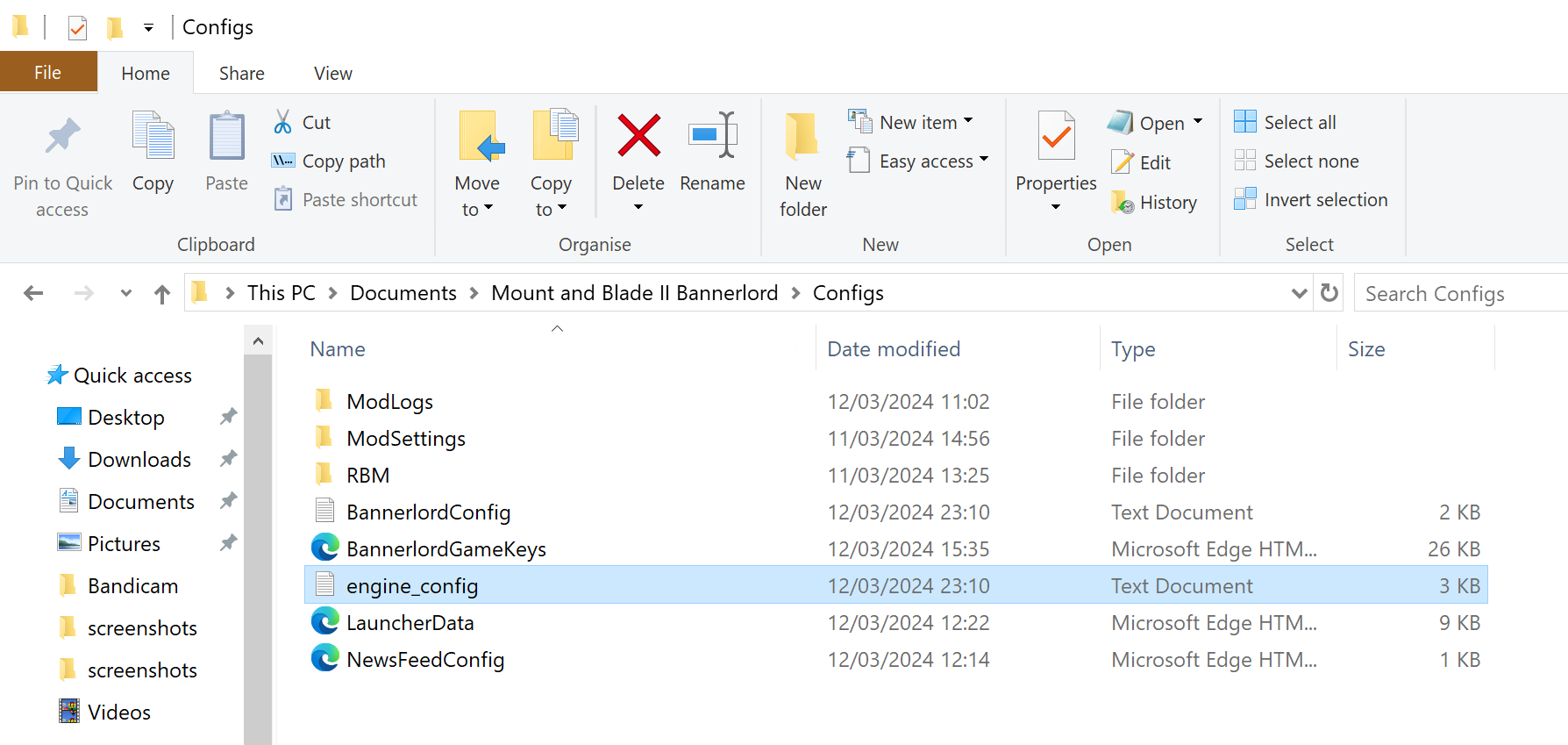 First, you'll need to make an edit to a single file. Head to this location on your PC: Documents > Mount and Blade II Bannerlord > engine>config.txt.
Open it with a text editor like Notepad, and look for this line: cheat_mode = 0
Change 0 to 1 and save the file.
What will happen when I enable cheats?
- Your inventory will display a list of every item in the game on the left side of the screen
- Your party screen will display a list of every military unit in the game
- When you click on an item or unit you will receive it for free
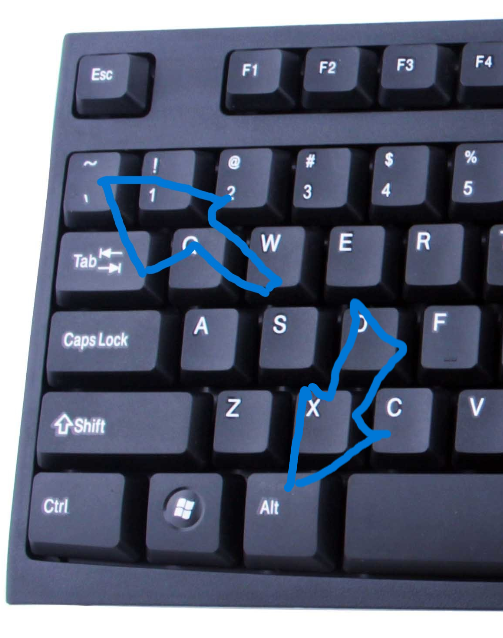
- You will enable the developer's console to type in various cheats. You can press Alt and ~ to open the in-game developer's console and start using console commands. Press Alt and ~ again to close it.
If you want to use console commands without spoiling the game content then you will have to just ignore what is going on in the inventory screen and party screen. It is worth not exploring the list of all items because there is a lot of cool content you can find as you play the game.
At any time once you have finished modifying a game, you can safely deactivate the console menu. and it won't interfere with your previous saved games.
Cheats
Here are some up to date cheat keybinds released buy the development team
All Mount & Blade II: Bannerlord Cheats
CTRL + F2 Knock out one of your troops
CTRL + F3 Knocks out your player character
CTRL + F4 Defeat an enemy
CTRL + ALT + F4 Defeat all enemies
CTRL + H Full heal your character.
CTRL + Shift + H Full heal your horse.
(While on World Map) CTRL + Left Mouse Button Teleport anywhere on your map.
All Mount & Blade II: Bannerlord Cheats
CTRL + F2 Knock out one of your troops
CTRL + F3 Knocks out your player character
CTRL + F4 Defeat an enemy
CTRL + ALT + F4 Defeat all enemies
CTRL + H Full heal your character.
CTRL + Shift + H Full heal your horse.
(While on World Map) CTRL + Left Mouse Button Teleport anywhere on your map.
Most useful console commands.
All Console Commands in Mount & Blade II
The Console Command screen gives you a way to see every known command you can use. They all start with a particular piece of code. Once you know all of those keywords, it makes inputting any Console Command you want to use in Mount & Blade II much easier. This list displays every starting piece of code for you, and detail what they do listed below.
The Console Command screen gives you a way to see every known command you can use. They all start with a particular piece of code. Once you know all of those keywords, it makes inputting any Console Command you want to use in Mount & Blade II much easier. This list displays every starting piece of code for you, and detail what they do listed below.
- agent.
- ai.
- campaign.
- config.
- debug.
- Log.
- Mission.
- Mission_cpp
- ui.toggle_ui
Updated Guide Information
This guide has recently been updated as only a few of the old console commands were working here are the commands listed in to original guide that still work.
campaign.add_skill_xp_to_hero
campaign.give_settlement_to_player
campaign.add_influence
campaign.add_renown_to_clan
campaign.add_focus_points_to_hero
------------------------------------------------------------
I may get around to updating this guide with specifically useful console commands however you could do me a huge a favour and post your favourite console commands in comment section then I can check them and keep updating this guide with useful content. That would be good.
campaign.add_skill_xp_to_hero
campaign.give_settlement_to_player
campaign.add_influence
campaign.add_renown_to_clan
campaign.add_focus_points_to_hero
------------------------------------------------------------
I may get around to updating this guide with specifically useful console commands however you could do me a huge a favour and post your favourite console commands in comment section then I can check them and keep updating this guide with useful content. That would be good.
More Mount & Blade II: Bannerlord guides
- The Silk Road: Trading, Workshop, and Goods★ 5 (1.6k)84k views3.7k ♥24 minUpdated Jul 8, 2020
- Money / Bannelord Guide★ 5 (893)74k views1.9k ♥20 minUpdated Apr 16, 2022
- Companions,Wanderers, and Wives. Oh my! [UPDATED 2024]★ 5 (1.3k)66k views3.3k ♥28 minUpdated Jan 13, 2025
- Сборник внутриигровых чит-кодов. Читы. Коды.★ 4 (123)54k views471 ♥4 minRussianUpdated 19 Mar, 2024
- Ultimate Bannerlord Beginner's Guide★ 5 (513)50k views943 ♥19 minUpdated Dec 21, 2022
- Perks, Perk Trees / Anti-Cowardice Guide (War Sails Update)★ 5 (539)31k views1.8k ♥132 minUpdated 27 Apr




This guide was created by its original author on the Steam Community. Are you the author and want it removed? Request removal.