THE NO BS GUIDE TO FIX YOUR BORDERLANDS 3! Performance improvements/Stutter fix/Configurations - - (updated 3/26/26)
IN GAME SETTINGS
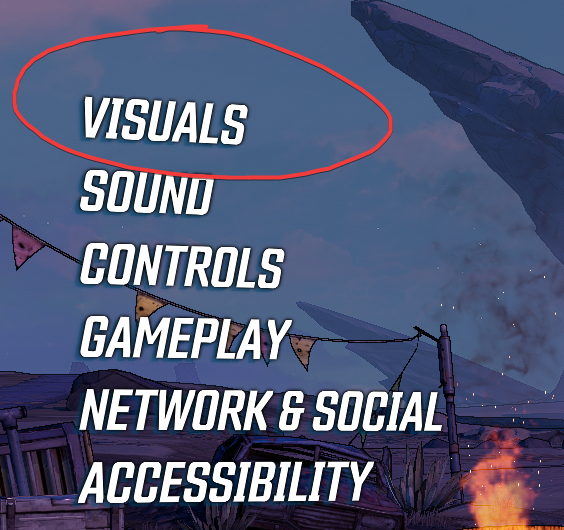 Graphics API - DirectX 12 (11 if you're running into issues)
Display mode - personal preference
Vertical Sync - Off
Limit Frame Rate - Minus 5-8 of your monitor Refresh rate / Example: 240hz = 235 fps
Alternatively just limit the fps to your Refresh rate
ADVANCED
Graphics Quality - Medium /Very Low (having it on low can see a decent improvement to fps, at a surprisingly zero loss in quality. Ik, crazy stuff right?)
Anti Aliasing - None (Personal preference)
Texture Streaming - Ultra
Material Quality - Medium
Anisotropic Filtering - 16x
Shadows - Medium
Draw Distance - Low
Clutter - Low
Terrain Detail - Medium
Foliage - Low
Volumetric Fog - Off
Screen Space Reflections - Off
Character Detail - High
Ambient Occlusion - Off
Camera Motion Blur - Off
Object Motion Blur - Off
FidelityFX Sharpening - On
SAVE YOUR IN GAME SETTINGS FIRST BEFORE MOVING ONTO THE NEXT STEP
I do wanna note. These are all personal preference, so use what you desire, depending on your rig.
INI. Tweaks - Configurations to improve performance
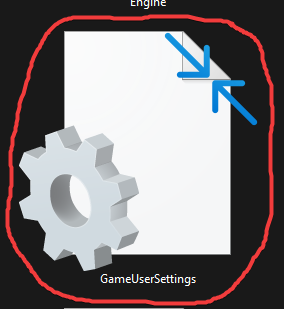
- Locate PC/documents/my games/borderlands 3/saved/Config/WindowsNoEditor
GameUserSettings -- Apply the following configurations --
Change/add the following
[ScalabilityGroups]
sg.ResolutionQuality=100.000000
sg.ViewDistanceQuality=2
sg.AntiAliasingQuality=3
sg.ShadowQuality=0
sg.PostProcessQuality=2
sg.TextureQuality=2
sg.EffectsQuality=1
sg.FoliageQuality=1bUsePerformanceMode=True
PreferredGraphicsAPI=DX12TextureStreamingViewBoostScale=10.000000
TextureStreamingViewBoostScaleOverride=-10.000000
TextureStreamingAdaptiveBoostScale=0.000000
TextureStreamingAdaptiveBoostScaleOverride=-0.000000
TextureStreamingPoolSizeMB=9000 (or 8000)
TextureStreamingPoolSizeMBOverride=-1 (This priorities Streaming over fps)
1(=priority to fps (no streaming boosts, way less stuttering, but noticeable texture quality refresh delay)
0(Setting it to 0, will give you a mix of the two)EdgeDetectionTexelOffset=1.3
will reduce the black lines just a tad. Less fps consumingUseDynamicStreaming=True
Add under [/script/oakgame.oakgameusersettings] - now set gameusersettings.ini to read only(will ensure the game won't try and rewrite the settings)
Engine -- Add the following configurations to the bottom --
[SystemSettings]
r.oneframethreadlag=1 (0 if you're frames are already good) - - - 0 = More responsive 1 = = More fps with a slight delay dependent on fps
r.DepthOfFieldQuality=0
r.LensFlareQuality=0
r.DefaultFeature.LensFlare=0
r.DefaultFeature.Bloom=0
r.BloomQuality=0
r.PostProcessAAQuality=0
r.MotionBlur.Max=0
r.MotionBlurQuality=0
r.DefaultFeature.MotionBlur=0 - now set Engine.ini to read only(will ensure the game won't try and rewrite the settings)
Reducing File Size (Removing Unnecessary Files)
Locate "steamapps\common\Borderlands 3\OakGame\Content\Paks"
Delete the following:
/ / / /
pakchunk85-WindowsNoEditor = French Language
pakchunk86-WindowsNoEditor = Italian Language
pakchunk87-WindowsNoEditor = German Language
pakchunk88-WindowsNoEditor = Spanish Language
pakchunk89-WindowsNoEditor = Japanese Language
pakchunk90-WindowsNoEditor = Korean Language
pakchunk91-WindowsNoEditor = Chinese Language
Disabling CFG (Control Flow Guard)

-- Will fix minor stuttering (works for other games too)
- Windows search "Exploit Protection" - or alternatively go to windows security > app & browser control > exploit protection > exploit protection settings
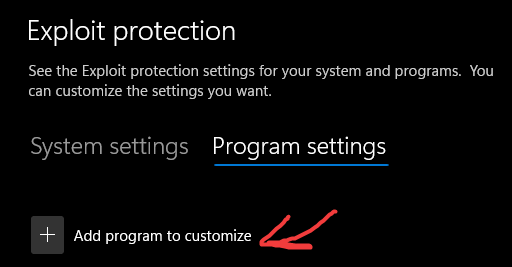 3. In the editing sceen scroll down to Control Flow Guard(CFG), check "override system settings" and toggle it to "off" and then hit apply
- Profit
Nvidia Profile Inspector
Download Nvidia Profile Inspector -
https://github.com/Orbmu2k/nvidiaProfileInspector/releases
Extract it's contents
Run the exe
Locate your Borderlands 3 in the top left section under "Profiles"
change this setting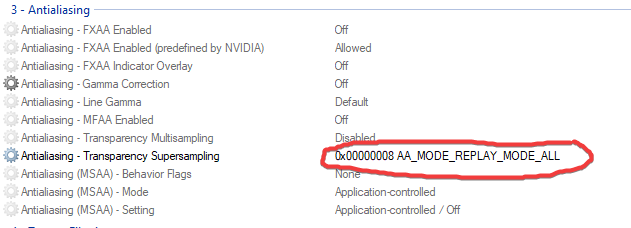 Resizable Bar = Off/Disabled (noticed that having it off greatly improves the flow of fps and less stutters/hitching
and hit "Apply Changes"

STEAM LAUNCH OPTIONS
- -high -USEALLAVAILABLECORES (make sure there is no space in the beginning)
You can also add -NOTEXTURESTREAMING - this pretty much eliminates all the stuttering.your load times will def feel it. I do like fast load times, so I personally don't use this(NOTEXTURESTREAMING)

MODS -- (OPTIONAL)
- https://www.nexusmods.com/borderlands3/mods/376 - less visual pollution
- https://www.nexusmods.com/borderlands3/mods/371 - vendor crash fix
- https://www.nexusmods.com/borderlands3/mods/370 - clear inspect screen
- https://www.nexusmods.com/borderlands3/mods/368 - faster travels
- https://www.nexusmods.com/borderlands3/mods/365 - small crit sprites
- https://www.nexusmods.com/borderlands3/mods/309 - disable bloom/depth of field
- https://www.nexusmods.com/borderlands3/mods/396 - fix radiation amp shot
- https://www.nexusmods.com/borderlands3/mods/412 - Fps boost (might help, might not)
Tutorials on how to install these mods, can be found in the descriptions
BLCM - HotFix Manager
Add mods through community made hotfixes
Link to Mod Library - https://github.com/BLCM/bl3mods/wiki/All-Mods
How to install mods - OpenHotfixLoader/B3HM
EXTRAS
Did you know bl3 had PythonSDK? Well now you do! It's essentially a tool to allow creators to create their own mods and post them publicly.
Link - https://bl-sdk.github.io/oak-mod-db/
Tutorials can be found there!
-REMOVE THEM BEGINNING MOVIES-
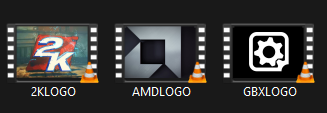
Are you tired of hearing the gearbox logo earrape you each time you launch the game? Let's fix that.
- Locate SteamLibrary\steamapps\common\Borderlands 3\OakGame\Content\Movies
and delete the following.
Integrity of game files
1. Right click Borderlands 3 in your library
2. From the drop down menu, select Properties..
3. Select the Installed Files tab and click the Verify integrity of game files button
4. Wait and profit
Profit
You've now successfully perfected your game!! (well hopefully lol, this worked for me after months of trial and error XD)
If this guide helped you. Do feel free to let me know in the comments!

I'd like to note. None of the configurations seen here, were discovered/found by me alone. This is just an archive of all possible solutions, put into one massive blender.
These were the ones, I found work best, which of course can vary from person to person.
- SHiFT Codes (updated: September 5, 2025)★ 5 (1.4k)56k views2k ♥3 minUpdated 5 Sep, 2025
- БЕСПЛАТНЫЕ SHIFT-КОДЫ, ЗОЛОТЫЕ и БРИЛЛИАНТОВЫЕ КЛЮЧИ!★ 5 (551)45k views990 ♥18 minUpdated 31 Dec, 2024
- Borderlands 3 - 100% Achievements Guide★ 5 (1.7k)43k views3.3k ♥17 minUpdated 4 Jul, 2022
- Squeezing out those fps - Graphics Optimization for BL3★ 5 (844)41k views1.5k ♥15 minUpdated 31 Mar, 2020
- SHIFT Codes Golden Keys 2026★ 5 (1k)40k views1.6k ♥1 minBulgarianUpdated 30 Jan
- Безлимитные золотые ключи (つ◕_◕)つ🔑🔑🔑★ 5 (396)26k views579 ♥1 minRussianUpdated 31 Aug, 2025



- Upgrading to PremiumTeam Fortress 2★ 5 (20k)1441k views11k ♥6 minUpdated May 11, 2022
- No More Room in Hell Official ManualNo More Room in Hell★ 5 (2.8k)569k views2.1k ♥29 minUpdated Apr 22, 2019
- NMRiH Community Hosting GuidesNo More Room in Hell★ 5 (526)351k views653 ♥1 minUpdated Aug 10, 2022
- How to 'Git Gud' Soon™MORDHAU★ 5 (2k)318k views3k ♥68 minUpdated Nov 16, 2024
- Лучшие кооперативные игры SteamPAYDAY 2★ 5 (1.5k)315k views2.1k ♥56 minRussianUpdated Apr 27, 2025
- Desert Eagle Heat Treated | Blue GemCounter-Strike 2★ 5 (1.6k)293k views1.5k ♥2 minUpdated Jan 16





This guide was created by its original author on the Steam Community. Are you the author and want it removed? Request removal.