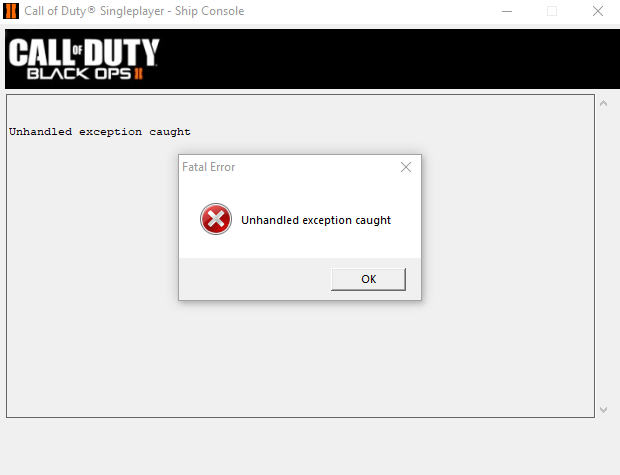
Black Ops II Unhandled exeption caught Fixed!
The Problem
After every mission the game would crash and the popup says "unhandled exeption caught". The problem is caused by the career record. I've tried fixing the game's DirectX, changed the windows compatibility mode, and validating files hasn't worked either.
How to Fix
There are 2 ways to fix this problem
-Have 60 friends or less on steam, you've got to clean out your friends list
~OR~
-Disable Black Ops II from accessing the internet
This can be done by turning off your computer's internet, or by disabling the program's internet access in windows firewall
To remove the game's internet access, go to Control Panel > System and Security > Windows Defender Firewall > Advanced settings > Outbound Rules > Actions > New Rule > Select Program > This program path - Browse > Locate your local bo2 folder and select "t6sp.exe" > Block the connection > Domain, Private, Public should already be selected > Name the rule > Finish
When you boot up the game, the singleplayer won't crash and will work normally
-Have 60 friends or less on steam, you've got to clean out your friends list
~OR~
-Disable Black Ops II from accessing the internet
This can be done by turning off your computer's internet, or by disabling the program's internet access in windows firewall
To remove the game's internet access, go to Control Panel > System and Security > Windows Defender Firewall > Advanced settings > Outbound Rules > Actions > New Rule > Select Program > This program path - Browse > Locate your local bo2 folder and select "t6sp.exe" > Block the connection > Domain, Private, Public should already be selected > Name the rule > Finish
When you boot up the game, the singleplayer won't crash and will work normally
More Call of Duty: Black Ops II guides
- How to install anime women mod for BO2★ 4 (784)40k views207 ♥1 minUpdated Oct 17, 2022
- (SPOILERS) How To Get The BEST ENDING Possible!★ 5 (707)34k views1.4k ♥2 minUpdated Oct 13, 2025
- Giant Accomplishment SAVE FILE★ 5 (473)26k views711 ♥1 minUpdated Sep 27, 2020
- How to Open Call of Duty: Black Ops II★ 4 (516)20k views109 ♥1 minBulgarian
- Call of Duty: Black Ops II — Гайд по достижениям★ 5 (1.2k)19k views1.3k ♥15 minRussianUpdated Apr 22, 2013
- Call of Duty Black Ops 2: Campaign Achievement Guide★ 5 (572)17k views1.2k ♥7 minUpdated Jul 20, 2020






This guide was created by its original author on the Steam Community. Are you the author and want it removed? Request removal.