Easy fix to play with friends without expansions
Launch commands
Are you in the uncomfortable situation of getting:
 or both.
The expansions won't be uninstalled and by just removing the command, the game will launch normally.
This game is using an incompatible game mode. Your mode: "Ashes of Malmouth", Sever's mode: "Grim Dawn"and not being able to join your bud's game just because Crate Entertainment couldn't add a freaking "Expansion Character" toggle?
Well, hold the refund and send everything to hell horses just for a bit. (Because I was there)
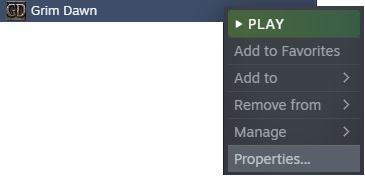
You can disable the expansions at the Launch Options menu on steam, Following:
Right click-->Properties
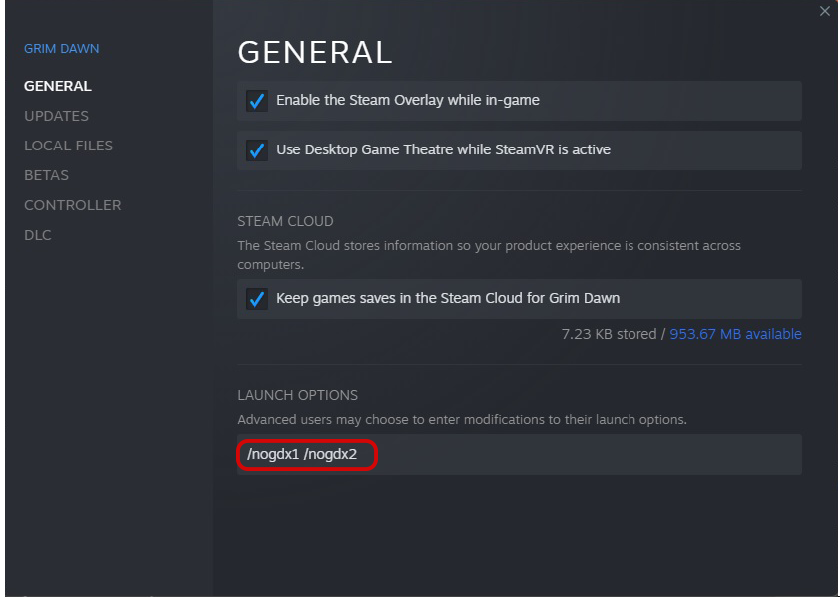
Under general use this commands to disable either:
/nogdx1
Ashes of Malmoth
/nogdx2
Forgotten Gods
The expansions won't be uninstalled and by just removing the command, the game will launch normally.
Cheers.
PS
What a foul Crate...
More Grim Dawn guides
- Beginner's Guide to Skills★ 5 (1.1k)53k views2.3k ♥167 minUpdated Nov 4, 2021
- Devotion Shrines★ 5 (2.1k)43k views3.7k ♥5 minUpdated Nov 22, 2023
- How to start new games at level 15+★ 4 (161)30k views341 ♥6 minUpdated Jul 6, 2019
- Секретные Локации★ 5 (1.1k)27k views1.9k ♥8 minRussianUpdated Apr 20, 2017
- Lokarr - Secret Quest (AoM)★ 5 (549)26k views1k ♥10 minUpdated Oct 5, 2018
- Все возможные комбинации в Grim Dawn + Все DLC★ 4 (230)26k views359 ♥3 minRussianUpdated Dec 10, 2021




🔥 Popular guides
- Upgrading to PremiumTeam Fortress 2★ 5 (20k)1441k views11k ♥6 minUpdated May 11, 2022
- No More Room in Hell Official ManualNo More Room in Hell★ 5 (2.8k)569k views2.1k ♥29 minUpdated Apr 22, 2019
- NMRiH Community Hosting GuidesNo More Room in Hell★ 5 (526)351k views653 ♥1 minUpdated Aug 10, 2022
- Лучшие кооперативные игры SteamPAYDAY 2★ 5 (1.5k)315k views2.1k ♥56 minRussianUpdated Apr 27, 2025
- Desert Eagle Heat Treated | Blue GemCounter-Strike 2★ 5 (1.6k)292k views1.5k ♥2 minUpdated Jan 16
- Treasure Hunt Puzzle SolutionsTotal War: WARHAMMER II★ 5 (6.9k)281k views15k ♥3 minUpdated Aug 19, 2021






This guide was created by its original author on the Steam Community. Are you the author and want it removed? Request removal.