How to make your character name colorful
Introduction
As far as I know, majority of player base does not know this is even possible to do because it never was explained anywhere officially.
That's why I wanted to share and spread a word about this, so called, feature.
...And to start things off, you firstly need a tool or an app (any will do, as long as it changes the name).
Now, I will mainly focus on making this guide further with "GD Stash" tool in-mind, because it's the most widely one used and probably, also, easiest/friendliest for beginners.
So, let's begin...
List of every color:
- (A) Aquamarine
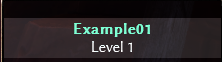
- (B) Blue (Pelorous)
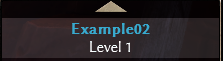
- (C) Cyan
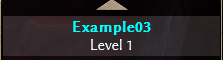
- (D) Dark (Rangoon Green)
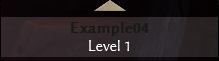
- (E) Driftwood
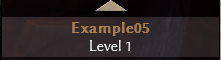
- (F) Hot Pink
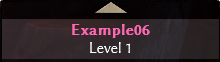
- (G) Malachite
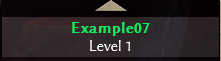
- (H) Indian Khaki
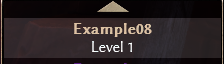
- (I) Indigo (Purple Heart)
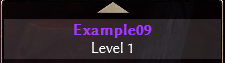
- (J) -
- (K) Khaki
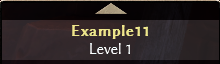
- (L) Lima (Lime)
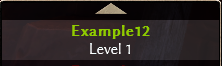
- (M) Red Oxide (Maroon)
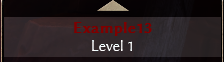
- (N) -
- (O) Orange (Tussock)
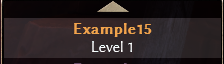
- (P) Lavender purple
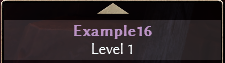
- (Q) Chatelle
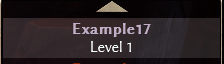
- (R) Red (Vermilion)
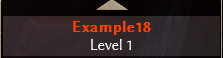
- (S) Gunsmoke (Suva Gray)
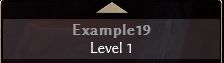
- (T) Bright Turquoise
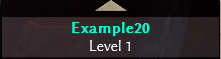
- (U) -
- (V) -
- (W) -
- (X) Tom Thumb
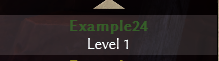
- (Y) Golden Fizz

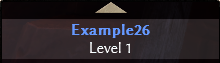
- (Z) Cornflower Blue
Adding some colors to life...
NOTICE: Do the following steps while your game is NOT open!
This is how my nickname looks normally on "GD Stash", without any color codes in it...
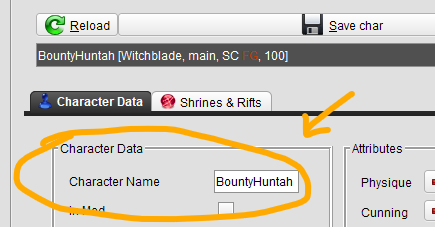
CHARACTER NAME: BountyHuntah
OUTPUT:
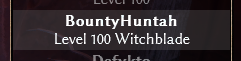
This is how it looks like after I add color code inside of my toons name (in this case, BountyHuntah)...
CHARACTER NAME: ^lBounty^kHuntah^e
OUTPUT:
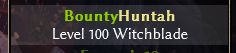
- - -
EXPLANATION: You start with a special symbol & a following alphabet letter like this:
EXAMPLE: ^bBountyHuntah
This will turn your name into blue, because letter b indicates for blue
It is also recommended if you close/end the color code like this: ^e
EXAMPLE 1: ^bBountyHuntah^e
EXAMPLE 2: ^bBounty^eHuntah
Final notes
Don't freak out if it didn't work out for you... check the other comments on this guide to see if your problem is similar and is actually easy to fix. Most of the time it is...If the problem still persists, leave a comment and let's try figure it out together.
I am pretty sure this feature still works and exists, otherwise some of my main toons would disappear in abyss, which hasn't happened for a few years now.
If you don't mind, share this guide with others and let's make this game a bit brighter and more colorful.
That's it... got nothing more to tell ya, bai! c:
- Beginner's Guide to Skills★ 5 (1.1k)53k views2.3k ♥167 minUpdated Nov 4, 2021
- Devotion Shrines★ 5 (2.1k)43k views3.7k ♥5 minUpdated Nov 22, 2023
- How to start new games at level 15+★ 4 (161)30k views341 ♥6 minUpdated Jul 6, 2019
- Секретные Локации★ 5 (1.1k)27k views1.9k ♥8 minRussianUpdated Apr 20, 2017
- Lokarr - Secret Quest (AoM)★ 5 (549)26k views1k ♥10 minUpdated Oct 5, 2018
- Все возможные комбинации в Grim Dawn + Все DLC★ 4 (230)26k views359 ♥3 minRussianUpdated Dec 10, 2021




- Upgrading to PremiumTeam Fortress 2★ 5 (20k)1441k views11k ♥6 minUpdated May 11, 2022
- No More Room in Hell Official ManualNo More Room in Hell★ 5 (2.8k)569k views2.1k ♥29 minUpdated Apr 22, 2019
- NMRiH Community Hosting GuidesNo More Room in Hell★ 5 (526)351k views653 ♥1 minUpdated Aug 10, 2022
- Лучшие кооперативные игры SteamPAYDAY 2★ 5 (1.5k)315k views2.1k ♥56 minRussianUpdated Apr 27, 2025
- Desert Eagle Heat Treated | Blue GemCounter-Strike 2★ 5 (1.6k)292k views1.5k ♥2 minUpdated Jan 16
- Treasure Hunt Puzzle SolutionsTotal War: WARHAMMER II★ 5 (6.9k)281k views15k ♥3 minUpdated Aug 19, 2021






This guide was created by its original author on the Steam Community. Are you the author and want it removed? Request removal.