Far Cry Cheats
Enable Devmode
- Open your Steam library.
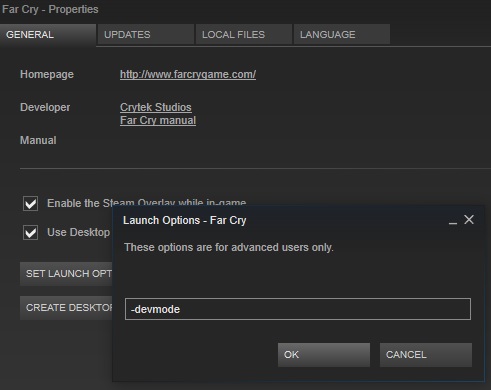
- Right click on Far Cry and select properties.
- Open "Set Launch Options"
- add -devmode
OR
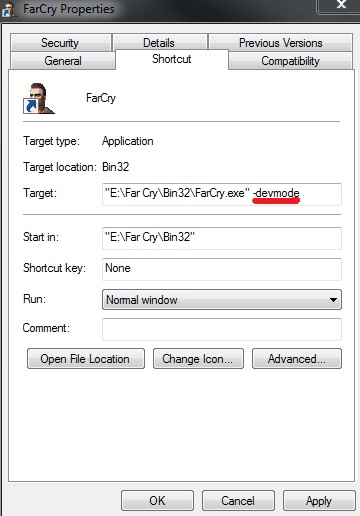
- Create a shortcut to your Farcry.exe.
- Right click your Far Cry shortcut and select properties.
- In the target line, add -devmode to the end:
Enable Godmode
Go to the directory where you installed Far Cry and open the file
Source [cowgod.net]
DevMode.lua
in a text editor like Notepad. Scroll all the way to the bottom of this file and you should see a line that says end. enter a couple of line breaks after that and then paste this in to the file:function ToggleGod()
if (not god) then
god=1;
else
god=1-god;
end
if (god==1) then
System:LogToConsole("God-Mode ON");
else
System:LogToConsole("God-Mode OFF");
end
end
Input:BindCommandToKey("#ToggleGod()","backspace",1);
if (not god) then
god=1;
else
god=1-god;
end
if (god==1) then
System:LogToConsole("God-Mode ON");
else
System:LogToConsole("God-Mode OFF");
end
end
Input:BindCommandToKey("#ToggleGod()","backspace",1);
Source [cowgod.net]
Cheats
[Backspace]
godmode on/off
[/b][/th]
all weapons
[/tr][O]
999 ammo for equiped weapon
[F1]
change view (first/third person)
[F4]
no clip
[F2]
next checkpoint
[F9]
save location of the player
[F10]
jump to saved location
[F11]
switch additional info on/off
Far Cry 2
Reviews, more Guides and YouTube Channel
To see my reviews and more guides, please feel free to follow me and/or my curator group:
http://steamcommunity.com/id/Ov3RT4K3R/myworkshopfiles/?section=guides
http://steamcommunity.com/groups/orcollective#curation
Also feel free to check out my YouTube Channel:
https://www.youtube.com/channel/UC83DYCmrWfl9ttrhX54jmWA
http://steamcommunity.com/id/Ov3RT4K3R/myworkshopfiles/?section=guides
http://steamcommunity.com/groups/orcollective#curation
Also feel free to check out my YouTube Channel:
https://www.youtube.com/channel/UC83DYCmrWfl9ttrhX54jmWA

More Far Cry guides
- Русификация игры Far Cry★ 5 (303)20k views582 ♥2 minRussianUpdated Apr 24
- Far Cry Fix [Widescreen Fix | AI Fix | SilentPatch | Quick Save & Load | 64-Bit]★ 5 (335)15k views592 ♥2 minUpdated Mar 29, 2024
- Исправление Far Cry [Widescreen Fix | AI Fix | SilentPatch | Quick Save & Load | 64-Bit | Русификатор]★ 5 (411)13k views710 ♥2 minRussianUpdated May 15, 2024
- Real Far Cry 1 / Downgrade to Patch v.1.33★ 4 (71)8.8k views155 ♥1 minUpdated May 9, 2024
- Spolszczenie Far Cry [879MB] [DUBBING+NAPISY]★ 4 (125)6.7k views125 ♥1 minPolishUpdated Jun 3, 2021
- Как вспомнить и поиграть в Far Cry с новым дыханием★ 4 (87)6.5k views165 ♥13 minUpdated Apr 23, 2023




This guide was created by its original author on the Steam Community. Are you the author and want it removed? Request removal.