[FIXED] Doom Eternal Could Not Enumerate Graphics Devices
FIX
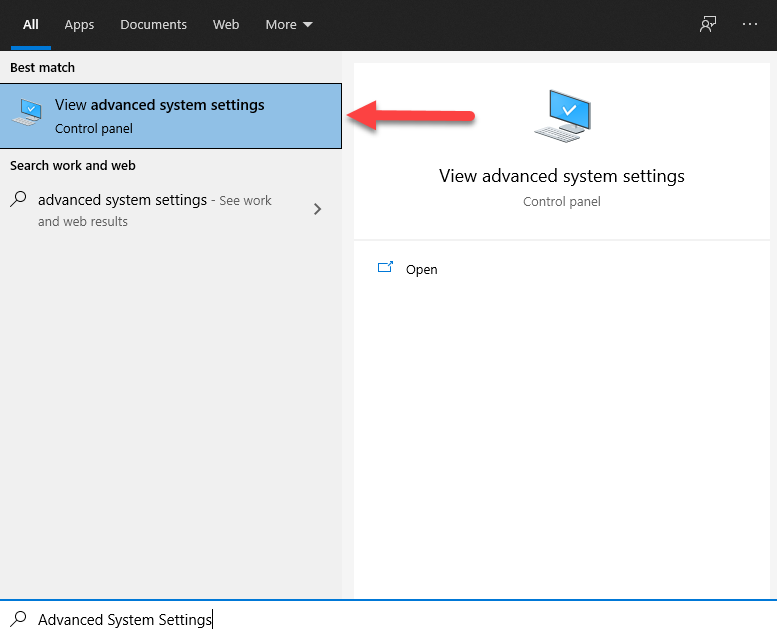
- Press the Windows key on your keyboard to bring up the Windows search.
- Type "Advanced System Settings" to bring up the Advanced System Settings app. Select "View advanced system settings".
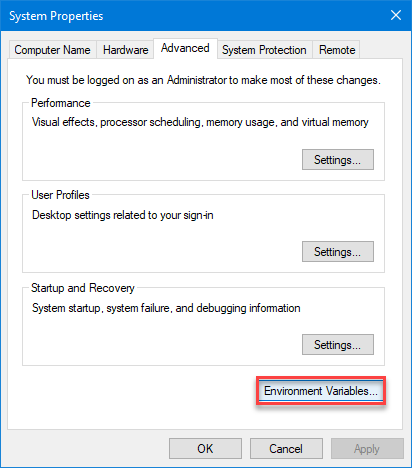
- This will bring up the Advanced Tab inside of the System Properties. Select the Environment Variables.
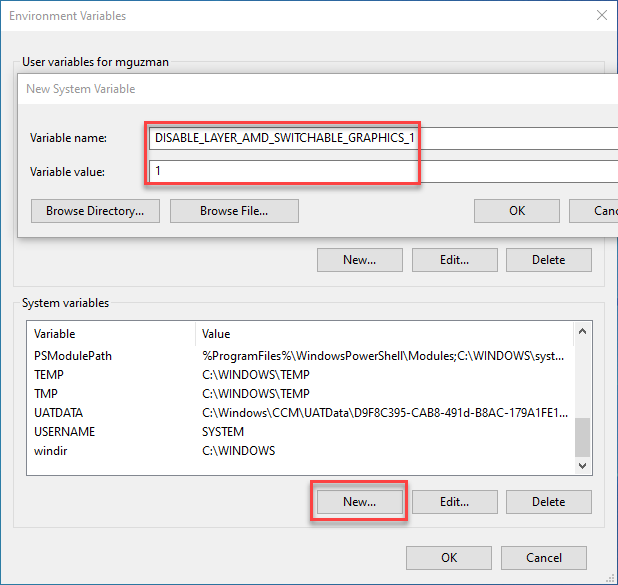
- From the System variables section, select the "New.." button. Fill in the field Variable name: with the text “DISABLE_LAYER_AMD_SWITCHABLE_GRAPHICS_1” and Variable value: with "1" as shown below. Then press the OK button.
- Select OK once more to close the Environment Variables window.
More DOOM Eternal guides
- DOOM Eternal 100% Achievement Guide★ 5 (677)39k views1.6k ♥15 minUpdated Apr 9, 2024
- DOOM Eternal Written Guide/Walkthrough for all collectables and secrets inc DLC.★ 5 (1.7k)36k views3.9k ♥129 minUpdated May 22, 2025
- Секреты Doom Eternal★ 5 (874)32k views1.7k ♥23 minRussianUpdated Apr 17, 2023
- Console Commands for DOOM Eternal★ 5 (213)29k views502 ♥18 minUpdated Mar 30, 2021
- Collectibles and Secrets Guide 100% DOOM Eternal★ 4 (370)26k views589 ♥1 minBulgarianUpdated Apr 2, 2021
- DOOM for Dummies [Tweaks, Fixes, Problem solving] [EN]★ 5 (720)23k views878 ♥15 minUpdated Jun 18, 2020




This guide was created by its original author on the Steam Community. Are you the author and want it removed? Request removal.