Host your own SAMP server
Download

Server.cfg
Extract the .Zip file to your desktop and browse it,
before lauching anything open the Server.cfg file using notepad and edit 3rd line "rcon_password"
this will be your server admin password so choose wisly
In the same config file you can edit many more things, here are few examples:
basic options:
maxplayers - max amount of players that can join
port - port of the server (best leave as default)
hostname - name of the server that will be in the client
weburl - website of the server
language - language of the server that will be shown in the client
Advanced options:
gamemode0 - the mode whih the server will run (can be only 1)
filterscripts - server addons
Running the server
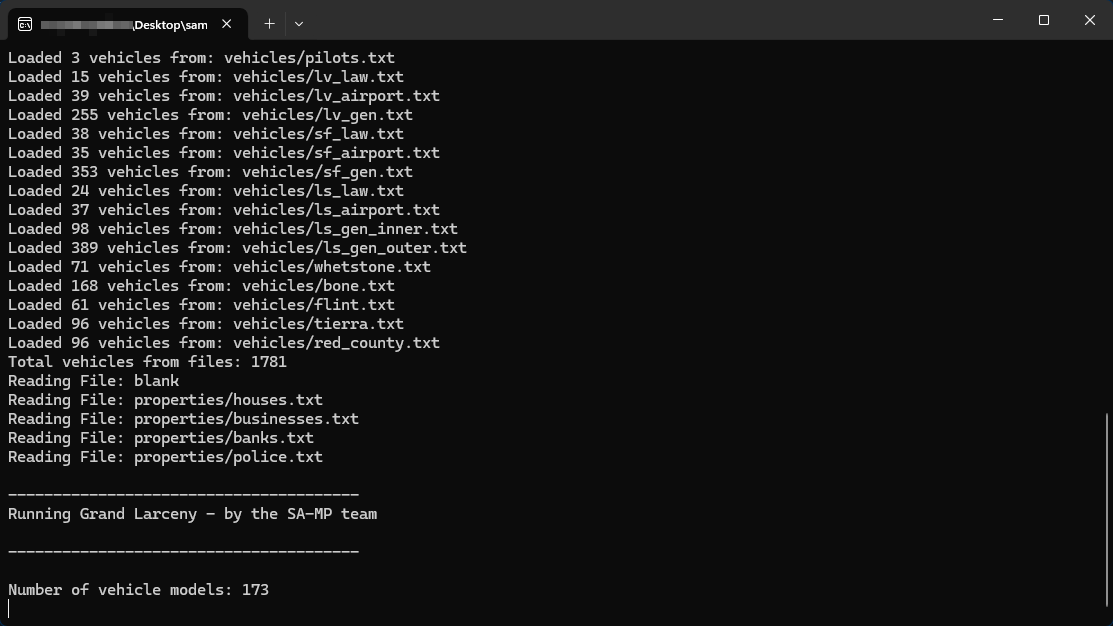
Open samp-server.exe, A command line will open, Don't exit the command line window, as long as its open the server is running.
Updating the server
When an update is realease all you have to do is redownload the server files from the official website and replace the files of the existing server with the new files.
Make sure not to replace the server.cfg and any files you moded that might have the same file names as the original files
Make sure not to replace the server.cfg and any files you moded that might have the same file names as the original files
Letting friends join
Go to your router settings (usually 192.168.1.1) and look for Port Forwarding, the default server port is 7777 unless changed by you, forward for both TCP and UDP.
Look up what is your ip in google and give it to a friend.
it is not recommended to share your ip with untrusted people.
Look up what is your ip in google and give it to a friend.
it is not recommended to share your ip with untrusted people.
More Grand Theft Auto: San Andreas guides
- Улучшаем GTA San Andreas★ 5 (3.9k)72k views4.6k ♥7 minRussianUpdated Jul 20, 2021
- Grand Theft Auto: San Andreas - The Improved Classic★ 5 (1.4k)56k views3.1k ♥5 minUpdated Oct 30, 2025
- Grand Theft Auto: San Andreas - Enhanced Edition★ 5 (1.6k)51k views2.2k ♥5 minUpdated Jun 28, 2020
- Grand Theft Auto San Andreas: Classic Edition★ 5 (1.5k)42k views3k ♥14 minRussianUpdated Jul 17
- GTA - San Andreas CHEATS★ 5 (1.5k)41k views2.4k ♥2 minUpdated Jan 4, 2024
- Silent Patch + Downgraders (SA)★ 5 (493)33k views861 ♥17 minUpdated Jan 3, 2020





🔥 Popular guides
- Upgrading to PremiumTeam Fortress 2★ 5 (20k)1441k views11k ♥6 minUpdated May 11, 2022
- No More Room in Hell Official ManualNo More Room in Hell★ 5 (2.8k)569k views2.1k ♥29 minUpdated Apr 22, 2019
- NMRiH Community Hosting GuidesNo More Room in Hell★ 5 (526)351k views653 ♥1 minUpdated Aug 10, 2022
- Лучшие кооперативные игры SteamPAYDAY 2★ 5 (1.5k)315k views2.1k ♥56 minRussianUpdated Apr 27, 2025
- Desert Eagle Heat Treated | Blue GemCounter-Strike 2★ 5 (1.6k)292k views1.5k ♥2 minUpdated Jan 16
- Treasure Hunt Puzzle SolutionsTotal War: WARHAMMER II★ 5 (6.9k)281k views15k ♥3 minUpdated Aug 19, 2021






This guide was created by its original author on the Steam Community. Are you the author and want it removed? Request removal.