Proper way to play GTA:SA 1.0 and SA:MP through Steam. *UPDATED 2025
At first sight.
 The Steam version of Grand Theft Auto: San Andreas comes with limitations and changes compared to the original release, such as the removal of certain songs, bugs, and compatibility issues with mods. Downgrading the game allows you to access features and mods available in earlier versions.
Follow this guide to downgrade GTA: San Andreas to version 1.0, which is the most popular version for mods and stability.
Downgrading your game.
With that being said, lets hop on our way to downgrade the game
- Step 1: You need to download this downgrader[mega.nz], which is used and shared by TJGM, a well known modder and youtuber.
- Step 2 : Launch San Andreas on Steam, before replacing files. There is a posibility that Steam will automatically update your game files to its normal state (which is the Steam version).
- Step 3: Open your San Andreas folder. You can find this by right clicking San Andreas in your Steam library, click “Properties…”, click “Local Files”, and then click “Browse”.
- Step 4: Open the downgrader archive that you just downloaded. Copy all of the files from the archive, into your San Andreas game folder (this is where gta-sa.exe is located). Replace all of the files when asked.
SA:MP
 (San Andreas Multiplayer) is a multiplayer modification for the PC version of Grand Theft Auto: San Andreas (GTA: SA).
It enables players to play GTA: San Andreas online with hundreds or even thousands of other players in a shared game world.
While GTA: San Andreas is primarily a single-player game, SA-MP
was developed to turn the game into a fully-fledged multiplayer experience, where players can interact, compete, cooperate, and explore the open world of San Andreas together.
How to install SA:MP
As you know, or not, SA:MP hasn't received major updates in recent years. The last official release was SA-MP 0.3.7, which came out in 2015. The lack of continued development could give the impression that it’s no longer active.
Also, the SA:MP official website got shut down, and their host tab in the client launcher, as well.
So, you have to download the launcher from a "unofficial" website.
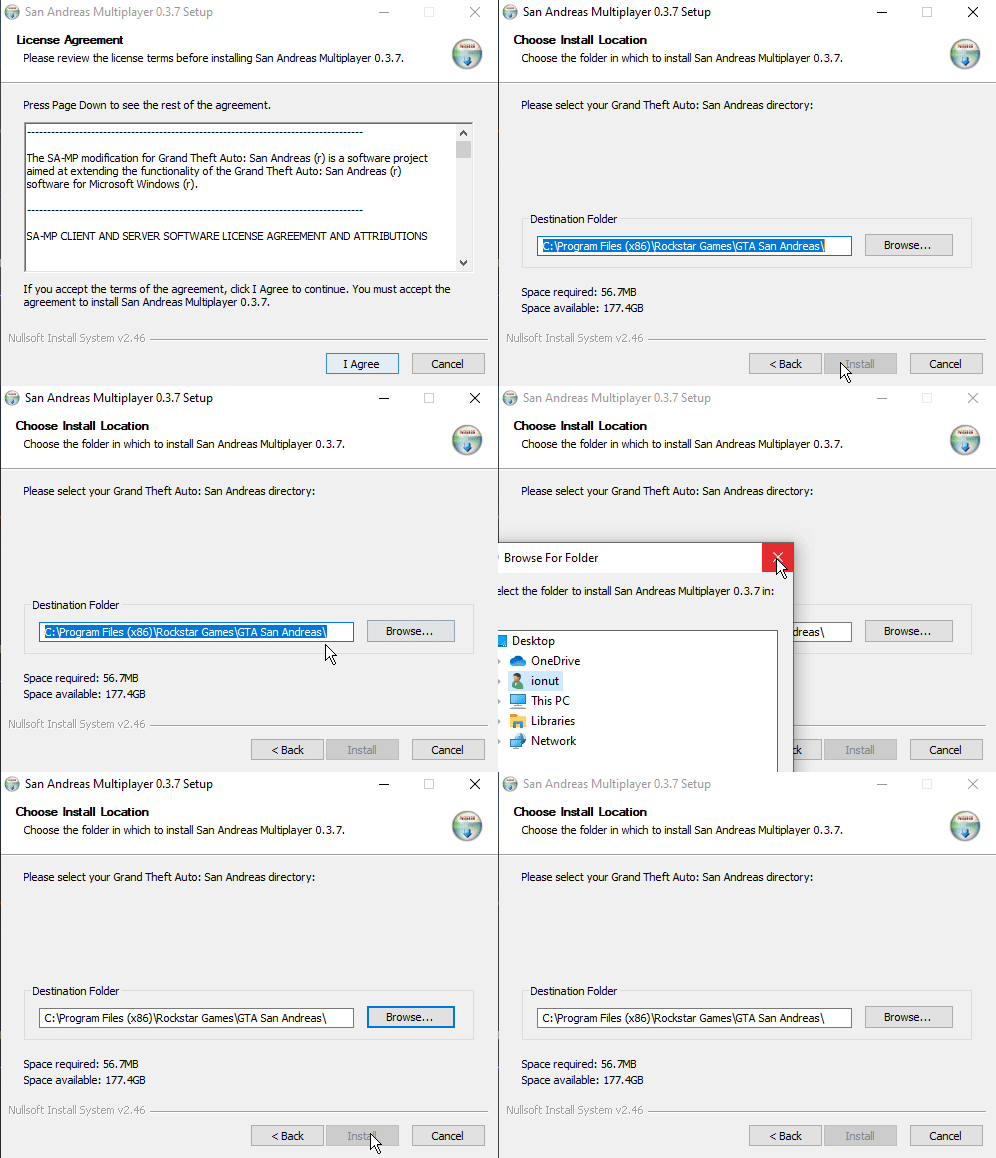
- Step 1: I strongly recommend you to download the launcher from here[www.sa-mp.mp].
- Step 2 : Install SA:MP client in folder «..:\Steam\SteamApps\common\Grand Theft Auto San Andreas»;
Also, there's a remade version of the SA:MP launcher, which is called open.mp
After instaling SA:MP, download the open.mp launcher and install it. Rename the open.mp exe to sa-mp.exe so it gets detected in the launcher.
(optional if having issues):
That's it you have now SA:MP installed. ♥
Modified launcher
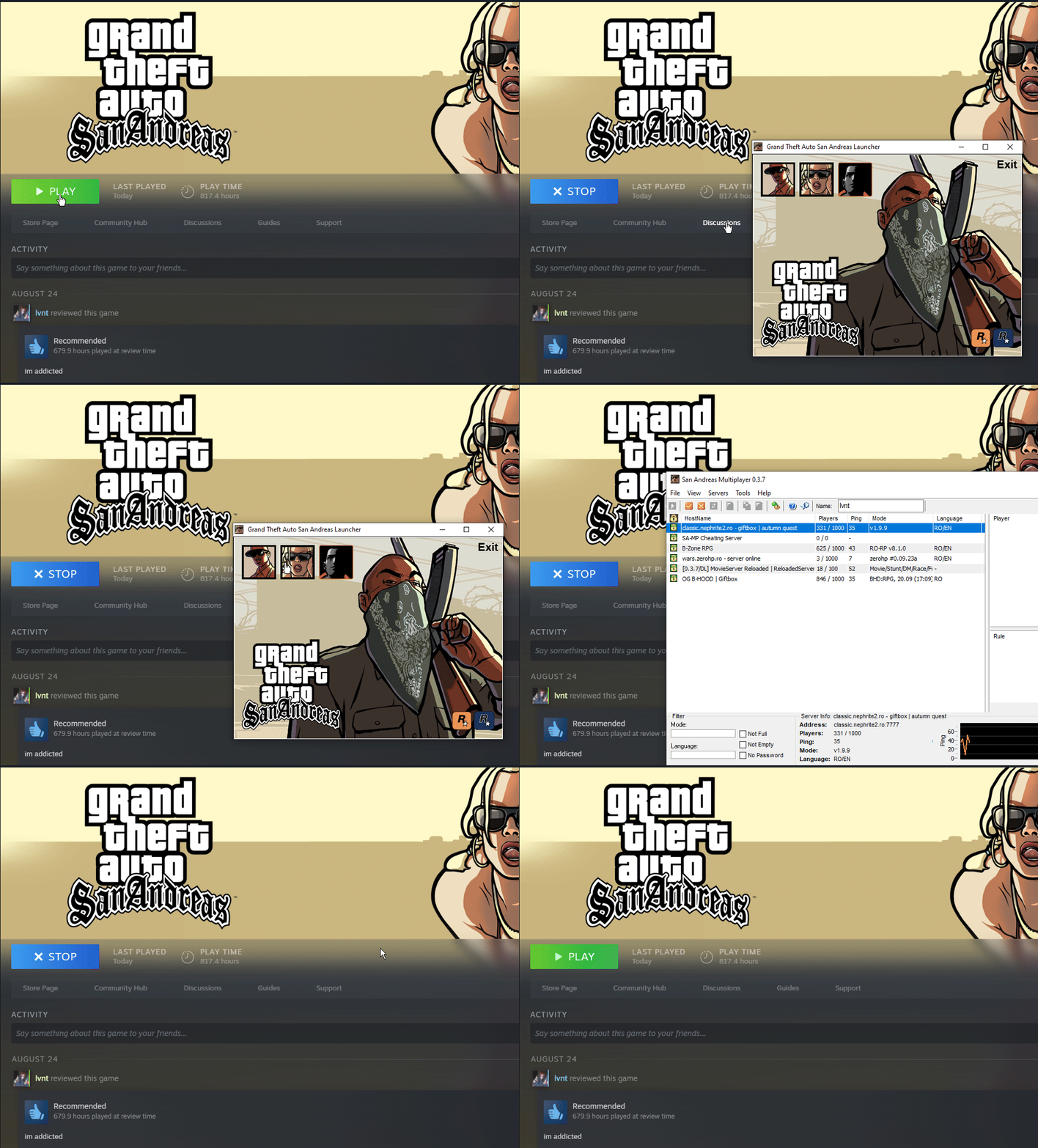
A launcher for GTA: San Andreas players on Steam that tracks playtime, even when using mods like SA-MP or MTA. It also provides a simple way to launch the game mods with just a click.
I don't know why this occurs.
How to install:
Step 1: Download it from here[www.mixmods.com.br]
Step 2: Extract "gta-sa.exe" to your game folder ( right click on Grand Theft Auto San Andreas in your Steam library, click “Properties…”, click “Local Files”, and then click “Browse”.)
Congrats, now you have your downgraded "Grand Theft Auto San Andreas" fully playable, either singleplayer or multiplayer.
End Of The Line
If this was helpful to you, please do not forget to Rate 👍 the guide, and add it to your Favorite⭐
PS: If I get some reactions, I'll create a guide on how to add essential mods for GTA:SA 1.0 / SA:MP
- Улучшаем GTA San Andreas★ 5 (3.9k)72k views4.6k ♥7 minRussianUpdated Jul 20, 2021
- Grand Theft Auto: San Andreas - The Improved Classic★ 5 (1.4k)56k views3.1k ♥5 minUpdated Oct 30, 2025
- Grand Theft Auto: San Andreas - Enhanced Edition★ 5 (1.6k)51k views2.2k ♥5 minUpdated Jun 28, 2020
- Grand Theft Auto San Andreas: Classic Edition★ 5 (1.5k)42k views3k ♥14 minRussianUpdated Jul 17
- GTA - San Andreas CHEATS★ 5 (1.5k)41k views2.4k ♥2 minUpdated Jan 4, 2024
- Silent Patch + Downgraders (SA)★ 5 (493)33k views861 ♥17 minUpdated Jan 3, 2020





- Upgrading to PremiumTeam Fortress 2★ 5 (20k)1441k views11k ♥6 minUpdated May 11, 2022
- No More Room in Hell Official ManualNo More Room in Hell★ 5 (2.8k)569k views2.1k ♥29 minUpdated Apr 22, 2019
- NMRiH Community Hosting GuidesNo More Room in Hell★ 5 (526)351k views653 ♥1 minUpdated Aug 10, 2022
- ULTIMATE GUIDE FOR GAME DEV TYCOONGame Dev Tycoon★ 5 (5.8k)326k views10k ♥4 minUpdated 23 Jan, 2014
- How to 'Git Gud' Soon™MORDHAU★ 5 (2k)318k views3k ♥68 minUpdated Nov 16, 2024
- Лучшие кооперативные игры SteamPAYDAY 2★ 5 (1.5k)315k views2.1k ♥56 minRussianUpdated Apr 27, 2025






This guide was created by its original author on the Steam Community. Are you the author and want it removed? Request removal.