Optimizing and speeding up time in Hearts of Iron 4
Multithreading
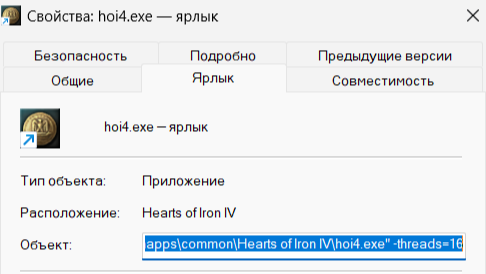
Since the game engine tries to process everything on a single core, you need to optimize it by enabling multithreading, which the devs supposedly added at some point.
Here's what you need to do:
1) Browse the local game files and find "hoi4.exe";
2) Create a shortcut for that file;
3) In the shortcut's "Properties", find the "Target" field;
4) After the last quotation mark, add a "space" and paste:
-threads=16
5) 16 is the number of threads you want (adjust based on your computer's specs);
6) Click "OK";
7) Launch the game through this shortcut.
Here's what you need to do:
1) Browse the local game files and find "hoi4.exe";
2) Create a shortcut for that file;
3) In the shortcut's "Properties", find the "Target" field;
4) After the last quotation mark, add a "space" and paste:
-threads=16
5) 16 is the number of threads you want (adjust based on your computer's specs);
6) Click "OK";
7) Launch the game through this shortcut.
Deleting the "backup" folder
In the path "Documents\Paradox Interactive\Hearts of Iron IV" there is a "backup" folder. You can delete it either manually or through the launcher by using the "clear user folder" option.
In-game (console)
You can enter the following commands in the console:
debug_smooth
(Disables smoothing / frame rate smoothing)
weather
(Turns off weather)
(Weather remains active even if you disable it in the game's settings)
debug_smooth
(Disables smoothing / frame rate smoothing)
weather
(Turns off weather)
(Weather remains active even if you disable it in the game's settings)
Graphics Settings
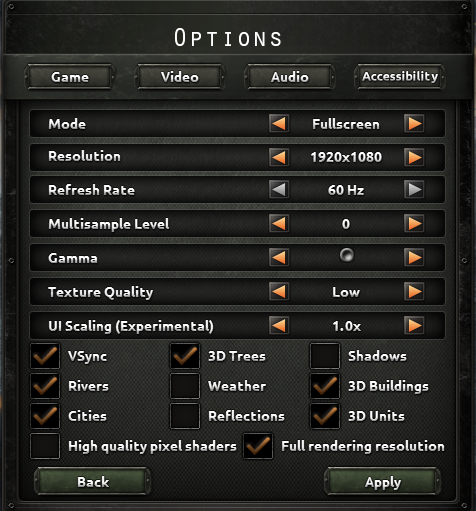
Recommended graphics settings:
1) Lower graphics settings to minimum;
2) Disable:
- High quality shaders;
- Weather;
- Reflections;
- Shadows.
(If you want maximum speed, uncheck everything)
1) Lower graphics settings to minimum;
2) Disable:
- High quality shaders;
- Weather;
- Reflections;
- Shadows.
(If you want maximum speed, uncheck everything)
Mod
Download a mod to increase the game's tick rate (clock speed).
https://steamcommunity.com/sharedfiles/filedetails/?id=3741171983
https://steamcommunity.com/sharedfiles/filedetails/?id=3741171983
Additionally
You can look for mods that try to optimize the gameplay and speed up the clock as well.
More Hearts of Iron IV guides
- Division Templates, Tank Designs, Aircraft Designs, and Metas (Bolivar 1.14+)★ 5 (3k)173k views8.7k ♥29 minUpdated Apr 30, 2025
- The Ultimate Guide to Division Templates, Aircraft and Tank Designs (Updated 15-06-2026)★ 5 (3.3k)134k views11k ♥54 minUpdated Jul 6
- Выполняем достижения в Hearts of Iron 4★ 5 (3.2k)69k views7.9k ♥326 minRussianUpdated Jul 19
- The Ultimate Guide to Navy; Ship Templates and Fleet Composition (Updated 24-3-2026)★ 5 (1.2k)61k views4.9k ♥33 minUpdated May 17
- HOI4. Большой гайд★ 5 (738)58k views2k ♥101 minRussian
- Лучшие шаблоны в HoI IV (1.15v.)★ 5 (612)49k views2.2k ♥6 minRussianUpdated May 20



🔥 Popular guides
- Upgrading to PremiumTeam Fortress 2★ 5 (20k)1441k views11k ♥6 minUpdated May 11, 2022
- No More Room in Hell Official ManualNo More Room in Hell★ 5 (2.8k)569k views2.1k ♥29 minUpdated Apr 22, 2019
- NMRiH Community Hosting GuidesNo More Room in Hell★ 5 (526)351k views653 ♥1 minUpdated Aug 10, 2022
- Лучшие кооперативные игры SteamPAYDAY 2★ 5 (1.5k)315k views2.1k ♥56 minRussianUpdated Apr 27, 2025
- Desert Eagle Heat Treated | Blue GemCounter-Strike 2★ 5 (1.6k)292k views1.5k ♥2 minUpdated Jan 16
- Treasure Hunt Puzzle SolutionsTotal War: WARHAMMER II★ 5 (6.9k)281k views15k ♥3 minUpdated Aug 19, 2021






This guide was created by its original author on the Steam Community. Are you the author and want it removed? Request removal.