КРУЖОК ConnectTool / CIRCLE ConnectTool
Результат / Result
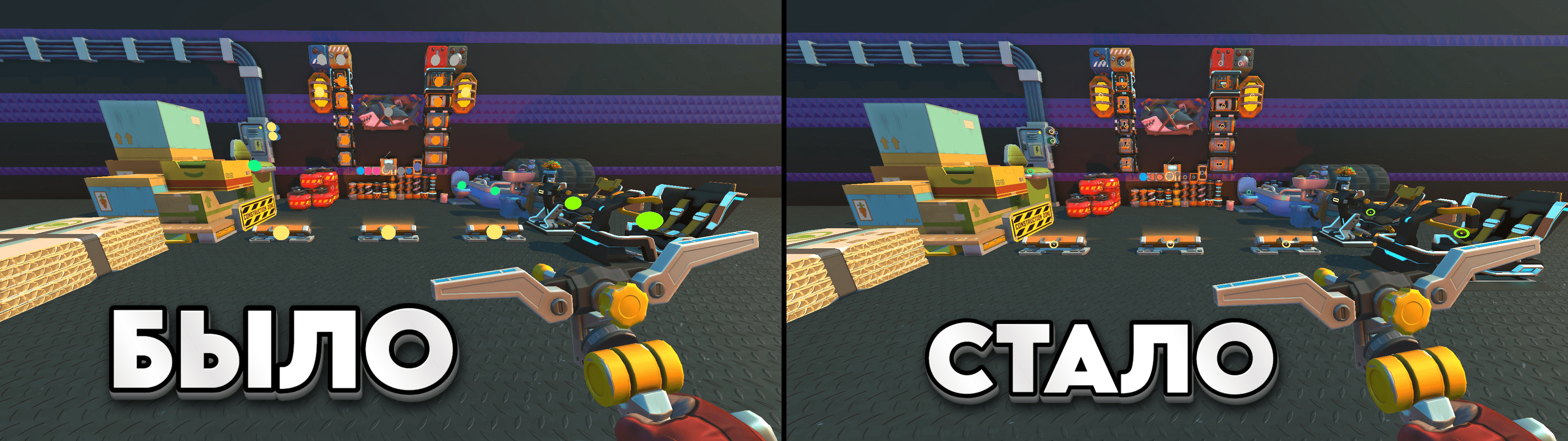
Загрузка файла motorpoint / Downloading the motorpoint file
ㅤㅤㅤИзображение можно сделать самому в формате .png размером 128x128 пикселей. Или скачать моё готовое изображение.
ㅤㅤㅤThe image can be made by yourself in the format.png size 128x128 pixels. Or download my finished image.
●Yandex disk:
https://disk.yandex.ru/d/ICUP9iy6iMQ9wA
●Google:https://drive.google.com/file/d/1P8vUOoPFBpAgSZ6ubLGLBjXu-SWfuU62/view?usp=drive_link
●Files.fm: https://files.fm/f/e44xhdg32q
●mail.ru:https://cloud.mail.ru/public/exnq/REm7CBWts
ㅤㅤㅤThe image can be made by yourself in the format.png size 128x128 pixels. Or download my finished image.
●Yandex disk:
https://disk.yandex.ru/d/ICUP9iy6iMQ9wA
●Google:https://drive.google.com/file/d/1P8vUOoPFBpAgSZ6ubLGLBjXu-SWfuU62/view?usp=drive_link
●Files.fm: https://files.fm/f/e44xhdg32q
●mail.ru:https://cloud.mail.ru/public/exnq/REm7CBWts
Замена файлов игры / Replacing game files
ㅤㅤ1.Нужно перейти в корневую папку с игрой (You need to go to the folder with the game) :
C:\Program Files (x86)\Steam\steamapps\common\Scrap Mechanic
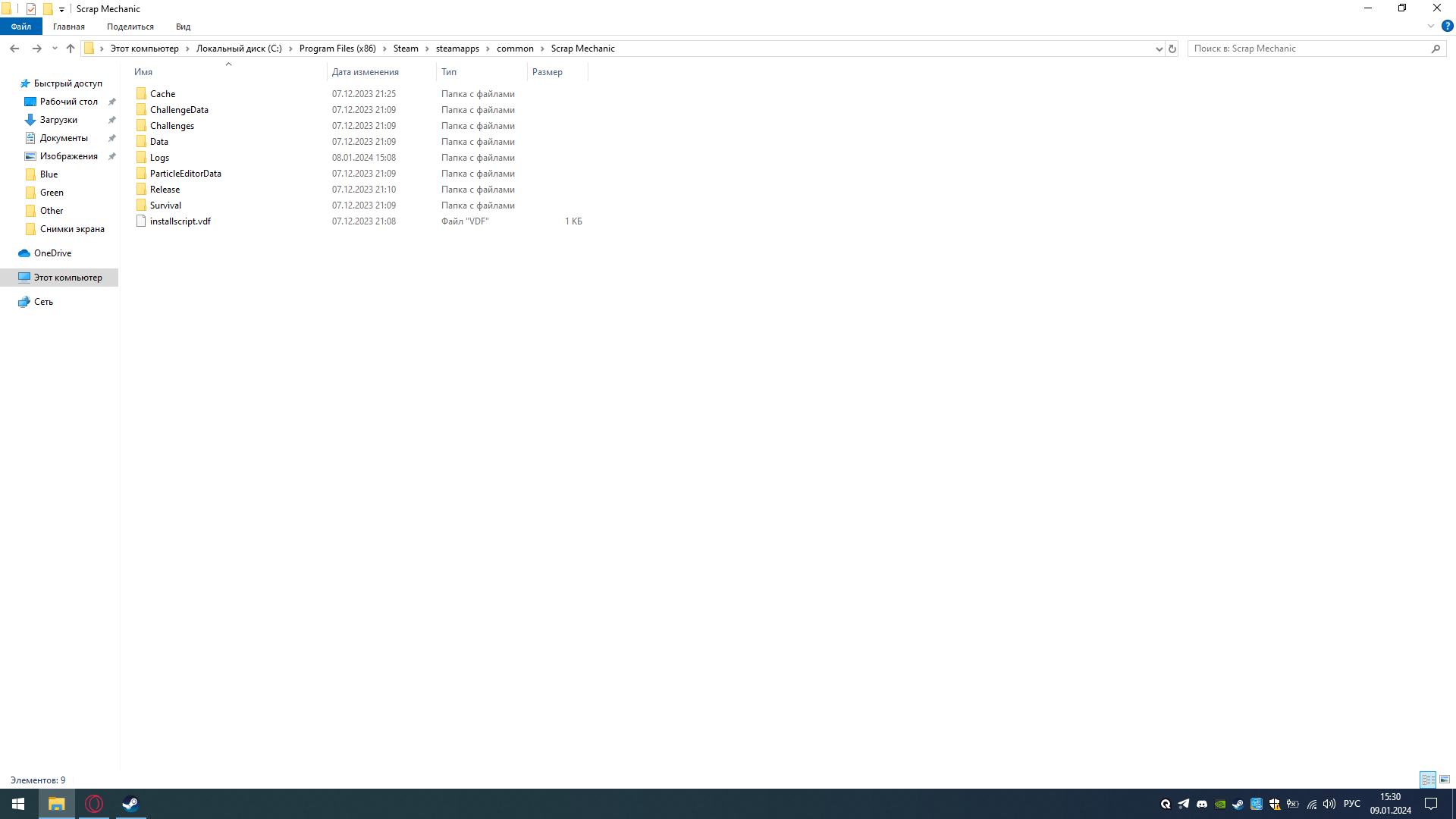 ㅤㅤ2. Заходим в Data / Open Data:
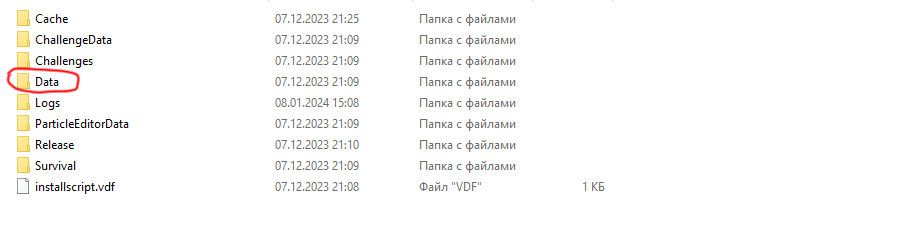 ㅤㅤ3. Далее - Textures / Next - Textures:
 ㅤㅤ4. ConnectTool:
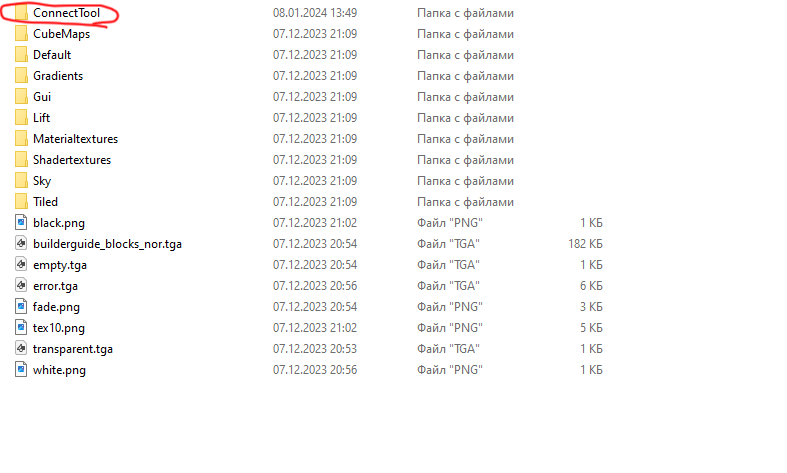 ㅤㅤ5. Заменяем файл morotpoint, на ваш или предварительно скаченный / Replacing the morotpoint file with yours or a pre-downloaded one:
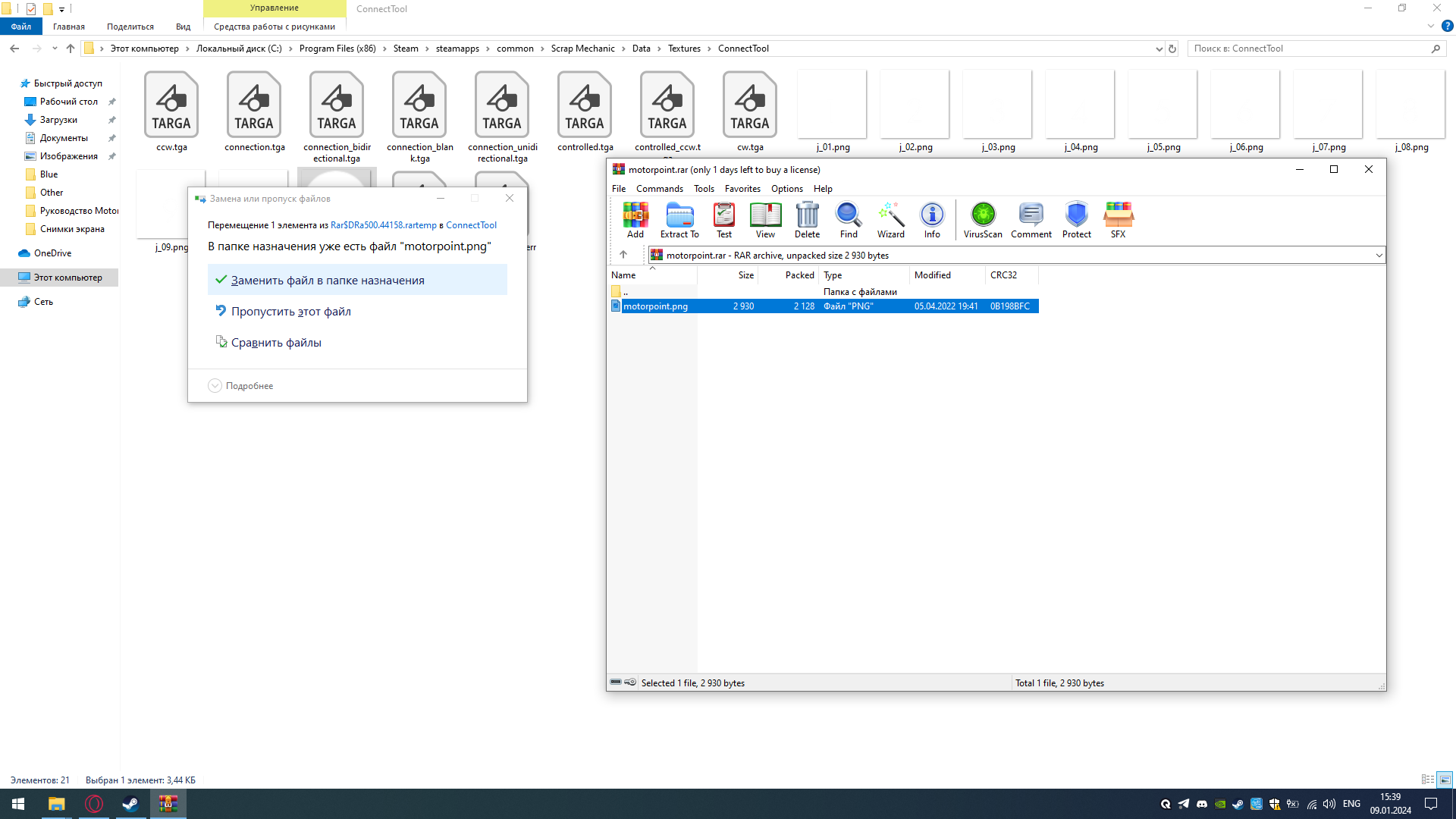
C:\Program Files (x86)\Steam\steamapps\common\Scrap Mechanic
ㅤㅤ2. Заходим в Data / Open Data:ㅤㅤ3. Далее - Textures / Next - Textures:ㅤㅤ4. ConnectTool:ㅤㅤ5. Заменяем файл morotpoint, на ваш или предварительно скаченный / Replacing the morotpoint file with yours or a pre-downloaded one:
Не работает! / Not work!
ㅤЕсли не появился кружочек в игре, то есть 2 известных мне причины:
- Вы сделали "Проверку целостности файлов игры" или переустановили игру.
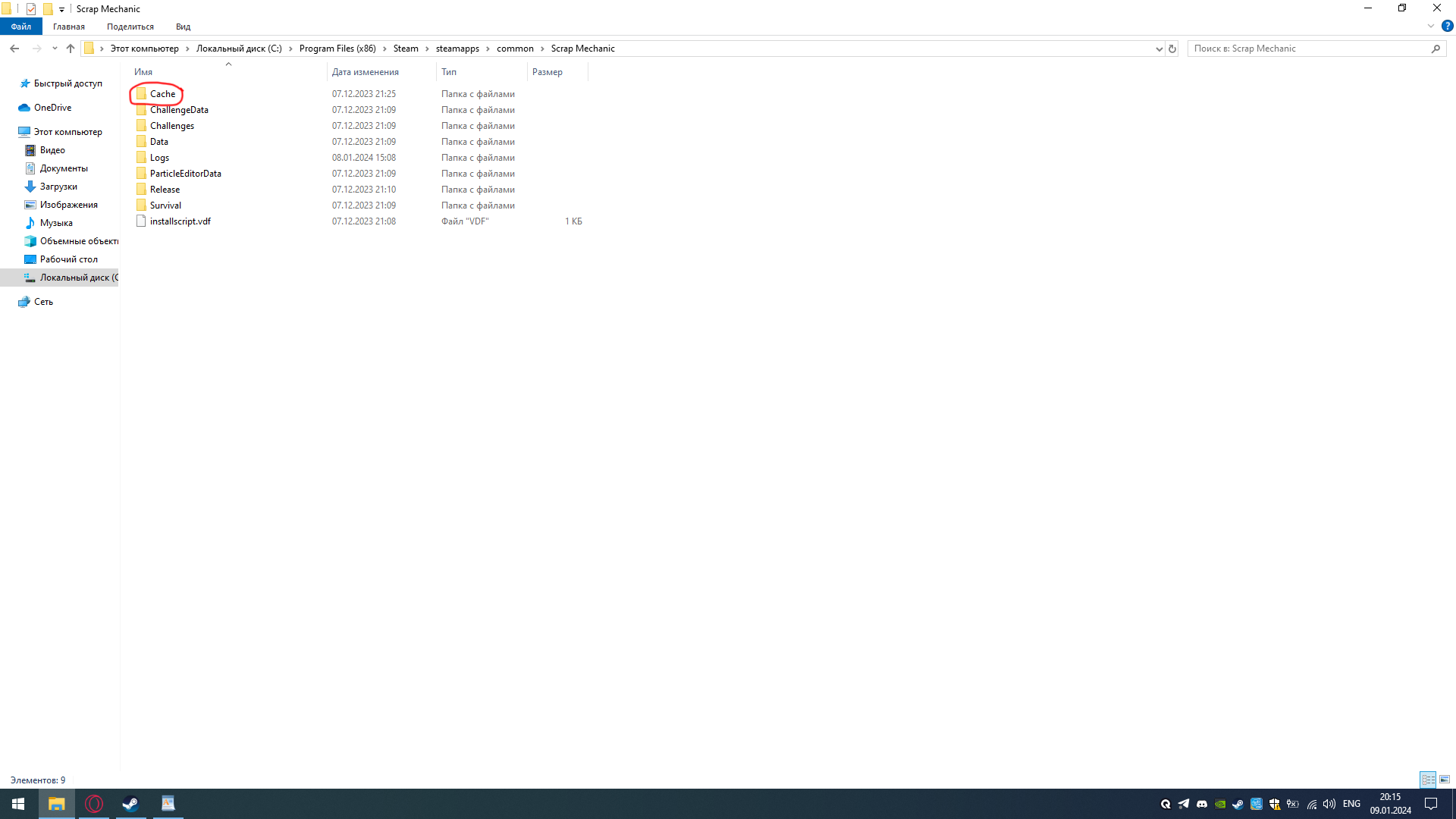
- Не удалена папка Cache в корневой папке игры.
ㅤВ первом случае нужно выполнить все действия выше, а во втором выполнить следующие действия:
/
ㅤIf the circle does not appear in the game, then there are 2 reasons known to me: - You have done a "Game File Integrity Check" or reinstalled the game.
- The Cache folder in the root folder of the game has not been deleted.
ㅤIn the first case, you need to perform all the steps above, and in the second, perform the following actions:
/ - Заходим в корневую папку игры / Go to the folder with the game.
 3. Удаляем папку Textures / Deleting the Textures folder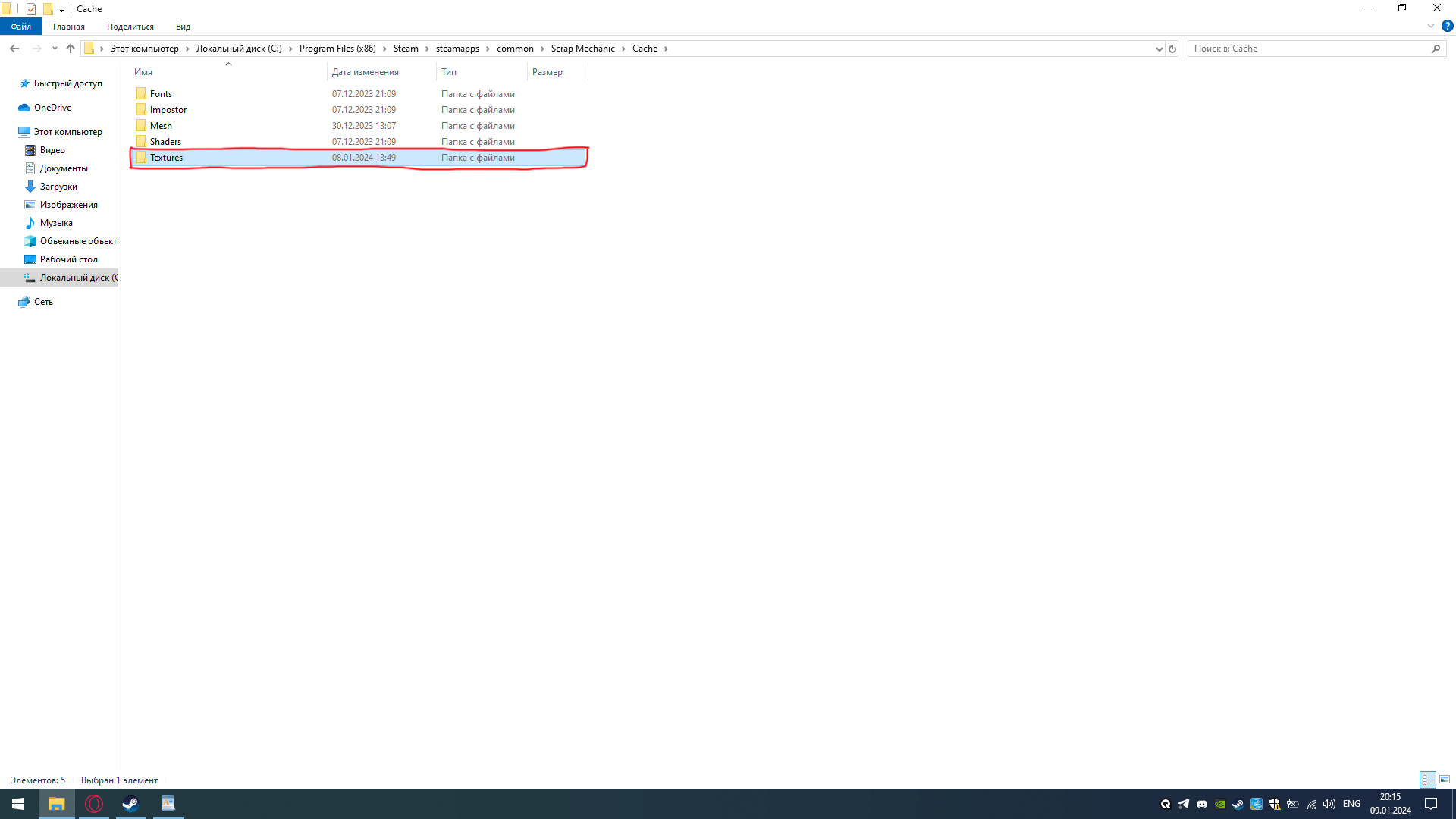
- Заходим в игру, кэш текстур загрузиться сам / We go into the game, the texture cache will load itself.
More Scrap Mechanic guides
- How raids actually work (Version 0.5.1)★ 5 (550)19k views867 ♥3 minUpdated 7 Apr, 2021
- Как пройти выживание?★ 5 (448)18k views700 ♥25 minRussianUpdated 12 Aug, 2020
- Все команды для скрап механик★ 5 (259)15k views475 ♥1 minRussianUpdated 1 Dec, 2023
- Robots and weapons concept proposal★ 5 (421)10k views182 ♥3 minUpdated 1 Apr, 2022
- How Does Fuel Consumption Work? Which Engine Is the Most Efficient?★ 5 (182)10k views152 ♥3 minUpdated 16 Oct, 2020
- Русификатор для Scrap Mechanic by Pro100DarkTV (v2.5)★ 5 (317)9.9k views516 ♥1 minRussianUpdated 19 Jun, 2021


🔥 Popular guides
- Upgrading to PremiumTeam Fortress 2★ 5 (20k)1441k views11k ♥6 minUpdated May 11, 2022
- No More Room in Hell Official ManualNo More Room in Hell★ 5 (2.8k)569k views2.1k ♥29 minUpdated Apr 22, 2019
- NMRiH Community Hosting GuidesNo More Room in Hell★ 5 (526)351k views653 ♥1 minUpdated Aug 10, 2022
- ULTIMATE GUIDE FOR GAME DEV TYCOONGame Dev Tycoon★ 5 (5.8k)326k views10k ♥4 minUpdated 23 Jan, 2014
- How to 'Git Gud' Soon™MORDHAU★ 5 (2k)318k views3k ♥68 minUpdated Nov 16, 2024
- Лучшие кооперативные игры SteamPAYDAY 2★ 5 (1.5k)315k views2.1k ♥56 minRussianUpdated Apr 27, 2025






This guide was created by its original author on the Steam Community. Are you the author and want it removed? Request removal.