End of Part 1
End of Part 1
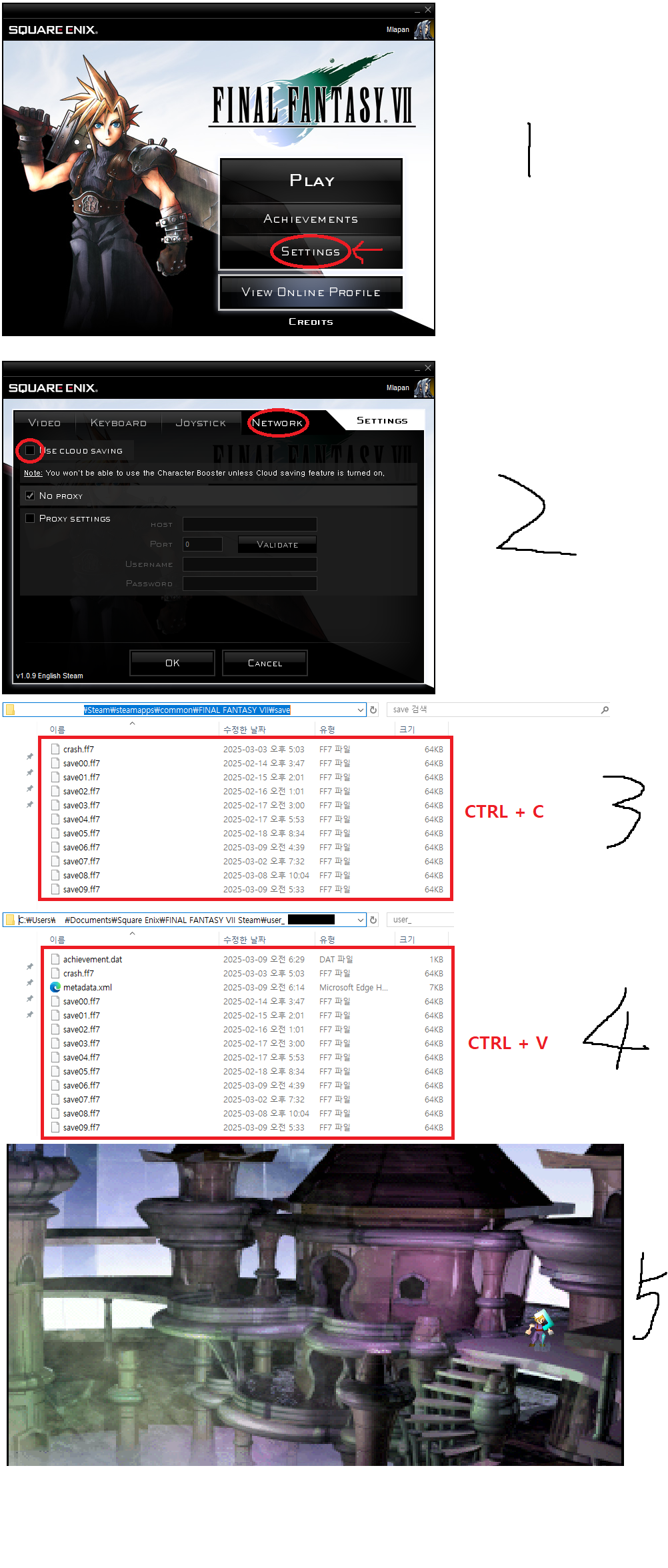
I don't know the exact reason, but I'm playing with 7th Heaven MOD and the End of part 1 achievement is not being achieved.
Here's how to fix it.
Instead of going through 7th Heaven, run FF7 with the Play button on Steam and watch the video that appears after defeating Genoa Life.
However, if you play the game through Steam, there will be no save file.
After entering the settings in Figure 1,
Enter the network in Figure 2 and uncheck Cloud Save (I'm not sure if this part is necessary or not.)
Go to the folder where your 7th Heaven is installed and copy the save file.
In my case, it was the path shown in the picture.
If you still can't find it, go to 7th Heaven On -> Settings -> General Settings -> FF7 Exe next to the path where it's installed.
Then go to the user_Number folder in the Square Enix folder in My Documents,
Paste the save file, and then play the game.
EX) C:\Users\Yours\Documents\Square Enix\FINAL FANTASY VII Steam\user_Number
or Find Square Enix folder
However, I don't know the exact reason, but the save file in My Documents kept getting automatically deleted. So, please check if you have a save file before playing the game and play it.
Picture 5 is the save point right before fighting Genova Life.
There, I loaded and defeated Genova Life and got the End of Part 1 achievement.
- Final Fantasy 7 Full Guide★ 5 (2.7k)51k views7k ♥137 minUpdated Jul 10, 2018
- Permanent Missable Content related to Achievements★ 5 (1.3k)39k views3.3k ♥15 minUpdated 3 Mar, 2019
- Remaster your FF7 - Essential Modding Guide★ 5 (623)38k views1.7k ♥23 minUpdated 24 Feb
- Materia Overlord Achievement Guide★ 5 (1.3k)35k views2.4k ♥18 minUpdated Jan 7, 2017
- Final Fantasy 7: Enemy Skill Guide★ 5 (690)34k views1.7k ♥17 minUpdated 12 May, 2016
- FINAL FANTASY VII STEAM 100% ACHIEVEMENT★ 5 (701)28k views1.8k ♥18 minUpdated 3 Jul, 2023


- Upgrading to PremiumTeam Fortress 2★ 5 (20k)1441k views11k ♥6 minUpdated May 11, 2022
- No More Room in Hell Official ManualNo More Room in Hell★ 5 (2.8k)569k views2.1k ♥29 minUpdated Apr 22, 2019
- NMRiH Community Hosting GuidesNo More Room in Hell★ 5 (526)351k views653 ♥1 minUpdated Aug 10, 2022
- ULTIMATE GUIDE FOR GAME DEV TYCOONGame Dev Tycoon★ 5 (5.8k)326k views10k ♥4 minUpdated 23 Jan, 2014
- How to 'Git Gud' Soon™MORDHAU★ 5 (2k)318k views3k ♥68 minUpdated Nov 16, 2024
- Лучшие кооперативные игры SteamPAYDAY 2★ 5 (1.5k)315k views2.1k ♥56 minRussianUpdated Apr 27, 2025






This guide was created by its original author on the Steam Community. Are you the author and want it removed? Request removal.