Final Fantasy VII - HD Textures & Soundtrack Overhaul
Einleitung | Foreword
Hallo und herzlich Willkommen, Freunde von Final Fantasy VII
und alle die es vielleicht noch werden wollen.
Ich habe mir vor kurzem diesen Klassiker auf Steam gegönnt
und schon öfter gehört dass man das Spiel mittels Grafik Mods ein wenig aufhübschen
kann. Allerdings waren die Ergebnisse hier auf Steam recht ernüchternd,
so gut wie alle Links down.
Also hab ich mich im Web auf die Suche gemacht und die nötigen Dateien zusammengesucht,
und dachte mir ich tu der Community was Gutes und pack das alles hier in einen Guide
zusammen um das Ganze auch im Jahr 2016 wieder leichter zugänglich zu machen.
Ich werde den Guide kurz und übersichtlich halten und nur auf das Nötigste eingehen,
würde mich trotzdem darüber freuen wenn ihr positives Feedback oder konstruktive Kritik
für mich übrig habt.
____________________________________________________________________________
Hello and welcome to all friends of Final Fantasy 7!
I've recently bought the Steam Version of the game and often heard
that there's a way to improve the graphics via HD mods.
The results of my search here on Steam were pretty underwhelming.
Nearly every link was down.
So i've searched the web for the files needed, and thought it would be nice
to share this with the Steam Community, to make it easy accessible in 2016.
I'll try to keep the guide short, but I would appreciate some positive feedback
and/or constructive criticism.
Wo bekomme ich die benötigten Dateien? | Where do I get the needed files?
UPDATE: Kopiert bitte den Linktext und ersetzt den Doppelpunkt mit einem normalen Punkt. Aus irgendeinem Grund löscht Steam den mega nz Link dauernd.
__________________________
UPDATE: Please copy the link text and replace the ":" with a "."! Steam seems to hate "mega nz" links and blocks them.
HD Texturen/AC Charakter Modelle:
- http://mega:nz/#!IosAAQxT!zeZ1a0e_KV4rkncWeEq1Pn6uETX2N9iE4J1Kwz5jK3w High Quality Graphics 3.1 Part 1
- http://mega:nz/#!xtN11SrR!M7tQvTqefGMw4mlNnIIi89JOW5ojKbv2-vCO9FpXj90 High Quality Graphics 3.1 Part 2
- http://mega:nz/#!Fl0EwYCI!tv3Aysdth1jqhf3EpUG_yggOc5llMN2Vl1HfUPWq5SY]High Quality Graphics 3.1 Part 3
- http://mega:nz/#!E5dGhaIZ!GG0q1HjjAf1oXOuyKwbqw5ckV4mxSa8CiI-t_2gkp38 High Quality Graphics 3.1 Part 4
- http://mega:nz/#!MpMUBIqa!E6FTZOmYvISlyFMDkO1fu58VvrMR1GeXN7ti_NZm35A High Quality Graphics 3.1 Part 5
- http://mega:nz/#!U1kmhYoD!K-q2d49TARqyoEXH_h8jkz65ag_0KrG7X9NF7ju8l0Q High Quality Graphics 3.1 Part 6
- http://mega:nz/#!Vt1CkDaJ!rF9yWkJCcXYn3rzxlx4nX66d9qDInKW_OJu5lQOPQ9M High Quality Graphics 3.1 Part 7
Überarbeiteter Soundtrack:
- http://mega:nz/#!tp8BUYZD!A58UN65WE4YB2HyO4ZB7l66F15V3HaE4pQHklUD9Q2U Final Fantasy VII Music Remake
Credits: Antoff7
Installation | Installation Guide
- Entpackt die downgeloadeten Dateien.
- Macht ein Backup vom "data" Ordner. (C:\Program Files (x86)\Steam\steamapps\common\FINAL FANTASY VII\data)
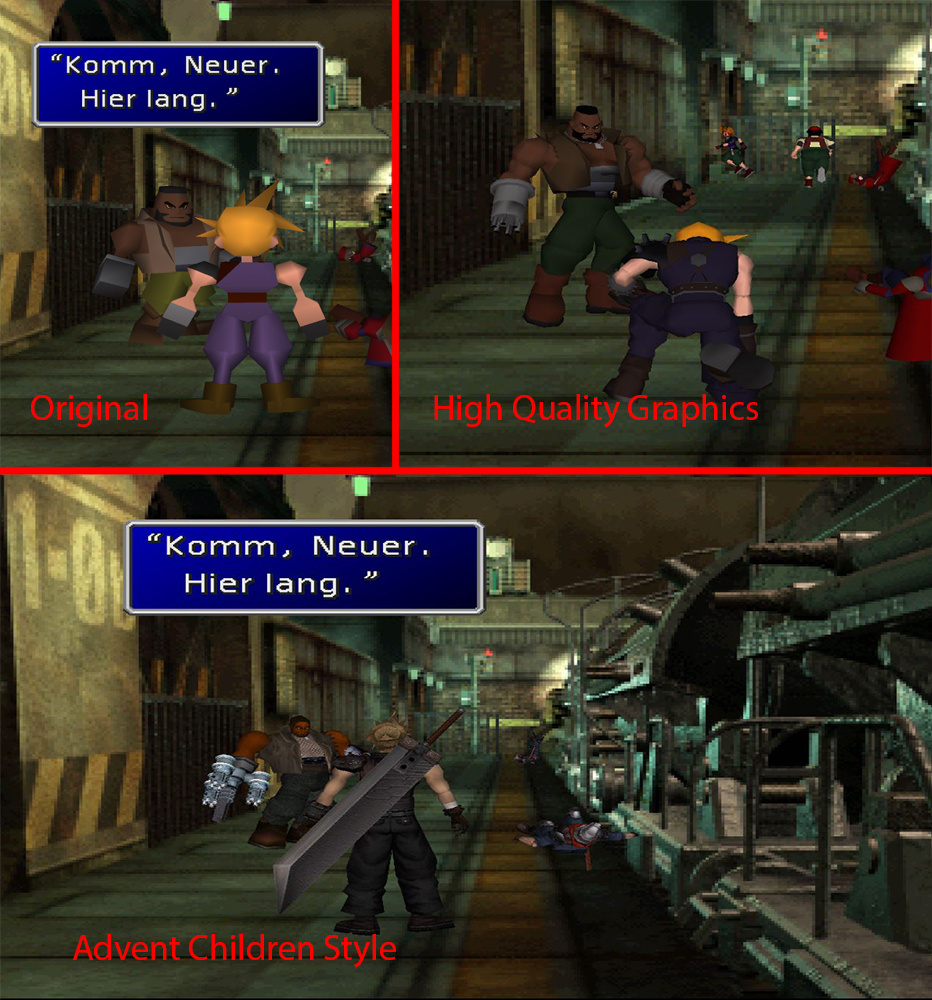
- Kopiert den Inhalt aus "1. High Quality Graphics" in den Ordner "data".
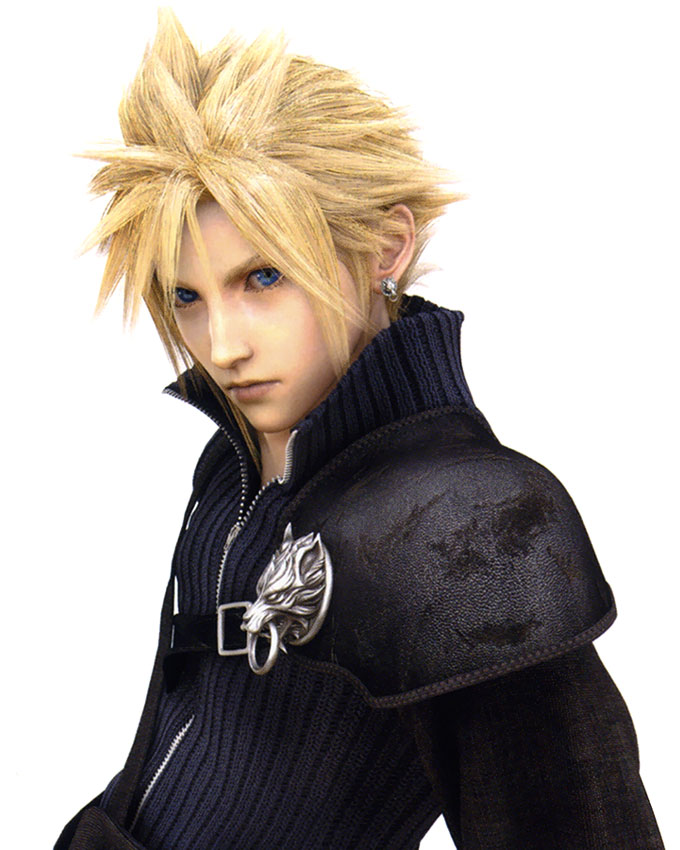
- Kopiert den Inhalt aus "2. Advent Children Style Models - Optional" in den Ordner "data".
- Kopiert den "music_ogg" Ordner aus "Final Fantasy VII - Music Remake 1.00" in den Ordner "data".
- Fertig!
Tip: Wenn Ihr die AC Modelle nicht haben wollt, überspringt einfach Punkt 4.
_________________________________________________________________________
- Unzip the downloaded files.
- Backup the "data" folder.(C:\Program Files (x86)\Steam\steamapps\common\FINAL FANTASY VII\data)
- Copy the files of "1. High Quality Graphics" into the "data" folder.
- Copy the files of "2. Advent Children Style Models - Optional" into the "data" folder.
- Copy the "music_ogg" folder from "Final Fantasy VII - Music Remake 1.00" into the "data" folder.
- Done! Enjoy!
Hint: If you don't wanna use the AC Models, just skip Step 4.
Screenshots
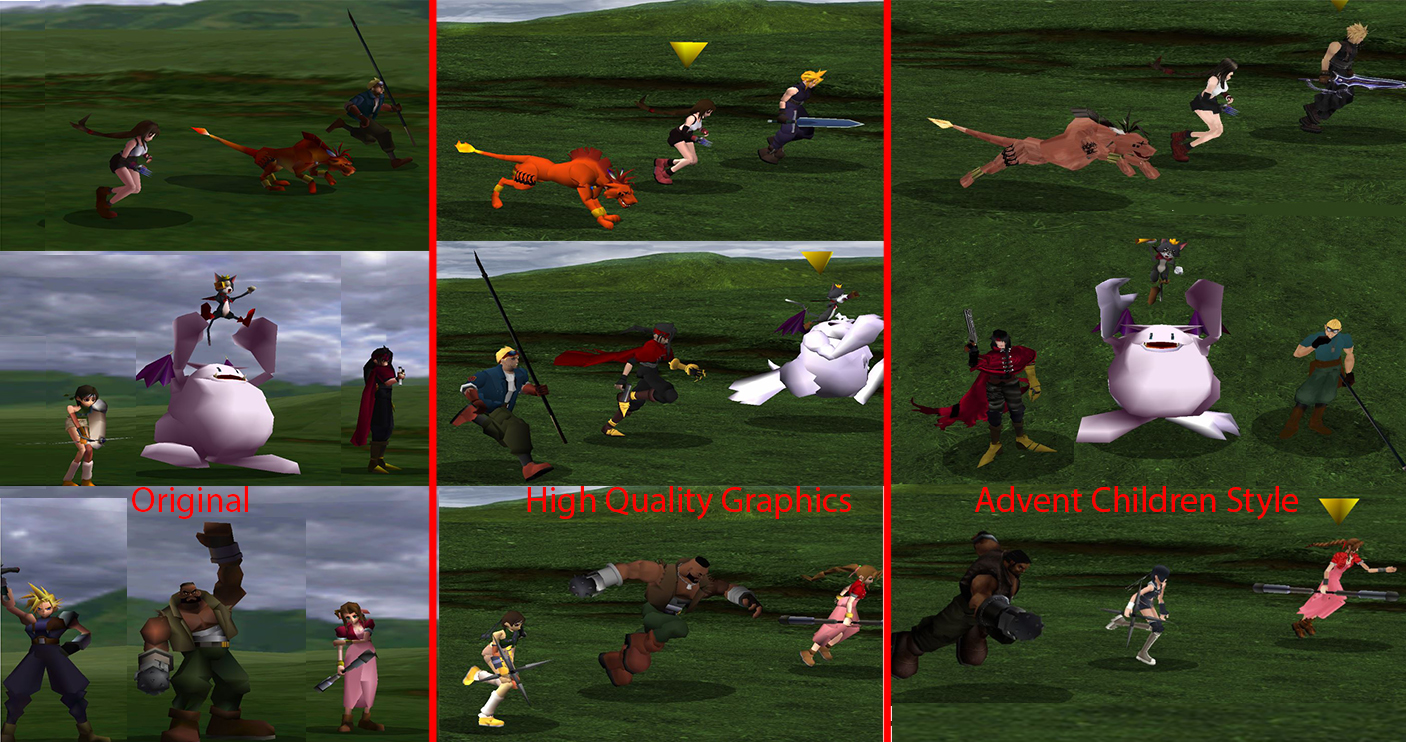
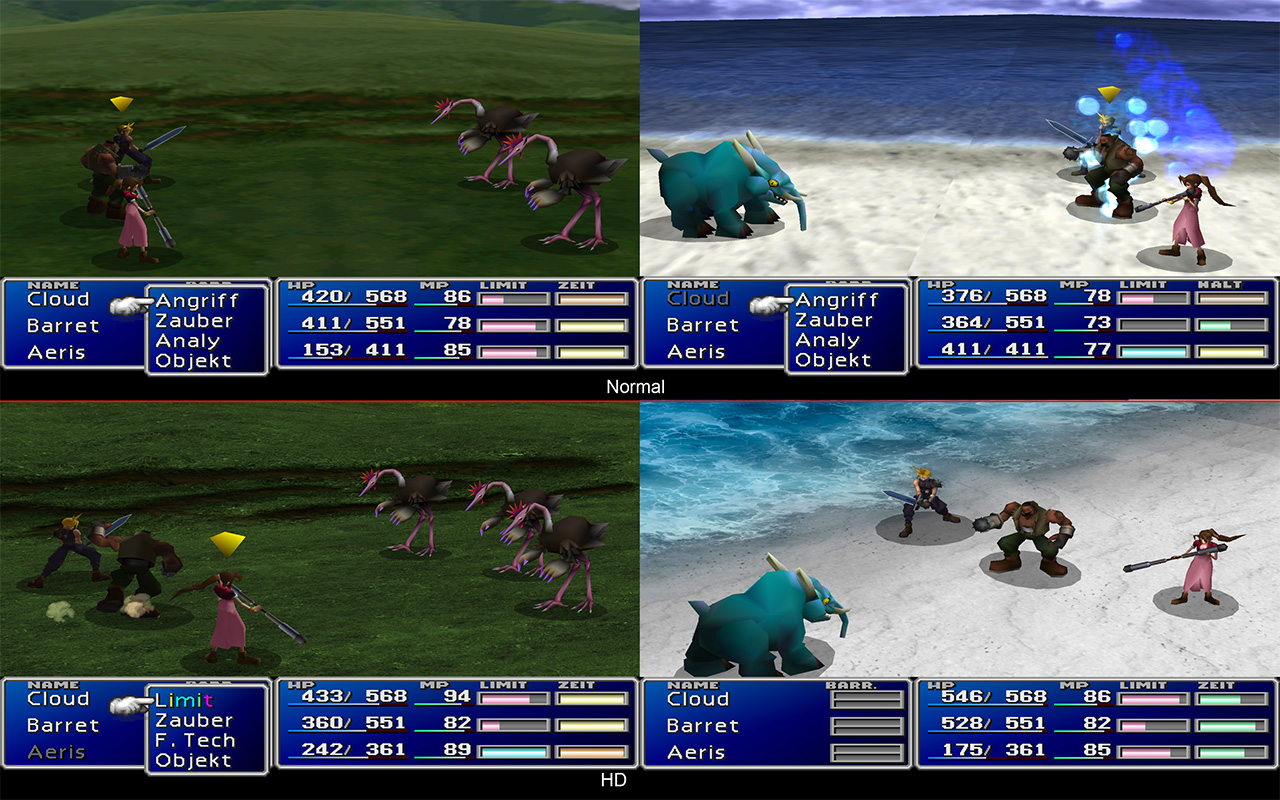
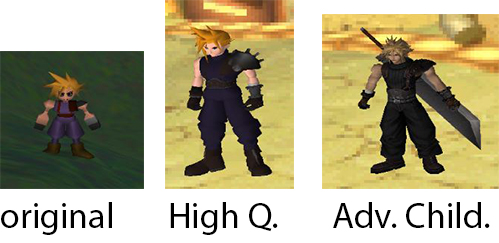
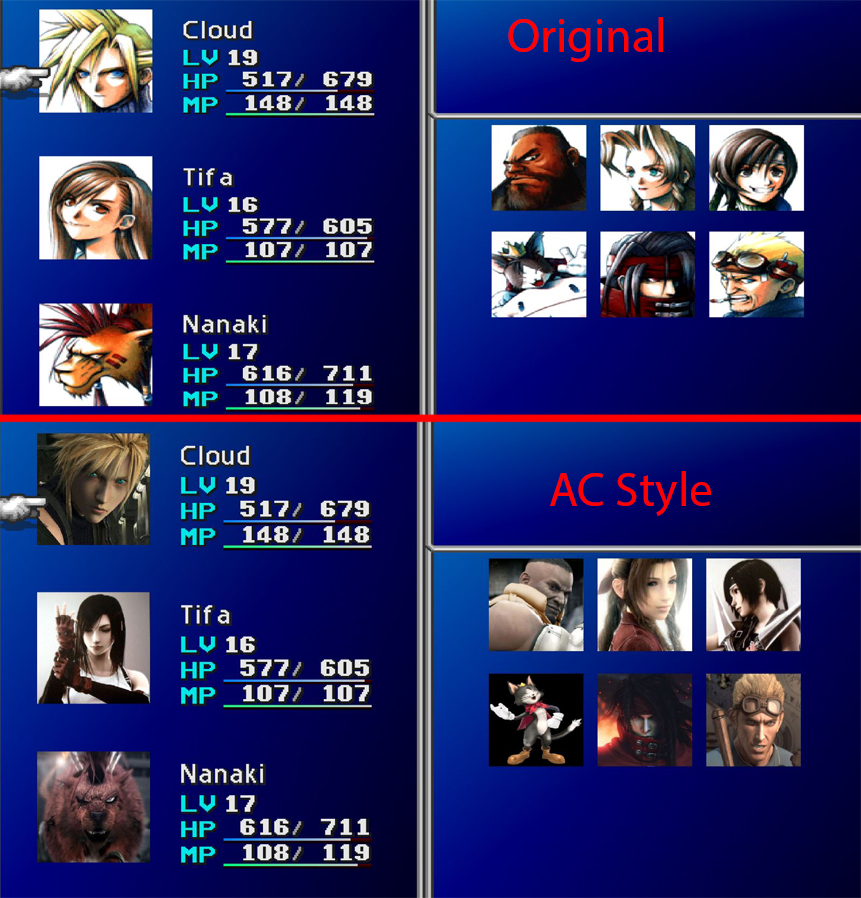
Soundtrack Preview
- Graphical Overhaul★ 5 (1k)90k views1.6k ♥3 minUpdated 27 May, 2014
- Final Fantasy 7 Full Guide★ 5 (2.7k)51k views7k ♥137 minUpdated 10 Jul, 2018
- XBox 360 Controller Fix★ 5 (775)48k views1.2k ♥7 minUpdated 17 Feb, 2023
- Final Fantasy VII General and Technical FAQ★ 5 (362)42k views333 ♥6 minUpdated 19 Jun, 2015
- Permanent Missable Content related to Achievements★ 5 (1.3k)39k views3.3k ♥15 minUpdated 3 Mar, 2019
- Remaster your FF7 - Essential Modding Guide★ 5 (623)38k views1.7k ♥23 minUpdated 24 Feb



- Upgrading to PremiumTeam Fortress 2★ 5 (20k)1441k views11k ♥6 minUpdated May 11, 2022
- No More Room in Hell Official ManualNo More Room in Hell★ 5 (2.8k)569k views2.1k ♥29 minUpdated Apr 22, 2019
- NMRiH Community Hosting GuidesNo More Room in Hell★ 5 (526)351k views653 ♥1 minUpdated Aug 10, 2022
- ULTIMATE GUIDE FOR GAME DEV TYCOONGame Dev Tycoon★ 5 (5.8k)326k views10k ♥4 minUpdated 23 Jan, 2014
- How to 'Git Gud' Soon™MORDHAU★ 5 (2k)318k views3k ♥68 minUpdated Nov 16, 2024
- Лучшие кооперативные игры SteamPAYDAY 2★ 5 (1.5k)315k views2.1k ♥56 minRussianUpdated Apr 27, 2025






This guide was created by its original author on the Steam Community. Are you the author and want it removed? Request removal.