How to gather system information
Using Steam to gather system information
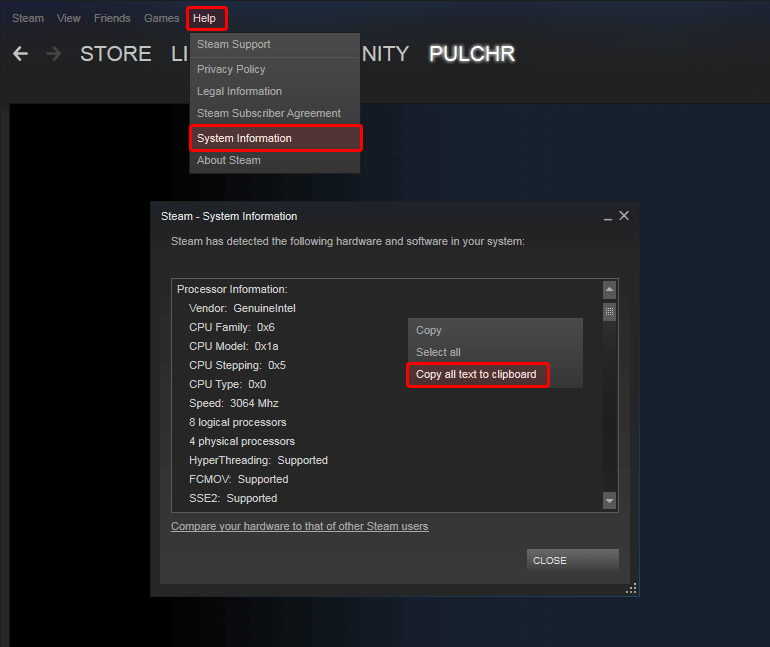
You can use Steam to collect system information about your computer.
Now that you have the system information available it's matter of what you want to do with it. You can paste it into a mail, create a text link with Hastebin[hastebin.com] (or any other such service) or look for the specific information that we're requesting.
- Go to the Steam Help menu.
- Pick System Information in the dropdown menu.
- Right-click and select Copy all text to clipboard
Now that you have the system information available it's matter of what you want to do with it. You can paste it into a mail, create a text link with Hastebin[hastebin.com] (or any other such service) or look for the specific information that we're requesting.
More Gear Up guides
- Top Vehicles (OUTDATED)★ 5 (244)13k views279 ♥8 minUpdated Dec 31, 2019
- THE MOST ULTIMATE TANKS 0.1.1.8 [Updated]★ 4 (96)9.9k views130 ♥4 minUpdated Dec 3, 2018
- Gear Up: Guide to all achievements [RU]★ 4 (73)2.8k views42 ♥6 minRussianUpdated Aug 1, 2020
- GAME TUTORIAL★ 4 (65)2k views60 ♥37 minUpdated Aug 4, 2020
- Weapon Summary [WIP]1.4k views12 ♥2 minUpdated Sep 24, 2015
- How to create "The Exonerator"1.3k views15 ♥3 min






This guide was created by its original author on the Steam Community. Are you the author and want it removed? Request removal.