HowToFix - Assassin's Creed [ENG]
HowToFix - Freezing and Stuttering
1) Open Your PC Folder
2) Go to the following path C:\Windows\System32\drivers\etc
3) Copy-Paste the "hosts" file anywhere you want
4) Open the copied "hosts" file (with notepad)
5) Copy-Paste the following lines at the end of the file:
216.98.48.18 127.0.0.1
216.98.48.53 127.0.0.1
216.98.48.57 127.0.0.1
216.98.48.133 127.0.0.1
216.98.48.134 127.0.0.1
203.132.26.155 127.0.0.1
6) Save the file
7) Now move the copied "hosts" file into the path C:\Windows\System32\drivers\etc and replace the original one with the copied one
8) Enjoy your game
2) Go to the following path C:\Windows\System32\drivers\etc
3) Copy-Paste the "hosts" file anywhere you want
4) Open the copied "hosts" file (with notepad)
5) Copy-Paste the following lines at the end of the file:
216.98.48.18 127.0.0.1
216.98.48.53 127.0.0.1
216.98.48.57 127.0.0.1
216.98.48.133 127.0.0.1
216.98.48.134 127.0.0.1
203.132.26.155 127.0.0.1
6) Save the file
7) Now move the copied "hosts" file into the path C:\Windows\System32\drivers\etc and replace the original one with the copied one
8) Enjoy your game
HowToFix - Dying during the leap of faith
1) Open your game
2) Go to Settings/Options -> Graphic
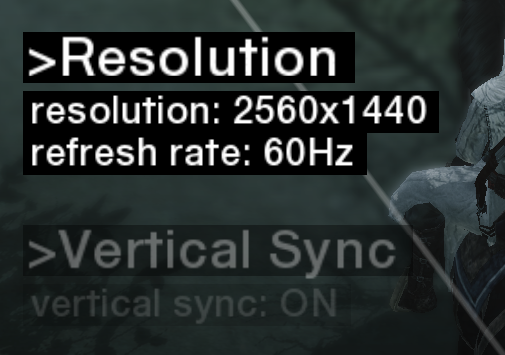
3) In "Resolution" select any resolution you want but it must be at 60hz.
4) In "Vertical Sync" select the "On" button
5) Enjoy your game !
An example below:
2) Go to Settings/Options -> Graphic
3) In "Resolution" select any resolution you want but it must be at 60hz.
4) In "Vertical Sync" select the "On" button
5) Enjoy your game !
An example below:
HowToFix - Controller Input
1) Open your steam library
2) Search your game (Assassin's Creed)
3) Then right click it and click on "Properties..."
4) Go to Controller
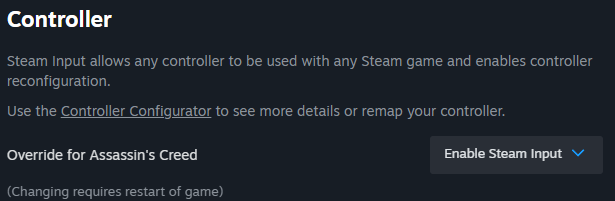
5) Check if "Override for Assassin's Creed" is in "Enable Steam Input"
6) Then click to Controller Configurator
7) Click to your current Layout

8) Go to "Search" and search for "Gamepad Layout" by Jotriel.jpg
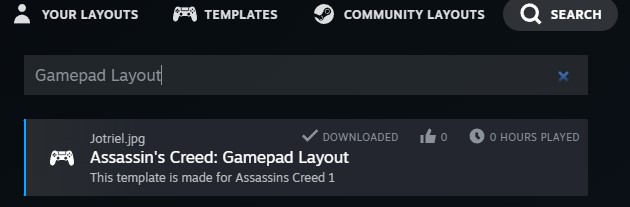
9) Click the layout to download it
10) After the download click on "Apply Layout"
11) Enjoy your game !
ps: Tested with the ps4 controller and everything worked
2) Search your game (Assassin's Creed)
3) Then right click it and click on "Properties..."
4) Go to Controller
5) Check if "Override for Assassin's Creed" is in "Enable Steam Input"
6) Then click to Controller Configurator
7) Click to your current Layout
8) Go to "Search" and search for "Gamepad Layout" by Jotriel.jpg
9) Click the layout to download it
10) After the download click on "Apply Layout"
11) Enjoy your game !
ps: Tested with the ps4 controller and everything worked
More Assassin's Creed guides
- Русификатор [Полная локализация]★ 5 (1.3k)55k views1.9k ♥1 minRussianUpdated Dec 28, 2023
- Flag & Templar Maps★ 5 (1.5k)32k views2.4k ♥31 minUpdated Mar 30, 2014
- Моды улучшающие графику Assassin's Creed★ 4 (144)18k views299 ♥14 minRussianUpdated Oct 19, 2023
- ASSASSIN'S CREED CONTROLLER FIX [XBOX & PLAYSTATION CONTROLLERS]★ 5 (250)18k views541 ♥2 minUpdated Jan 9, 2025
- Как убрать лаги + Русификатор и Озвучка + Оформление + Геймпад★ 5 (264)15k views599 ♥1 minRussianUpdated Oct 4, 2025
- HOW TO FULL SCREEN★ 5 (524)15k views153 ♥1 minBulgarian





This guide was created by its original author on the Steam Community. Are you the author and want it removed? Request removal.