Mouse Fix + Volume Fix + FPS/Stutter Fix
Disable Mouse Acceleration
- Go to: C > Users > {Your user name} > Documents > My Games > Watch_Dogs > {that long string folder} > GamerProfile.xml
- Use any notepad to edit. I use Notepad++ for ease.
- Set:Sensitivity="1"Note: If UseMouseAcceleration entry is not present, just add it respectively.
UseMouseAcceleration="0"
UseMouseSmooth="0"
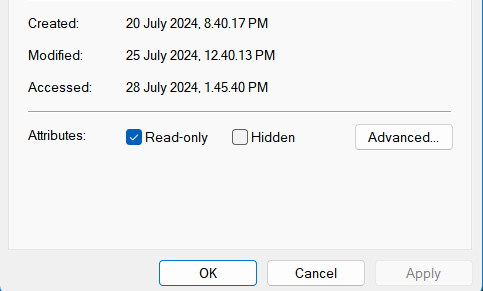
Smoothness="0" - Make it Read-only.
Note: Change all game settings you need beforehand because "Read-only" will restrict that functionality.

Fix Low Volume
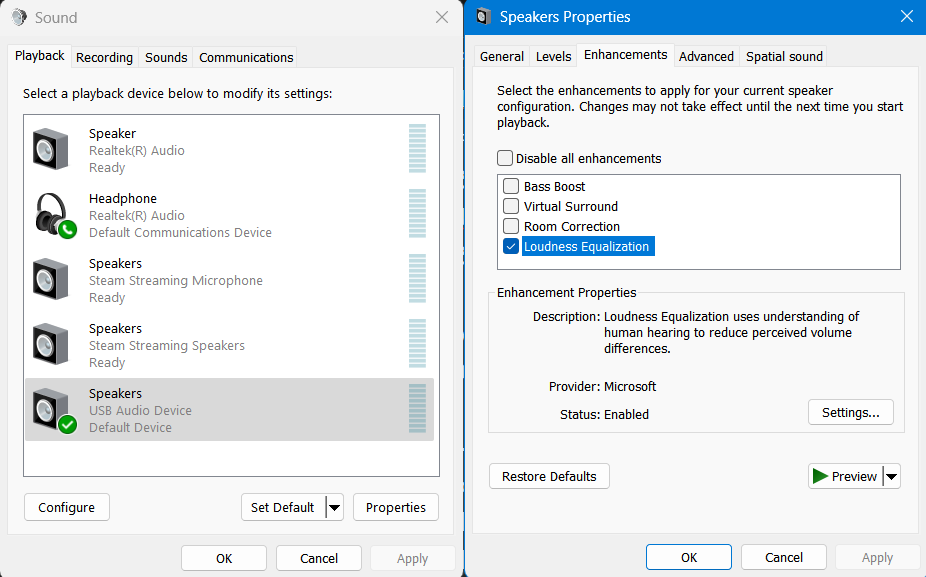
- Go to: Control Panel > Sound.
or search "Change system sounds".
- Select "Playback" Tab.
- Select Properties of the Headphone you are using.
- Select "Enhancements" Tab. Enable "Loudness Equalization". Apply Ok.
Fix FPS & Stutters with Frame Generation
- Buy Lossless Scaling
https://store.steampowered.com/app/993090/Lossless_Scaling/
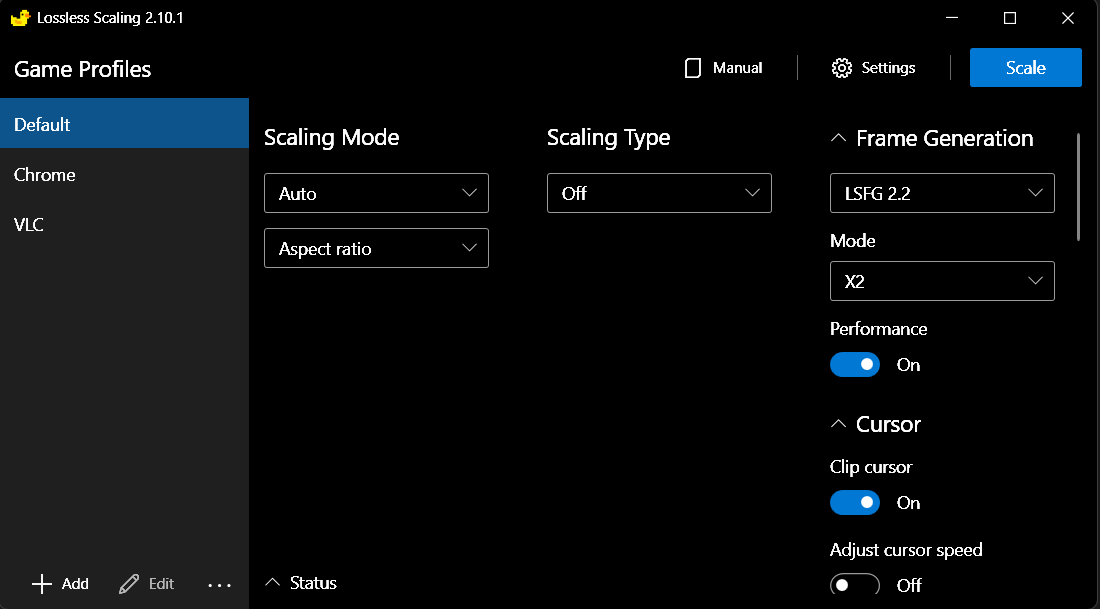
Note: Frame Generation will work with any decent GPU. I use GTX 1060. - Run the Program and enable LSFG (Frame Generation) and Performance from the menu. Check settings and remember/set the Hotkey. "Scaling Type" Off if Upscaling is not required.
- Run Watch_Dogs. Disable Exclusive Fullscreen from game Settings. Use Normal/Borderless Fullscreen.
- Press the program Hotkey, Profit.
More Watch_Dogs guides
- Watch_Dogs — Improve Graphics + Performance★ 5 (370)28k views574 ♥1 minUpdated 28 May, 2014
- How to get rid of mouse acceleration/smoothing.★ 5 (453)25k views339 ♥1 minUpdated 5 Dec, 2015
- Watch Dogs - Баги, ошибки, зависания, вылеты и их решения★ 5 (375)21k views319 ♥4 minRussianUpdated 10 Jan, 2015
- Повышаем фпс и графон \ Lets UP FPS and Graphics★ 4 (252)18k views393 ♥1 min
- Watch Dogs - ALL easter eggs!★ 5 (194)13k views206 ♥5 minBulgarian
- 1 simple way to know if you are being invaded.★ 4 (92)11k views28 ♥1 minUpdated 6 Jun, 2014






🔥 Popular guides
- Upgrading to PremiumTeam Fortress 2★ 5 (20k)1441k views11k ♥6 minUpdated May 11, 2022
- No More Room in Hell Official ManualNo More Room in Hell★ 5 (2.8k)569k views2.1k ♥29 minUpdated Apr 22, 2019
- NMRiH Community Hosting GuidesNo More Room in Hell★ 5 (526)351k views653 ♥1 minUpdated Aug 10, 2022
- ULTIMATE GUIDE FOR GAME DEV TYCOONGame Dev Tycoon★ 5 (5.8k)326k views10k ♥4 minUpdated 23 Jan, 2014
- How to 'Git Gud' Soon™MORDHAU★ 5 (2k)318k views3k ♥68 minUpdated Nov 16, 2024
- Лучшие кооперативные игры SteamPAYDAY 2★ 5 (1.5k)315k views2.1k ♥56 minRussianUpdated Apr 27, 2025






This guide was created by its original author on the Steam Community. Are you the author and want it removed? Request removal.