Решение проблемы с озвучкой / Solving the problem with the voice acting.
Способ первый / Method one
Rus.
Оденьте наушники с системой 7.1 или попробуйте любые другие наушники. (Игру необходимо перезапустить)
Eng.
Put on the headphones with the system 7.1 or try any other headphones. (The game must be restarted)
Оденьте наушники с системой 7.1 или попробуйте любые другие наушники. (Игру необходимо перезапустить)
Eng.
Put on the headphones with the system 7.1 or try any other headphones. (The game must be restarted)
Способ второй / Method two
Rus.
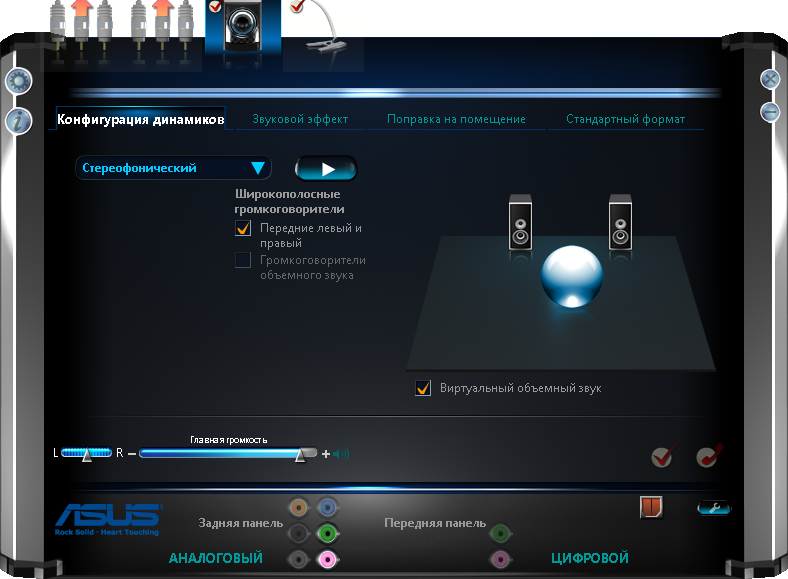
Идем в ПУСК - Панель управления - (Ваша звуковая система)(в моем случае это Диспетчер Realtek HD) Ставим конфигурацию динамиков на Стереофоническую. Перезапускаем игру. И Вуаля у нас все заговорили.
Eng.
Go to Start - Control Panel - (Your sound system) (in my case manager Realtek HD) Put on the stereo speaker configuration. Restart the game. And we all started talking.
More Watch_Dogs guides
- Watch_Dogs — Improve Graphics + Performance★ 5 (370)28k views574 ♥1 minUpdated 28 May, 2014
- How to get rid of mouse acceleration/smoothing.★ 5 (453)25k views339 ♥1 minUpdated 5 Dec, 2015
- Watch Dogs - Баги, ошибки, зависания, вылеты и их решения★ 5 (375)21k views319 ♥4 minRussianUpdated 10 Jan, 2015
- Повышаем фпс и графон \ Lets UP FPS and Graphics★ 4 (252)18k views393 ♥1 min
- Watch Dogs - ALL easter eggs!★ 5 (194)13k views206 ♥5 minBulgarian
- 1 simple way to know if you are being invaded.★ 4 (92)11k views28 ♥1 minUpdated 6 Jun, 2014






🔥 Popular guides
- Upgrading to PremiumTeam Fortress 2★ 5 (20k)1441k views11k ♥6 minUpdated May 11, 2022
- No More Room in Hell Official ManualNo More Room in Hell★ 5 (2.8k)569k views2.1k ♥29 minUpdated Apr 22, 2019
- NMRiH Community Hosting GuidesNo More Room in Hell★ 5 (526)351k views653 ♥1 minUpdated Aug 10, 2022
- ULTIMATE GUIDE FOR GAME DEV TYCOONGame Dev Tycoon★ 5 (5.8k)326k views10k ♥4 minUpdated 23 Jan, 2014
- How to 'Git Gud' Soon™MORDHAU★ 5 (2k)318k views3k ♥68 minUpdated Nov 16, 2024
- Лучшие кооперативные игры SteamPAYDAY 2★ 5 (1.5k)315k views2.1k ♥56 minRussianUpdated Apr 27, 2025






This guide was created by its original author on the Steam Community. Are you the author and want it removed? Request removal.